suno-music
Suno music by Ace Data Cloud. Generate songs, instrumental music and lyrics, extend tracks, create covers and edit multitrack Studio projects. Use when the user asks for Suno music or song generation.
Install
npx skills add https://github.com/AceDataCloud/Skills/tree/main/skills/suno-music
claude plugin marketplace add https://llmmart.ai/marketplace.json && claude plugin install acedatacloud-skills@llmmart
git clone https://github.com/AceDataCloud/Skills.git
The skills CLI installs just this skill, for any of its supported agents. Claude Code installs the whole acedatacloud/skills collection as a plugin from our marketplace. Git is the plain clone.
README
Suno by Ace Data Cloud — skills.sh first run
Use Suno through the Ace Data Cloud API from an Agent Skills-compatible coding assistant. This Skill is maintained by Ace Data Cloud and uses your Ace service API key; it does not claim to be published by Suno. Install it independently; the account Skill and an MCP server are optional.
简体中文 · skills.sh installation page · current models and pricing
1. Install this service only
Open the skills.sh page above and check the repository is acedatacloud/skills. In your project terminal:
npx --yes skills@1.7.2 add acedatacloud/skills --skill suno-music -a codex --yes
npx --yes skills@1.7.2 list
This example targets Codex; replace codex with your supported agent, such as claude-code or cursor. For Codex, the installed instructions are .agents/skills/suno-music/SKILL.md. Start a fresh session. Installation does not generate media or set up an API key. This is a Skill, not a model-provider dropdown or a new extension button.
For the released snapshot checked on 2026-10-18, use https://github.com/AceDataCloud/Skills/tree/v2026.1017.279001 in place of acedatacloud/skills. That released snapshot predates these improved instructions; use the default branch after this PR is merged to receive them.
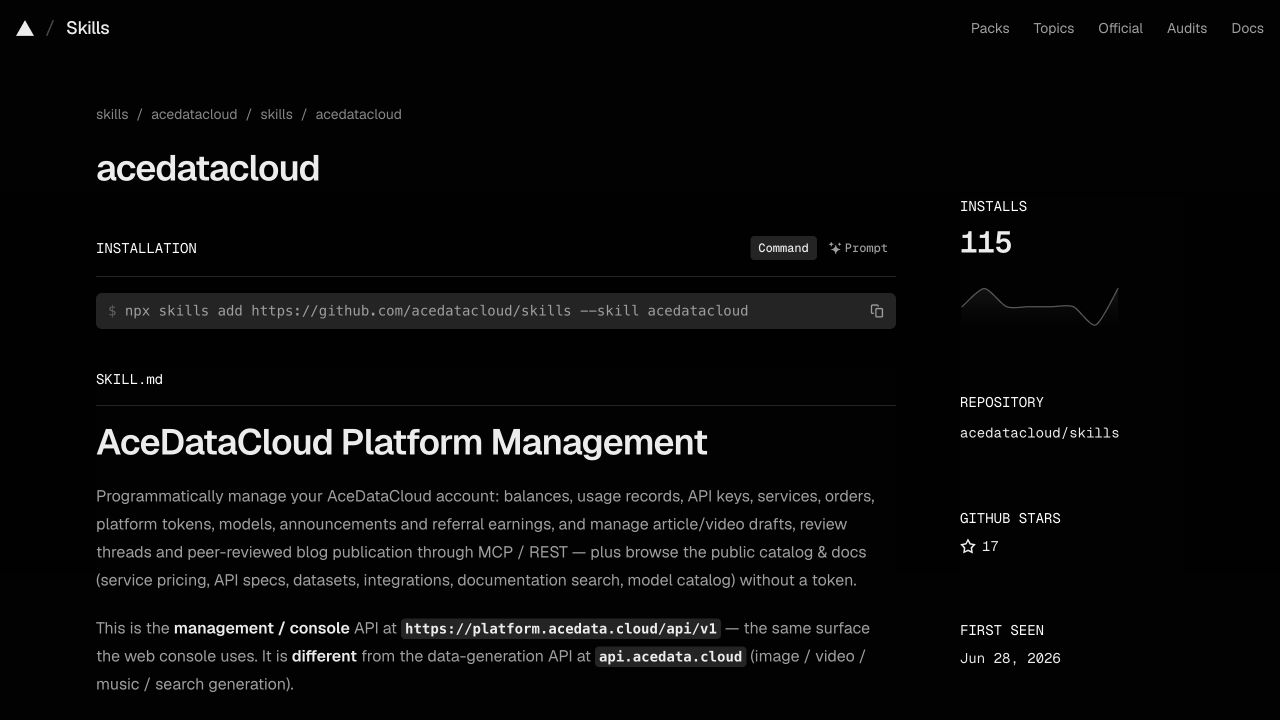
Actual account-Skill page captured on 2026-10-17, showing the same installation control. Use this service's slug above; the screenshot is not a suno-music installation or generation result. Image sources and limits.
2. Register, sign in and get the correct API key
- Open Ace Data Cloud → Applications; register and sign in if needed.
- Open General application. If absent, choose Initialize General Application. Check Suno access, current balance and price before submitting anything.
- Copy the key on the application card, or open Manage Keys → Create to create a separate key such as
skills.sh Suno. Set expiry and API/usage limits as needed. If Allowed APIs is enabled, include/suno/audiosand/suno/tasks. Other actions in SKILL.md may need extra routes. - Copy only the key value. Do not include
Beareror screenshot redaction characters. Aplatform-...management token is not the service key.
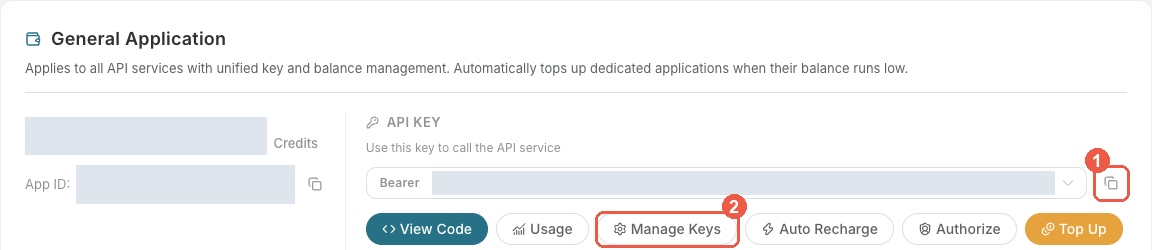
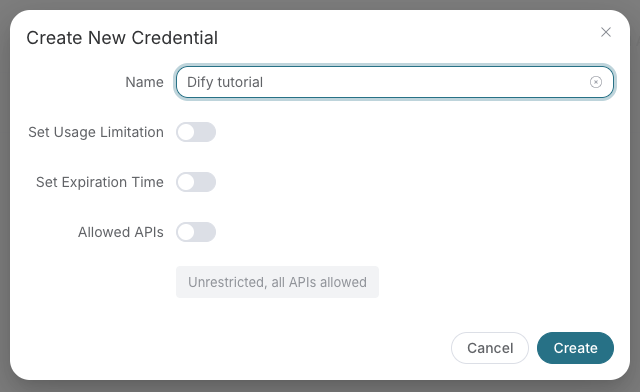
These are existing, redacted Ace console screenshots from the Suno Dify guide, checked on 2026-10-18. They illustrate the shared key controls, not a Suno run in skills.sh. The example name “Dify tutorial” is illustrative; use your own name. Menu labels may change.
3. Put the key in the assistant's execution environment
skills.sh does not store credentials. For a terminal-launched coding assistant, export the key in that terminal before starting the assistant, then start a new session:
export ACEDATACLOUD_API_TOKEN="your_api_key_here"
For an already running IDE, restart it from the configured environment or use that IDE's documented secret/environment settings. A Skill install does not load .env automatically. Never paste the key into a prompt, commit it, or print it in logs. OpenClaw has its own Gateway setup in SKILL.md; it is not required for skills.sh installation.
4. Submit once and inspect the result
Read SKILL.md and its exact request shape first. Ask your assistant to use Suno by Ace Data Cloud, inspect the current price, and prepare a single audio request using chirp-v6. Approve the intended cost before it submits /suno/audios. Installation and a prepared request do not prove that generation ran.
Run the existing Quick Start only after the key and intended cost are correct. For an asynchronous response, save its task ID and query that same ID at /suno/tasks. Do not resubmit generation to check progress. Read the audio URL from the completed task result. A preview while pending is not a terminal result.
Example request copied from this Skill's current Quick Start. Billable: run only after confirming the service, price and intended request. It has not been executed for this guide:
curl -X POST https://api.acedata.cloud/suno/audios \
  -H "Authorization: Bearer $ACEDATACLOUD_API_TOKEN" \
  -H "Content-Type: application/json" \
  -d '{"prompt": "a happy pop song about coding", "model": "chirp-v6", "async": true}'
If the response returns a task ID, query that ID with the following command; replace YOUR_TASK_ID with the existing ID.
curl -X POST https://api.acedata.cloud/suno/tasks \
  -H "Authorization: Bearer $ACEDATACLOUD_API_TOKEN" \
  -H "Content-Type: application/json" \
  -d '{"id":"YOUR_TASK_ID"}'
The expected output is an actual returned audio/video/image URL after terminal success, not a URL copied from this guide. Keep the same task ID while pending.
Use the exact task response fields and terminal states in SKILL.md. A URL in this guide would be illustrative; no media generation was performed for this tutorial. Check the request/task history for one intended charge; a completed media link alone does not prove the final bill.
Troubleshooting
| Symptom | What to check |
|---|---|
| 401 | Full service key, no Bearer inside its value, available to the actual assistant process. |
| 403 | Service access, expiry and Allowed APIs; read the error because moderation can also return 403. |
| 400 | Exact model ID and request shape in SKILL.md; do not silently substitute a model. |
| 429 | Wait and reduce concurrency; do not automatically retry a paid submit. |
| Pending / timeout / 5xx | Read the same task or request history before considering a new submit. |
| Media URL unavailable | Confirm terminal success and use the actual returned URL; share only task/trace ID with support. |
Support: dev@acedata.cloud. Source: AceDataCloud/Skills. skills.sh installation counters are not unique users or revenue. Source links use the four supported UTM fields for this skills.sh guide; they do not prove a registration or payment.
Skill manifest
Suno by Ace Data Cloud
Generate AI-powered music through AceDataCloud's Suno API.
Install and connect from skills.sh
This integration is maintained by Ace Data Cloud; it is not an official Suno publisher listing. Install only this Skill with npx skills add acedatacloud/skills --skill suno-music --yes, or use the public skills.sh page. Keep the slug suno-music when selecting it.
Read the illustrated first-run guide (简体中文) for registration, Applications → General application, API key access and price checks, and the environment variable location for your coding agent. For skills.sh installations, use this guide; any ClawHub-specific setup applies only to OpenClaw. The shared references linked here are online because focused installs do not include sibling _shared/ folders.
ClawHub / OpenClaw setup
- Already installed from skills.sh? Continue at step 2. For a coding agent, install with
npx skills add acedatacloud/skills --skill suno-music --yes(installation and first run). For OpenClaw, useclawhub install @acedatacloud/sunoand check that the ClawHub publisher is @acedatacloud. - Sign in at AceDataCloud → Applications, open General application, and check Suno access, balance, and current pricing. Copy its API key, or select Manage Keys → Create for a separate key. Copy the key value without
Bearer; aplatform-...management token is not a service API key. - If you enable Allowed APIs restrictions, include
/suno/audiosand/suno/tasks. Advanced workflows below may call additional routes. - For a coding agent or direct command, export
ACEDATACLOUD_API_TOKEN="your_api_key_here"in the environment of the process that runs the Skill; project.envloading is agent-specific. For OpenClaw, putACEDATACLOUD_API_TOKEN=your_api_key_herein~/.openclaw/.envon the Gateway host, then restart the Gateway and start a new session. Never put the key in a prompt or commit an.envfile. - Run the Quick Start below. If it returns a task ID, query that same task until it finishes; do not submit a second billable generation just to check progress.
Illustrated key setup, first run, and troubleshooting · Token details
If you came from skills.sh, use Applications for this first run. Check the current price before generating music.
Quick Start
curl -X POST https://api.acedata.cloud/suno/audios \
  -H "Authorization: Bearer $ACEDATACLOUD_API_TOKEN" \
  -H "Content-Type: application/json" \
  -d '{"prompt": "a happy pop song about coding", "model": "chirp-v6", "async": true}'
Async: All generation is async. See async task polling. Poll via
POST /suno/taskswith{"id": "<task_id>"}every 3-5 seconds.
Available Models
| Model | Best For |
|---|---|
chirp-v6 |
Current v6 model |
chirp-v6-wild |
v6 Wild model |
chirp-v6-mini |
v6 Mini model |
chirp-v5-5 |
Previous model name, retained for compatibility |
chirp-v5 |
High quality |
chirp-v4-5-plus |
Enhanced v4.5 |
chirp-v4-5 |
Good balance of quality and speed |
chirp-v4 |
Fast, reliable |
chirp-v3-5 |
Legacy, stable |
chirp-v3-0 |
Legacy |
Audio availability precheck (Beta)
Before extending or covering an existing song, optionally check POST /suno/availability. Use the song's audio_id UUID from a completed Suno task, not a task_id. Use the same AceDataCloud service Bearer token and include /suno/availability in Allowed APIs if the key is restricted. The check currently costs 0 Credits; it does not submit a generation.
curl -X POST https://api.acedata.cloud/suno/availability \
  -H "Authorization: Bearer $ACEDATACLOUD_API_TOKEN" \
  -H "Content-Type: application/json" \
  -d '{"audio_id":"33333333-3333-4333-8333-333333333333"}'
Replace the example UUID with the actual song ID. Send only audio_id, not async, model, or an action. The endpoint returns synchronously, even though its response includes task_id; do not poll /suno/tasks for this check.
- HTTP 200 with
success=true, the checkeddata.id, anddata.available=truemeans positive evidence on the current channel at check time. It is not a guarantee that a later extension, cover or other operation will succeed; availability can change before that operation. - A successful check never returns
data.available=false. HTTP 503availability_unknownmeans unknown, not unavailable; an inconclusive offline status is not proof that processing will fail. Do not turn this error intofalseor a definitive rejection. - HTTP 400 means a missing or invalid
audio_id; HTTP 401 means a missing or invalid token; HTTP 429 means rate limiting. HTTP 500 and other upstream failures are errors, not a negative availability result. Preserve returnederror.codeanderror.message, plustask_idandtrace_idfor troubleshooting, never the token.
After the check, submit a follow-up operation only with the user's authorization and follow its normal task-polling rules. Do not automatically retry a paid operation or silently switch models in response to a precheck result.
Core Workflows
1. Quick Generation (Inspiration Mode)
Generate a song from a text description. Suno creates lyrics, style, and music automatically.
POST /suno/audios
{
  "prompt": "an upbeat electronic track about the future of AI",
  "model": "chirp-v6",
  "instrumental": false
}
2. Custom Generation (Full Control)
Provide your own lyrics, title, and style for precise control.
POST /suno/audios
{
  "custom": true,
  "lyric": "[Verse]\nCode is poetry in motion\n[Chorus]\nWe build the future tonight",
  "title": "Digital Dreams",
  "style": "Synthwave, Electronic, Dreamy",
  "model": "chirp-v6",
  "vocal_gender": "f"
}
3. Extend a Song
Continue an existing song from a specific timestamp with new lyrics. extend and upload_extend require a source audio_id and continue_at > 0; fractional seconds such as 30.792 are preserved without rounding. Lyrics and style guide only the new section after that boundary, not the earlier song. Do not send an extra persona_id for extension.
POST /suno/audios
{
  "action": "extend",
  "audio_id": "existing-audio-id",
  "lyric": "[Bridge]\nNew section lyrics here",
  "continue_at": 120.0,
  "style": "Same style as original"
}
4. Cover / Remix
Create a new version of an existing song in a different style.
POST /suno/audios
{
  "action": "cover",
  "audio_id": "existing-audio-id",
  "style": "Jazz, Acoustic, Mellow"
}
Cover with a specified voice
Use persona_id to select a singer style or cloned voice for generate, cover, or upload_cover. vocal_gender is not required and cannot replace a voice ID; voice similarity depends on the reference and result.
For a private voice created through /suno/voices, use this sequence with recordings the user is authorized to use. Keep voice creation, original-song upload, and cover on the same service channel.
- Reuse the voice's actual
persona_id, or create a voice from a publicly accessible, clean single-speaker recording and save the returneddata.persona_id:
POST /suno/voices
{
  "audio_url": "HTTPS_VOICE_REFERENCE_URL",
  "name": "My Voice"
}
- Upload the original song with that same
persona_idto associate the song with the private voice. This field works only withmode: "standard"(the default), nevermode: "enhanced":
POST /suno/upload
{
  "audio_url": "HTTPS_ORIGINAL_SONG_URL",
  "mode": "standard",
  "persona_id": "PERSONA_ID"
}
- After upload succeeds, use its returned
data.audio_idwith the samepersona_idfor the cover. Do not reuse an older audio ID that was not associated with this private voice:
POST /suno/audios
{
  "action": "upload_cover",
  "model": "chirp-v6",
  "audio_id": "VOICE_LINKED_UPLOAD_AUDIO_ID",
  "persona_id": "PERSONA_ID",
  "custom": true,
  "instrumental": false,
  "lyric": "[Verse]\nOriginal lyrics to sing",
  "async": true
}
Poll the cover's original task via /suno/tasks to terminal success using the audio clip-state rule below; an upload result or preview URL is not a finished cover. Include /suno/voices and /suno/upload in Allowed APIs when needed, alongside /suno/audios and /suno/tasks.
5. Full Song Creation Workflow
For best results follow this multi-step workflow:
- Generate lyrics —
POST /suno/lyricswith a topic/prompt - Optimize style —
POST /suno/styleto refine style description - Generate music —
POST /suno/audioswith custom action, lyrics + style - Poll task —
POST /suno/taskswithid(oridsfor batch) until status is complete - Optional: Extend — Use extend action to add more sections
- Optional: Concat — Use concat action to merge extended segments
- Optional: Convert — Get MP3 (
/suno/mp3), WAV (/suno/wav), MIDI (/suno/midi), or MP4 (/suno/mp4)
Available Actions
| Action | Description |
|---|---|
generate |
Generate from prompt (default) |
extend |
Continue an existing audio from a timestamp |
upload_extend |
Upload external audio, then extend it |
upload_cover |
Upload external audio, then create a cover |
concat |
Concatenate extended segments into one track |
cover |
Copy the style of an existing audio |
artist_consistency |
Generate in a custom singer's style |
artist_consistency_vox |
Artist consistency with vocal focus |
stems |
Separate a track into stems |
all_stems |
Separate into all available stems |
replace_section |
Replace a specific time range in a song |
underpainting |
Add accompaniment to an uploaded song |
overpainting |
Add vocals to an uploaded song |
remaster |
Remaster an existing audio |
mashup |
Blend multiple audio IDs together |
samples |
Add samples to an uploaded song |
inspo |
Generate from 1–4 complete reference audio URLs |
add_stem |
Generate a specified instrument or vocal track for source audio |
extract_stem |
Extract a specified stem and its complementary version |
sounds |
Generate a one-shot or looping sound effect |
adjust_speed |
Change playback speed, optionally preserving pitch |
Select action-specific inputs
- Source
audio_idis required for extension, covers, concat, stems/all_stems, section replacement, underpainting/overpainting, remaster, samples, adding/extracting a stem, and speed adjustment.mashupneeds at least twomashup_audio_idsinstead. persona_idis a voice ID, not a song ID.artist_consistencyandartist_consistency_voxrequire it and may also take the source song'saudio_id;generate,cover, andupload_covercan use it. Extra voice IDs are not used byextendorupload_extend. Voice support onmashupandinspodepends on the selected service channel; do not promise it for other actions.- For
replace_section, supplyaudio_id, nonnegativereplace_section_start, andreplace_section_endgreater than the start and no later than the source duration.lyriccontains full lyrics/context;promptcontains the new interval lyrics. Optionalnegative_tagsexcludes styles. Defaultreplace_section_result_mode="full_song"returns two assembled songs;"candidates"returns two unassembled segments, not finished full songs. samplesuses one source audio interval:samples_startdefaults to 0 and must be nonnegative; requiredsamples_endmust be greater than the start and within the source duration. Both support fractional seconds. This is not Inspo.insponeeds 1–4 publicly accessible authorized HTTP(S)audio_urls. Setinstrumental=truefor music without lyrics;lyric_promptgenerates lyrics only withcustom=trueand nolyric. Apersona_idis channel-dependent, not a guaranteed voice match.all_stemswaits for every stem before terminal success. A playable early URL is not completion of the full stem set.add_stemandextract_stemrequirestem_typefrom the current API/tool schema.soundsneedssoundandsound_type(one-shotorloop), with optional integerbpm(1–300) andkey.adjust_speedneeds sourceaudio_id,titleandspeed_multiplier(0.25–4);keep_pitchdefaults to false.
MCP exposes these as suno_add_stem, suno_extract_stem, suno_generate_sound, and suno_adjust_speed. Inspect the connected schemas before calling; retain and poll the original task ID rather than resubmitting to check progress.
Custom Music Models (Beta)
Custom models learn reusable musical characteristics from 6–24 authorized audio files. Creation is a paid, long-running operation. Ask the user to confirm the files and cost before submitting it.
Create
POST /suno/custom-models
{
  "action": "create",
  "name": "My Album Sound",
  "audio_urls": [
    "https://cdn.example.com/track-01.mp3",
    "https://cdn.example.com/track-02.mp3",
    "https://cdn.example.com/track-03.mp3",
    "https://cdn.example.com/track-04.mp3",
    "https://cdn.example.com/track-05.mp3",
    "https://cdn.example.com/track-06.mp3"
  ]
}
Send a stable Idempotency-Key header and reuse it after network failures. Save the returned id; query it until status is ready.
Query and list
POST /suno/custom-models
{"action": "retrieve", "id": "<custom-model-id>"}
POST /suno/custom-models
{"action": "retrieve_batch", "status": "ready", "limit": 20, "offset": 0}
Generate
POST /suno/custom-models
{
  "action": "generate",
  "id": "<ready-custom-model-id>",
  "lyric": "[Verse]\nOriginal lyrics here",
  "style": "warm indie pop",
  "title": "New Song",
  "async": true
}
Async acceptance is not terminal success: poll the returned task and inspect response.success. A custom-model request never falls back to another model. The model must belong to the current Suno application and have status: "ready".
In MCP, suno_generate_with_custom_model also accepts instrumental=true without lyrics, or lyric_prompt for automatic lyrics; otherwise provide lyric. Title and style are optional. Inspect its schema for negative_tags, vocal_gender, weirdness, style_influence, duration, and callback_url; preserve explicit 0 control values. Studio uses suno_manage_project with request.action and a separate idempotency_key; follow the version, complete-state and terminal-result rules below.
Archive
POST /suno/custom-models
{"action": "delete", "id": "<custom-model-id>"}
delete archives the platform resource and prevents further use. capacity_released: false means it does not promise that model capacity was released.
Studio Projects (Beta)
Use POST /suno/projects for versioned multitrack editing, not /suno/audios. Only process audio the user has rights to use. Send an Idempotency-Key header (1–128 characters) for every action except retrieve; keep the same key and payload when recovering an uncertain request. A new operation needs a new key; reusing a key with a different payload returns 409.
Create, retrieve, and save
POST /suno/projects
{"action":"create","title":"My Studio Project"}
Save data.id, then retrieve with that project id before editing. The returned state is authoritative; modify it rather than inventing track/clip structures. An empty project starts with {"tracks":[],"timing":{"bps":2}}.
POST /suno/projects
{"action":"retrieve","id":"PROJECT_ID"}
POST /suno/projects
{"action":"save","id":"PROJECT_ID","state":{"tracks":[],"timing":{"bps":2}}}
save replaces the complete state, not a patch: preserve unknown fields from retrieve.data.state. It completes synchronously even if its result includes task_id. Only the first save of a new, unversioned project may omit version_id. Afterwards, include the latest version_id in every modification, candidate generation, and render. After save, add_track, commit_candidate, or remove_track, retain the new version from the result. upload, render, generate_track, and replace_section do not change the project version. On HTTP 409, retrieve the current project, reconcile changes, and submit with a new key; do not blindly replay stale edits.
timing.bps is beats per second, must be positive, and defaults to 2 (120 BPM). Clip startBeats, endBeats, and readStartBeats are project beats, not audio-analysis bar positions. Request placement fields start_beats / end_beats are nonnegative project beats; start_seconds / end_seconds select source-audio seconds.
Upload and add audio
POST /suno/projects
{"action":"upload","id":"PROJECT_ID","version_id":"CURRENT_VERSION_ID","audio_url":"https://cdn.example.com/reference.mp3","async":true}
Poll the upload task to success, then read response.data.candidate.audio_id and use it in add_track:
POST /suno/projects
{"action":"add_track","id":"PROJECT_ID","version_id":"CURRENT_VERSION_ID","audio_id":"AUDIO_ID","name":"Backing Vocals"}
Default placement preserves playback speed and converts audio duration to beats using timing.bps.
Generate, choose, and commit candidates
Projects accept only these public model names: chirp-v3-5, chirp-v4, chirp-v4-5, chirp-v4-5-plus, chirp-v5, chirp-v5-5, chirp-v6, chirp-v6-wild, chirp-v6-mini. An unsupported name returns 400 before submission; an accepted name does not guarantee the selected operation succeeds. Never silently switch models.
POST /suno/projects
{"action":"replace_section","id":"PROJECT_ID","version_id":"CURRENT_VERSION_ID","source_audio_id":"AUDIO_ID","start_seconds":35.12,"end_seconds":48.76,"model":"chirp-v6","replacement_lyrics":"New section lyrics","async":true}
replace_section returns two candidates without selecting one. The end must not exceed the actual source duration. prompt supplies source lyrics/context; replacement_lyrics supplies the new interval lyrics. If fixed=true, the range must be shorter than 26 seconds; support is model-dependent and this mode is not verified by the documented Backend run.
For a new track, first add the source audio to the project, then retrieve the complete state and append an empty audio track with a fresh unique id, type:"audio", clips:[], takeLanes:[], mute:false, solo:false, amplitude:1, instrument:{"type":"song"}, and color:"#7251F7". Save the complete state before generating, retaining its new version and the destination track ID. Render that version to success and use response.data.audio_id as the mix reference:
POST /suno/projects
{"action":"generate_track","id":"PROJECT_ID","version_id":"CURRENT_VERSION_ID","source_audio_id":"AUDIO_ID","render_audio_id":"RENDER_AUDIO_ID","model":"chirp-v5","start_seconds":12,"end_seconds":20,"stem_control_tags":"add Piano","tags":"gentle piano, instrumental","instrumental":true,"vocal_gender":"unspecified","async":true}
generate_track always submits two candidates; do not send batch_size. stem_control_tags is descriptive text, not an enum. instrumental defaults to true; use prompt for new-track text/lyrics and vocal_gender (f, m, unspecified, default unspecified) for a preference, not a guaranteed result. Both generation actions accept tags and negative_tags (default empty strings). Source-second ranges are not output-duration guarantees; inspect each candidate's actual duration. Generation does not add candidates to the project.
Poll to success, read response.data.operation_id and the chosen response.data.candidates[].id (do not substitute project IDs or the commit task ID), and let the user choose a candidate before committing:
POST /suno/projects
{"action":"commit_candidate","id":"PROJECT_ID","version_id":"CURRENT_VERSION_ID","operation_id":"OPERATION_ID","candidate_id":"CANDIDATE_ID","track_id":"TRACK_ID","async":true}
- Candidates are bound to the version used to generate them. Save an empty destination track before generating a new-track candidate; creating it afterwards makes the candidate stale.
- Replacement candidates must go back to the original track containing the unique source clip. A full take preserves its placement; an interval replacement preserves the surrounding clips. Do not supply
start_beats/end_beatsfor these replacements. If duration cannot be matched reliably, the request returns 400 and leaves the project unchanged. - New-track candidates use the saved empty track and default to the source clip's start, or an explicit non-overlapping range. Overlap on the destination track returns 400.
- To remove a track, confirm the intended track, then submit the current version and retrieve again to verify the remaining state:
POST /suno/projects
{"action":"remove_track","id":"PROJECT_ID","version_id":"CURRENT_VERSION_ID","track_id":"TRACK_ID"}
Render and recover
POST /suno/projects
{"action":"render","id":"PROJECT_ID","version_id":"CURRENT_VERSION_ID","title":"Final Mix","async":true}
Omit start_beats / end_beats to render from the earliest audible clip start to the latest audible end. Muted tracks/clips are excluded; when solo tracks exist, only those tracks participate. An empty or inaudible project, negative bounds, or an end not greater than the start returns 400. On terminal success, persist the returned render_id, audio_id, audio_url, and duration.
upload, add_track, generate_track, replace_section, commit_candidate, and render always run asynchronously, even with async:false. For every asynchronous Projects operation, poll POST /suno/tasks with {"action":"retrieve","id":"TASK_ID"} every 3–5 seconds. Success requires finished_at and response.success=true; response.success=false indicates failure. Read response.error on failure, including after a callback. HTTP 200 or a task_id is acceptance, not completed audio. This Projects rule is distinct from the /suno/audios clip-state rule below.
A readable candidate URL or successful commit does not prove the project can render. The documented Backend run generated and committed a new track, but rendering with it failed with studio_audio_unavailable; a replacement candidate also failed to commit because its duration matched neither the source nor the selected interval. Keep the original project and candidate for inspection; do not guess placement or automatically repeat paid generation. Before removing an unavailable track, confirm the intended edit with the user, retrieve the current state, remove only that track, then retrieve and render the new version to verify recovery. Projects and candidates are bound to their application and execution environment; do not assume cross-application reuse or automatic failover.
An identical key and payload replay the original result, including failure, without generating again. To explicitly retry, first confirm the original task failed, then use a new key. Never resubmit while the original is processing or uncertain. Keep trace_id for troubleshooting; report studio_state_invalid (400), studio_model_unsupported (400), studio_unavailable / studio_model_unavailable (503), too_many_requests (429), and studio_audio_unavailable / content_rejected (403) rather than changing models or discarding edits.
Auxiliary Endpoints
| Endpoint | Method | Purpose |
|---|---|---|
/suno/lyrics |
POST | Generate structured lyrics from a prompt (model: "default" or "remi-v1") |
/suno/style |
POST | Optimize/refine a style description |
/suno/mashup-lyrics |
POST | Combine two sets of lyrics |
/suno/mp4 |
POST | Get MP4 video version of a song |
/suno/wav |
POST | Convert to lossless WAV format |
/suno/midi |
POST | Extract MIDI data for DAW editing |
/suno/vox |
POST | Extract vocal track (stem separation) |
/suno/voices |
POST | Create a reusable voice from an audio URL; requires audio_url, with optional name and description |
/suno/timing |
POST | Get word-level timing/subtitles |
/suno/availability |
POST | Synchronous audio availability precheck (Beta); positive evidence or error, never false |
/suno/persona |
POST | Save a vocal style as a reusable persona; requires audio_id and name |
/suno/persona |
GET | List reusable personas |
/suno/persona |
DELETE | Delete a reusable persona |
/suno/upload |
POST | Upload external audio for extend/cover |
/suno/tasks |
POST | Query task status and results |
/suno/custom-models |
POST | Create, generate with, query, list, or archive custom music models |
/suno/projects |
POST | Create, retrieve, edit, generate candidates, and render versioned Studio projects (Beta) |
Persona management
Use the same AceDataCloud service Bearer token and include /suno/persona in Allowed APIs for restricted keys. GET /suno/persona listing and DELETE /suno/persona deletion cost 0 Credits; no extra billing-exemption header is required. POST /suno/persona creation still follows the endpoint's current pricing rules; do not assume all persona operations are free.
List with the actual authorized user's user_id; optional limit defaults to 50 and offset to 0:
curl --get https://api.acedata.cloud/suno/persona \
  -H "Authorization: Bearer $ACEDATACLOUD_API_TOKEN" \
  --data-urlencode "user_id=USER_ID" --data-urlencode "limit=50" --data-urlencode "offset=0"
Read the returned items and count, and reuse actual persona_id values rather than inventing IDs. Before deleting, confirm the intended persona with the user; free billing is not authorization for deletion. Send the required persona_id as a query parameter; user_id is optional for ownership verification:
curl --request DELETE --get https://api.acedata.cloud/suno/persona \
  -H "Authorization: Bearer $ACEDATACLOUD_API_TOKEN" \
  --data-urlencode "persona_id=PERSONA_ID"
Check the returned success before reporting deletion.
Advanced Parameters
| Parameter | Type | Description |
|---|---|---|
lyric_prompt |
object | Structured prompt payload for auto-generating lyrics (used when custom: true without explicit lyric) |
negative_tags |
string | Style or genre tags to avoid (e.g., "heavy metal, distortion"); use for generation with custom: true or replace_section. No fixed character limit is currently enforced by this endpoint; keep it concise because overly long input may still fail |
style_influence |
number | Strength of style influence (advanced custom mode, v5+ only) |
audio_weight |
number | Audio/reference influence from 0–1; preserve explicit 0. Model/action dependent, including generation, extension, covers, adding a stem and voice consistency |
variety |
string | off, normal, high, extra, max; only generate and add_stem |
max_mode |
boolean | Enhanced mode for generate with custom=true, or add_stem; costs more, so enable only after explicit user selection and a current price check |
duration |
integer | Target track length of 10–360 seconds; only generate uses it. Actual length depends on model/mode and must be read from the result |
Lyrics Format
Use section markers in square brackets:
[Verse 1]
Your verse lyrics here

[Chorus]
Catchy chorus lyrics

[Bridge]
Bridge section

[Outro]
Ending lyrics
Audio processing failure recovery
A downloadable audio file does not guarantee its audio_id remains usable for follow-up processing such as covers, extension or stem separation. Keep the original audio and task evidence; do not infer processing availability from the download URL.
For /suno/audios, preserve these public HTTP 500 error codes instead of reporting a generic failure:
| Code | Meaning |
|---|---|
suno_processing_unavailable |
Music processing is unavailable |
suno_model_unavailable |
The selected model is unavailable for this operation |
suno_processing_failed |
Music processing returned no audio |
Also preserve HTTP 500 api_error with the message the account may have been offline when returned by /suno/audios.
On any of these errors, retain task_id and trace_id when returned and contact support with those IDs, never the API key. If submission is uncertain, query the existing task before considering another request. Do not automatically retry a paid operation or silently switch models; a failed result is not authorization for a new billable request.
Gotchas
/suno/audiosgeneration is async — set"callback_url"to get a task id immediately, then poll/suno/tasksusing{"id":"<task_id>"}or{"ids":[...],"action":"retrieve_batch"}- CRITICAL for
/suno/audios: Check the clipstatefield — onlystate: "complete"withsuccess: truemeans done. Duringpending, the API may return intermediateaudio_urlvalues (streaming previews). Do NOT stop polling just becauseaudio_urlis non-empty - Lyrics max ~3000 characters. For longer songs, use the extend workflow
- Style tags are descriptive phrases, not enum values (e.g., "Synthwave, Electronic, Dreamy")
vocal_gender("f"/"m") is only supported on v4.5+ modelsvariation_category("high"/"normal"/"subtle") is only supported on v5+ models- Only
generateusesduration; other actions do not. It is a target, not a fixed output length; read each returned clip's actualdurationrather than promising the requested length - The
concataction merges extended song segments — requires audio_id of the extended track personarequires an existingaudio_idand aname; optionalvox_audio_id,vocal_start,vocal_end, anddescriptionrefine the vocal reference- Upload external audio via
/suno/uploadbefore using it with extend/cover
MCP:
pip install mcp-suno| Hosted:https://suno.mcp.acedata.cloud/mcp| See all MCP servers
Files (skills)
-
README.md 7 KB
# Suno by Ace Data Cloud — skills.sh first run Use Suno through the **Ace Data Cloud** API from an Agent Skills-compatible coding assistant. This Skill is maintained by Ace Data Cloud and uses your Ace service API key; it does not claim to be published by Suno. Install it independently; the account Skill and an MCP server are optional. [简体中文](readme.zh-CN.md) · [skills.sh installation page](https://skills.sh/acedatacloud/skills/suno-music) · [current models and pricing](https://platform.acedata.cloud/models?utm_source=skills_sh&utm_medium=referral&utm_campaign=evergreen&utm_content=suno_music_pricing) ## 1. Install this service only Open the skills.sh page above and check the repository is **acedatacloud/skills**. In your project terminal: ```bash npx --yes skills@1.7.2 add acedatacloud/skills --skill suno-music -a codex --yes npx --yes skills@1.7.2 list ``` This example targets Codex; replace `codex` with your supported agent, such as `claude-code` or `cursor`. For Codex, the installed instructions are `.agents/skills/suno-music/SKILL.md`. Start a fresh session. Installation does not generate media or set up an API key. This is a Skill, not a model-provider dropdown or a new extension button. For the released snapshot checked on 2026-10-18, use `https://github.com/AceDataCloud/Skills/tree/v2026.1017.279001` in place of `acedatacloud/skills`. That released snapshot predates these improved instructions; use the default branch after this PR is merged to receive them.  Actual account-Skill page captured on 2026-10-17, showing the same installation control. Use this service's slug above; the screenshot is not a suno-music installation or generation result. [Image sources and limits](https://github.com/AceDataCloud/Skills/blob/0901d63b7f7d216318463b1c33976838a084da3b/docs/skills-sh/image-sources.json). ## 2. Register, sign in and get the correct API key 1. Open [Ace Data Cloud → Applications](https://platform.acedata.cloud/console/applications?utm_source=skills_sh&utm_medium=referral&utm_campaign=evergreen&utm_content=suno_music_api_key); register and sign in if needed. 2. Open **General application**. If absent, choose **Initialize General Application**. Check **Suno** access, current balance and price before submitting anything. 3. Copy the key on the application card, or open **Manage Keys → Create** to create a separate key such as `skills.sh Suno`. Set expiry and API/usage limits as needed. If **Allowed APIs** is enabled, include `/suno/audios` and `/suno/tasks`. Other actions in SKILL.md may need extra routes. 4. Copy only the key value. Do not include `Bearer ` or screenshot redaction characters. A `platform-...` management token is not the service key.   These are existing, redacted **Ace console** screenshots from the [Suno Dify guide](https://github.com/AceDataCloud/SunoDify/blob/8d3d03570e73324220f111f7fe343da0792a8071/README.md), checked on 2026-10-18. They illustrate the shared key controls, not a Suno run in skills.sh. The example name “Dify tutorial” is illustrative; use your own name. Menu labels may change. ## 3. Put the key in the assistant's execution environment skills.sh does not store credentials. For a terminal-launched coding assistant, export the key in that terminal **before starting the assistant**, then start a new session: ```bash export ACEDATACLOUD_API_TOKEN="your_api_key_here" ``` For an already running IDE, restart it from the configured environment or use that IDE's documented secret/environment settings. A Skill install does not load `.env` automatically. Never paste the key into a prompt, commit it, or print it in logs. OpenClaw has its own Gateway setup in SKILL.md; it is not required for skills.sh installation. ## 4. Submit once and inspect the result Read [SKILL.md](SKILL.md) and its exact request shape first. Ask your assistant to use **Suno by Ace Data Cloud**, inspect the current price, and prepare a single audio request using `chirp-v6`. Approve the intended cost before it submits `/suno/audios`. Installation and a prepared request do not prove that generation ran. Run the existing Quick Start only after the key and intended cost are correct. For an asynchronous response, save its task ID and query **that same ID** at `/suno/tasks`. Do not resubmit generation to check progress. Read the audio URL from the completed task result. A preview while pending is not a terminal result. Example request copied from this Skill's current Quick Start. **Billable: run only after confirming the service, price and intended request.** It has not been executed for this guide: ```bash curl -X POST https://api.acedata.cloud/suno/audios \ -H "Authorization: Bearer $ACEDATACLOUD_API_TOKEN" \ -H "Content-Type: application/json" \ -d '{"prompt": "a happy pop song about coding", "model": "chirp-v6", "async": true}' ``` If the response returns a task ID, query that ID with the following command; replace `YOUR_TASK_ID` with the existing ID. ```bash curl -X POST https://api.acedata.cloud/suno/tasks \ -H "Authorization: Bearer $ACEDATACLOUD_API_TOKEN" \ -H "Content-Type: application/json" \ -d '{"id":"YOUR_TASK_ID"}' ``` The expected output is an actual returned audio/video/image URL after terminal success, not a URL copied from this guide. Keep the same task ID while pending. Use the exact task response fields and terminal states in SKILL.md. A URL in this guide would be illustrative; no media generation was performed for this tutorial. Check the request/task history for one intended charge; a completed media link alone does not prove the final bill. ## Troubleshooting | Symptom | What to check | |---|---| | 401 | Full service key, no `Bearer ` inside its value, available to the actual assistant process. | | 403 | Service access, expiry and Allowed APIs; read the error because moderation can also return 403. | | 400 | Exact model ID and request shape in SKILL.md; do not silently substitute a model. | | 429 | Wait and reduce concurrency; do not automatically retry a paid submit. | | Pending / timeout / 5xx | Read the same task or request history before considering a new submit. | | Media URL unavailable | Confirm terminal success and use the actual returned URL; share only task/trace ID with support. | Support: [dev@acedata.cloud](mailto:dev@acedata.cloud). Source: [AceDataCloud/Skills](https://github.com/AceDataCloud/Skills). skills.sh installation counters are not unique users or revenue. Source links use the four supported UTM fields for this skills.sh guide; they do not prove a registration or payment. -
readme.zh-CN.md 5.5 KB
Loading… -
SKILL.md 30.6 KB
---
name: suno-music
description: Suno music by Ace Data Cloud. Generate songs, instrumental music and lyrics, check audio availability, extend tracks, create covers and edit multitrack Studio projects. Use when the user asks for Suno music or song generation.
license: Apache-2.0
metadata:
  author: acedatacloud
  version: "1.0"
compatibility: Requires ACEDATACLOUD_API_TOKEN in the agent process environment and HTTPS access to api.acedata.cloud. See README.md for installation and key setup.
---

# Suno by Ace Data Cloud

Generate AI-powered music through AceDataCloud's Suno API.

## Install and connect from skills.sh

This integration is maintained by **Ace Data Cloud**; it is not an official Suno publisher listing. Install only this Skill with `npx skills add acedatacloud/skills --skill suno-music --yes`, or use the [public skills.sh page](https://skills.sh/acedatacloud/skills/suno-music). Keep the slug `suno-music` when selecting it.

Read the [illustrated first-run guide](README.md) ([简体中文](readme.zh-CN.md)) for registration, **Applications → General application**, API key access and price checks, and the environment variable location for your coding agent. For skills.sh installations, use this guide; any ClawHub-specific setup applies only to OpenClaw. The shared references linked here are online because focused installs do not include sibling `_shared/` folders.

## ClawHub / OpenClaw setup

1. Already installed from skills.sh? Continue at step 2. For a coding agent, install with `npx skills add acedatacloud/skills --skill suno-music --yes` ([installation and first run](https://github.com/AceDataCloud/Skills#first-run-from-skillssh)). For OpenClaw, use `clawhub install @acedatacloud/suno` and check that the ClawHub publisher is **@acedatacloud**.
2. Sign in at [AceDataCloud → Applications](https://platform.acedata.cloud/console/applications), open **General application**, and check Suno access, balance, and current pricing. Copy its API key, or select **Manage Keys → Create** for a separate key. Copy the key value without `Bearer `; a `platform-...` management token is not a service API key.
3. If you enable **Allowed APIs** restrictions, include `/suno/audios` and `/suno/tasks`. Advanced workflows below may call additional routes.
4. For a coding agent or direct command, export `ACEDATACLOUD_API_TOKEN="your_api_key_here"` in the environment of the process that runs the Skill; project `.env` loading is agent-specific. For OpenClaw, put `ACEDATACLOUD_API_TOKEN=your_api_key_here` in `~/.openclaw/.env` on the Gateway host, then restart the Gateway and start a new session. Never put the key in a prompt or commit an `.env` file.
5. Run the **Quick Start** below. If it returns a task ID, query that same task until it finishes; do not submit a second billable generation just to check progress.

[Illustrated key setup, first run, and troubleshooting](https://github.com/AceDataCloud/Skills#first-run-with-clawhub-and-openclaw) · [Token details](https://github.com/AceDataCloud/Skills/blob/main/skills/_shared/authentication.md)

If you came from skills.sh, use [Applications for this first run](https://platform.acedata.cloud/console/applications?utm_source=skills_sh&utm_medium=referral&utm_campaign=evergreen&utm_content=suno_music_first_run). Check the current price before generating music.

## Quick Start

```bash
curl -X POST https://api.acedata.cloud/suno/audios \
  -H "Authorization: Bearer $ACEDATACLOUD_API_TOKEN" \
  -H "Content-Type: application/json" \
  -d '{"prompt": "a happy pop song about coding", "model": "chirp-v6", "async": true}'
```

> **Async:** All generation is async. See [async task polling](https://github.com/AceDataCloud/Skills/blob/main/skills/_shared/async-tasks.md). Poll via `POST /suno/tasks` with `{"id": "<task_id>"}` every 3-5 seconds.

## Available Models

| Model | Best For |
|-------|---------|
| `chirp-v6` | Current v6 model |
| `chirp-v6-wild` | v6 Wild model |
| `chirp-v6-mini` | v6 Mini model |
| `chirp-v5-5` | Previous model name, retained for compatibility |
| `chirp-v5` | High quality |
| `chirp-v4-5-plus` | Enhanced v4.5 |
| `chirp-v4-5` | Good balance of quality and speed |
| `chirp-v4` | Fast, reliable |
| `chirp-v3-5` | Legacy, stable |
| `chirp-v3-0` | Legacy |

## Audio availability precheck (Beta)

Before extending or covering an existing song, optionally check `POST /suno/availability`. Use the song's `audio_id` UUID from a completed Suno task, not a `task_id`. Use the same AceDataCloud service Bearer token and include `/suno/availability` in **Allowed APIs** if the key is restricted. The check currently costs 0 Credits; it does not submit a generation.

```bash
curl -X POST https://api.acedata.cloud/suno/availability \
  -H "Authorization: Bearer $ACEDATACLOUD_API_TOKEN" \
  -H "Content-Type: application/json" \
  -d '{"audio_id":"33333333-3333-4333-8333-333333333333"}'
```

Replace the example UUID with the actual song ID. Send only `audio_id`, not `async`, `model`, or an action. The endpoint returns synchronously, even though its response includes `task_id`; do not poll `/suno/tasks` for this check.

- HTTP 200 with `success=true`, the checked `data.id`, and `data.available=true` means positive evidence on the current channel at check time. It is not a guarantee that a later extension, cover or other operation will succeed; availability can change before that operation.
- A successful check never returns `data.available=false`. HTTP 503 `availability_unknown` means unknown, not unavailable; an inconclusive offline status is not proof that processing will fail. Do not turn this error into `false` or a definitive rejection.
- HTTP 400 means a missing or invalid `audio_id`; HTTP 401 means a missing or invalid token; HTTP 429 means rate limiting. HTTP 500 and other upstream failures are errors, not a negative availability result. Preserve returned `error.code` and `error.message`, plus `task_id` and `trace_id` for troubleshooting, never the token.

After the check, submit a follow-up operation only with the user's authorization and follow its normal task-polling rules. Do not automatically retry a paid operation or silently switch models in response to a precheck result.

## Core Workflows

### 1. Quick Generation (Inspiration Mode)

Generate a song from a text description. Suno creates lyrics, style, and music automatically.

```json
POST /suno/audios
{
  "prompt": "an upbeat electronic track about the future of AI",
  "model": "chirp-v6",
  "instrumental": false
}
```

### 2. Custom Generation (Full Control)

Provide your own lyrics, title, and style for precise control.

```json
POST /suno/audios
{
  "custom": true,
  "lyric": "[Verse]\nCode is poetry in motion\n[Chorus]\nWe build the future tonight",
  "title": "Digital Dreams",
  "style": "Synthwave, Electronic, Dreamy",
  "model": "chirp-v6",
  "vocal_gender": "f"
}
```

### 3. Extend a Song

Continue an existing song from a specific timestamp with new lyrics. `extend` and `upload_extend` require a source `audio_id` and `continue_at > 0`; fractional seconds such as `30.792` are preserved without rounding. Lyrics and style guide only the new section after that boundary, not the earlier song. Do not send an extra `persona_id` for extension.

```json
POST /suno/audios
{
  "action": "extend",
  "audio_id": "existing-audio-id",
  "lyric": "[Bridge]\nNew section lyrics here",
  "continue_at": 120.0,
  "style": "Same style as original"
}
```

### 4. Cover / Remix

Create a new version of an existing song in a different style.

```json
POST /suno/audios
{
  "action": "cover",
  "audio_id": "existing-audio-id",
  "style": "Jazz, Acoustic, Mellow"
}
```

#### Cover with a specified voice

Use `persona_id` to select a singer style or cloned voice for `generate`, `cover`, or `upload_cover`. `vocal_gender` is not required and cannot replace a voice ID; voice similarity depends on the reference and result.

For a private voice created through `/suno/voices`, use this sequence with recordings the user is authorized to use. Keep voice creation, original-song upload, and cover on the same service channel.

1. Reuse the voice's actual `persona_id`, or create a voice from a publicly accessible, clean single-speaker recording and save the returned `data.persona_id`:

```json
POST /suno/voices
{
  "audio_url": "HTTPS_VOICE_REFERENCE_URL",
  "name": "My Voice"
}
```

2. Upload the original song with that same `persona_id` to associate the song with the private voice. This field works only with `mode: "standard"` (the default), never `mode: "enhanced"`:

```json
POST /suno/upload
{
  "audio_url": "HTTPS_ORIGINAL_SONG_URL",
  "mode": "standard",
  "persona_id": "PERSONA_ID"
}
```

3. After upload succeeds, use its returned `data.audio_id` with the same `persona_id` for the cover. Do not reuse an older audio ID that was not associated with this private voice:

```json
POST /suno/audios
{
  "action": "upload_cover",
  "model": "chirp-v6",
  "audio_id": "VOICE_LINKED_UPLOAD_AUDIO_ID",
  "persona_id": "PERSONA_ID",
  "custom": true,
  "instrumental": false,
  "lyric": "[Verse]\nOriginal lyrics to sing",
  "async": true
}
```

Poll the cover's original task via `/suno/tasks` to terminal success using the audio clip-state rule below; an upload result or preview URL is not a finished cover. Include `/suno/voices` and `/suno/upload` in **Allowed APIs** when needed, alongside `/suno/audios` and `/suno/tasks`.

### 5. Full Song Creation Workflow

For best results follow this multi-step workflow:

1. **Generate lyrics** — `POST /suno/lyrics` with a topic/prompt
2. **Optimize style** — `POST /suno/style` to refine style description
3. **Generate music** — `POST /suno/audios` with custom action, lyrics + style
4. **Poll task** — `POST /suno/tasks` with `id` (or `ids` for batch) until status is complete
5. **Optional: Extend** — Use extend action to add more sections
6. **Optional: Concat** — Use concat action to merge extended segments
7. **Optional: Convert** — Get MP3 (`/suno/mp3`), WAV (`/suno/wav`), MIDI (`/suno/midi`), or MP4 (`/suno/mp4`)

## Available Actions

| Action | Description |
|--------|-------------|
| `generate` | Generate from prompt (default) |
| `extend` | Continue an existing audio from a timestamp |
| `upload_extend` | Upload external audio, then extend it |
| `upload_cover` | Upload external audio, then create a cover |
| `concat` | Concatenate extended segments into one track |
| `cover` | Copy the style of an existing audio |
| `artist_consistency` | Generate in a custom singer's style |
| `artist_consistency_vox` | Artist consistency with vocal focus |
| `stems` | Separate a track into stems |
| `all_stems` | Separate into all available stems |
| `replace_section` | Replace a specific time range in a song |
| `underpainting` | Add accompaniment to an uploaded song |
| `overpainting` | Add vocals to an uploaded song |
| `remaster` | Remaster an existing audio |
| `mashup` | Blend multiple audio IDs together |
| `samples` | Add samples to an uploaded song |
| `inspo` | Generate from 1–4 complete reference audio URLs |
| `add_stem` | Generate a specified instrument or vocal track for source audio |
| `extract_stem` | Extract a specified stem and its complementary version |
| `sounds` | Generate a one-shot or looping sound effect |
| `adjust_speed` | Change playback speed, optionally preserving pitch |

### Select action-specific inputs

- Source `audio_id` is required for extension, covers, concat, stems/all_stems, section replacement, underpainting/overpainting, remaster, samples, adding/extracting a stem, and speed adjustment. `mashup` needs at least two `mashup_audio_ids` instead.
- `persona_id` is a voice ID, not a song ID. `artist_consistency` and `artist_consistency_vox` require it and may also take the source song's `audio_id`; `generate`, `cover`, and `upload_cover` can use it. Extra voice IDs are not used by `extend` or `upload_extend`. Voice support on `mashup` and `inspo` depends on the selected service channel; do not promise it for other actions.
- For `replace_section`, supply `audio_id`, nonnegative `replace_section_start`, and `replace_section_end` greater than the start and no later than the source duration. `lyric` contains full lyrics/context; `prompt` contains the new interval lyrics. Optional `negative_tags` excludes styles. Default `replace_section_result_mode="full_song"` returns two assembled songs; `"candidates"` returns two unassembled segments, not finished full songs.
- `samples` uses one source audio interval: `samples_start` defaults to 0 and must be nonnegative; required `samples_end` must be greater than the start and within the source duration. Both support fractional seconds. This is not Inspo.
- `inspo` needs 1–4 publicly accessible authorized HTTP(S) `audio_urls`. Set `instrumental=true` for music without lyrics; `lyric_prompt` generates lyrics only with `custom=true` and no `lyric`. A `persona_id` is channel-dependent, not a guaranteed voice match.
- `all_stems` waits for every stem before terminal success. A playable early URL is not completion of the full stem set.
- `add_stem` and `extract_stem` require `stem_type` from the current API/tool schema. `sounds` needs `sound` and `sound_type` (`one-shot` or `loop`), with optional integer `bpm` (1–300) and `key`. `adjust_speed` needs source `audio_id`, `title` and `speed_multiplier` (0.25–4); `keep_pitch` defaults to false.

MCP exposes these as `suno_add_stem`, `suno_extract_stem`, `suno_generate_sound`, and `suno_adjust_speed`. Inspect the connected schemas before calling; retain and poll the original task ID rather than resubmitting to check progress.

## Custom Music Models (Beta)

Custom models learn reusable musical characteristics from 6–24 authorized audio files. Creation is a paid, long-running operation. Ask the user to confirm the files and cost before submitting it.

### Create

```json
POST /suno/custom-models
{
  "action": "create",
  "name": "My Album Sound",
  "audio_urls": [
    "https://cdn.example.com/track-01.mp3",
    "https://cdn.example.com/track-02.mp3",
    "https://cdn.example.com/track-03.mp3",
    "https://cdn.example.com/track-04.mp3",
    "https://cdn.example.com/track-05.mp3",
    "https://cdn.example.com/track-06.mp3"
  ]
}
```

Send a stable `Idempotency-Key` header and reuse it after network failures. Save the returned `id`; query it until `status` is `ready`.

### Query and list

```json
POST /suno/custom-models
{"action": "retrieve", "id": "<custom-model-id>"}
```

```json
POST /suno/custom-models
{"action": "retrieve_batch", "status": "ready", "limit": 20, "offset": 0}
```

### Generate

```json
POST /suno/custom-models
{
  "action": "generate",
  "id": "<ready-custom-model-id>",
  "lyric": "[Verse]\nOriginal lyrics here",
  "style": "warm indie pop",
  "title": "New Song",
  "async": true
}
```

Async acceptance is not terminal success: poll the returned task and inspect `response.success`. A custom-model request never falls back to another model. The model must belong to the current Suno application and have `status: "ready"`.

In MCP, `suno_generate_with_custom_model` also accepts `instrumental=true` without lyrics, or `lyric_prompt` for automatic lyrics; otherwise provide `lyric`. Title and style are optional. Inspect its schema for `negative_tags`, `vocal_gender`, `weirdness`, `style_influence`, `duration`, and `callback_url`; preserve explicit `0` control values. Studio uses `suno_manage_project` with `request.action` and a separate `idempotency_key`; follow the version, complete-state and terminal-result rules below.

### Archive

```json
POST /suno/custom-models
{"action": "delete", "id": "<custom-model-id>"}
```

`delete` archives the platform resource and prevents further use. `capacity_released: false` means it does not promise that model capacity was released.

## Studio Projects (Beta)

Use `POST /suno/projects` for versioned multitrack editing, not `/suno/audios`. Only process audio the user has rights to use. Send an `Idempotency-Key` header (1–128 characters) for every action except `retrieve`; keep the same key and payload when recovering an uncertain request. A new operation needs a new key; reusing a key with a different payload returns 409.

### Create, retrieve, and save

```json
POST /suno/projects
{"action":"create","title":"My Studio Project"}
```

Save `data.id`, then `retrieve` with that project `id` before editing. The returned `state` is authoritative; modify it rather than inventing track/clip structures. An empty project starts with `{"tracks":[],"timing":{"bps":2}}`.

```json
POST /suno/projects
{"action":"retrieve","id":"PROJECT_ID"}
```

```json
POST /suno/projects
{"action":"save","id":"PROJECT_ID","state":{"tracks":[],"timing":{"bps":2}}}
```

`save` replaces the complete state, not a patch: preserve unknown fields from `retrieve.data.state`. It completes synchronously even if its result includes `task_id`. Only the first save of a new, unversioned project may omit `version_id`. Afterwards, include the latest `version_id` in every modification, candidate generation, and render. After `save`, `add_track`, `commit_candidate`, or `remove_track`, retain the new version from the result. `upload`, `render`, `generate_track`, and `replace_section` do not change the project version. On HTTP 409, retrieve the current project, reconcile changes, and submit with a new key; do not blindly replay stale edits.

`timing.bps` is beats per second, must be positive, and defaults to 2 (120 BPM). Clip `startBeats`, `endBeats`, and `readStartBeats` are project beats, not audio-analysis bar positions. Request placement fields `start_beats` / `end_beats` are nonnegative project beats; `start_seconds` / `end_seconds` select source-audio seconds.

### Upload and add audio

```json
POST /suno/projects
{"action":"upload","id":"PROJECT_ID","version_id":"CURRENT_VERSION_ID","audio_url":"https://cdn.example.com/reference.mp3","async":true}
```

Poll the upload task to success, then read `response.data.candidate.audio_id` and use it in `add_track`:

```json
POST /suno/projects
{"action":"add_track","id":"PROJECT_ID","version_id":"CURRENT_VERSION_ID","audio_id":"AUDIO_ID","name":"Backing Vocals"}
```

Default placement preserves playback speed and converts audio duration to beats using `timing.bps`.

### Generate, choose, and commit candidates

Projects accept only these public model names: `chirp-v3-5`, `chirp-v4`, `chirp-v4-5`, `chirp-v4-5-plus`, `chirp-v5`, `chirp-v5-5`, `chirp-v6`, `chirp-v6-wild`, `chirp-v6-mini`. An unsupported name returns 400 before submission; an accepted name does not guarantee the selected operation succeeds. Never silently switch models.

```json
POST /suno/projects
{"action":"replace_section","id":"PROJECT_ID","version_id":"CURRENT_VERSION_ID","source_audio_id":"AUDIO_ID","start_seconds":35.12,"end_seconds":48.76,"model":"chirp-v6","replacement_lyrics":"New section lyrics","async":true}
```

`replace_section` returns two candidates without selecting one. The end must not exceed the actual source duration. `prompt` supplies source lyrics/context; `replacement_lyrics` supplies the new interval lyrics. If `fixed=true`, the range must be shorter than 26 seconds; support is model-dependent and this mode is not verified by the documented Backend run.

For a new track, first add the source audio to the project, then retrieve the complete state and append an empty audio track with a fresh unique `id`, `type:"audio"`, `clips:[]`, `takeLanes:[]`, `mute:false`, `solo:false`, `amplitude:1`, `instrument:{"type":"song"}`, and `color:"#7251F7"`. Save the complete state before generating, retaining its new version and the destination track ID. Render that version to success and use `response.data.audio_id` as the mix reference:

```json
POST /suno/projects
{"action":"generate_track","id":"PROJECT_ID","version_id":"CURRENT_VERSION_ID","source_audio_id":"AUDIO_ID","render_audio_id":"RENDER_AUDIO_ID","model":"chirp-v5","start_seconds":12,"end_seconds":20,"stem_control_tags":"add Piano","tags":"gentle piano, instrumental","instrumental":true,"vocal_gender":"unspecified","async":true}
```

`generate_track` always submits two candidates; do not send `batch_size`. `stem_control_tags` is descriptive text, not an enum. `instrumental` defaults to true; use `prompt` for new-track text/lyrics and `vocal_gender` (`f`, `m`, `unspecified`, default `unspecified`) for a preference, not a guaranteed result. Both generation actions accept `tags` and `negative_tags` (default empty strings). Source-second ranges are not output-duration guarantees; inspect each candidate's actual duration. Generation does not add candidates to the project.

Poll to success, read `response.data.operation_id` and the chosen `response.data.candidates[].id` (do not substitute project IDs or the commit task ID), and let the user choose a candidate before committing:

```json
POST /suno/projects
{"action":"commit_candidate","id":"PROJECT_ID","version_id":"CURRENT_VERSION_ID","operation_id":"OPERATION_ID","candidate_id":"CANDIDATE_ID","track_id":"TRACK_ID","async":true}
```

- Candidates are bound to the version used to generate them. Save an empty destination track **before** generating a new-track candidate; creating it afterwards makes the candidate stale.
- Replacement candidates must go back to the original track containing the unique source clip. A full take preserves its placement; an interval replacement preserves the surrounding clips. Do not supply `start_beats` / `end_beats` for these replacements. If duration cannot be matched reliably, the request returns 400 and leaves the project unchanged.
- New-track candidates use the saved empty track and default to the source clip's start, or an explicit non-overlapping range. Overlap on the destination track returns 400.
- To remove a track, confirm the intended track, then submit the current version and retrieve again to verify the remaining state:

```json
POST /suno/projects
{"action":"remove_track","id":"PROJECT_ID","version_id":"CURRENT_VERSION_ID","track_id":"TRACK_ID"}
```

### Render and recover

```json
POST /suno/projects
{"action":"render","id":"PROJECT_ID","version_id":"CURRENT_VERSION_ID","title":"Final Mix","async":true}
```

Omit `start_beats` / `end_beats` to render from the earliest audible clip start to the latest audible end. Muted tracks/clips are excluded; when solo tracks exist, only those tracks participate. An empty or inaudible project, negative bounds, or an end not greater than the start returns 400. On terminal success, persist the returned `render_id`, `audio_id`, `audio_url`, and duration.

`upload`, `add_track`, `generate_track`, `replace_section`, `commit_candidate`, and `render` always run asynchronously, even with `async:false`. For every asynchronous Projects operation, poll `POST /suno/tasks` with `{"action":"retrieve","id":"TASK_ID"}` every 3–5 seconds. Success requires `finished_at` and `response.success=true`; `response.success=false` indicates failure. Read `response.error` on failure, including after a callback. HTTP 200 or a `task_id` is acceptance, not completed audio. This Projects rule is distinct from the `/suno/audios` clip-state rule below.

A readable candidate URL or successful commit does not prove the project can render. The documented Backend run generated and committed a new track, but rendering with it failed with `studio_audio_unavailable`; a replacement candidate also failed to commit because its duration matched neither the source nor the selected interval. Keep the original project and candidate for inspection; do not guess placement or automatically repeat paid generation. Before removing an unavailable track, confirm the intended edit with the user, retrieve the current state, remove only that track, then retrieve and render the new version to verify recovery. Projects and candidates are bound to their application and execution environment; do not assume cross-application reuse or automatic failover.

An identical key and payload replay the original result, including failure, without generating again. To explicitly retry, first confirm the original task failed, then use a new key. Never resubmit while the original is processing or uncertain. Keep `trace_id` for troubleshooting; report `studio_state_invalid` (400), `studio_model_unsupported` (400), `studio_unavailable` / `studio_model_unavailable` (503), `too_many_requests` (429), and `studio_audio_unavailable` / `content_rejected` (403) rather than changing models or discarding edits.

## Auxiliary Endpoints

| Endpoint | Method | Purpose |
|----------|--------|---------|
| `/suno/lyrics` | POST | Generate structured lyrics from a prompt (`model`: `"default"` or `"remi-v1"`) |
| `/suno/style` | POST | Optimize/refine a style description |
| `/suno/mashup-lyrics` | POST | Combine two sets of lyrics |
| `/suno/mp4` | POST | Get MP4 video version of a song |
| `/suno/wav` | POST | Convert to lossless WAV format |
| `/suno/midi` | POST | Extract MIDI data for DAW editing |
| `/suno/vox` | POST | Extract vocal track (stem separation) |
| `/suno/voices` | POST | Create a reusable voice from an audio URL; requires `audio_url`, with optional `name` and `description` |
| `/suno/timing` | POST | Get word-level timing/subtitles |
| `/suno/availability` | POST | Synchronous audio availability precheck (Beta); positive evidence or error, never `false` |
| `/suno/persona` | POST | Save a vocal style as a reusable persona; requires `audio_id` and `name` |
| `/suno/persona` | GET | List reusable personas |
| `/suno/persona` | DELETE | Delete a reusable persona |
| `/suno/upload` | POST | Upload external audio for extend/cover |
| `/suno/tasks` | POST | Query task status and results |
| `/suno/custom-models` | POST | Create, generate with, query, list, or archive custom music models |
| `/suno/projects` | POST | Create, retrieve, edit, generate candidates, and render versioned Studio projects (Beta) |

## Persona management

Use the same AceDataCloud service Bearer token and include `/suno/persona` in **Allowed APIs** for restricted keys. `GET /suno/persona` listing and `DELETE /suno/persona` deletion cost 0 Credits; no extra billing-exemption header is required. `POST /suno/persona` creation still follows the endpoint's current pricing rules; do not assume all persona operations are free.

List with the actual authorized user's `user_id`; optional `limit` defaults to 50 and `offset` to 0:

```bash
curl --get https://api.acedata.cloud/suno/persona \
  -H "Authorization: Bearer $ACEDATACLOUD_API_TOKEN" \
  --data-urlencode "user_id=USER_ID" --data-urlencode "limit=50" --data-urlencode "offset=0"
```

Read the returned `items` and `count`, and reuse actual `persona_id` values rather than inventing IDs. Before deleting, confirm the intended persona with the user; free billing is not authorization for deletion. Send the required `persona_id` as a query parameter; `user_id` is optional for ownership verification:

```bash
curl --request DELETE --get https://api.acedata.cloud/suno/persona \
  -H "Authorization: Bearer $ACEDATACLOUD_API_TOKEN" \
  --data-urlencode "persona_id=PERSONA_ID"
```

Check the returned `success` before reporting deletion.

## Advanced Parameters

| Parameter | Type | Description |
|-----------|------|-------------|
| `lyric_prompt` | object | Structured prompt payload for auto-generating lyrics (used when `custom: true` without explicit `lyric`) |
| `negative_tags` | string | Style or genre tags to avoid (e.g., `"heavy metal, distortion"`); use for generation with `custom: true` or `replace_section`. No fixed character limit is currently enforced by this endpoint; keep it concise because overly long input may still fail |
| `style_influence` | number | Strength of style influence (advanced custom mode, v5+ only) |
| `audio_weight` | number | Audio/reference influence from 0–1; preserve explicit `0`. Model/action dependent, including generation, extension, covers, adding a stem and voice consistency |
| `variety` | string | `off`, `normal`, `high`, `extra`, `max`; only `generate` and `add_stem` |
| `max_mode` | boolean | Enhanced mode for `generate` with `custom=true`, or `add_stem`; costs more, so enable only after explicit user selection and a current price check |
| `duration` | integer | Target track length of 10–360 seconds; only `generate` uses it. Actual length depends on model/mode and must be read from the result |

## Lyrics Format

Use section markers in square brackets:

```
[Verse 1]
Your verse lyrics here

[Chorus]
Catchy chorus lyrics

[Bridge]
Bridge section

[Outro]
Ending lyrics
```

## Audio processing failure recovery

A downloadable audio file does not guarantee its `audio_id` remains usable for follow-up processing such as covers, extension or stem separation. Keep the original audio and task evidence; do not infer processing availability from the download URL.

For `/suno/audios`, preserve these public HTTP 500 error codes instead of reporting a generic failure:

| Code | Meaning |
|------|---------|
| `suno_processing_unavailable` | Music processing is unavailable |
| `suno_model_unavailable` | The selected model is unavailable for this operation |
| `suno_processing_failed` | Music processing returned no audio |

Also preserve HTTP 500 `api_error` with the message `the account may have been offline` when returned by `/suno/audios`.

On any of these errors, retain `task_id` and `trace_id` when returned and contact support with those IDs, never the API key. If submission is uncertain, query the existing task before considering another request. Do not automatically retry a paid operation or silently switch models; a failed result is not authorization for a new billable request.

## Gotchas

- `/suno/audios` generation is **async** — set `"callback_url"` to get a task id immediately, then poll `/suno/tasks` using `{"id":"<task_id>"}` or `{"ids":[...],"action":"retrieve_batch"}`
- **CRITICAL for `/suno/audios`:** Check the clip `state` field — only `state: "complete"` with `success: true` means done. During `pending`, the API may return intermediate `audio_url` values (streaming previews). Do NOT stop polling just because `audio_url` is non-empty
- Lyrics max ~3000 characters. For longer songs, use the **extend** workflow
- Style tags are descriptive phrases, not enum values (e.g., "Synthwave, Electronic, Dreamy")
- `vocal_gender` ("f"/"m") is only supported on v4.5+ models
- `variation_category` ("high"/"normal"/"subtle") is only supported on v5+ models
- Only `generate` uses `duration`; other actions do not. It is a *target*, not a fixed output length; read each returned clip's *actual* `duration` rather than promising the requested length
- The `concat` action merges extended song segments — requires audio_id of the extended track
- `persona` requires an existing `audio_id` and a `name`; optional `vox_audio_id`, `vocal_start`, `vocal_end`, and `description` refine the vocal reference
- Upload external audio via `/suno/upload` before using it with extend/cover

> **MCP:** `pip install mcp-suno` | Hosted: `https://suno.mcp.acedata.cloud/mcp` | See [all MCP servers](https://github.com/AceDataCloud/Skills/blob/main/skills/_shared/mcp-servers.md)
Comments (0)
Sign in to join the conversation.
Reviews (0)
No reviews yet.
No comments yet.