suno-by-acedatacloud
Create songs or instrumental music with Suno, provided by Ace Data Cloud; retrieve the same task until its final audio is ready.
Install
npx skills add https://github.com/AceDataCloud/Skills/tree/main/platforms/amp/skills/suno-by-acedatacloud
claude plugin marketplace add https://llmmart.ai/marketplace.json && claude plugin install acedatacloud-skills@llmmart
git clone https://github.com/AceDataCloud/Skills.git
The skills CLI installs just this skill, for any of its supported agents. Claude Code installs the whole acedatacloud/skills collection as a plugin from our marketplace. Git is the plain clone.
README
Suno by Ace Data Cloud for Amp
An independently installable Suno Skill with native MCP tools, supplied by Ace Data Cloud. Search terms: Suno, suno, music. This does not add a default LLM provider, and it is not endorsed by Suno's maker or Amp.
简体中文 · Current API pricing · Source
1. Install just this service
Amp's official Skill mechanism installs a Skill and its sibling mcp.json. Install Amp following its official CLI guide, then sign in with your existing Amp account using amp login.
amp skill add AceDataCloud/Skills/platforms/amp/skills/suno-by-acedatacloud
The source command above is published from Ace Skills main (2026-10-19). Signed-in Amp installation is still awaiting verification. The proposed official amp-contrib directory entry is pending review; do not treat this source install as an accepted official listing. If accepted, its independent command is amp skill add ampcode/amp-contrib/suno-by-acedatacloud. Do not install both copies.
For a reviewed local checkout: amp skill add ./platforms/amp/skills/suno-by-acedatacloud --target /absolute/path/to/project/.agents/skills. Amp currently requires an account even for this installer. A local copy/format check is not a signed-in Amp execution test.
2. Register/sign in to Ace and get your own key
- Open Ace Data Cloud → Applications, register if needed, then sign in. Open General application; choose Initialize General Application if none exists.
- Check Suno service access, your balance and current pricing. Copy the API key, or choose Manage Keys → Create for a dedicated
Amp Sunokey. - Review expiration, usage limits and Allowed APIs. If restricted, allow the generation/edit and task-query routes you actually need:
/suno/audios, /suno/tasks. Service availability and any trial allowance are whatever your account currently shows. - Copy only the token value, without quotes, spaces or
Bearer. Aplatform-...management token cannot replace a service API key.
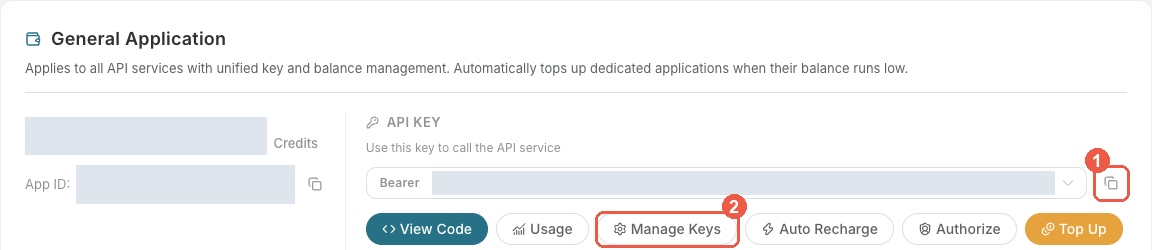
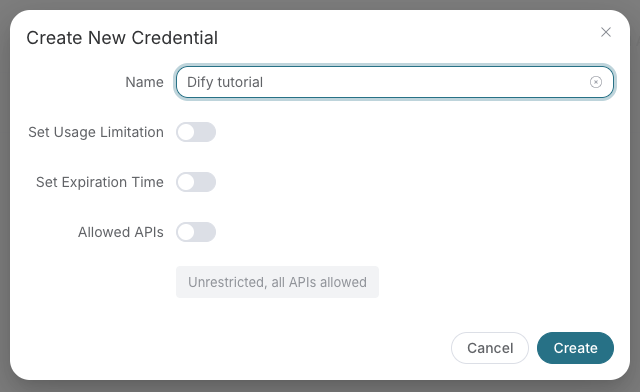
These are real, redacted Ace console screenshots reused from the Dify guide at source revision 8d3d035; checked 2026-10-18. The screenshot's example key name is not an Amp setting.
3. Put the key in Amp's process environment
Set ACEDATACLOUD_API_TOKEN privately in the terminal that starts Amp. On macOS/Linux:
# Replace this placeholder locally; never paste a real key in a prompt or commit it.
export ACEDATACLOUD_API_TOKEN='YOUR_API_TOKEN'
amp
On PowerShell use $env:ACEDATACLOUD_API_TOKEN = 'YOUR_API_TOKEN' before starting Amp. The manifest contains only Bearer ${ACEDATACLOUD_API_TOKEN}, not your key. A new terminal needs the variable too. Hosted personal/workspace Skills run elsewhere: configure their secret in that execution environment; your local shell variable is not automatically copied.
4. Find and load the service
Run amp skill list --json, or open the Amp command palette with Ctrl+O → skills: list. Find suno-by-acedatacloud, then ask Amp to load it. Skill MCP tools stay hidden until the Skill loads. amp mcp doctor suno-ace checks the connection; amp tools list --json inspects active tools. Project-configured MCP servers may need amp mcp approve suno-ace after you review their configuration; do not add a duplicate direct MCP configuration just to approve a Skill.

Official reference from Amp keybindings, downloaded 2026-10-18; capture date/version not published. It is not an Ace run and does not show the Skill selected. page logs is debugging, not the tool entry. Real Suno installation/load/result screenshots remain pending an authorized Amp session.
For a no-generation check, ask:
Use Suno by Ace Data Cloud only to call suno_list_models once. Do not generate media or create a task.
Use suno_list_models once to inspect the supported choices; this is informational and does not prove API permissions or balance. Amp inference may itself cost usage: do not run an agent turn unless it is covered by your authorized budget/subscription. Command help, file validation and tool discovery do not prove a paid result.
5. First requested result, then the same task
When you decide to pay for generation, ask:
Use Suno by Ace Data Cloud to create one music result. First show the current model/parameters and price for my approval. After I approve, submit once with suno_generate_music, save its task ID, and query only that ID with suno_get_task. Do not retry generation while waiting.
Require an explicit terminal success (state=complete with success, or the returned finished timestamp and successful response). Failure is terminal too. A pending task or an early media URL is not completion. Return the actual task ID and final media links. Continue suno_get_task with its original ID after a timeout; do not rerun the entire generation workflow. Compare the corresponding usage record in Ace with that single request. Credits are not USD; conversion uses your current package price/amount.
Troubleshooting
| Symptom | Action |
|---|---|
| No Skill/tools | Check installation path and suno-by-acedatacloud, reload Skills, load this Skill, and check for an older Skill masking the same name. |
| Login prompt before install/doctor | Use the existing Amp account; the Ace API key is a separate credential. |
| 401/403 | Check the full copied service key, Suno access, expiry, limits, Allowed APIs and balance; never expose the key. |
| 429 | Wait and reduce concurrency; no automatic paid retries. |
| Pending task or early URL | Query the same task ID; do not generate again. |
| 400, moderation, failed/uncertain request | Preserve the error, inspect the original task, and ask before changing parameters/model or retrying. |
| Different tools unexpectedly visible | A direct MCP setting can override the Skill server. Review existing settings; do not overwrite unrelated connections. |
Privacy and support
The free Skill connects to https://suno.mcp.acedata.cloud/mcp; your chosen inputs and Bearer credential are handled by Ace Data Cloud. API generation uses your Ace account and follows current prices. Review the installed files before sharing them with a workspace; never put a real key in a repository. MCP implementation · Support.
Skill manifest
Suno by Ace Data Cloud
Create songs or instrumental music with Suno, provided by Ace Data Cloud; retrieve the same task until its final audio is ready. This is an Ace Data Cloud integration, not an official Suno or Amp plugin endorsement.
Setup and tool scope
Requires Amp native Skill MCP support, an existing Amp login, and ACEDATACLOUD_API_TOKEN in the environment that starts Amp.
Read README.md for installation, illustrated API-key setup, and troubleshooting.
The sibling mcp.json connects only suno-ace at https://suno.mcp.acedata.cloud/mcp and limits tools to this service.
Reuse an existing matching connection; do not add a second server or alter unrelated settings.
Keep the API key in ACEDATACLOUD_API_TOKEN; never request it in the conversation, put it in a command argument, or print it.
Load this Skill to expose its MCP tools. Use suno_list_models once to inspect the supported choices; this is informational and does not prove API permissions or balance.
Generation and retrieval
- Confirm the user wants this music operation and accepts its current pricing, parameters and output count. Choose a currently supported model and parameters with the user; do not silently substitute models, providers, prices, or resolution tiers.
- Call
suno_generate_musicexactly once for that requested operation. Use an edit tool only when the user provides authorized reference media and asks to edit it. - Save the returned task ID. Call
suno_get_task(task_id="<original task ID>")to retrieve the same task after pending results, disconnects or timeouts. Never submit generation again merely to poll. - Require an explicit terminal success (
state=completewith success, or the returned finished timestamp and successful response). Failure is terminal too. A pending task or an early media URL is not completion. Do not invent IDs, output links, media availability, completion or billing. Report the final status and returned media links; preserve upstream errors (including rate limit and moderation meaning). - On an uncertain submission, inspect its original task/request before any new paid request. A failed result is not permission to retry, change the model, or use a fallback.
Custom inputs and processing failures
When the connected tool supports negative_tags, use it for generation with custom: true or for replace_section. The audio endpoint currently enforces no fixed character limit for this field; keep it concise because overly long input may still fail.
A downloadable audio file does not guarantee its audio_id remains usable for covers, extension or stem separation. Preserve the public HTTP 500 codes suno_processing_unavailable (processing unavailable), suno_model_unavailable (selected model unavailable for this operation), and suno_processing_failed (processing returned no audio). Also preserve HTTP 500 api_error with the message the account may have been offline when returned by /suno/audios. Retain task_id and trace_id when returned and contact support with those IDs, never the API key. Query the existing task if submission is uncertain; do not automatically retry a paid operation or silently switch models.
Amp reasoning can have its own usage charge. Installation/tool discovery and API metadata are distinct from inference, generation, terminal media, and the account's usage record.
Files (skills)
-
LICENSE 629 B · in bundle
-
listing.json 815 B
Loading… -
mcp.json 296 B
Loading… -
README.md 7.5 KB
# Suno by Ace Data Cloud for Amp An independently installable **Suno** Skill with native MCP tools, supplied by Ace Data Cloud. Search terms: Suno, suno, music. This does not add a default LLM provider, and it is not endorsed by Suno's maker or Amp. [简体中文](README.zh-CN.md) · [Current API pricing](https://platform.acedata.cloud/models?utm_source=amp&utm_medium=integration&utm_campaign=evergreen&utm_content=suno_amp_pricing) · [Source](https://github.com/AceDataCloud/Skills/tree/main/platforms/amp/skills/suno-by-acedatacloud) ## 1. Install just this service Amp's [official Skill mechanism](https://ampcode.com/docs/customize/skills) installs a Skill and its sibling `mcp.json`. Install Amp following its [official CLI guide](https://ampcode.com/docs/cli), then sign in with your existing Amp account using `amp login`. ```bash amp skill add AceDataCloud/Skills/platforms/amp/skills/suno-by-acedatacloud ``` The source command above is published from [Ace Skills main](https://github.com/AceDataCloud/Skills/commit/6169154675fd6523ad4230c257c7f70227a7c41b) (2026-10-19). Signed-in Amp installation is still awaiting verification. The proposed official [amp-contrib directory](https://github.com/ampcode/amp-contrib) entry is pending review; **do not treat this source install as an accepted official listing**. If accepted, its independent command is `amp skill add ampcode/amp-contrib/suno-by-acedatacloud`. Do not install both copies. For a reviewed local checkout: `amp skill add ./platforms/amp/skills/suno-by-acedatacloud --target /absolute/path/to/project/.agents/skills`. Amp currently requires an account even for this installer. A local copy/format check is not a signed-in Amp execution test. ## 2. Register/sign in to Ace and get your own key 1. Open [Ace Data Cloud → Applications](https://platform.acedata.cloud/console/applications?utm_source=amp&utm_medium=integration&utm_campaign=evergreen&utm_content=suno_amp_api_key), register if needed, then sign in. Open **General application**; choose **Initialize General Application** if none exists. 2. Check Suno service access, your balance and [current pricing](https://platform.acedata.cloud/models?utm_source=amp&utm_medium=integration&utm_campaign=evergreen&utm_content=suno_amp_pricing). Copy the API key, or choose **Manage Keys → Create** for a dedicated `Amp Suno` key. 3. Review expiration, usage limits and **Allowed APIs**. If restricted, allow the generation/edit and task-query routes you actually need: `/suno/audios, /suno/tasks`. Service availability and any trial allowance are whatever your account currently shows. 4. Copy only the token value, without quotes, spaces or `Bearer `. A `platform-...` management token cannot replace a service API key.   These are real, redacted Ace console screenshots reused from the Dify guide at source revision `8d3d035`; checked 2026-10-18. The screenshot's example key name is not an Amp setting. ## 3. Put the key in Amp's process environment Set `ACEDATACLOUD_API_TOKEN` privately in the terminal that starts Amp. On macOS/Linux: ```bash # Replace this placeholder locally; never paste a real key in a prompt or commit it. export ACEDATACLOUD_API_TOKEN='YOUR_API_TOKEN' amp ``` On PowerShell use `$env:ACEDATACLOUD_API_TOKEN = 'YOUR_API_TOKEN'` before starting Amp. The manifest contains only `Bearer ${ACEDATACLOUD_API_TOKEN}`, not your key. A new terminal needs the variable too. Hosted personal/workspace Skills run elsewhere: configure their secret in that execution environment; your local shell variable is not automatically copied. ## 4. Find and load the service Run `amp skill list --json`, or open the Amp command palette with **Ctrl+O → skills: list**. Find `suno-by-acedatacloud`, then ask Amp to load it. Skill MCP tools stay hidden until the Skill loads. `amp mcp doctor suno-ace` checks the connection; `amp tools list --json` inspects active tools. Project-configured MCP servers may need `amp mcp approve suno-ace` after you review their configuration; do not add a duplicate direct MCP configuration just to approve a Skill.  Official reference from [Amp keybindings](https://ampcode.com/docs/cli/keybindings), downloaded 2026-10-18; capture date/version not published. It is **not an Ace run** and does not show the Skill selected. `page logs` is debugging, not the tool entry. Real Suno installation/load/result screenshots remain pending an authorized Amp session. For a no-generation check, ask: > Use Suno by Ace Data Cloud only to call suno_list_models once. Do not generate media or create a task. Use `suno_list_models` once to inspect the supported choices; this is informational and does not prove API permissions or balance. Amp inference may itself cost usage: do not run an agent turn unless it is covered by your authorized budget/subscription. Command help, file validation and tool discovery do not prove a paid result. ## 5. First requested result, then the same task When you decide to pay for generation, ask: > Use Suno by Ace Data Cloud to create one music result. First show the current model/parameters and price for my approval. After I approve, submit once with suno_generate_music, save its task ID, and query only that ID with suno_get_task. Do not retry generation while waiting. Require an explicit terminal success (`state=complete` with success, or the returned finished timestamp and successful response). Failure is terminal too. A pending task or an early media URL is not completion. Return the actual task ID and final media links. Continue `suno_get_task` with its original ID after a timeout; do not rerun the entire generation workflow. Compare the corresponding usage record in Ace with that single request. Credits are not USD; conversion uses your current package price/amount. ## Troubleshooting | Symptom | Action | | --- | --- | | No Skill/tools | Check installation path and `suno-by-acedatacloud`, reload Skills, load this Skill, and check for an older Skill masking the same name. | | Login prompt before install/doctor | Use the existing Amp account; the Ace API key is a separate credential. | | 401/403 | Check the full copied service key, Suno access, expiry, limits, Allowed APIs and balance; never expose the key. | | 429 | Wait and reduce concurrency; no automatic paid retries. | | Pending task or early URL | Query the same task ID; do not generate again. | | 400, moderation, failed/uncertain request | Preserve the error, inspect the original task, and ask before changing parameters/model or retrying. | | Different tools unexpectedly visible | A direct MCP setting can override the Skill server. Review existing settings; do not overwrite unrelated connections. | ## Privacy and support The free Skill connects to `https://suno.mcp.acedata.cloud/mcp`; your chosen inputs and Bearer credential are handled by Ace Data Cloud. API generation uses your Ace account and follows current prices. Review the installed files before sharing them with a workspace; never put a real key in a repository. [MCP implementation](https://github.com/AceDataCloud/SunoMCP) · [Support](https://github.com/AceDataCloud/Skills/issues). -
README.zh-CN.md 5.1 KB
Loading… -
SKILL.md 3.7 KB
---
name: suno-by-acedatacloud
description: Create songs or instrumental music with Suno, provided by Ace Data Cloud; retrieve the same task until its final audio is ready.
license: Apache-2.0
metadata:
  author: Ace Data Cloud
  version: "1.0.0"
  category: music
---

# Suno by Ace Data Cloud

Create songs or instrumental music with Suno, provided by Ace Data Cloud; retrieve the same task until its final audio is ready.
This is an Ace Data Cloud integration, not an official Suno or Amp plugin endorsement.

## Setup and tool scope

Requires Amp native Skill MCP support, an existing Amp login, and `ACEDATACLOUD_API_TOKEN` in the environment that starts Amp.

Read [README.md](README.md) for installation, illustrated API-key setup, and troubleshooting.
The sibling `mcp.json` connects only `suno-ace` at `https://suno.mcp.acedata.cloud/mcp` and limits tools to this service.
Reuse an existing matching connection; do not add a second server or alter unrelated settings.
Keep the API key in `ACEDATACLOUD_API_TOKEN`; never request it in the conversation, put it in a command argument, or print it.
Load this Skill to expose its MCP tools. Use `suno_list_models` once to inspect the supported choices; this is informational and does not prove API permissions or balance.

## Generation and retrieval

1. Confirm the user wants this music operation and accepts its [current pricing](https://platform.acedata.cloud/models?utm_source=amp&utm_medium=integration&utm_campaign=evergreen&utm_content=suno_amp_pricing), parameters and output count. Choose a currently supported model and parameters with the user; do not silently substitute models, providers, prices, or resolution tiers.
2. Call `suno_generate_music` exactly once for that requested operation. Use an edit tool only when the user provides authorized reference media and asks to edit it.
3. Save the returned task ID. Call `suno_get_task(task_id="<original task ID>")` to retrieve the same task after pending results, disconnects or timeouts. Never submit generation again merely to poll.
4. Require an explicit terminal success (`state=complete` with success, or the returned finished timestamp and successful response). Failure is terminal too. A pending task or an early media URL is not completion. Do not invent IDs, output links, media availability, completion or billing. Report the final status and returned media links; preserve upstream errors (including rate limit and moderation meaning).
5. On an uncertain submission, inspect its original task/request before any new paid request. A failed result is not permission to retry, change the model, or use a fallback.

## Custom inputs and processing failures

When the connected tool supports `negative_tags`, use it for generation with `custom: true` or for `replace_section`. The audio endpoint currently enforces no fixed character limit for this field; keep it concise because overly long input may still fail.

A downloadable audio file does not guarantee its `audio_id` remains usable for covers, extension or stem separation. Preserve the public HTTP 500 codes `suno_processing_unavailable` (processing unavailable), `suno_model_unavailable` (selected model unavailable for this operation), and `suno_processing_failed` (processing returned no audio). Also preserve HTTP 500 `api_error` with the message `the account may have been offline` when returned by `/suno/audios`. Retain `task_id` and `trace_id` when returned and contact support with those IDs, never the API key. Query the existing task if submission is uncertain; do not automatically retry a paid operation or silently switch models.

Amp reasoning can have its own usage charge. Installation/tool discovery and API metadata are distinct from inference, generation, terminal media, and the account's usage record.
Comments (0)
Sign in to join the conversation.
Reviews (0)
No reviews yet.
No comments yet.