seedance-video
Seedance video by Ace Data Cloud. Generate text-to-video and image-to-video, use multimodal references, or edit and extend video. Use when the user asks for Seedance 2.0 or 2.5 video generation.
Install
npx skills add https://github.com/AceDataCloud/Skills/tree/main/skills/seedance-video
claude plugin marketplace add https://llmmart.ai/marketplace.json && claude plugin install acedatacloud-skills@llmmart
git clone https://github.com/AceDataCloud/Skills.git
The skills CLI installs just this skill, for any of its supported agents. Claude Code installs the whole acedatacloud/skills collection as a plugin from our marketplace. Git is the plain clone.
README
Seedance by Ace Data Cloud — skills.sh first run
Use Seedance through the Ace Data Cloud API from an Agent Skills-compatible coding assistant. This Skill is maintained by Ace Data Cloud and uses your Ace service API key; it does not claim to be published by Seedance. Install it independently; the account Skill and an MCP server are optional.
简体中文 · skills.sh installation page · current models and pricing
1. Install this service only
Open the skills.sh page above and check the repository is acedatacloud/skills. In your project terminal:
npx --yes skills@1.7.2 add acedatacloud/skills --skill seedance-video -a codex --yes
npx --yes skills@1.7.2 list
This example targets Codex; replace codex with your supported agent, such as claude-code or cursor. For Codex, the installed instructions are .agents/skills/seedance-video/SKILL.md. Start a fresh session. Installation does not generate media or set up an API key. This is a Skill, not a model-provider dropdown or a new extension button.
For the released snapshot checked on 2026-10-18, use https://github.com/AceDataCloud/Skills/tree/v2026.1017.279001 in place of acedatacloud/skills. That released snapshot predates these improved instructions; use the default branch after this PR is merged to receive them.
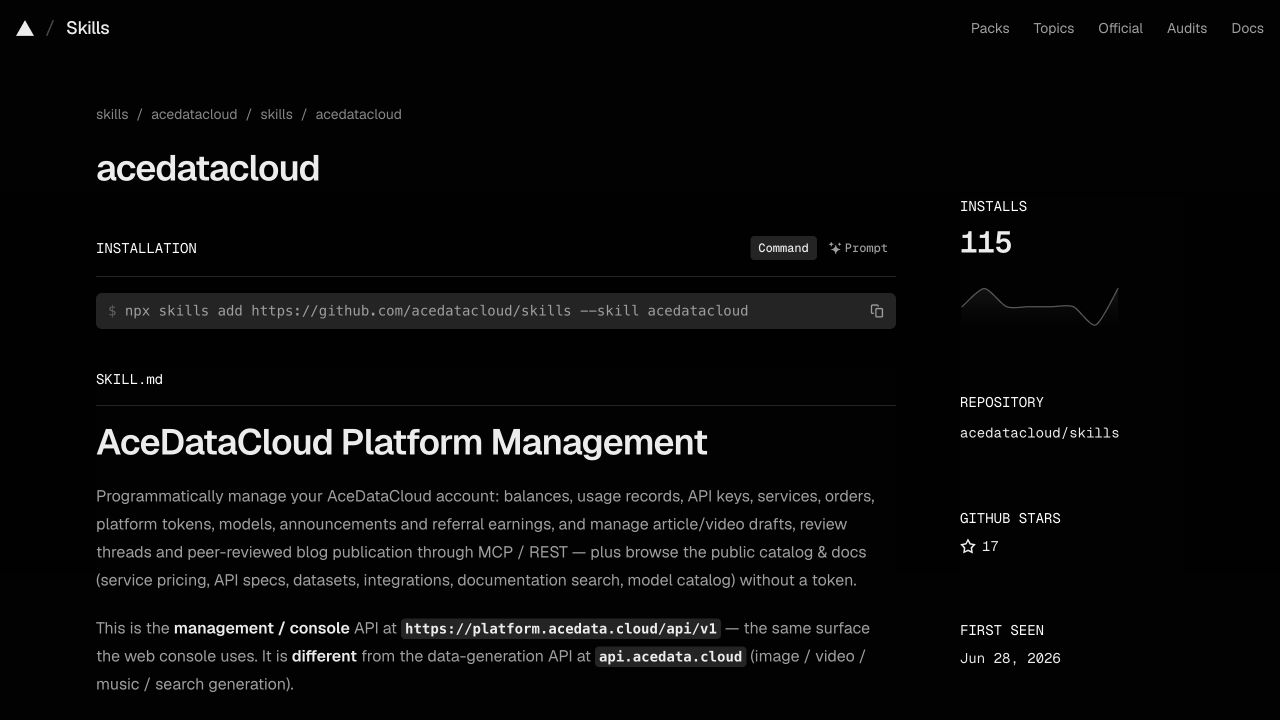
Actual account-Skill page captured on 2026-10-17, showing the same installation control. Use this service's slug above; the screenshot is not a seedance-video installation or generation result. Image sources and limits.
2. Register, sign in and get the correct API key
- Open Ace Data Cloud → Applications; register and sign in if needed.
- Open General application. If absent, choose Initialize General Application. Check Seedance access, current balance and price before submitting anything.
- Copy the key on the application card, or open Manage Keys → Create to create a separate key such as
skills.sh Seedance. Set expiry and API/usage limits as needed. If Allowed APIs is enabled, include/seedance/videosand/seedance/tasks. Other actions in SKILL.md may need extra routes. - Copy only the key value. Do not include
Beareror screenshot redaction characters. Aplatform-...management token is not the service key.
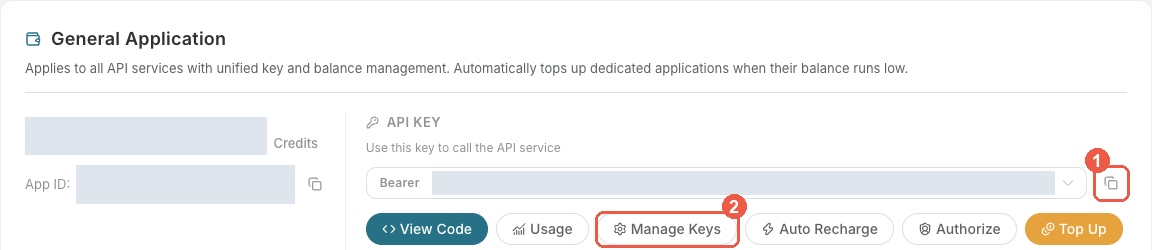
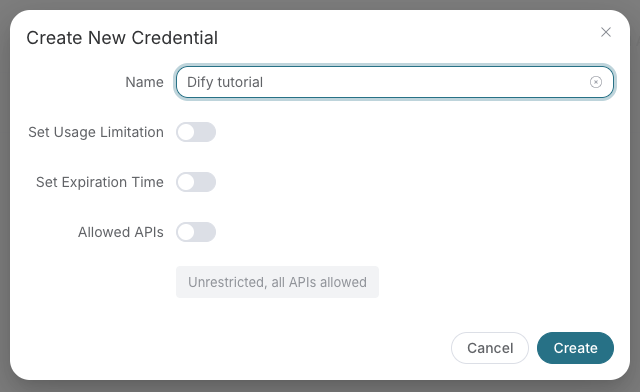
These are existing, redacted Ace console screenshots from the Suno Dify guide, checked on 2026-10-18. They illustrate the shared key controls, not a Seedance run in skills.sh. The example name “Dify tutorial” is illustrative; use your own name. Menu labels may change.
3. Put the key in the assistant's execution environment
skills.sh does not store credentials. For a terminal-launched coding assistant, export the key in that terminal before starting the assistant, then start a new session:
export ACEDATACLOUD_API_TOKEN="your_api_key_here"
For an already running IDE, restart it from the configured environment or use that IDE's documented secret/environment settings. A Skill install does not load .env automatically. Never paste the key into a prompt, commit it, or print it in logs. OpenClaw has its own Gateway setup in SKILL.md; it is not required for skills.sh installation.
4. Submit once and inspect the result
Read SKILL.md and its exact request shape first. Ask your assistant to use Seedance by Ace Data Cloud, inspect the current price, and prepare a single video request using doubao-seedance-2-0-260128. Approve the intended cost before it submits /seedance/videos. Installation and a prepared request do not prove that generation ran.
Run the existing Quick Start only after the key and intended cost are correct. For an asynchronous response, save its task ID and query that same ID at /seedance/tasks. Do not resubmit generation to check progress. Wait for the terminal succeeded result and use its returned video URL.
Example request copied from this Skill's current Quick Start. Billable: run only after confirming the service, price and intended request. It has not been executed for this guide:
curl -X POST https://api.acedata.cloud/seedance/videos \
  -H "Authorization: Bearer $ACEDATACLOUD_API_TOKEN" \
  -H "Content-Type: application/json" \
  -d '{"model": "doubao-seedance-2-0-260128", "content": [{"type": "text", "text": "a dancer performing contemporary ballet in a misty forest"}], "async": true}'
If the response returns a task ID, query that ID with the following command; replace YOUR_TASK_ID with the existing ID.
curl -X POST https://api.acedata.cloud/seedance/tasks \
  -H "Authorization: Bearer $ACEDATACLOUD_API_TOKEN" \
  -H "Content-Type: application/json" \
  -d '{"id":"YOUR_TASK_ID"}'
The expected output is an actual returned audio/video/image URL after terminal success, not a URL copied from this guide. Keep the same task ID while pending.
Use the exact task response fields and terminal states in SKILL.md. A URL in this guide would be illustrative; no media generation was performed for this tutorial. Check the request/task history for one intended charge; a completed media link alone does not prove the final bill.
Troubleshooting
| Symptom | What to check |
|---|---|
| 401 | Full service key, no Bearer inside its value, available to the actual assistant process. |
| 403 | Service access, expiry and Allowed APIs; read the error because moderation can also return 403. |
| 400 | Exact model ID and request shape in SKILL.md; do not silently substitute a model. |
| 429 | Wait and reduce concurrency; do not automatically retry a paid submit. |
| Pending / timeout / 5xx | Read the same task or request history before considering a new submit. |
| Media URL unavailable | Confirm terminal success and use the actual returned URL; share only task/trace ID with support. |
Support: dev@acedata.cloud. Source: AceDataCloud/Skills. skills.sh installation counters are not unique users or revenue. Source links use the four supported UTM fields for this skills.sh guide; they do not prove a registration or payment.
Skill manifest
Seedance by Ace Data Cloud
Generate AI dance and motion videos through AceDataCloud's Seedance (ByteDance) API.
Install and connect from skills.sh
This integration is maintained by Ace Data Cloud; it is not an official Seedance publisher listing. Install only this Skill with npx skills add acedatacloud/skills --skill seedance-video --yes, or use the public skills.sh page. Keep the slug seedance-video when selecting it.
Read the illustrated first-run guide (简体中文) for registration, Applications → General application, API key access and price checks, and the environment variable location for your coding agent. For skills.sh installations, use this guide; any ClawHub-specific setup applies only to OpenClaw. The shared references linked here are online because focused installs do not include sibling _shared/ folders.
ClawHub / OpenClaw setup
- Install the official Skill with
clawhub install @acedatacloud/seedance. Check that the ClawHub publisher is @acedatacloud. - Sign in at AceDataCloud → Applications, open General application, and check Seedance access, balance, and current pricing. Copy its API key, or select Manage Keys → Create for a separate key. Copy the key value without
Bearer; aplatform-...management token is not a service API key. - If you enable Allowed APIs restrictions, include
/seedance/videosand/seedance/tasks. Advanced workflows below may call additional routes. - On the OpenClaw Gateway host, put
ACEDATACLOUD_API_TOKEN=your_api_key_herein~/.openclaw/.env, then restart the Gateway and start a new session. For a direct terminal test, runexport ACEDATACLOUD_API_TOKEN="your_api_key_here"in that shell. Never put the key in a prompt or commit an.envfile. - Run the Quick Start below. If this workflow returns a task ID, query that same task until it finishes; do not submit the same billable request again just to check progress.
Illustrated key setup, first run, and troubleshooting · Token details
Quick Start
curl -X POST https://api.acedata.cloud/seedance/videos \
  -H "Authorization: Bearer $ACEDATACLOUD_API_TOKEN" \
  -H "Content-Type: application/json" \
  -d '{"model": "doubao-seedance-2-0-260128", "content": [{"type": "text", "text": "a dancer performing contemporary ballet in a misty forest"}], "async": true}'
Async: See async task polling. Poll via
POST /seedance/taskswith{"id": "..."}. This returns a task ID immediately. Poll for the result:
curl -X POST https://api.acedata.cloud/seedance/tasks \
  -H "Authorization: Bearer $ACEDATACLOUD_API_TOKEN" \
  -H "Content-Type: application/json" \
  -d '{"id": "<task_id from above>"}'
Models
Seedance 2.5 (latest flagship)
| Model | Best For | Limits |
|---|---|---|
doubao-seedance-2-5-260628 |
Up to 30 seconds, pure-audio or multimodal reference, video edit/extend | 480p, 720p, 1080p; 30 images / 10 videos / 10 audios / 50 total |
Use omni_reference_task_type: "auto", "edit", or "extend". Edit and extend require reference_video and ratio: "adaptive"; edit also requires duration: -1. Optional output_format is mp4 or mov.
Seedance 2.0 (multimodal reference, up to 4k)
The 2.0 series adds multimodal reference inputs: real-person / character image references, reference audio, and reference video (see the workflows below).
| Model | Best For | Max resolution |
|---|---|---|
doubao-seedance-2-0-260128 |
Highest quality, real-person/character reference, 4k output | 4k |
doubao-seedance-2-0-fast-260128 |
Faster 2.0 generation | 720p |
doubao-seedance-2-0-mini-260615 |
Lightweight / most cost-effective 2.0 | 720p |
Seedance 1.x
| Model | Type | Best For |
|---|---|---|
doubao-seedance-1-5-pro-251215 |
Text+Image-to-Video | 1.5 flagship, audio support |
doubao-seedance-1-0-pro-250528 |
Text+Image-to-Video | General-purpose, reliable quality |
doubao-seedance-1-0-pro-fast-251015 |
Text+Image-to-Video | Faster Pro generation |
doubao-seedance-1-0-lite-t2v-250428 |
Text-to-Video only | Lightweight text-to-video |
doubao-seedance-1-0-lite-i2v-250428 |
Image-to-Video only | Lightweight image-to-video |
Workflows
1. Text-to-Video
Pass a text content item in the content array.
POST /seedance/videos
{
  "model": "doubao-seedance-1-0-pro-250528",
  "content": [
    {"type": "text", "text": "a street dancer doing breakdancing moves in an urban setting"}
  ],
  "resolution": "1080p",
  "ratio": "16:9",
  "duration": 5
}
2. Image-to-Video
Include an image content item (with an optional role) alongside the text.
POST /seedance/videos
{
  "model": "doubao-seedance-1-5-pro-251215",
  "content": [
    {"type": "text", "text": "the person starts dancing gracefully"},
    {
      "type": "image_url",
      "role": "first_frame",
      "image_url": {"url": "https://example.com/dancer.jpg"}
    }
  ],
  "resolution": "720p",
  "duration": 5
}
Image roles:
first_frame— image is used as the opening framelast_frame— image is used as the closing framereference_image— image is used as a style / subject / real-person reference (Seedance 2.0 keeps the referenced person or character consistent)
Reference media (Seedance 2.x):
audio_url— userole: "reference_audio"video_url— userole: "reference_video"- 2.5 accepts pure-audio reference; 2.0 requires an image or video alongside audio
3. First-frame + Last-frame
Provide both a start and end frame image:
POST /seedance/videos
{
  "model": "doubao-seedance-2-0-260128",
  "content": [
    {"type": "text", "text": "smooth transition between two scenes"},
    {"type": "image_url", "role": "first_frame", "image_url": {"url": "https://example.com/start.jpg"}},
    {"type": "image_url", "role": "last_frame", "image_url": {"url": "https://example.com/end.jpg"}}
  ]
}
4. Real-person / character reference (Seedance 2.0)
Seedance 2.0 models (doubao-seedance-2-0-260128, doubao-seedance-2-0-fast-260128, doubao-seedance-2-0-mini-260615) can keep a specific person or character consistent across a brand-new scene. Pass one or more photos as image_url items with role: "reference_image" — the model preserves that subject's appearance. Up to 9 reference images are accepted.
POST /seedance/videos
{
  "model": "doubao-seedance-2-0-260128",
  "content": [
    {"type": "text", "text": "the same person walking through a neon-lit night market, cinematic"},
    {"type": "image_url", "role": "reference_image", "image_url": {"url": "https://example.com/person.jpg"}}
  ],
  "resolution": "1080p",
  "duration": 8
}
5. Reference audio / video (Seedance 2.0)
2.0 models also accept reference audio (voice timbre, background music) and reference video (subject content, camera movement, motion, overall style). Add audio_url and/or video_url content items. Limits: up to 3 audio and 3 video references per request.
POST /seedance/videos
{
  "model": "doubao-seedance-2-0-260128",
  "content": [
    {"type": "text", "text": "a singer performing on stage, matching the reference voice and motion"},
    {"type": "image_url", "role": "reference_image", "image_url": {"url": "https://example.com/person.jpg"}},
    {"type": "audio_url", "role": "reference_audio", "audio_url": {"url": "https://example.com/voice.mp3"}},
    {"type": "video_url", "role": "reference_video", "video_url": {"url": "https://example.com/motion.mp4"}}
  ],
  "generate_audio": true
}
Parameters
| Parameter | Values | Description |
|---|---|---|
model |
see Models table | Model to use (required) |
content |
array | Input items: text, image_url, audio_url (2.0), video_url (2.0) (required) |
resolution |
"480p", "720p", "1080p", "4k" |
Output resolution. 4k is doubao-seedance-2-0-260128 (standard) only; 2-0-fast / 2-0-mini max out at 720p (default: 720p for pro/2.0, 480p for lite) |
ratio |
"16:9", "4:3", "1:1", "3:4", "9:16", "21:9", "adaptive" |
Aspect ratio (default: 16:9) |
duration |
2 – 30, or -1 |
1.0: 2–12 (no auto); 1.5 Pro: 4–12/-1; 2.0: 4–15/-1; 2.5: 4–30/-1 |
frames |
29–289 (must satisfy 25+4n) | Frame count — mutually exclusive with duration |
seed |
-1 to 4294967295 | Seed for reproducible results (-1 = random) |
generate_audio |
true / false |
Generate audio (supported by doubao-seedance-1-5-pro-251215 and the doubao-seedance-2-0 series; other models ignore it) |
camerafixed |
true / false |
Fix the camera position during generation |
watermark |
true / false |
Add a watermark to the generated video |
return_last_frame |
true / false |
Return the last frame of the generated video |
omni_reference_task_type |
auto, edit, extend |
Seedance 2.5 task type |
output_format |
mp4, mov |
Seedance 2.5 output format |
tools |
object[] | Seedance 2.5 web search tool, e.g. [{"type":"web_search"}] |
priority |
0–9 | Seedance 2.5 queue priority |
safety_identifier |
string | Stable anonymous end-user ID (max 64 chars; do not send PII) |
execution_expires_after |
number | Task timeout threshold in seconds |
Inline Parameter Syntax
You can also embed generation parameters directly in the text prompt using the --param value syntax:
A kitten yawning at the camera. --rs 720p --rt 16:9 --dur 5 --fps 24 --seed 42
Supported inline params: --rs (resolution), --rt (ratio), --dur (duration), --frames, --fps (24 only), --seed, --cf (camera_fixed), --wm (watermark).
Gotchas
- Model names use the
doubao-*convention (e.g.doubao-seedance-1-0-pro-250528) — old short names likeseedance-1.0are not valid - The
contentarray replaces the oldprompt+image_urlfields; always usecontent - Image and text scenarios are mutually exclusive per content item — each item has either
textorimage_url, not both first_frameandlast_framemay be combined in one request, butreference_imageis mutually exclusive withfirst_frame/last_frame— do not mix a reference image with first/last framesgenerate_audio: trueis supported bydoubao-seedance-1-5-pro-251215and thedoubao-seedance-2-0series; other models ignore this field- Lite models are split:
*-lite-t2v-*only accepts text,*-lite-i2v-*only accepts image-to-video audio_urlandvideo_urlreference items are supported by Seedance 2.0 and 2.5; 2.5 also supports pure-audio reference- Resolution options are
480p,720p,1080p, and4k(4kisdoubao-seedance-2-0-260128only;2-0-fast/2-0-minimax out at720p) — there is no 360p or 540p - Duration is model-specific: 1.0 supports 2–12; 1.5 Pro supports 4–12/-1; 2.0 supports 4–15/-1; 2.5 supports 4–30/-1
- Task states use
"succeeded"(not "completed") — check for this value when polling
MCP:
pip install mcp-seedance| Hosted:https://seedance.mcp.acedata.cloud/mcp| See all MCP servers
Files (skills)
-
README.md 7.1 KB
# Seedance by Ace Data Cloud — skills.sh first run Use Seedance through the **Ace Data Cloud** API from an Agent Skills-compatible coding assistant. This Skill is maintained by Ace Data Cloud and uses your Ace service API key; it does not claim to be published by Seedance. Install it independently; the account Skill and an MCP server are optional. [简体中文](readme.zh-CN.md) · [skills.sh installation page](https://skills.sh/acedatacloud/skills/seedance-video) · [current models and pricing](https://platform.acedata.cloud/models?utm_source=skills_sh&utm_medium=referral&utm_campaign=evergreen&utm_content=seedance_video_pricing) ## 1. Install this service only Open the skills.sh page above and check the repository is **acedatacloud/skills**. In your project terminal: ```bash npx --yes skills@1.7.2 add acedatacloud/skills --skill seedance-video -a codex --yes npx --yes skills@1.7.2 list ``` This example targets Codex; replace `codex` with your supported agent, such as `claude-code` or `cursor`. For Codex, the installed instructions are `.agents/skills/seedance-video/SKILL.md`. Start a fresh session. Installation does not generate media or set up an API key. This is a Skill, not a model-provider dropdown or a new extension button. For the released snapshot checked on 2026-10-18, use `https://github.com/AceDataCloud/Skills/tree/v2026.1017.279001` in place of `acedatacloud/skills`. That released snapshot predates these improved instructions; use the default branch after this PR is merged to receive them.  Actual account-Skill page captured on 2026-10-17, showing the same installation control. Use this service's slug above; the screenshot is not a seedance-video installation or generation result. [Image sources and limits](https://github.com/AceDataCloud/Skills/blob/0901d63b7f7d216318463b1c33976838a084da3b/docs/skills-sh/image-sources.json). ## 2. Register, sign in and get the correct API key 1. Open [Ace Data Cloud → Applications](https://platform.acedata.cloud/console/applications?utm_source=skills_sh&utm_medium=referral&utm_campaign=evergreen&utm_content=seedance_video_api_key); register and sign in if needed. 2. Open **General application**. If absent, choose **Initialize General Application**. Check **Seedance** access, current balance and price before submitting anything. 3. Copy the key on the application card, or open **Manage Keys → Create** to create a separate key such as `skills.sh Seedance`. Set expiry and API/usage limits as needed. If **Allowed APIs** is enabled, include `/seedance/videos` and `/seedance/tasks`. Other actions in SKILL.md may need extra routes. 4. Copy only the key value. Do not include `Bearer ` or screenshot redaction characters. A `platform-...` management token is not the service key.   These are existing, redacted **Ace console** screenshots from the [Suno Dify guide](https://github.com/AceDataCloud/SunoDify/blob/8d3d03570e73324220f111f7fe343da0792a8071/README.md), checked on 2026-10-18. They illustrate the shared key controls, not a Seedance run in skills.sh. The example name “Dify tutorial” is illustrative; use your own name. Menu labels may change. ## 3. Put the key in the assistant's execution environment skills.sh does not store credentials. For a terminal-launched coding assistant, export the key in that terminal **before starting the assistant**, then start a new session: ```bash export ACEDATACLOUD_API_TOKEN="your_api_key_here" ``` For an already running IDE, restart it from the configured environment or use that IDE's documented secret/environment settings. A Skill install does not load `.env` automatically. Never paste the key into a prompt, commit it, or print it in logs. OpenClaw has its own Gateway setup in SKILL.md; it is not required for skills.sh installation. ## 4. Submit once and inspect the result Read [SKILL.md](SKILL.md) and its exact request shape first. Ask your assistant to use **Seedance by Ace Data Cloud**, inspect the current price, and prepare a single video request using `doubao-seedance-2-0-260128`. Approve the intended cost before it submits `/seedance/videos`. Installation and a prepared request do not prove that generation ran. Run the existing Quick Start only after the key and intended cost are correct. For an asynchronous response, save its task ID and query **that same ID** at `/seedance/tasks`. Do not resubmit generation to check progress. Wait for the terminal `succeeded` result and use its returned video URL. Example request copied from this Skill's current Quick Start. **Billable: run only after confirming the service, price and intended request.** It has not been executed for this guide: ```bash curl -X POST https://api.acedata.cloud/seedance/videos \ -H "Authorization: Bearer $ACEDATACLOUD_API_TOKEN" \ -H "Content-Type: application/json" \ -d '{"model": "doubao-seedance-2-0-260128", "content": [{"type": "text", "text": "a dancer performing contemporary ballet in a misty forest"}], "async": true}' ``` If the response returns a task ID, query that ID with the following command; replace `YOUR_TASK_ID` with the existing ID. ```bash curl -X POST https://api.acedata.cloud/seedance/tasks \ -H "Authorization: Bearer $ACEDATACLOUD_API_TOKEN" \ -H "Content-Type: application/json" \ -d '{"id":"YOUR_TASK_ID"}' ``` The expected output is an actual returned audio/video/image URL after terminal success, not a URL copied from this guide. Keep the same task ID while pending. Use the exact task response fields and terminal states in SKILL.md. A URL in this guide would be illustrative; no media generation was performed for this tutorial. Check the request/task history for one intended charge; a completed media link alone does not prove the final bill. ## Troubleshooting | Symptom | What to check | |---|---| | 401 | Full service key, no `Bearer ` inside its value, available to the actual assistant process. | | 403 | Service access, expiry and Allowed APIs; read the error because moderation can also return 403. | | 400 | Exact model ID and request shape in SKILL.md; do not silently substitute a model. | | 429 | Wait and reduce concurrency; do not automatically retry a paid submit. | | Pending / timeout / 5xx | Read the same task or request history before considering a new submit. | | Media URL unavailable | Confirm terminal success and use the actual returned URL; share only task/trace ID with support. | Support: [dev@acedata.cloud](mailto:dev@acedata.cloud). Source: [AceDataCloud/Skills](https://github.com/AceDataCloud/Skills). skills.sh installation counters are not unique users or revenue. Source links use the four supported UTM fields for this skills.sh guide; they do not prove a registration or payment. -
readme.zh-CN.md 5.6 KB
Loading… -
SKILL.md 11.9 KB
---
name: seedance-video
description: Seedance video by Ace Data Cloud. Generate text-to-video and image-to-video, use multimodal references, or edit and extend video. Use when the user asks for Seedance 2.0 or 2.5 video generation.
license: Apache-2.0
metadata:
  author: acedatacloud
  version: "1.0"
compatibility: Requires ACEDATACLOUD_API_TOKEN in the agent process environment and HTTPS access to api.acedata.cloud. See README.md for installation and key setup.
---

# Seedance by Ace Data Cloud

Generate AI dance and motion videos through AceDataCloud's Seedance (ByteDance) API.

## Install and connect from skills.sh

This integration is maintained by **Ace Data Cloud**; it is not an official Seedance publisher listing. Install only this Skill with `npx skills add acedatacloud/skills --skill seedance-video --yes`, or use the [public skills.sh page](https://skills.sh/acedatacloud/skills/seedance-video). Keep the slug `seedance-video` when selecting it.

Read the [illustrated first-run guide](README.md) ([简体中文](readme.zh-CN.md)) for registration, **Applications → General application**, API key access and price checks, and the environment variable location for your coding agent. For skills.sh installations, use this guide; any ClawHub-specific setup applies only to OpenClaw. The shared references linked here are online because focused installs do not include sibling `_shared/` folders.

## ClawHub / OpenClaw setup

1. Install the official Skill with `clawhub install @acedatacloud/seedance`. Check that the ClawHub publisher is **@acedatacloud**.
2. Sign in at [AceDataCloud → Applications](https://platform.acedata.cloud/console/applications), open **General application**, and check Seedance access, balance, and current pricing. Copy its API key, or select **Manage Keys → Create** for a separate key. Copy the key value without `Bearer `; a `platform-...` management token is not a service API key.
3. If you enable **Allowed APIs** restrictions, include `/seedance/videos` and `/seedance/tasks`. Advanced workflows below may call additional routes.
4. On the OpenClaw Gateway host, put `ACEDATACLOUD_API_TOKEN=your_api_key_here` in `~/.openclaw/.env`, then restart the Gateway and start a new session. For a direct terminal test, run `export ACEDATACLOUD_API_TOKEN="your_api_key_here"` in that shell. Never put the key in a prompt or commit an `.env` file.
5. Run the **Quick Start** below. If this workflow returns a task ID, query that same task until it finishes; do not submit the same billable request again just to check progress.

[Illustrated key setup, first run, and troubleshooting](https://github.com/AceDataCloud/Skills#first-run-with-clawhub-and-openclaw) · [Token details](https://github.com/AceDataCloud/Skills/blob/main/skills/_shared/authentication.md)

## Quick Start

```bash
curl -X POST https://api.acedata.cloud/seedance/videos \
  -H "Authorization: Bearer $ACEDATACLOUD_API_TOKEN" \
  -H "Content-Type: application/json" \
  -d '{"model": "doubao-seedance-2-0-260128", "content": [{"type": "text", "text": "a dancer performing contemporary ballet in a misty forest"}], "async": true}'
```

> **Async:** See [async task polling](https://github.com/AceDataCloud/Skills/blob/main/skills/_shared/async-tasks.md). Poll via `POST /seedance/tasks` with `{"id": "..."}`.
This returns a task ID immediately. Poll for the result:

```bash
curl -X POST https://api.acedata.cloud/seedance/tasks \
  -H "Authorization: Bearer $ACEDATACLOUD_API_TOKEN" \
  -H "Content-Type: application/json" \
  -d '{"id": "<task_id from above>"}'
```

## Models

### Seedance 2.5 (latest flagship)

| Model | Best For | Limits |
|-------|----------|--------|
| `doubao-seedance-2-5-260628` | Up to 30 seconds, pure-audio or multimodal reference, video edit/extend | `480p`, `720p`, `1080p`; 30 images / 10 videos / 10 audios / 50 total |

Use `omni_reference_task_type: "auto"`, `"edit"`, or `"extend"`. Edit and extend require `reference_video` and `ratio: "adaptive"`; edit also requires `duration: -1`. Optional `output_format` is `mp4` or `mov`.

### Seedance 2.0 (multimodal reference, up to 4k)

The 2.0 series adds multimodal reference inputs: real-person / character **image** references, reference **audio**, and reference **video** (see the workflows below).

| Model | Best For | Max resolution |
|-------|----------|----------------|
| `doubao-seedance-2-0-260128` | Highest quality, real-person/character reference, 4k output | `4k` |
| `doubao-seedance-2-0-fast-260128` | Faster 2.0 generation | `720p` |
| `doubao-seedance-2-0-mini-260615` | Lightweight / most cost-effective 2.0 | `720p` |

### Seedance 1.x

| Model | Type | Best For |
|-------|------|----------|
| `doubao-seedance-1-5-pro-251215` | Text+Image-to-Video | 1.5 flagship, audio support |
| `doubao-seedance-1-0-pro-250528` | Text+Image-to-Video | General-purpose, reliable quality |
| `doubao-seedance-1-0-pro-fast-251015` | Text+Image-to-Video | Faster Pro generation |
| `doubao-seedance-1-0-lite-t2v-250428` | Text-to-Video only | Lightweight text-to-video |
| `doubao-seedance-1-0-lite-i2v-250428` | Image-to-Video only | Lightweight image-to-video |

## Workflows

### 1. Text-to-Video

Pass a text content item in the `content` array.

```json
POST /seedance/videos
{
  "model": "doubao-seedance-1-0-pro-250528",
  "content": [
    {"type": "text", "text": "a street dancer doing breakdancing moves in an urban setting"}
  ],
  "resolution": "1080p",
  "ratio": "16:9",
  "duration": 5
}
```

### 2. Image-to-Video

Include an image content item (with an optional `role`) alongside the text.

```json
POST /seedance/videos
{
  "model": "doubao-seedance-1-5-pro-251215",
  "content": [
    {"type": "text", "text": "the person starts dancing gracefully"},
    {
      "type": "image_url",
      "role": "first_frame",
      "image_url": {"url": "https://example.com/dancer.jpg"}
    }
  ],
  "resolution": "720p",
  "duration": 5
}
```

Image roles:
- `first_frame` — image is used as the opening frame
- `last_frame` — image is used as the closing frame
- `reference_image` — image is used as a style / subject / real-person reference (Seedance 2.0 keeps the referenced person or character consistent)

Reference media (Seedance 2.x):
- `audio_url` — use `role: "reference_audio"`
- `video_url` — use `role: "reference_video"`
- 2.5 accepts pure-audio reference; 2.0 requires an image or video alongside audio

### 3. First-frame + Last-frame

Provide both a start and end frame image:

```json
POST /seedance/videos
{
  "model": "doubao-seedance-2-0-260128",
  "content": [
    {"type": "text", "text": "smooth transition between two scenes"},
    {"type": "image_url", "role": "first_frame", "image_url": {"url": "https://example.com/start.jpg"}},
    {"type": "image_url", "role": "last_frame", "image_url": {"url": "https://example.com/end.jpg"}}
  ]
}
```

### 4. Real-person / character reference (Seedance 2.0)

Seedance 2.0 models (`doubao-seedance-2-0-260128`, `doubao-seedance-2-0-fast-260128`, `doubao-seedance-2-0-mini-260615`) can keep a **specific person or character** consistent across a brand-new scene. Pass one or more photos as `image_url` items with `role: "reference_image"` — the model preserves that subject's appearance. Up to 9 reference images are accepted.

```json
POST /seedance/videos
{
  "model": "doubao-seedance-2-0-260128",
  "content": [
    {"type": "text", "text": "the same person walking through a neon-lit night market, cinematic"},
    {"type": "image_url", "role": "reference_image", "image_url": {"url": "https://example.com/person.jpg"}}
  ],
  "resolution": "1080p",
  "duration": 8
}
```

### 5. Reference audio / video (Seedance 2.0)

2.0 models also accept reference **audio** (voice timbre, background music) and reference **video** (subject content, camera movement, motion, overall style). Add `audio_url` and/or `video_url` content items. Limits: up to 3 audio and 3 video references per request.

```json
POST /seedance/videos
{
  "model": "doubao-seedance-2-0-260128",
  "content": [
    {"type": "text", "text": "a singer performing on stage, matching the reference voice and motion"},
    {"type": "image_url", "role": "reference_image", "image_url": {"url": "https://example.com/person.jpg"}},
    {"type": "audio_url", "role": "reference_audio", "audio_url": {"url": "https://example.com/voice.mp3"}},
    {"type": "video_url", "role": "reference_video", "video_url": {"url": "https://example.com/motion.mp4"}}
  ],
  "generate_audio": true
}
```

## Parameters

| Parameter | Values | Description |
|-----------|--------|-------------|
| `model` | see Models table | Model to use (required) |
| `content` | array | Input items: `text`, `image_url`, `audio_url` (2.0), `video_url` (2.0) (required) |
| `resolution` | `"480p"`, `"720p"`, `"1080p"`, `"4k"` | Output resolution. `4k` is `doubao-seedance-2-0-260128` (standard) only; `2-0-fast` / `2-0-mini` max out at `720p` (default: 720p for pro/2.0, 480p for lite) |
| `ratio` | `"16:9"`, `"4:3"`, `"1:1"`, `"3:4"`, `"9:16"`, `"21:9"`, `"adaptive"` | Aspect ratio (default: 16:9) |
| `duration` | `2` – `30`, or `-1` | 1.0: 2–12 (no auto); 1.5 Pro: 4–12/-1; 2.0: 4–15/-1; 2.5: 4–30/-1 |
| `frames` | 29–289 (must satisfy 25+4n) | Frame count — mutually exclusive with `duration` |
| `seed` | -1 to 4294967295 | Seed for reproducible results (-1 = random) |
| `generate_audio` | `true` / `false` | Generate audio (supported by `doubao-seedance-1-5-pro-251215` and the `doubao-seedance-2-0` series; other models ignore it) |
| `camerafixed` | `true` / `false` | Fix the camera position during generation |
| `watermark` | `true` / `false` | Add a watermark to the generated video |
| `return_last_frame` | `true` / `false` | Return the last frame of the generated video |
| `omni_reference_task_type` | `auto`, `edit`, `extend` | Seedance 2.5 task type |
| `output_format` | `mp4`, `mov` | Seedance 2.5 output format |
| `tools` | object[] | Seedance 2.5 web search tool, e.g. `[{"type":"web_search"}]` |
| `priority` | 0–9 | Seedance 2.5 queue priority |
| `safety_identifier` | string | Stable anonymous end-user ID (max 64 chars; do not send PII) |
| `execution_expires_after` | number | Task timeout threshold in seconds |

## Inline Parameter Syntax

You can also embed generation parameters directly in the text prompt using the `--param value` syntax:

```
A kitten yawning at the camera. --rs 720p --rt 16:9 --dur 5 --fps 24 --seed 42
```

Supported inline params: `--rs` (resolution), `--rt` (ratio), `--dur` (duration), `--frames`, `--fps` (24 only), `--seed`, `--cf` (camera_fixed), `--wm` (watermark).

## Gotchas

- Model names use the `doubao-*` convention (e.g. `doubao-seedance-1-0-pro-250528`) — old short names like `seedance-1.0` are not valid
- The `content` array replaces the old `prompt` + `image_url` fields; always use `content`
- Image and text scenarios are mutually exclusive per content item — each item has either `text` or `image_url`, not both
- `first_frame` and `last_frame` may be combined in one request, but `reference_image` is mutually exclusive with `first_frame` / `last_frame` — do not mix a reference image with first/last frames
- `generate_audio: true` is supported by `doubao-seedance-1-5-pro-251215` and the `doubao-seedance-2-0` series; other models ignore this field
- Lite models are split: `*-lite-t2v-*` only accepts text, `*-lite-i2v-*` only accepts image-to-video
- `audio_url` and `video_url` reference items are supported by Seedance 2.0 and 2.5; 2.5 also supports pure-audio reference
- Resolution options are `480p`, `720p`, `1080p`, and `4k` (`4k` is `doubao-seedance-2-0-260128` only; `2-0-fast` / `2-0-mini` max out at `720p`) — there is no 360p or 540p
- Duration is model-specific: 1.0 supports 2–12; 1.5 Pro supports 4–12/-1; 2.0 supports 4–15/-1; 2.5 supports 4–30/-1
- Task states use `"succeeded"` (not "completed") — check for this value when polling

> **MCP:** `pip install mcp-seedance` | Hosted: `https://seedance.mcp.acedata.cloud/mcp` | See [all MCP servers](https://github.com/AceDataCloud/Skills/blob/main/skills/_shared/mcp-servers.md)
Comments (0)
Sign in to join the conversation.
Reviews (0)
No reviews yet.
No comments yet.