nano-banana-image
Nano Banana image by Ace Data Cloud. Generate and edit images with Nano Banana, Nano Banana 2.1 or Pro. Use when the user asks for Nano Banana or NanoBanana image generation, reference-image editing or 1K, 2K and 4K output.
Install
npx skills add https://github.com/AceDataCloud/Skills/tree/main/skills/nano-banana-image
claude plugin marketplace add https://llmmart.ai/marketplace.json && claude plugin install acedatacloud-skills@llmmart
git clone https://github.com/AceDataCloud/Skills.git
The skills CLI installs just this skill, for any of its supported agents. Claude Code installs the whole acedatacloud/skills collection as a plugin from our marketplace. Git is the plain clone.
README
Nano Banana by Ace Data Cloud — skills.sh first run
Use Nano Banana through the Ace Data Cloud API from an Agent Skills-compatible coding assistant. This Skill is maintained by Ace Data Cloud and uses your Ace service API key; it does not claim to be published by Nano Banana. Install it independently; the account Skill and an MCP server are optional.
简体中文 · skills.sh installation page · current models and pricing
1. Install this service only
Open the skills.sh page above and check the repository is acedatacloud/skills. In your project terminal:
npx --yes skills@1.7.2 add acedatacloud/skills --skill nano-banana-image -a codex --yes
npx --yes skills@1.7.2 list
This example targets Codex; replace codex with your supported agent, such as claude-code or cursor. For Codex, the installed instructions are .agents/skills/nano-banana-image/SKILL.md. Start a fresh session. Installation does not generate media or set up an API key. This is a Skill, not a model-provider dropdown or a new extension button.
For the released snapshot checked on 2026-10-18, use https://github.com/AceDataCloud/Skills/tree/v2026.1017.279001 in place of acedatacloud/skills. That released snapshot predates these improved instructions; use the default branch after this PR is merged to receive them.
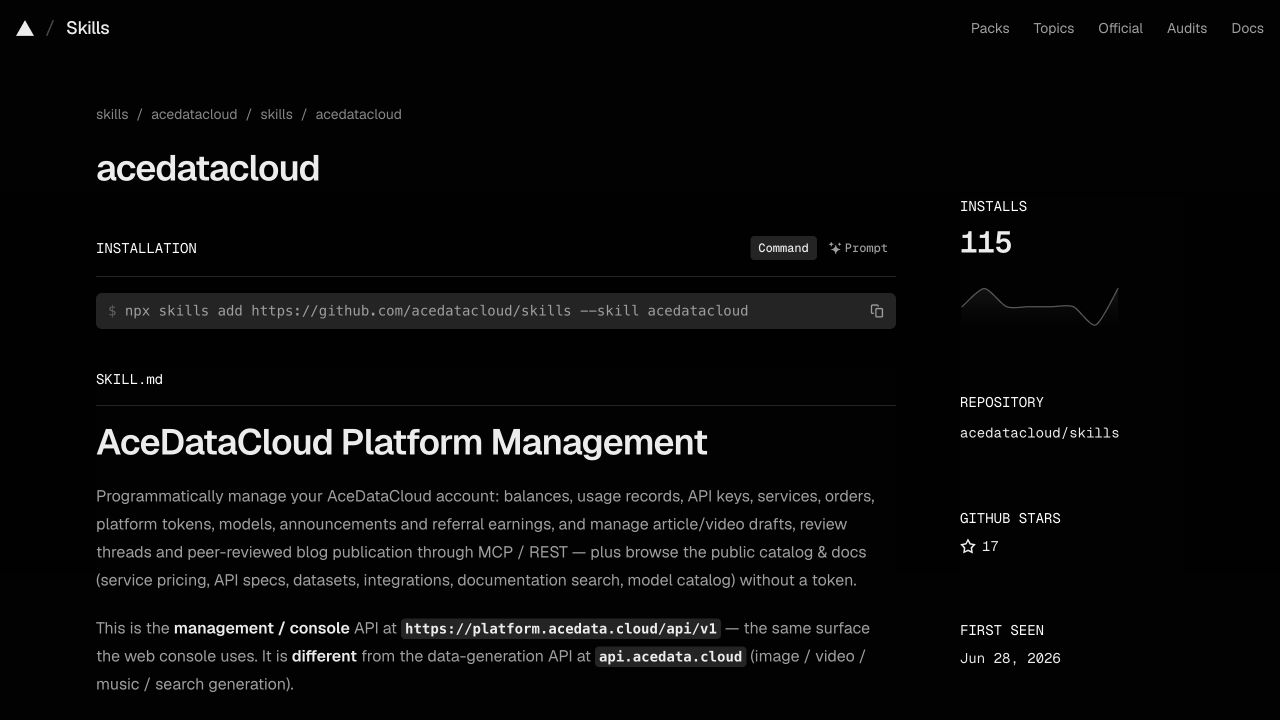
Actual account-Skill page captured on 2026-10-17, showing the same installation control. Use this service's slug above; the screenshot is not a nano-banana-image installation or generation result. Image sources and limits.
2. Register, sign in and get the correct API key
- Open Ace Data Cloud → Applications; register and sign in if needed.
- Open General application. If absent, choose Initialize General Application. Check Nano Banana access, current balance and price before submitting anything.
- Copy the key on the application card, or open Manage Keys → Create to create a separate key such as
skills.sh Nano Banana. Set expiry and API/usage limits as needed. If Allowed APIs is enabled, include/nano-banana/imagesand/nano-banana/tasks. Other actions in SKILL.md may need extra routes. - Copy only the key value. Do not include
Beareror screenshot redaction characters. Aplatform-...management token is not the service key.
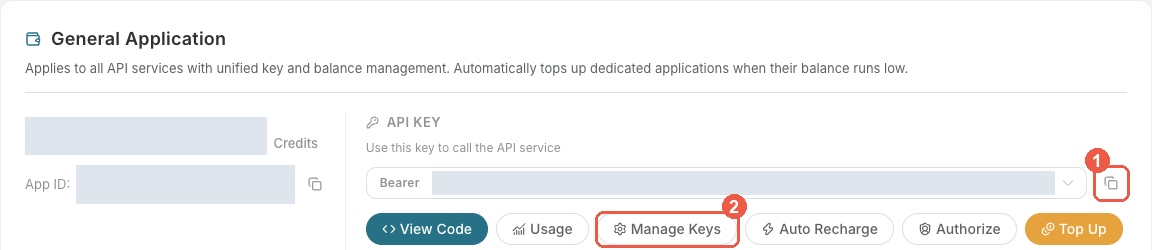
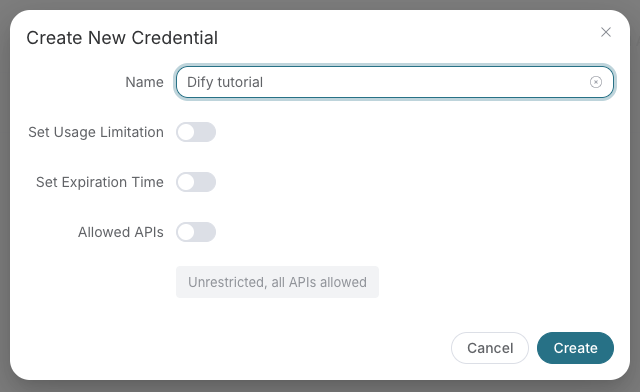
These are existing, redacted Ace console screenshots from the Suno Dify guide, checked on 2026-10-18. They illustrate the shared key controls, not a Nano Banana run in skills.sh. The example name “Dify tutorial” is illustrative; use your own name. Menu labels may change.
3. Put the key in the assistant's execution environment
skills.sh does not store credentials. For a terminal-launched coding assistant, export the key in that terminal before starting the assistant, then start a new session:
export ACEDATACLOUD_API_TOKEN="your_api_key_here"
For an already running IDE, restart it from the configured environment or use that IDE's documented secret/environment settings. A Skill install does not load .env automatically. Never paste the key into a prompt, commit it, or print it in logs. OpenClaw has its own Gateway setup in SKILL.md; it is not required for skills.sh installation.
4. Submit once and inspect the result
Read SKILL.md and its exact request shape first. Ask your assistant to use Nano Banana by Ace Data Cloud, inspect the current price, and prepare a single image request using nano-banana-2.1. Approve the intended cost before it submits /nano-banana/images. Installation and a prepared request do not prove that generation ran.
Run the existing Quick Start only after the key and intended cost are correct. For an asynchronous response, save its task ID and query that same ID at /nano-banana/tasks. Do not resubmit generation to check progress. Read the image URL from the completed result. Keep this endpoint's schema separate from the OpenAI-compatible image schema.
Example request copied from this Skill's current Quick Start. Billable: run only after confirming the service, price and intended request. It has not been executed for this guide:
curl -X POST https://api.acedata.cloud/nano-banana/images \
  -H "Authorization: Bearer $ACEDATACLOUD_API_TOKEN" \
  -H "Content-Type: application/json" \
  -d '{"action": "generate", "prompt": "a watercolor painting of a French countryside village", "model": "nano-banana"}'
If the response returns a task ID, query that ID with the following command; replace YOUR_TASK_ID with the existing ID.
curl -X POST https://api.acedata.cloud/nano-banana/tasks \
  -H "Authorization: Bearer $ACEDATACLOUD_API_TOKEN" \
  -H "Content-Type: application/json" \
  -d '{"id":"YOUR_TASK_ID"}'
The expected output is an actual returned audio/video/image URL after terminal success, not a URL copied from this guide. Keep the same task ID while pending.
Use the exact task response fields and terminal states in SKILL.md. A URL in this guide would be illustrative; no media generation was performed for this tutorial. Check the request/task history for one intended charge; a completed media link alone does not prove the final bill.
Troubleshooting
| Symptom | What to check |
|---|---|
| 401 | Full service key, no Bearer inside its value, available to the actual assistant process. |
| 403 | Service access, expiry and Allowed APIs; read the error because moderation can also return 403. |
| 400 | Exact model ID and request shape in SKILL.md; do not silently substitute a model. |
| 429 | Wait and reduce concurrency; do not automatically retry a paid submit. |
| Pending / timeout / 5xx | Read the same task or request history before considering a new submit. |
| Media URL unavailable | Confirm terminal success and use the actual returned URL; share only task/trace ID with support. |
Support: dev@acedata.cloud. Source: AceDataCloud/Skills. skills.sh installation counters are not unique users or revenue. Source links use the four supported UTM fields for this skills.sh guide; they do not prove a registration or payment.
Skill manifest
Nano Banana by Ace Data Cloud
Generate and edit AI images through AceDataCloud's NanoBanana (Gemini-based) API.
Install and connect from skills.sh
This integration is maintained by Ace Data Cloud; it is not an official Nano Banana publisher listing. Install only this Skill with npx skills add acedatacloud/skills --skill nano-banana-image --yes, or use the public skills.sh page. Keep the slug nano-banana-image when selecting it.
Read the illustrated first-run guide (简体中文) for registration, Applications → General application, API key access and price checks, and the environment variable location for your coding agent. For skills.sh installations, use this guide; any ClawHub-specific setup applies only to OpenClaw. The shared references linked here are online because focused installs do not include sibling _shared/ folders.
ClawHub / OpenClaw setup
- Install the official Skill with
clawhub install @acedatacloud/nano-banana. Check that the ClawHub publisher is @acedatacloud. - Sign in at AceDataCloud → Applications, open General application, and check Nano Banana access, balance, and current pricing. Copy its API key, or select Manage Keys → Create for a separate key. Copy the key value without
Bearer; aplatform-...management token is not a service API key. - If you enable Allowed APIs restrictions, include
/nano-banana/imagesand/nano-banana/tasks. Advanced workflows below may call additional routes. - On the OpenClaw Gateway host, put
ACEDATACLOUD_API_TOKEN=your_api_key_herein~/.openclaw/.env, then restart the Gateway and start a new session. For a direct terminal test, runexport ACEDATACLOUD_API_TOKEN="your_api_key_here"in that shell. Never put the key in a prompt or commit an.envfile. - Run the Quick Start below. If this workflow returns a task ID, query that same task until it finishes; do not submit the same billable request again just to check progress.
Illustrated key setup, first run, and troubleshooting · Token details
Quick Start
curl -X POST https://api.acedata.cloud/nano-banana/images \
  -H "Authorization: Bearer $ACEDATACLOUD_API_TOKEN" \
  -H "Content-Type: application/json" \
  -d '{"action": "generate", "prompt": "a watercolor painting of a French countryside village", "model": "nano-banana"}'
Async: See async task polling. Poll via
POST /nano-banana/taskswith{"id": "..."}.
Models
| Model | Best For |
|---|---|
nano-banana |
Standard image generation (default) |
nano-banana-2-lite |
Fast, lightweight second-generation model |
nano-banana-2 |
Improved quality, second generation |
nano-banana-2.1 |
Latest efficient model; 1K, 2K, and 4K generation and editing |
nano-banana-pro |
Highest quality, most detailed output |
nano-banana:official |
Official channel variant of nano-banana |
nano-banana-2-lite:official |
Official channel variant of nano-banana-2-lite |
nano-banana-2:official |
Official channel variant of nano-banana-2 |
nano-banana-pro:official |
Official channel variant of nano-banana-pro |
Workflows
1. Text-to-Image
POST /nano-banana/images
{
  "action": "generate",
  "prompt": "a photorealistic macro shot of morning dew on a spider web",
  "model": "nano-banana-2.1",
  "aspect_ratio": "16:9",
  "resolution": "2K"
}
2. Image Editing
Edit existing images using natural language instructions — no mask needed. Pass source images via image_urls.
POST /nano-banana/images
{
  "action": "edit",
  "prompt": "change the background to a starry night sky",
  "image_urls": ["https://example.com/photo.jpg"],
  "model": "nano-banana-2.1",
  "resolution": "2K"
}
Parameters
| Parameter | Values | Description |
|---|---|---|
action |
"generate", "edit" |
Operation mode |
model |
"nano-banana", "nano-banana-2-lite", "nano-banana-2", "nano-banana-2.1", "nano-banana-pro", "nano-banana:official", "nano-banana-2-lite:official", "nano-banana-2:official", "nano-banana-pro:official" |
Model to use; 2.1 has no :official variant |
prompt |
string | Image description or editing instruction |
image_urls |
array of strings | Source image URLs (required for edit action) |
aspect_ratio |
"1:1", "3:2", "2:3", "16:9", "9:16", "4:3", "3:4" |
Output aspect ratio |
resolution |
"1K", "2K", "4K" |
Default 1K; nano-banana and nano-banana-2-lite support only 1K; 2, 2.1, and Pro support all three resolutions |
callback_url |
string | Async callback URL; returns a task ID immediately |
To use 2.1, explicitly set model:"nano-banana-2.1"; omitting model still selects nano-banana. For nonblocking requests, set async:true, retain task_id, and poll /nano-banana/tasks to terminal success before returning an image. No nano-banana-2.1:official variant is published.
The same 2.1 model is also accepted by POST /openai/images/generations (public alias /v1/images/generations) and POST /openai/images/edits (public alias /v1/images/edits). Those use their own OpenAI-compatible schemas (image for JSON editing, not image_urls; size rather than this endpoint's resolution/aspect_ratio). Check that endpoint's current schema before reusing a request; do not assume identical response fields. Prices depend on the current service/package; consult live pricing rather than hard-coding a per-call USD amount.
Gotchas
- Editing does NOT require a mask — just describe the change in natural language
- Editing uses the same
/nano-banana/imagesendpoint withaction: "edit"andimage_urlsarray (not a separate/editpath) nano-banana-2.1supports 1K, 2K, and 4K;nano-banana-prooffers the highest quality:officialvariants (e.g.,nano-banana:official) route through the official channel- Task polling uses
id(nottask_id) in the/nano-banana/tasksrequest body - Aspect ratio uses colon notation (e.g.,
"16:9") not pixel dimensions - The Gemini-based model excels at understanding complex, conversational editing instructions
MCP:
pip install mcp-nano-banana| Hosted:https://nanobanana.mcp.acedata.cloud/mcp| See all MCP servers
Files (skills)
-
README.md 7.1 KB
# Nano Banana by Ace Data Cloud — skills.sh first run Use Nano Banana through the **Ace Data Cloud** API from an Agent Skills-compatible coding assistant. This Skill is maintained by Ace Data Cloud and uses your Ace service API key; it does not claim to be published by Nano Banana. Install it independently; the account Skill and an MCP server are optional. [简体中文](readme.zh-CN.md) · [skills.sh installation page](https://skills.sh/acedatacloud/skills/nano-banana-image) · [current models and pricing](https://platform.acedata.cloud/models?utm_source=skills_sh&utm_medium=referral&utm_campaign=evergreen&utm_content=nano_banana_image_pricing) ## 1. Install this service only Open the skills.sh page above and check the repository is **acedatacloud/skills**. In your project terminal: ```bash npx --yes skills@1.7.2 add acedatacloud/skills --skill nano-banana-image -a codex --yes npx --yes skills@1.7.2 list ``` This example targets Codex; replace `codex` with your supported agent, such as `claude-code` or `cursor`. For Codex, the installed instructions are `.agents/skills/nano-banana-image/SKILL.md`. Start a fresh session. Installation does not generate media or set up an API key. This is a Skill, not a model-provider dropdown or a new extension button. For the released snapshot checked on 2026-10-18, use `https://github.com/AceDataCloud/Skills/tree/v2026.1017.279001` in place of `acedatacloud/skills`. That released snapshot predates these improved instructions; use the default branch after this PR is merged to receive them.  Actual account-Skill page captured on 2026-10-17, showing the same installation control. Use this service's slug above; the screenshot is not a nano-banana-image installation or generation result. [Image sources and limits](https://github.com/AceDataCloud/Skills/blob/0901d63b7f7d216318463b1c33976838a084da3b/docs/skills-sh/image-sources.json). ## 2. Register, sign in and get the correct API key 1. Open [Ace Data Cloud → Applications](https://platform.acedata.cloud/console/applications?utm_source=skills_sh&utm_medium=referral&utm_campaign=evergreen&utm_content=nano_banana_image_api_key); register and sign in if needed. 2. Open **General application**. If absent, choose **Initialize General Application**. Check **Nano Banana** access, current balance and price before submitting anything. 3. Copy the key on the application card, or open **Manage Keys → Create** to create a separate key such as `skills.sh Nano Banana`. Set expiry and API/usage limits as needed. If **Allowed APIs** is enabled, include `/nano-banana/images` and `/nano-banana/tasks`. Other actions in SKILL.md may need extra routes. 4. Copy only the key value. Do not include `Bearer ` or screenshot redaction characters. A `platform-...` management token is not the service key.   These are existing, redacted **Ace console** screenshots from the [Suno Dify guide](https://github.com/AceDataCloud/SunoDify/blob/8d3d03570e73324220f111f7fe343da0792a8071/README.md), checked on 2026-10-18. They illustrate the shared key controls, not a Nano Banana run in skills.sh. The example name “Dify tutorial” is illustrative; use your own name. Menu labels may change. ## 3. Put the key in the assistant's execution environment skills.sh does not store credentials. For a terminal-launched coding assistant, export the key in that terminal **before starting the assistant**, then start a new session: ```bash export ACEDATACLOUD_API_TOKEN="your_api_key_here" ``` For an already running IDE, restart it from the configured environment or use that IDE's documented secret/environment settings. A Skill install does not load `.env` automatically. Never paste the key into a prompt, commit it, or print it in logs. OpenClaw has its own Gateway setup in SKILL.md; it is not required for skills.sh installation. ## 4. Submit once and inspect the result Read [SKILL.md](SKILL.md) and its exact request shape first. Ask your assistant to use **Nano Banana by Ace Data Cloud**, inspect the current price, and prepare a single image request using `nano-banana-2.1`. Approve the intended cost before it submits `/nano-banana/images`. Installation and a prepared request do not prove that generation ran. Run the existing Quick Start only after the key and intended cost are correct. For an asynchronous response, save its task ID and query **that same ID** at `/nano-banana/tasks`. Do not resubmit generation to check progress. Read the image URL from the completed result. Keep this endpoint's schema separate from the OpenAI-compatible image schema. Example request copied from this Skill's current Quick Start. **Billable: run only after confirming the service, price and intended request.** It has not been executed for this guide: ```bash curl -X POST https://api.acedata.cloud/nano-banana/images \ -H "Authorization: Bearer $ACEDATACLOUD_API_TOKEN" \ -H "Content-Type: application/json" \ -d '{"action": "generate", "prompt": "a watercolor painting of a French countryside village", "model": "nano-banana"}' ``` If the response returns a task ID, query that ID with the following command; replace `YOUR_TASK_ID` with the existing ID. ```bash curl -X POST https://api.acedata.cloud/nano-banana/tasks \ -H "Authorization: Bearer $ACEDATACLOUD_API_TOKEN" \ -H "Content-Type: application/json" \ -d '{"id":"YOUR_TASK_ID"}' ``` The expected output is an actual returned audio/video/image URL after terminal success, not a URL copied from this guide. Keep the same task ID while pending. Use the exact task response fields and terminal states in SKILL.md. A URL in this guide would be illustrative; no media generation was performed for this tutorial. Check the request/task history for one intended charge; a completed media link alone does not prove the final bill. ## Troubleshooting | Symptom | What to check | |---|---| | 401 | Full service key, no `Bearer ` inside its value, available to the actual assistant process. | | 403 | Service access, expiry and Allowed APIs; read the error because moderation can also return 403. | | 400 | Exact model ID and request shape in SKILL.md; do not silently substitute a model. | | 429 | Wait and reduce concurrency; do not automatically retry a paid submit. | | Pending / timeout / 5xx | Read the same task or request history before considering a new submit. | | Media URL unavailable | Confirm terminal success and use the actual returned URL; share only task/trace ID with support. | Support: [dev@acedata.cloud](mailto:dev@acedata.cloud). Source: [AceDataCloud/Skills](https://github.com/AceDataCloud/Skills). skills.sh installation counters are not unique users or revenue. Source links use the four supported UTM fields for this skills.sh guide; they do not prove a registration or payment. -
readme.zh-CN.md 5.7 KB
Loading… -
SKILL.md 7.1 KB
---
name: nano-banana-image
description: Nano Banana image by Ace Data Cloud. Generate and edit images with Nano Banana, Nano Banana 2.1 or Pro. Use when the user asks for Nano Banana or NanoBanana image generation, reference-image editing or 1K, 2K and 4K output.
license: Apache-2.0
metadata:
  author: acedatacloud
  version: "1.0"
compatibility: Requires ACEDATACLOUD_API_TOKEN in the agent process environment and HTTPS access to api.acedata.cloud. See README.md for installation and key setup.
---

# Nano Banana by Ace Data Cloud

Generate and edit AI images through AceDataCloud's NanoBanana (Gemini-based) API.

## Install and connect from skills.sh

This integration is maintained by **Ace Data Cloud**; it is not an official Nano Banana publisher listing. Install only this Skill with `npx skills add acedatacloud/skills --skill nano-banana-image --yes`, or use the [public skills.sh page](https://skills.sh/acedatacloud/skills/nano-banana-image). Keep the slug `nano-banana-image` when selecting it.

Read the [illustrated first-run guide](README.md) ([简体中文](readme.zh-CN.md)) for registration, **Applications → General application**, API key access and price checks, and the environment variable location for your coding agent. For skills.sh installations, use this guide; any ClawHub-specific setup applies only to OpenClaw. The shared references linked here are online because focused installs do not include sibling `_shared/` folders.

## ClawHub / OpenClaw setup

1. Install the official Skill with `clawhub install @acedatacloud/nano-banana`. Check that the ClawHub publisher is **@acedatacloud**.
2. Sign in at [AceDataCloud → Applications](https://platform.acedata.cloud/console/applications), open **General application**, and check Nano Banana access, balance, and current pricing. Copy its API key, or select **Manage Keys → Create** for a separate key. Copy the key value without `Bearer `; a `platform-...` management token is not a service API key.
3. If you enable **Allowed APIs** restrictions, include `/nano-banana/images` and `/nano-banana/tasks`. Advanced workflows below may call additional routes.
4. On the OpenClaw Gateway host, put `ACEDATACLOUD_API_TOKEN=your_api_key_here` in `~/.openclaw/.env`, then restart the Gateway and start a new session. For a direct terminal test, run `export ACEDATACLOUD_API_TOKEN="your_api_key_here"` in that shell. Never put the key in a prompt or commit an `.env` file.
5. Run the **Quick Start** below. If this workflow returns a task ID, query that same task until it finishes; do not submit the same billable request again just to check progress.

[Illustrated key setup, first run, and troubleshooting](https://github.com/AceDataCloud/Skills#first-run-with-clawhub-and-openclaw) · [Token details](https://github.com/AceDataCloud/Skills/blob/main/skills/_shared/authentication.md)

## Quick Start

```bash
curl -X POST https://api.acedata.cloud/nano-banana/images \
  -H "Authorization: Bearer $ACEDATACLOUD_API_TOKEN" \
  -H "Content-Type: application/json" \
  -d '{"action": "generate", "prompt": "a watercolor painting of a French countryside village", "model": "nano-banana"}'
```

> **Async:** See [async task polling](https://github.com/AceDataCloud/Skills/blob/main/skills/_shared/async-tasks.md). Poll via `POST /nano-banana/tasks` with `{"id": "..."}`.
## Models

| Model | Best For |
|-------|----------|
| `nano-banana` | Standard image generation (default) |
| `nano-banana-2-lite` | Fast, lightweight second-generation model |
| `nano-banana-2` | Improved quality, second generation |
| `nano-banana-2.1` | Latest efficient model; 1K, 2K, and 4K generation and editing |
| `nano-banana-pro` | Highest quality, most detailed output |
| `nano-banana:official` | Official channel variant of `nano-banana` |
| `nano-banana-2-lite:official` | Official channel variant of `nano-banana-2-lite` |
| `nano-banana-2:official` | Official channel variant of `nano-banana-2` |
| `nano-banana-pro:official` | Official channel variant of `nano-banana-pro` |

## Workflows

### 1. Text-to-Image

```json
POST /nano-banana/images
{
  "action": "generate",
  "prompt": "a photorealistic macro shot of morning dew on a spider web",
  "model": "nano-banana-2.1",
  "aspect_ratio": "16:9",
  "resolution": "2K"
}
```

### 2. Image Editing

Edit existing images using natural language instructions — no mask needed. Pass source images via `image_urls`.

```json
POST /nano-banana/images
{
  "action": "edit",
  "prompt": "change the background to a starry night sky",
  "image_urls": ["https://example.com/photo.jpg"],
  "model": "nano-banana-2.1",
  "resolution": "2K"
}
```

## Parameters

| Parameter | Values | Description |
|-----------|--------|-------------|
| `action` | `"generate"`, `"edit"` | Operation mode |
| `model` | `"nano-banana"`, `"nano-banana-2-lite"`, `"nano-banana-2"`, `"nano-banana-2.1"`, `"nano-banana-pro"`, `"nano-banana:official"`, `"nano-banana-2-lite:official"`, `"nano-banana-2:official"`, `"nano-banana-pro:official"` | Model to use; 2.1 has no `:official` variant |
| `prompt` | string | Image description or editing instruction |
| `image_urls` | array of strings | Source image URLs (required for edit action) |
| `aspect_ratio` | `"1:1"`, `"3:2"`, `"2:3"`, `"16:9"`, `"9:16"`, `"4:3"`, `"3:4"` | Output aspect ratio |
| `resolution` | `"1K"`, `"2K"`, `"4K"` | Default 1K; `nano-banana` and `nano-banana-2-lite` support only 1K; 2, 2.1, and Pro support all three resolutions |
| `callback_url` | string | Async callback URL; returns a task ID immediately |

To use 2.1, explicitly set `model:"nano-banana-2.1"`; omitting `model` still selects `nano-banana`. For nonblocking requests, set `async:true`, retain `task_id`, and poll `/nano-banana/tasks` to terminal success before returning an image. No `nano-banana-2.1:official` variant is published.

The same 2.1 model is also accepted by `POST /openai/images/generations` (public alias `/v1/images/generations`) and `POST /openai/images/edits` (public alias `/v1/images/edits`). Those use their own OpenAI-compatible schemas (`image` for JSON editing, not `image_urls`; `size` rather than this endpoint's `resolution`/`aspect_ratio`). Check that endpoint's current schema before reusing a request; do not assume identical response fields. Prices depend on the current service/package; consult live pricing rather than hard-coding a per-call USD amount.

## Gotchas

- Editing does **NOT** require a mask — just describe the change in natural language
- Editing uses the same `/nano-banana/images` endpoint with `action: "edit"` and `image_urls` array (not a separate `/edit` path)
- `nano-banana-2.1` supports 1K, 2K, and 4K; `nano-banana-pro` offers the highest quality
- `:official` variants (e.g., `nano-banana:official`) route through the official channel
- Task polling uses `id` (not `task_id`) in the `/nano-banana/tasks` request body
- Aspect ratio uses colon notation (e.g., `"16:9"`) not pixel dimensions
- The Gemini-based model excels at understanding complex, conversational editing instructions

> **MCP:** `pip install mcp-nano-banana` | Hosted: `https://nanobanana.mcp.acedata.cloud/mcp` | See [all MCP servers](https://github.com/AceDataCloud/Skills/blob/main/skills/_shared/mcp-servers.md)
Comments (0)
Sign in to join the conversation.
Reviews (0)
No reviews yet.
No comments yet.