lov-professional-portrait
Turn a single-person photo into a polished professional portrait while preserving the person's identity. Use restrained skin retouching, exposure cleanup, optional hat removal and hairstyle reconstruction, background polish, and an explicit quality gate. Trigger when the user ask
Install
npx skills add https://github.com/lovstudio/skills/tree/main/skills/professional-portrait
claude plugin marketplace add https://llmmart.ai/marketplace.json && claude plugin install lovstudio-skills@llmmart
git clone https://github.com/lovstudio/skills.git
The skills CLI installs just this skill, for any of its supported agents. Claude Code installs the whole lovstudio/skills collection as a plugin from our marketplace. Git is the plain clone.
README
职业形象照 · Professional Portrait

把一张普通人像修成干净、自然、仍然像本人的职业形象照。
它把“磨皮、提亮、去帽、补发型、职业化”拆成尽量少的编辑步骤,并用身份一致性、皮肤质感、发际线和光影完整性做最终质检。
Part of skill-publisher general skills — by example.com
能做什么
- 自然磨皮、均匀肤色,保留真实毛孔和年龄特征。
- 提亮面部和眼神,不把肤色漂白。
- 去掉帽子并重建自然发型,例如三七分、略蓬松。
- 将生活照整理成适合个人主页、简历和社交头像的职业照。
- 根据“变化不明显”“风格变了”等短反馈做单点迭代。
- 按需制作前后对比或渐进过程图。
安装
npx skills add professional-portrait
也可以直接从源码安装:
git clone https://example.com/skills/professional-portrait-skill \
  "${SKILL_SKILLS_INSTALL_DIR:?Set SKILL_SKILLS_INSTALL_DIR}/lov-professional-portrait"
使用
把一张照片交给支持图像编辑的 Agent,然后直接描述结果:
把这张照片修成自然的职业形象照,保持本人长相。
只磨皮和提亮一点,不要塑料感,不要改变脸型。
去掉帽子,改成三七分、略蓬松的短发,其他都保持不变。
默认原则
- 本人身份特征优先于“变好看”。
- 不默认改脸型、年龄、肤色、身材、服装和背景。
- 先少量精修,再根据反馈增强一个维度。
- 原图始终保留,结果使用新文件名保存。
- 用户照片不会被自动发布为公开案例。
真实案例
下面展示一次经过本人明确同意公开的四阶段渐进精修:原图、净颜提亮、 发型升级、职业形象照。
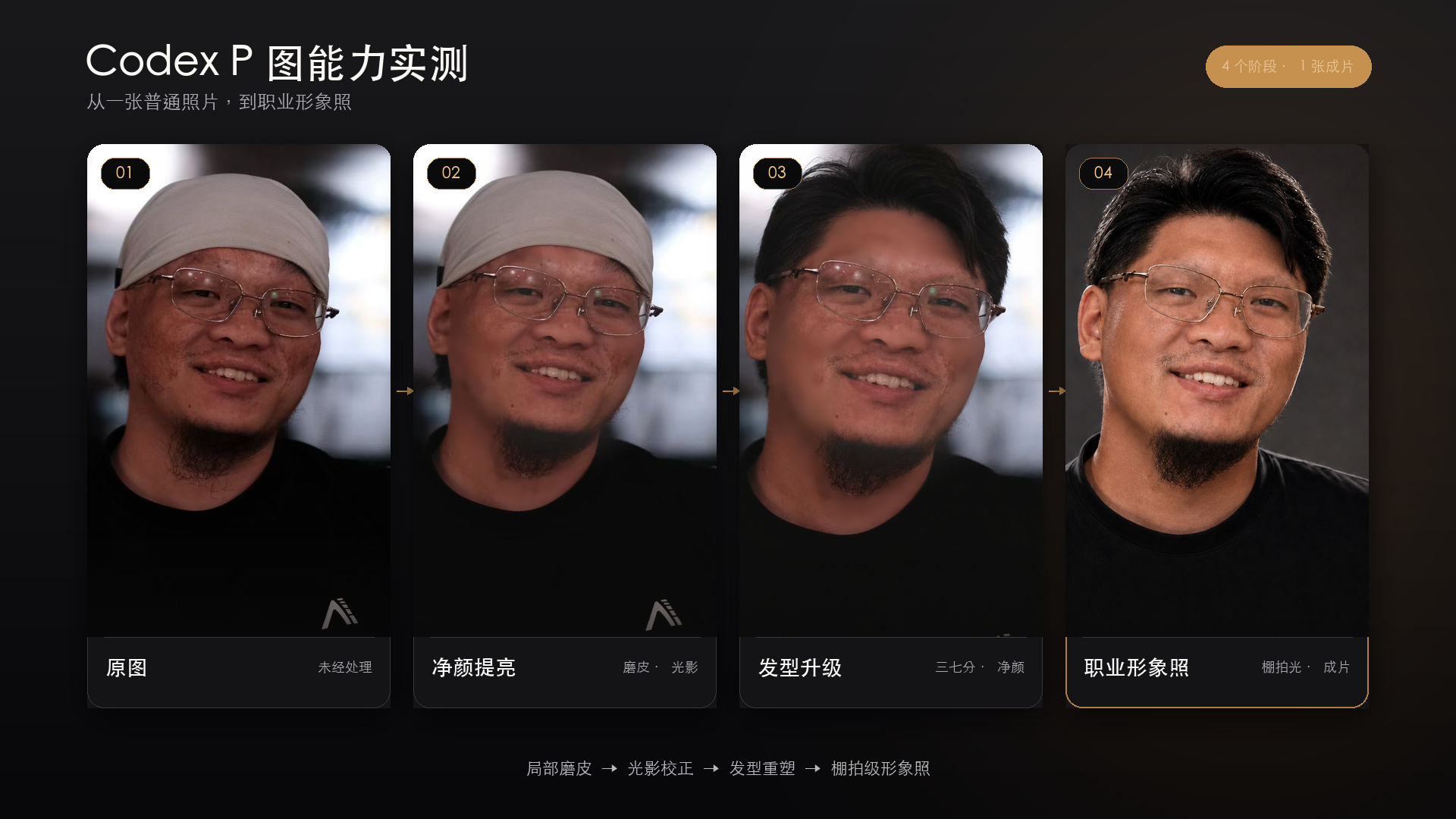
运行要求
需要具备图片查看与生成式图片编辑能力的 Agent,例如带有
image_gen 或同等原生图片编辑工具的运行环境。无需额外 Python 依赖。
License
MIT
Skill manifest
职业形象照 · Professional Portrait
Turn one source photo into a polished, believable professional portrait. The face should still look unmistakably like the same person; "more professional" must not become "a different, AI-perfect person."
When to Use
- A casual photo needs to become a professional headshot or profile image.
- The user wants cleaner skin, brighter facial exposure, or a more polished overall look without changing identity.
- A hat, stray hair, or distracting background should be repaired.
- The user is iterating with feedback such as "变化不明显", "更干净帅气一点", or "只提亮面部".
- The user wants a before/after or progressive comparison after the edits.
Core Principle
Identity fidelity outranks beautification. Lock the following unless the user explicitly requests a change:
- Face geometry, eyes, nose, lips, jaw, ears, and apparent age.
- Skin tone family and recognizable facial details.
- Expression, gaze, body proportions, pose, and camera perspective.
- Clothing, accessories, framing, and background.
Remove only temporary distractions by default. Preserve believable skin texture, asymmetry, and age-appropriate detail.
Workflow (MANDATORY)
Step 1: Inspect the edit target
Identify the user's source photo as the edit target, not merely a style reference.
- If the photo is a local file, view it with the runtime's image-viewing tool before editing.
- Check face visibility, lighting, sharpness, crop, background, clothing, accessories, hair boundaries, and compression artifacts.
- Never publish, upload as a public example, or add the user's portrait to a repository unless the user separately asks for that.
Step 2: Infer the smallest sufficient brief
Do not ask the user to choose from a long style menu when the request already has a clear outcome. Use these defaults:
| User intent | Default treatment |
|---|---|
| "磨皮 / 干净一点" | Light skin cleanup with visible pores |
| "提亮" | Lift face exposure and eye clarity; preserve skin tone |
| "职业照 / 形象照" | Natural retouch + balanced light + polished crop/background |
| "去帽子" | Reconstruct only the hidden hair/head region |
| "帅气 / 精神" | Improve grooming, contrast, posture impression, and catchlights without reshaping the face |
Ask one concise question only when the answer materially changes the result, such as whether to replace the background or what hairstyle to reconstruct. Use the user's prior messages and visible photo to infer everything else.
Step 3: Plan the passes
Use the fewest generative edits possible because every extra pass can drift identity.
- Base pass — restrained retouch and lighting cleanup.
- Structural pass — only when requested: remove hat, rebuild hair, replace background, or adjust wardrobe.
- Correction pass — one targeted fix after inspection, not another broad makeover.
When multiple changes are requested together and the edit tool handles them reliably, combine them into one identity-locked pass. Otherwise isolate the structural change.
Step 4: Build the edit prompt
Classify the task as identity-preserve. Label the source image as:
Image 1: edit target and identity reference.
Every prompt must include:
- Intended use: professional profile photo or headshot.
- Exact requested changes.
- Identity and composition invariants.
- Realistic skin and hair requirements.
- A short avoid list.
Read references/prompts.md and use the closest recipe. Keep the prompt
specific to the current request; do not silently add wardrobe, background,
body, or facial changes.
Step 5: Edit with the native image tool
- Prefer the runtime's built-in generative image-editing tool.
- Include the inspected source photo as the edit target.
- Preserve source resolution and aspect ratio unless the user requests a crop.
- Save non-destructively. Default filename:
<source-stem>-professional-portrait-v1.png. - If the user names a destination, save the selected final there.
- Do not substitute a text prompt, SVG mockup, or CSS filter for the requested raster portrait.
Step 6: Inspect at full image and face crop
Read references/quality-gate.md. Check at least:
- Identity match.
- Natural skin texture and tone.
- Eyes, teeth, ears, jaw, and hairline integrity.
- Hat-removal seams or background edge artifacts.
- Coherent lighting, shadows, and sharpness.
- Professional framing without unrequested changes.
If a check fails, make one localized correction and repeat the gate.
Step 7: Handle iterative feedback precisely
Translate short feedback into one changed dimension:
- "没太大区别" → increase only the requested retouch/brightness strength.
- "脸不够干净" → refine blemishes and uneven tone; preserve pores and shape.
- "再亮一点" → lift face exposure and midtones; do not whiten globally.
- "风格变了" → restore original color, composition, clothing, and facial character; reduce the edit scope.
- "更职业" → improve light, background discipline, crop, grooming, and finish; do not make the person older, richer, or more corporate by assumption.
Repeat all identity invariants in every correction prompt.
Step 8: Deliver
Return:
- The final image inline when the runtime supports it.
- The saved file path for project-bound or local-file work.
- A concise list of intentional changes.
- A note confirming what was preserved.
If requested, create a separate before/after or progressive comparison board. Do not bake labels, watermarks, or marketing text into the portrait itself.
Completion Criteria
The task is complete only when:
- The final is recognizably the same person at first glance.
- The requested improvement is visible at normal viewing size.
- Skin and hair remain photographic rather than plastic or painted.
- No unrequested identity, clothing, pose, or scene changes remain.
- The original file is untouched and the final path is reported.
Runtime context (shared)
运行前读取本 Skill 包的 skill.yaml,由宿主提供 skill-runtime/v1 上下文。字段解析顺序为:当前请求、项目上下文、个人 Preferences、品牌 Profile、通用默认值。
- 只使用 Manifest 声明的字段;Profile 保存公开品牌事实,Preferences 保存个人工作偏好。
required: true字段缺失时,按 Manifest 的问题配置向用户提出一个聚焦问题;用户明确同意后再保存回答。- 报错提供可复制的
context_id、字段路径与来源,诊断内容避开秘密、完整私人路径和原始配置。
通用反馈闭环
用户在 Skill 驱动任务中提出修改意见时,继续当前产物前必须执行:
- 先判断意见是
task-specific(仅本次)还是reusable(可跨任务复用)。 task-specific只修改当前任务,不改 Skill。reusable先确定作用域:领域规则先更新对应 canonical Skill;适用于所有 Skill 的规则先更新共享规范。- 完成规则更新、版本、lint 与分发核验后,再把修改应用到当前任务。
reusable修改会使此前的“确认”“继续”“发吧”失效;完成当前产物修改和回读后必须停下,等待用户下一步指示,不自动进入发布、提交或其他外部写入。
Files (skills)
-
cases
-
cases.json 510 B
[ { "type": "case", "title": "从带帽生活照到职业形象照", "description": "基于一张普通人像,依次完成轻磨皮、面部提亮、去帽与三七分发型重建,再收敛为职业照级别的光影和干净度。每轮只增强一个维度,并始终以本人身份、脸型、姿态和服装不漂移为验收门槛。", "cover": "https://raw.githubusercontent.com/skill-publisher/professional-portrait-skill/main/cases/professional-portrait-progress-16x9.png" } ] -
professional-portrait-progress-16x9.png 1.2 MB · in bundle
-
-
references
-
prompts.md 2.9 KB
# Portrait Editing Prompt Recipes Use these as modular prompt blocks. Keep only the blocks relevant to the current request. ## Identity lock ```text Use case: identity-preserve Asset type: professional profile portrait Input images: Image 1 is the edit target and the sole identity reference. Primary request: Edit the supplied photograph, not a newly imagined person. Constraints: Preserve the exact identity, face geometry, apparent age, expression, gaze, pose, body proportions, camera perspective, clothing, composition, and background unless a requested change below explicitly names one of them. Avoid: face reshaping, enlarged eyes, narrowed nose, altered jaw, different teeth, different ears, changed ethnicity, changed age, waxy skin, illustration, beauty-filter look, text, logo, watermark. ``` ## Natural cleanup ```text Requested changes: Remove temporary blemishes and minor redness, gently even the skin tone, soften harsh under-eye shadows, and tidy small flyaway hairs. Keep pores, fine texture, natural asymmetry, moles or identity-defining marks, and realistic facial contrast. The improvement should be visible but photographic. ``` ## Face brightening ```text Requested changes: Lift facial midtone exposure slightly, improve eye clarity and subtle catchlights, and balance white balance across the face. Preserve the person's natural skin-tone family and the original background exposure. Avoid global whitening, clipped highlights, glowing skin, or a halo around the head. ``` ## Professional finish ```text Intended use: resume, professional profile, speaker bio, or personal website. Requested changes: Create a clean, confident, contemporary professional-photo finish through restrained retouching, balanced studio-like facial light, controlled contrast, tidy grooming, and coherent sharpness. Preserve the original wardrobe and scene unless separately requested. Style: premium editorial corporate portrait, natural and approachable rather than stiff, glamorous, or synthetic. ``` ## Hat removal and hairstyle reconstruction ```text Requested structural change: Remove only the hat. Reconstruct the hidden head and hair using a natural hairline consistent with the visible face, temples, ears, head angle, lighting, and age. Create a neat 70/30 side part with slight volume and realistic individual strands. Preserve the face, ears, neck, clothing, pose, background, framing, and all other pixels as closely as possible. Avoid: oversized hair, helmet shape, painted strands, implausible hairline, extra ears, distorted skull, changed forehead, or altered facial identity. ``` ## Targeted correction ```text This is a correction pass on the latest result. Change only: <one issue>. Restore and preserve every other aspect from the supplied image, especially identity, face geometry, skin tone, expression, hairline, clothing, composition, and background. Do not reinterpret the portrait. ``` -
quality-gate.md 1.3 KB
# Professional Portrait Quality Gate

Inspect the full frame and a face crop before delivery.

| Area | Pass condition | Common failure |
|---|---|---|
| Identity | Same person at first glance | Generic attractive replacement face |
| Face geometry | Eyes, nose, lips, jaw, ears unchanged | Slimmed jaw, enlarged eyes |
| Skin | Even but textured and age-appropriate | Plastic, painted, over-whitened |
| Eyes and teeth | Natural count, shape, reflection, color | Glassy eyes, invented teeth |
| Hair | Individual strands and plausible hairline | Helmet hair, smeared edge |
| Hat removal | Head shape and occluded region are coherent | Dent, duplicated ear, halo |
| Lighting | Face, neck, hair, clothing share one light | Bright face pasted onto dark body |
| Background | Clean edges and coherent depth | Cutout halo or melted objects |
| Professional finish | Calm, polished, believable | Glamour filter or synthetic studio look |
| Scope | Only requested elements changed | New wardrobe, pose, age, or scene |

## Decision rule

- Any identity failure: revise before delivery.
- Any anatomical or hat-removal artifact: revise before delivery.
- If the edit is invisible at normal size, increase only the requested
  dimension once.
- If the style drifts, return to the original image and reduce the edit scope
  rather than stacking another broad pass.
-
-
.gitignore 78 B · in bundle
-
CHANGELOG.md 355 B
# Changelog ## [0.2.0] - 2026-08-24 ### Added - add the shared feedback-classification and approval-invalidation gate used by every LovStudio Skill ## 0.1.1 - Publish the authorized four-stage portrait-retouch comparison image. - Attach the comparison image to the public case for marketplace display. ## 0.1.0 - Initial independent skill release. -
LICENSE 1 KB · in bundle
-
README.md 2.2 KB
# 职业形象照 · Professional Portrait  把一张普通人像修成干净、自然、仍然像本人的职业形象照。 它把“磨皮、提亮、去帽、补发型、职业化”拆成尽量少的编辑步骤,并用身份一致性、皮肤质感、发际线和光影完整性做最终质检。 Part of [skill-publisher general skills](https://example.com/skills/general-skills) — by [example.com](https://example.com) ## 能做什么 - 自然磨皮、均匀肤色,保留真实毛孔和年龄特征。 - 提亮面部和眼神,不把肤色漂白。 - 去掉帽子并重建自然发型,例如三七分、略蓬松。 - 将生活照整理成适合个人主页、简历和社交头像的职业照。 - 根据“变化不明显”“风格变了”等短反馈做单点迭代。 - 按需制作前后对比或渐进过程图。 ## 安装 ```bash npx skills add professional-portrait ``` 也可以直接从源码安装: ```bash git clone https://example.com/skills/professional-portrait-skill \ "${SKILL_SKILLS_INSTALL_DIR:?Set SKILL_SKILLS_INSTALL_DIR}/lov-professional-portrait" ``` ## 使用 把一张照片交给支持图像编辑的 Agent,然后直接描述结果: ```text 把这张照片修成自然的职业形象照,保持本人长相。 ``` ```text 只磨皮和提亮一点,不要塑料感,不要改变脸型。 ``` ```text 去掉帽子,改成三七分、略蓬松的短发,其他都保持不变。 ``` ## 默认原则 - 本人身份特征优先于“变好看”。 - 不默认改脸型、年龄、肤色、身材、服装和背景。 - 先少量精修,再根据反馈增强一个维度。 - 原图始终保留,结果使用新文件名保存。 - 用户照片不会被自动发布为公开案例。 ## 真实案例 下面展示一次经过本人明确同意公开的四阶段渐进精修:原图、净颜提亮、 发型升级、职业形象照。  ## 运行要求 需要具备图片查看与生成式图片编辑能力的 Agent,例如带有 `image_gen` 或同等原生图片编辑工具的运行环境。无需额外 Python 依赖。 ## License MIT -
SKILL.md 8.3 KB
--- name: lov-professional-portrait category: Design tagline: "Turn one photo into a clean, identity-preserving professional portrait." description: > Turn a single-person photo into a polished professional portrait while preserving the person's identity. Use restrained skin retouching, exposure cleanup, optional hat removal and hairstyle reconstruction, background polish, and an explicit quality gate. Trigger when the user asks for a professional headshot, business portrait, profile photo, skin retouch, brighter face, hat removal, or hairstyle cleanup. Also trigger on "职业照", "形象照", "证件形象照", "精修人像", "磨皮提亮", "去掉帽子", "换发型", "professional portrait", "headshot", "portrait retouch", and "remove hat". license: MIT compatibility: > Portable Agent Skills format. Requires an agent runtime with image viewing and generative raster-image editing, such as image_gen or an equivalent built-in image tool. No Python dependency is required. metadata: author: contributors version: "0.2.0" tags: portrait headshot retouch identity-preserve photo-editing --- # 职业形象照 · Professional Portrait Turn one source photo into a polished, believable professional portrait. The face should still look unmistakably like the same person; "more professional" must not become "a different, AI-perfect person." ## When to Use - A casual photo needs to become a professional headshot or profile image. - The user wants cleaner skin, brighter facial exposure, or a more polished overall look without changing identity. - A hat, stray hair, or distracting background should be repaired. - The user is iterating with feedback such as "变化不明显", "更干净帅气一点", or "只提亮面部". - The user wants a before/after or progressive comparison after the edits. ## Core Principle Identity fidelity outranks beautification. Lock the following unless the user explicitly requests a change: - Face geometry, eyes, nose, lips, jaw, ears, and apparent age. - Skin tone family and recognizable facial details. - Expression, gaze, body proportions, pose, and camera perspective. - Clothing, accessories, framing, and background. Remove only temporary distractions by default. Preserve believable skin texture, asymmetry, and age-appropriate detail. ## Workflow (MANDATORY) ### Step 1: Inspect the edit target Identify the user's source photo as the **edit target**, not merely a style reference. - If the photo is a local file, view it with the runtime's image-viewing tool before editing. - Check face visibility, lighting, sharpness, crop, background, clothing, accessories, hair boundaries, and compression artifacts. - Never publish, upload as a public example, or add the user's portrait to a repository unless the user separately asks for that. ### Step 2: Infer the smallest sufficient brief Do not ask the user to choose from a long style menu when the request already has a clear outcome. Use these defaults: | User intent | Default treatment | |---|---| | "磨皮 / 干净一点" | Light skin cleanup with visible pores | | "提亮" | Lift face exposure and eye clarity; preserve skin tone | | "职业照 / 形象照" | Natural retouch + balanced light + polished crop/background | | "去帽子" | Reconstruct only the hidden hair/head region | | "帅气 / 精神" | Improve grooming, contrast, posture impression, and catchlights without reshaping the face | Ask one concise question only when the answer materially changes the result, such as whether to replace the background or what hairstyle to reconstruct. Use the user's prior messages and visible photo to infer everything else. ### Step 3: Plan the passes Use the fewest generative edits possible because every extra pass can drift identity. 1. **Base pass** — restrained retouch and lighting cleanup. 2. **Structural pass** — only when requested: remove hat, rebuild hair, replace background, or adjust wardrobe. 3. **Correction pass** — one targeted fix after inspection, not another broad makeover. When multiple changes are requested together and the edit tool handles them reliably, combine them into one identity-locked pass. Otherwise isolate the structural change. ### Step 4: Build the edit prompt Classify the task as `identity-preserve`. Label the source image as: ```text Image 1: edit target and identity reference. ``` Every prompt must include: - Intended use: professional profile photo or headshot. - Exact requested changes. - Identity and composition invariants. - Realistic skin and hair requirements. - A short avoid list. Read `references/prompts.md` and use the closest recipe. Keep the prompt specific to the current request; do not silently add wardrobe, background, body, or facial changes. ### Step 5: Edit with the native image tool - Prefer the runtime's built-in generative image-editing tool. - Include the inspected source photo as the edit target. - Preserve source resolution and aspect ratio unless the user requests a crop. - Save non-destructively. Default filename: `<source-stem>-professional-portrait-v1.png`. - If the user names a destination, save the selected final there. - Do not substitute a text prompt, SVG mockup, or CSS filter for the requested raster portrait. ### Step 6: Inspect at full image and face crop Read `references/quality-gate.md`. Check at least: 1. Identity match. 2. Natural skin texture and tone. 3. Eyes, teeth, ears, jaw, and hairline integrity. 4. Hat-removal seams or background edge artifacts. 5. Coherent lighting, shadows, and sharpness. 6. Professional framing without unrequested changes. If a check fails, make one localized correction and repeat the gate. ### Step 7: Handle iterative feedback precisely Translate short feedback into one changed dimension: - "没太大区别" → increase only the requested retouch/brightness strength. - "脸不够干净" → refine blemishes and uneven tone; preserve pores and shape. - "再亮一点" → lift face exposure and midtones; do not whiten globally. - "风格变了" → restore original color, composition, clothing, and facial character; reduce the edit scope. - "更职业" → improve light, background discipline, crop, grooming, and finish; do not make the person older, richer, or more corporate by assumption. Repeat all identity invariants in every correction prompt. ### Step 8: Deliver Return: - The final image inline when the runtime supports it. - The saved file path for project-bound or local-file work. - A concise list of intentional changes. - A note confirming what was preserved. If requested, create a separate before/after or progressive comparison board. Do not bake labels, watermarks, or marketing text into the portrait itself. ## Completion Criteria The task is complete only when: - The final is recognizably the same person at first glance. - The requested improvement is visible at normal viewing size. - Skin and hair remain photographic rather than plastic or painted. - No unrequested identity, clothing, pose, or scene changes remain. - The original file is untouched and the final path is reported. ## Runtime context (shared) 运行前读取本 Skill 包的 `skill.yaml`,由宿主提供 `skill-runtime/v1` 上下文。字段解析顺序为:当前请求、项目上下文、个人 Preferences、品牌 Profile、通用默认值。 - 只使用 Manifest 声明的字段;Profile 保存公开品牌事实,Preferences 保存个人工作偏好。 - `required: true` 字段缺失时,按 Manifest 的问题配置向用户提出一个聚焦问题;用户明确同意后再保存回答。 - 报错提供可复制的 `context_id`、字段路径与来源,诊断内容避开秘密、完整私人路径和原始配置。 ## 通用反馈闭环 用户在 Skill 驱动任务中提出修改意见时,继续当前产物前必须执行: 1. 先判断意见是 `task-specific`(仅本次)还是 `reusable`(可跨任务复用)。 2. `task-specific` 只修改当前任务,不改 Skill。 3. `reusable` 先确定作用域:领域规则先更新对应 canonical Skill;适用于所有 Skill 的规则先更新共享规范。 4. 完成规则更新、版本、lint 与分发核验后,再把修改应用到当前任务。 5. `reusable` 修改会使此前的“确认”“继续”“发吧”失效;完成当前产物修改和回读后必须停下,等待用户下一步指示,不自动进入发布、提交或其他外部写入。 -
skill.yaml 856 B
schema: skill-manifest/v1
id: lov-professional-portrait
version: "0.2.0"
runtime: skill-runtime/v1
context:
  profile:
    fields:
    - path: identity.name
      required: true
      question: 如果本次输出需要品牌身份,请提供品牌名称。
    - path: identity.logo
      required: false
      question: 如果需要使用品牌 Logo,请提供 Logo 地址或文件路径。
    - path: brand.tone
      required: false
      question: 如果已有品牌语气或审美关键词,请提供它们。
  preferences:
    namespace: lov_professional_portrait
    fields:
    - path: user.language
      required: false
      question: 希望使用哪种语言输出?
    - path: user.timezone
      required: false
      question: 需要使用哪个时区处理日期和时间?
  interaction:
    ask_missing: true
    max_questions: 1
Comments (0)
Sign in to join the conversation.
Reviews (0)
No reviews yet.
No comments yet.