lov-business-card
Generate a professional, editorial-style business card (2:1) as a high-resolution PNG and a self-contained interactive HTML. Collects the user's identity (name, roles, tagline, interests, locations, optional avatar), fills a parameterized design template with a chosen theme, and
#design
Install
npx skills add https://github.com/lovstudio/skills/tree/main/skills/business-card
claude plugin marketplace add https://llmmart.ai/marketplace.json && claude plugin install lovstudio-skills@llmmart
git clone https://github.com/lovstudio/skills.git
The skills CLI installs just this skill, for any of its supported agents. Claude Code installs the whole lovstudio/skills collection as a plugin from our marketplace. Git is the plain clone.
README
lov-business-card
把任何人的姓名、头衔与金句,一键变成精美的编辑式名片。
高清 PNG(默认 4800×2400) · 可点击下载的自包含 HTML · 三套主题


这是什么
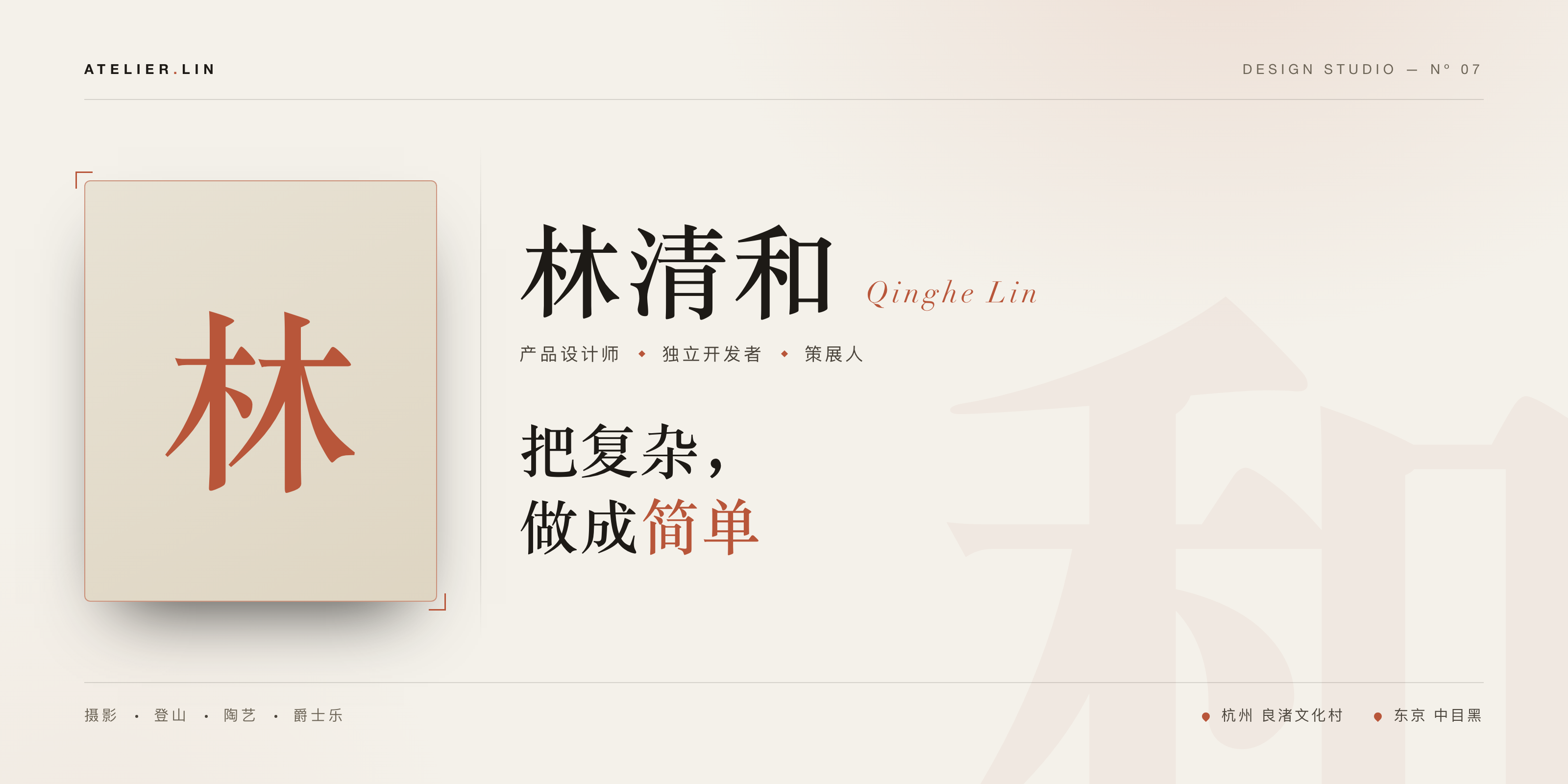
把一段身份信息渲染成一张 2:1 的**编辑式(editorial / luxury-minimal)**名片:瑞士排版网格、 发丝线分隔、单一强调色、宋体 × Didot 字体配对、刊头与底栏分区、淡淡的姓名水印。靠字号、字距、 层级建立秩序,而不是堆装饰。没有头像?自动用姓名首字渲染衬线 monogram。
示例
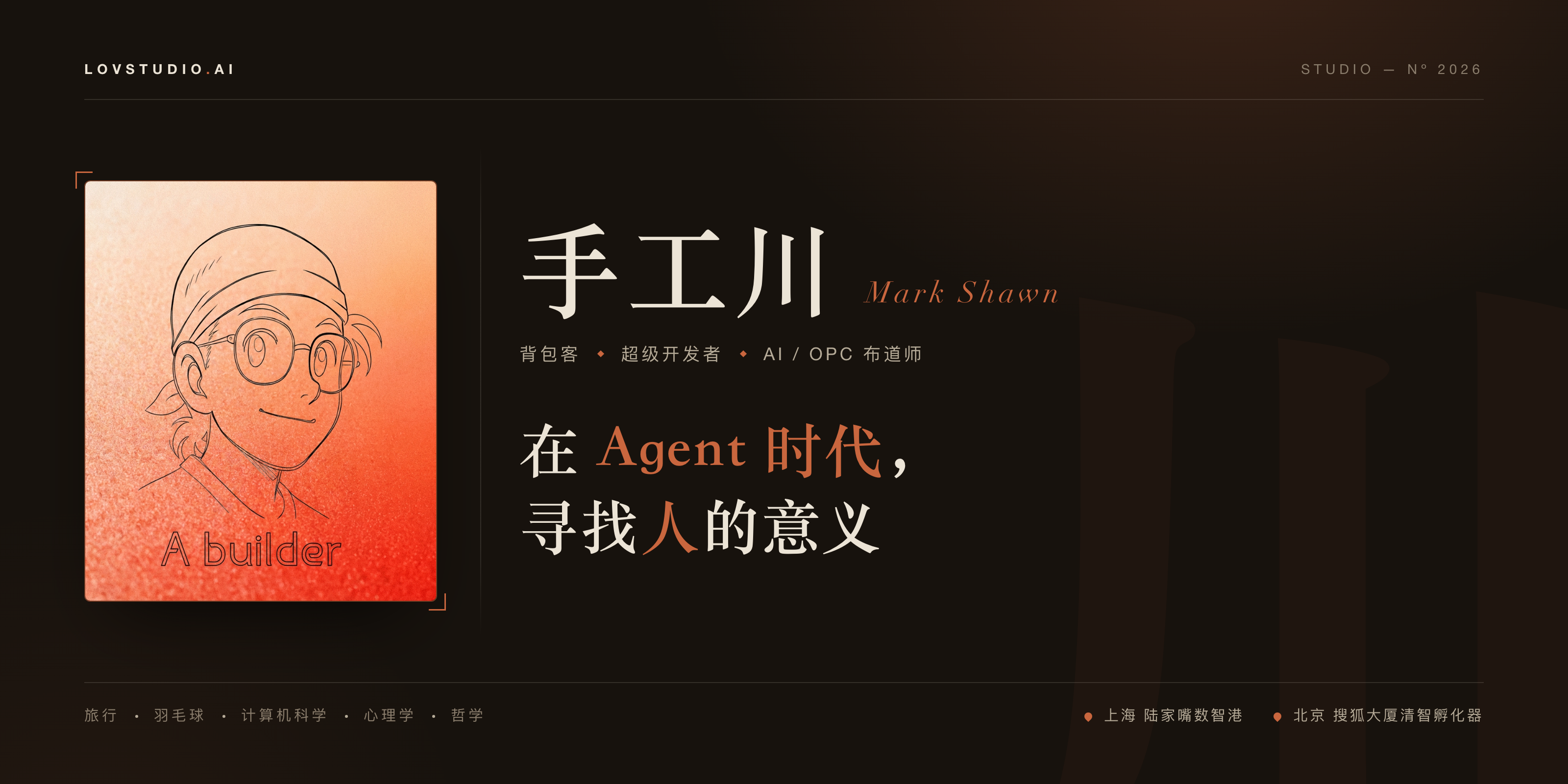
上图为「品牌方」的实际名片(dark-terracotta 主题 + 头像)。同一套数据,三种主题:
dark-terracotta(暖深·陶土,默认) |
midnight(冷深·钢蓝) |
ivory(浅·象牙 + monogram 回退) |
|---|---|---|
|
 |
 |
Install
git clone https://example.com/skills/business-card-skill "${SKILL_SKILLS_INSTALL_DIR:?Set SKILL_SKILLS_INSTALL_DIR}/lov-business-card"
Requires: Python 3.8+ and Google Chrome / Chromium (for PNG rendering). macOS 用内置 sips 裁切,
其他平台 pip install pillow。没有浏览器时跳过 PNG —— 打开 HTML 用右下角按钮下载即可。
Usage
SKILL_DIR="${SKILL_SKILLS_INSTALL_DIR:?Set SKILL_SKILLS_INSTALL_DIR}/lov-business-card"
python3 "$SKILL_DIR/scripts/render_card.py" \
  --name "品牌方" --latin "Mark Shawn" \
  --brand "SKILL.AI" --index "STUDIO — Nº 2026" \
  --tags "背包客,超级开发者,AI / OPC 布道师" \
  --tagline "在 **Agent 时代**,|寻找**人**的意义" \
  --pursuits "旅行,羽毛球,计算机科学,心理学,哲学" \
  --bases "上海 陆家嘴数智港,北京 搜狐大厦清智孵化器" \
  --avatar ./me.png --theme dark-terracotta \
  --out ./output --format both
Options
| Option | Default | Description |
|---|---|---|
--name |
(required) | 姓名,支持中文 |
--latin |
"" |
英文名 / 罗马音(斜体小字) |
--brand |
"" |
左上品牌;含 . 时圆点会高亮 |
--index |
"" |
右上编号,如 STUDIO — Nº 2026 |
--tags |
"" |
角色标签,逗号分隔 |
--tagline |
"" |
金句;**词** 高亮,\| 换行 |
--pursuits |
"" |
爱好,逗号分隔(底栏左) |
--bases |
"" |
据点/城市,逗号分隔(底栏右,带定位针) |
--avatar |
"" |
头像图片路径;省略则用 monogram |
--caption |
"" |
头像底部图注(可选) |
--watermark |
姓名末字 | 背景巨型水印字 |
--theme |
dark-terracotta |
dark-terracotta | midnight | ivory |
--out |
./output |
输出目录 |
--format |
both |
png | html | both |
--scale |
3 |
PNG 倍率(3 → 4800×2400) |
Output
{name}-名片.png— 高清名片(默认 4800×2400){name}-名片.html+modern-screenshot.umd.js— 浏览器打开,点「下载为图片 PNG」自出 3× 高清图(两文件需同目录)
加主题
往 scripts/render_card.py 的 THEMES 字典加一组 CSS 变量即可,模板无需改动。
Star History
License
MIT
Skill manifest
名片工坊 · Business Card Studio
把任意用户的身份信息,渲染成一张 2:1 的编辑式(editorial / luxury-minimal)名片: 瑞士排版网格、发丝线分隔、单一强调色、宋体 × Didot 字体配对。输出高分辨率 PNG (默认 4800×2400)+ 一个自包含、可在浏览器点击下载的 HTML。
工作流
1. 先用 AskUserQuestion 收集信息(必做)
不要直接跑脚本。 先确认主题与必填项。能从对话/记忆里推断的先预填,只问不知道的。
建议问题(一次最多 3 个):
- 主题:dark-terracotta(暖深·陶土,默认)/ midnight(冷深·钢蓝)/ ivory(浅·象牙编辑风)
- 是否有头像:有 → 要文件路径;无 → 用名字首字渲染 monogram
- 强调词:tagline 里哪个词要高亮(强调色)
身份字段尽量从上下文取;缺的逐项问或让用户一次性给。
2. 映射到 CLI 参数
| 用户提供 | flag | 说明 |
|---|---|---|
| 姓名 | --name | 必填,支持中文 |
| 英文名/罗马音 | --latin | 名字旁的斜体小字 |
| 品牌(左上) | --brand | 如 SKILL.AI(含 . 会高亮圆点) |
| 编号(右上) | --index | 如 STUDIO — Nº 2026 |
| 角色标签 | --tags | 逗号分隔,菱形分隔渲染 |
| 金句 | --tagline | 词 高亮,竖线 | 换行 |
| 爱好/兴趣 | --pursuits | 逗号分隔(底栏左) |
| 据点/城市 | --bases | 逗号分隔,每项带定位针(底栏右) |
| 头像 | --avatar | 图片路径;省略则用 monogram |
| 头像图注 | --caption | 可选,肖像底部小字 |
| 主题 | --theme | dark-terracotta|midnight|ivory |
| 输出目录 | --out | 默认 ./output |
| 格式 | --format | png|html|both(默认 both) |
3. 运行
python3 scripts/render_card.py \
  --name "品牌方" --latin "Mark Shawn" \
  --brand "SKILL.AI" --index "STUDIO — Nº 2026" \
  --tags "背包客,超级开发者,AI / OPC 布道师" \
  --tagline "在 **Agent 时代**,|寻找**人**的意义" \
  --pursuits "旅行,羽毛球,计算机科学,心理学,哲学" \
  --bases "上海 陆家嘴数智港,北京 搜狐大厦清智孵化器" \
  --avatar ./me.png --theme dark-terracotta \
  --out ./output --format both
4. 交付
把 PNG 展示给用户;告诉他们 HTML 可在浏览器打开、右下角「下载为图片 PNG」自出 3× 高清图 (HTML 与同目录的 modern-screenshot.umd.js 需一起保留)。
设计说明
- 比例:固定 2:1(1600×800 画布),PNG 按 --scale 倍率导出(默认 3 → 4800×2400)。
- 自适应:HTML 在浏览器里等比缩放铺满视口,绝不放大、不溢出;导出尺寸不受影响。
- 无头像:自动用姓名首字渲染衬线 monogram,仍然专业。
- 主题扩展:在 scripts/render_card.py 的 THEMES 字典加一组 CSS 变量即可。
User Configuration
本 skill 不假设任何私有工作区。所有身份、品牌、输出路径都由 CLI flag 传入; --out 默认当前目录下 ./output。如需复用默认身份,调用方可自行从用户 profile 预填这些 flag,但脚本本身不读取任何固定个人路径。
Runtime context (shared)
运行前读取本 Skill 包的 skill.yaml,由宿主提供 skill-runtime/v1 上下文。字段解析顺序为:当前请求、项目上下文、个人 Preferences、品牌 Profile、通用默认值。
- 只使用 Manifest 声明的字段;Profile 保存公开品牌事实,Preferences 保存个人工作偏好。
required: true字段缺失时,按 Manifest 的问题配置向用户提出一个聚焦问题;用户明确同意后再保存回答。- 报错提供可复制的
context_id、字段路径与来源,诊断内容避开秘密、完整私人路径和原始配置。
通用反馈闭环
用户在 Skill 驱动任务中提出修改意见时,继续当前产物前必须执行:
- 先判断意见是
task-specific(仅本次)还是reusable(可跨任务复用)。 task-specific只修改当前任务,不改 Skill。reusable先确定作用域:领域规则先更新对应 canonical Skill;适用于所有 Skill 的规则先更新共享规范。- 完成规则更新、版本、lint 与分发核验后,再把修改应用到当前任务。
reusable修改会使此前的“确认”“继续”“发吧”失效;完成当前产物修改和回读后必须停下,等待用户下一步指示,不自动进入发布、提交或其他外部写入。
Files (skills)
-
assets
-
modern-screenshot.umd.js 28.6 KB
(function(y,v){typeof exports=="object"&&typeof module!="undefined"?v(exports):typeof define=="function"&&define.amd?define(["exports"],v):(y=typeof globalThis!="undefined"?globalThis:y||self,v(y.modernScreenshot={}))})(this,function(y){"use strict";var rr=Object.defineProperty,nr=Object.defineProperties;var or=Object.getOwnPropertyDescriptors;var Z=Object.getOwnPropertySymbols;var xe=Object.prototype.hasOwnProperty,Me=Object.prototype.propertyIsEnumerable;var Oe=Math.pow,Le=(y,v,N)=>v in y?rr(y,v,{enumerable:!0,configurable:!0,writable:!0,value:N}):y[v]=N,D=(y,v)=>{for(var N in v||(v={}))xe.call(v,N)&&Le(y,N,v[N]);if(Z)for(var N of Z(v))Me.call(v,N)&&Le(y,N,v[N]);return y},M=(y,v)=>nr(y,or(v));var je=(y,v)=>{var N={};for(var R in y)xe.call(y,R)&&v.indexOf(R)<0&&(N[R]=y[R]);if(y!=null&&Z)for(var R of Z(y))v.indexOf(R)<0&&Me.call(y,R)&&(N[R]=y[R]);return N};var C=(y,v,N)=>new Promise((R,O)=>{var X=P=>{try{q(N.next(P))}catch(W){O(W)}},j=P=>{try{q(N.throw(P))}catch(W){O(W)}},q=P=>P.done?R(P.value):Promise.resolve(P.value).then(X,j);q((N=N.apply(y,v)).next())});var Be;function v(e,t){return e[13]=1,e[14]=t>>8,e[15]=t&255,e[16]=t>>8,e[17]=t&255,e}const N=112,R=72,O=89,X=115;let j;function q(){const e=new Int32Array(256);for(let t=0;t<256;t++){let r=t;for(let n=0;n<8;n++)r=r&1?3988292384^r>>>1:r>>>1;e[t]=r}return e}function P(e){let t=-1;j||(j=q());for(let r=0;r<e.length;r++)t=j[(t^e[r])&255]^t>>>8;return t^-1}function W(e){const t=e.length-1;for(let r=t;r>=4;r--)if(e[r-4]===9&&e[r-3]===N&&e[r-2]===R&&e[r-1]===O&&e[r]===X)return r-3;return 0}function ae(e,t,r=!1){const n=new Uint8Array(13);t*=39.3701,n[0]=N,n[1]=R,n[2]=O,n[3]=X,n[4]=t>>>24,n[5]=t>>>16,n[6]=t>>>8,n[7]=t&255,n[8]=n[4],n[9]=n[5],n[10]=n[6],n[11]=n[7],n[12]=1;const i=P(n),a=new Uint8Array(4);if(a[0]=i>>>24,a[1]=i>>>16,a[2]=i>>>8,a[3]=i&255,r){const s=W(e);return e.set(n,s),e.set(a,s+13),e}else{const s=new Uint8Array(4);s[0]=0,s[1]=0,s[2]=0,s[3]=9;const o=new Uint8Array(54);return o.set(e,0),o.set(s,33),o.set(n,37),o.set(a,50),o}}const qe="AAlwSFlz",We="AAAJcEhZ",He="AAAACXBI";function Ve(e){let t=e.indexOf(qe);return t===-1&&(t=e.indexOf(We)),t===-1&&(t=e.indexOf(He)),t}const se="[modern-screenshot]",U=typeof window!="undefined",ze=U&&"Worker"in window,ie=U&&"atob"in window,Xe=U&&"btoa"in window,ee=U?(Be=window.navigator)==null?void 0:Be.userAgent:"",le=ee.includes("Chrome"),G=ee.includes("AppleWebKit")&&!le,te=ee.includes("Firefox"),Ge=e=>e&&"__CONTEXT__"in e,Ye=e=>e.constructor.name==="CSSFontFaceRule",Je=e=>e.constructor.name==="CSSImportRule",Ke=e=>e.constructor.name==="CSSLayerBlockRule",I=e=>e.nodeType===1,H=e=>typeof e.className=="object",ce=e=>e.tagName==="image",Qe=e=>e.tagName==="use",V=e=>I(e)&&typeof e.style!="undefined"&&!H(e),Ze=e=>e.nodeType===8,et=e=>e.nodeType===3,$=e=>e.tagName==="IMG",Y=e=>e.tagName==="VIDEO",tt=e=>e.tagName==="CANVAS",rt=e=>e.tagName==="TEXTAREA",nt=e=>e.tagName==="INPUT",ot=e=>e.tagName==="STYLE",at=e=>e.tagName==="SCRIPT",st=e=>e.tagName==="SELECT",it=e=>e.tagName==="SLOT",lt=e=>e.tagName==="IFRAME",ct=(...e)=>console.warn(se,...e);function ut(e){var r;const t=(r=e==null?void 0:e.createElement)==null?void 0:r.call(e,"canvas");return t&&(t.height=t.width=1),!!t&&"toDataURL"in t&&!!t.toDataURL("image/webp").includes("image/webp")}const re=e=>e.startsWith("data:");function ue(e,t){if(e.match(/^[a-z]+:\/\//i))return e;if(U&&e.match(/^\/\//))return window.location.protocol+e;if(e.match(/^[a-z]+:/i)||!U)return e;const r=J().implementation.createHTMLDocument(),n=r.createElement("base"),i=r.createElement("a");return r.head.appendChild(n),r.body.appendChild(i),t&&(n.href=t),i.href=e,i.href}function J(e){var t;return(t=e&&I(e)?e==null?void 0:e.ownerDocument:e)!=null?t:window.document}const K="http://www.w3.org/2000/svg";function fe(e,t,r){const n=J(r).createElementNS(K,"svg");return n.setAttributeNS(null,"width",e.toString()),n.setAttributeNS(null,"height",t.toString()),n.setAttributeNS(null,"viewBox",`0 0 ${e} ${t}`),n}function de(e,t){let r=new XMLSerializer().serializeToString(e);return t&&(r=r.replace(/[\u0000-\u0008\v\f\u000E-\u001F\uD800-\uDFFF\uFFFE\uFFFF]/gu,"")),`data:image/svg+xml;charset=utf-8,${encodeURIComponent(r)}`}function ft(e,t="image/png",r=1){return C(this,null,function*(){try{return yield new Promise((n,i)=>{e.toBlob(a=>{a?n(a):i(new Error("Blob is null"))},t,r)})}catch(n){if(ie)return dt(e.toDataURL(t,r));throw n}})}function dt(e){var o,c;const[t,r]=e.split(","),n=(c=(o=t.match(/data:(.+);/))==null?void 0:o[1])!=null?c:void 0,i=window.atob(r),a=i.length,s=new Uint8Array(a);for(let u=0;u<a;u+=1)s[u]=i.charCodeAt(u);return new Blob([s],{type:n})}function ge(e,t){return new Promise((r,n)=>{const i=new FileReader;i.onload=()=>r(i.result),i.onerror=()=>n(i.error),i.onabort=()=>n(new Error(`Failed read blob to ${t}`)),t==="dataUrl"?i.readAsDataURL(e):t==="arrayBuffer"&&i.readAsArrayBuffer(e)})}const gt=e=>ge(e,"dataUrl"),mt=e=>ge(e,"arrayBuffer");function _(e,t){const r=J(t).createElement("img");return r.decoding="sync",r.loading="eager",r.src=e,r}function L(e,t){return new Promise(r=>{const{timeout:n,ownerDocument:i,onError:a,onWarn:s}=t!=null?t:{},o=typeof e=="string"?_(e,J(i)):e;let c=null,u=null;function l(){r(o),c&&clearTimeout(c),u==null||u()}if(n&&(c=setTimeout(l,n)),Y(o)){const d=o.currentSrc||o.src;if(!d)return o.poster?L(o.poster,t).then(r):l();if(o.readyState>=2)return l();const m=l,f=h=>{s==null||s("Failed video load",d,h),a==null||a(h),l()};u=()=>{o.removeEventListener("loadeddata",m),o.removeEventListener("error",f)},o.addEventListener("loadeddata",m,{once:!0}),o.addEventListener("error",f,{once:!0})}else{const d=ce(o)?o.href.baseVal:o.currentSrc||o.src;if(!d)return l();const m=()=>C(this,null,function*(){if($(o)&&"decode"in o)try{yield o.decode()}catch(h){s==null||s("Failed to decode image, trying to render anyway",o.dataset.originalSrc||d,h)}l()}),f=h=>{s==null||s("Failed image load",o.dataset.originalSrc||d,h),l()};if($(o)&&o.complete)return m();u=()=>{o.removeEventListener("load",m),o.removeEventListener("error",f)},o.addEventListener("load",m,{once:!0}),o.addEventListener("error",f,{once:!0})}})}function me(e,t){return C(this,null,function*(){V(e)&&($(e)||Y(e)?yield L(e,t):yield Promise.all(["img","video"].flatMap(r=>Array.from(e.querySelectorAll(r)).map(n=>L(n,t)))))})}const he=function(){let t=0;const r=()=>`0000${(Math.random()*Oe(36,4)<<0).toString(36)}`.slice(-4);return()=>(t+=1,`u${r()}${t}`)}();function we(e){return e==null?void 0:e.split(",").map(t=>t.trim().replace(/"|'/g,"").toLowerCase()).filter(Boolean)}let pe=0;function ht(e){const t=`${se}[#${pe}]`;return pe++,{time:r=>e&&console.time(`${t} ${r}`),timeEnd:r=>e&&console.timeEnd(`${t} ${r}`),warn:(...r)=>e&&ct(...r)}}function wt(e){return{cache:e?"no-cache":"force-cache"}}function k(e,t){return C(this,null,function*(){return Ge(e)?e:ye(e,M(D({},t),{autoDestruct:!0}))})}function ye(e,t){return C(this,null,function*(){var f,h,g,p,E;const{scale:r=1,workerUrl:n,workerNumber:i=1}=t||{},a=!!(t!=null&&t.debug),s=(f=t==null?void 0:t.features)!=null?f:!0,o=(h=e.ownerDocument)!=null?h:U?window.document:void 0,c=(p=(g=e.ownerDocument)==null?void 0:g.defaultView)!=null?p:U?window:void 0,u=new Map,l=M(D({width:0,height:0,quality:1,type:"image/png",scale:r,backgroundColor:null,style:null,filter:null,maximumCanvasSize:0,timeout:3e4,progress:null,debug:a,fetch:D({requestInit:wt((E=t==null?void 0:t.fetch)==null?void 0:E.bypassingCache),placeholderImage:"data:image/png;base64,R0lGODlhAQABAIAAAAAAAP///yH5BAEAAAAALAAAAAABAAEAAAIBRAA7",bypassingCache:!1},t==null?void 0:t.fetch),fetchFn:null,font:{},drawImageInterval:100,workerUrl:null,workerNumber:i,onCloneEachNode:null,onCloneNode:null,onEmbedNode:null,onCreateForeignObjectSvg:null,includeStyleProperties:null,autoDestruct:!1},t),{__CONTEXT__:!0,log:ht(a),node:e,ownerDocument:o,ownerWindow:c,dpi:r===1?null:96*r,svgStyleElement:be(o),svgDefsElement:o==null?void 0:o.createElementNS(K,"defs"),svgStyles:new Map,defaultComputedStyles:new Map,workers:[...Array.from({length:ze&&n&&i?i:0})].map(()=>{try{const b=new Worker(n);return b.onmessage=w=>C(this,null,function*(){var A,F,B,$e;const{url:S,result:T}=w.data;T?(F=(A=u.get(S))==null?void 0:A.resolve)==null||F.call(A,T):($e=(B=u.get(S))==null?void 0:B.reject)==null||$e.call(B,new Error(`Error receiving message from worker: ${S}`))}),b.onmessageerror=w=>{var T,A;const{url:S}=w.data;(A=(T=u.get(S))==null?void 0:T.reject)==null||A.call(T,new Error(`Error receiving message from worker: ${S}`))},b}catch(b){return l.log.warn("Failed to new Worker",b),null}}).filter(Boolean),fontFamilies:new Map,fontCssTexts:new Map,acceptOfImage:`${[ut(o)&&"image/webp","image/svg+xml","image/*","*/*"].filter(Boolean).join(",")};q=0.8`,requests:u,drawImageCount:0,tasks:[],features:s,isEnable:b=>{var w,S;return b==="restoreScrollPosition"?typeof s=="boolean"?!1:(w=s[b])!=null?w:!1:typeof s=="boolean"?s:(S=s[b])!=null?S:!0},shadowRoots:[]});l.log.time("wait until load"),yield me(e,{timeout:l.timeout,onWarn:l.log.warn}),l.log.timeEnd("wait until load");const{width:d,height:m}=pt(e,l);return l.width=d,l.height=m,l})}function be(e){if(!e)return;const t=e.createElement("style"),r=t.ownerDocument.createTextNode(` .______background-clip--text { background-clip: text; -webkit-background-clip: text; } `);return t.appendChild(r),t}function pt(e,t){let{width:r,height:n}=t;if(I(e)&&(!r||!n)){const i=e.getBoundingClientRect();r=r||i.width||Number(e.getAttribute("width"))||0,n=n||i.height||Number(e.getAttribute("height"))||0}return{width:r,height:n}}function yt(e,t){return C(this,null,function*(){const{log:r,timeout:n,drawImageCount:i,drawImageInterval:a}=t;r.time("image to canvas");const s=yield L(e,{timeout:n,onWarn:t.log.warn}),{canvas:o,context2d:c}=bt(e.ownerDocument,t),u=()=>{try{c==null||c.drawImage(s,0,0,o.width,o.height)}catch(l){t.log.warn("Failed to drawImage",l)}};if(u(),t.isEnable("fixSvgXmlDecode"))for(let l=0;l<i;l++)yield new Promise(d=>{setTimeout(()=>{c==null||c.clearRect(0,0,o.width,o.height),u(),d()},l+a)});return t.drawImageCount=0,r.timeEnd("image to canvas"),o})}function bt(e,t){const{width:r,height:n,scale:i,backgroundColor:a,maximumCanvasSize:s}=t,o=e.createElement("canvas");o.width=Math.floor(r*i),o.height=Math.floor(n*i),o.style.width=`${r}px`,o.style.height=`${n}px`,s&&(o.width>s||o.height>s)&&(o.width>s&&o.height>s?o.width>o.height?(o.height*=s/o.width,o.width=s):(o.width*=s/o.height,o.height=s):o.width>s?(o.height*=s/o.width,o.width=s):(o.width*=s/o.height,o.height=s));const c=o.getContext("2d");return c&&a&&(c.fillStyle=a,c.fillRect(0,0,o.width,o.height)),{canvas:o,context2d:c}}function Se(e,t){if(e.ownerDocument)try{const a=e.toDataURL();if(a!=="data:,")return _(a,e.ownerDocument)}catch(a){t.log.warn("Failed to clone canvas",a)}const r=e.cloneNode(!1),n=e.getContext("2d"),i=r.getContext("2d");try{return n&&i&&i.putImageData(n.getImageData(0,0,e.width,e.height),0,0),r}catch(a){t.log.warn("Failed to clone canvas",a)}return r}function St(e,t){var r;try{if((r=e==null?void 0:e.contentDocument)!=null&&r.documentElement)return ne(e.contentDocument.documentElement,t)}catch(n){t.log.warn("Failed to clone iframe",n)}return e.cloneNode(!1)}function Et(e){const t=e.cloneNode(!1);return e.currentSrc&&e.currentSrc!==e.src&&(t.src=e.currentSrc,t.srcset=""),t.loading==="lazy"&&(t.loading="eager"),t}function Ct(e,t){return C(this,null,function*(){if(e.ownerDocument&&!e.currentSrc&&e.poster)return _(e.poster,e.ownerDocument);const r=e.cloneNode(!1);r.crossOrigin="anonymous",e.currentSrc&&e.currentSrc!==e.src&&(r.src=e.currentSrc);const n=r.ownerDocument;if(n){let i=!0;if(yield L(r,{onError:()=>i=!1,onWarn:t.log.warn}),!i)return e.poster?_(e.poster,e.ownerDocument):r;r.currentTime=e.currentTime,yield new Promise(s=>{r.addEventListener("seeked",s,{once:!0})});const a=n.createElement("canvas");a.width=e.offsetWidth,a.height=e.offsetHeight;try{const s=a.getContext("2d");s&&s.drawImage(r,0,0,a.width,a.height)}catch(s){return t.log.warn("Failed to clone video",s),e.poster?_(e.poster,e.ownerDocument):r}return Se(a,t)}return r})}function Tt(e,t){return tt(e)?Se(e,t):lt(e)?St(e,t):$(e)?Et(e):Y(e)?Ct(e,t):e.cloneNode(!1)}function vt(e){let t=e.sandbox;if(!t){const{ownerDocument:r}=e;try{r&&(t=r.createElement("iframe"),t.id=`__SANDBOX__${he()}`,t.width="0",t.height="0",t.style.visibility="hidden",t.style.position="fixed",r.body.appendChild(t),t.srcdoc='<!DOCTYPE html><meta charset="UTF-8"><title></title><body>',e.sandbox=t)}catch(n){e.log.warn("Failed to getSandBox",n)}}return t}const At=["width","height","-webkit-text-fill-color"],Nt=["stroke","fill"];function Ee(e,t,r){const{defaultComputedStyles:n}=r,i=e.nodeName.toLowerCase(),a=H(e)&&i!=="svg",s=a?Nt.map(g=>[g,e.getAttribute(g)]).filter(([,g])=>g!==null):[],o=[a&&"svg",i,s.map((g,p)=>`${g}=${p}`).join(","),t].filter(Boolean).join(":");if(n.has(o))return n.get(o);const c=vt(r),u=c==null?void 0:c.contentWindow;if(!u)return new Map;const l=u==null?void 0:u.document;let d,m;a?(d=l.createElementNS(K,"svg"),m=d.ownerDocument.createElementNS(d.namespaceURI,i),s.forEach(([g,p])=>{m.setAttributeNS(null,g,p)}),d.appendChild(m)):d=m=l.createElement(i),m.textContent=" ",l.body.appendChild(d);const f=u.getComputedStyle(m,t),h=new Map;for(let g=f.length,p=0;p<g;p++){const E=f.item(p);At.includes(E)||h.set(E,f.getPropertyValue(E))}return l.body.removeChild(d),n.set(o,h),h}function Ce(e,t,r){var o;const n=new Map,i=[],a=new Map;if(r)for(const c of r)s(c);else for(let c=e.length,u=0;u<c;u++){const l=e.item(u);s(l)}for(let c=i.length,u=0;u<c;u++)(o=a.get(i[u]))==null||o.forEach((l,d)=>n.set(d,l));function s(c){const u=e.getPropertyValue(c),l=e.getPropertyPriority(c),d=c.lastIndexOf("-"),m=d>-1?c.substring(0,d):void 0;if(m){let f=a.get(m);f||(f=new Map,a.set(m,f)),f.set(c,[u,l])}t.get(c)===u&&!l||(m?i.push(m):n.set(c,[u,l]))}return n}function Rt(e,t,r,n){var d,m,f,h;const{ownerWindow:i,includeStyleProperties:a,currentParentNodeStyle:s}=n,o=t.style,c=i.getComputedStyle(e),u=Ee(e,null,n);s==null||s.forEach((g,p)=>{u.delete(p)});const l=Ce(c,u,a);l.delete("transition-property"),l.delete("all"),l.delete("d"),l.delete("content"),r&&(l.delete("position"),l.delete("margin-top"),l.delete("margin-right"),l.delete("margin-bottom"),l.delete("margin-left"),l.delete("margin-block-start"),l.delete("margin-block-end"),l.delete("margin-inline-start"),l.delete("margin-inline-end"),l.set("box-sizing",["border-box",""])),((d=l.get("background-clip"))==null?void 0:d[0])==="text"&&t.classList.add("______background-clip--text"),le&&(l.has("font-kerning")||l.set("font-kerning",["normal",""]),(((m=l.get("overflow-x"))==null?void 0:m[0])==="hidden"||((f=l.get("overflow-y"))==null?void 0:f[0])==="hidden")&&((h=l.get("text-overflow"))==null?void 0:h[0])==="ellipsis"&&e.scrollWidth===e.clientWidth&&l.set("text-overflow",["clip",""]));for(let g=o.length,p=0;p<g;p++)o.removeProperty(o.item(p));return l.forEach(([g,p],E)=>{o.setProperty(E,g,p)}),l}function It(e,t){(rt(e)||nt(e)||st(e))&&t.setAttribute("value",e.value)}const kt=["::before","::after"],Dt=["::-webkit-scrollbar","::-webkit-scrollbar-button","::-webkit-scrollbar-thumb","::-webkit-scrollbar-track","::-webkit-scrollbar-track-piece","::-webkit-scrollbar-corner","::-webkit-resizer"];function Pt(e,t,r,n,i){const{ownerWindow:a,svgStyleElement:s,svgStyles:o,currentNodeStyle:c}=n;if(!s||!a)return;function u(l){var w;const d=a.getComputedStyle(e,l);let m=d.getPropertyValue("content");if(!m||m==="none")return;i==null||i(m),m=m.replace(/(')|(")|(counter\(.+\))/g,"");const f=[he()],h=Ee(e,l,n);c==null||c.forEach((S,T)=>{h.delete(T)});const g=Ce(d,h,n.includeStyleProperties);g.delete("content"),g.delete("-webkit-locale"),((w=g.get("background-clip"))==null?void 0:w[0])==="text"&&t.classList.add("______background-clip--text");const p=[`content: '${m}';`];if(g.forEach(([S,T],A)=>{p.push(`${A}: ${S}${T?" !important":""};`)}),p.length===1)return;try{t.className=[t.className,...f].join(" ")}catch(S){n.log.warn("Failed to copyPseudoClass",S);return}const E=p.join(` `);let b=o.get(E);b||(b=[],o.set(E,b)),b.push(`.${f[0]}${l}`)}kt.forEach(u),r&&Dt.forEach(u)}const Te=new Set(["symbol"]);function ve(e,t,r,n,i){return C(this,null,function*(){if(I(r)&&(ot(r)||at(r))||n.filter&&!n.filter(r))return;Te.has(t.nodeName)||Te.has(r.nodeName)?n.currentParentNodeStyle=void 0:n.currentParentNodeStyle=n.currentNodeStyle;const a=yield ne(r,n,!1,i);n.isEnable("restoreScrollPosition")&&Ut(e,a),t.appendChild(a)})}function Ae(e,t,r,n){return C(this,null,function*(){var a;let i=e.firstChild;I(e)&&e.shadowRoot&&(i=(a=e.shadowRoot)==null?void 0:a.firstChild,r.shadowRoots.push(e.shadowRoot));for(let s=i;s;s=s.nextSibling)if(!Ze(s))if(I(s)&&it(s)&&typeof s.assignedNodes=="function"){const o=s.assignedNodes();for(let c=0;c<o.length;c++)yield ve(e,t,o[c],r,n)}else yield ve(e,t,s,r,n)})}function Ut(e,t){if(!V(e)||!V(t))return;const{scrollTop:r,scrollLeft:n}=e;if(!r&&!n)return;const{transform:i}=t.style,a=new DOMMatrix(i),{a:s,b:o,c,d:u}=a;a.a=1,a.b=0,a.c=0,a.d=1,a.translateSelf(-n,-r),a.a=s,a.b=o,a.c=c,a.d=u,t.style.transform=a.toString()}function _t(e,t){const{backgroundColor:r,width:n,height:i,style:a}=t,s=e.style;if(r&&s.setProperty("background-color",r,"important"),n&&s.setProperty("width",`${n}px`,"important"),i&&s.setProperty("height",`${i}px`,"important"),a)for(const o in a)s[o]=a[o]}const Ft=/^[\w-:]+$/;function ne(e,t,r=!1,n){return C(this,null,function*(){var u,l,d,m;const{ownerDocument:i,ownerWindow:a,fontFamilies:s,onCloneEachNode:o}=t;if(i&&et(e))return n&&/\S/.test(e.data)&&n(e.data),i.createTextNode(e.data);if(i&&a&&I(e)&&(V(e)||H(e))){const f=yield Tt(e,t);if(t.isEnable("removeAbnormalAttributes")){const w=f.getAttributeNames();for(let S=w.length,T=0;T<S;T++){const A=w[T];Ft.test(A)||f.removeAttribute(A)}}const h=t.currentNodeStyle=Rt(e,f,r,t);r&&_t(f,t);let g=!1;if(t.isEnable("copyScrollbar")){const w=[(u=h.get("overflow-x"))==null?void 0:u[0],(l=h.get("overflow-y"))==null?void 0:l[0]];g=w.includes("scroll")||(w.includes("auto")||w.includes("overlay"))&&(e.scrollHeight>e.clientHeight||e.scrollWidth>e.clientWidth)}const p=(d=h.get("text-transform"))==null?void 0:d[0],E=we((m=h.get("font-family"))==null?void 0:m[0]),b=E?w=>{p==="uppercase"?w=w.toUpperCase():p==="lowercase"?w=w.toLowerCase():p==="capitalize"&&(w=w[0].toUpperCase()+w.substring(1)),E.forEach(S=>{let T=s.get(S);T||s.set(S,T=new Set),w.split("").forEach(A=>T.add(A))})}:void 0;return Pt(e,f,g,t,b),It(e,f),Y(e)||(yield Ae(e,f,t,b)),yield o==null?void 0:o(f),f}const c=e.cloneNode(!1);return yield Ae(e,c,t),yield o==null?void 0:o(c),c})}function Ne(e){if(e.ownerDocument=void 0,e.ownerWindow=void 0,e.svgStyleElement=void 0,e.svgDefsElement=void 0,e.svgStyles.clear(),e.defaultComputedStyles.clear(),e.sandbox){try{e.sandbox.remove()}catch(t){e.log.warn("Failed to destroyContext",t)}e.sandbox=void 0}e.workers=[],e.fontFamilies.clear(),e.fontCssTexts.clear(),e.requests.clear(),e.tasks=[],e.shadowRoots=[]}function Bt(e){const o=e,{url:t,timeout:r,responseType:n}=o,i=je(o,["url","timeout","responseType"]),a=new AbortController,s=r?setTimeout(()=>a.abort(),r):void 0;return fetch(t,D({signal:a.signal},i)).then(c=>{if(!c.ok)throw new Error("Failed fetch, not 2xx response",{cause:c});switch(n){case"arrayBuffer":return c.arrayBuffer();case"dataUrl":return c.blob().then(gt);case"text":default:return c.text()}}).finally(()=>clearTimeout(s))}function z(e,t){const{url:r,requestType:n="text",responseType:i="text",imageDom:a}=t;let s=r;const{timeout:o,acceptOfImage:c,requests:u,fetchFn:l,fetch:{requestInit:d,bypassingCache:m,placeholderImage:f},font:h,workers:g,fontFamilies:p}=e;n==="image"&&(G||te)&&e.drawImageCount++;let E=u.get(r);if(!E){m&&m instanceof RegExp&&m.test(s)&&(s+=(/\?/.test(s)?"&":"?")+new Date().getTime());const b=n.startsWith("font")&&h&&h.minify,w=new Set;b&&n.split(";")[1].split(",").forEach(F=>{p.has(F)&&p.get(F).forEach(B=>w.add(B))});const S=b&&w.size,T=D({url:s,timeout:o,responseType:S?"arrayBuffer":i,headers:n==="image"?{accept:c}:void 0},d);E={type:n,resolve:void 0,reject:void 0,response:null},E.response=C(this,null,function*(){if(l&&n==="image"){const A=yield l(r);if(A)return A}return!G&&r.startsWith("http")&&g.length?new Promise((A,F)=>{g[u.size&g.length-1].postMessage(D({rawUrl:r},T)),E.resolve=A,E.reject=F}):Bt(T)}).catch(A=>{if(u.delete(r),n==="image"&&f)return e.log.warn("Failed to fetch image base64, trying to use placeholder image",s),typeof f=="string"?f:f(a);throw A}),u.set(r,E)}return E.response}function Re(e,t,r,n){return C(this,null,function*(){if(!Ie(e))return e;for(const[i,a]of $t(e,t))try{const s=yield z(r,{url:a,requestType:n?"image":"text",responseType:"dataUrl"});e=e.replace(Lt(i),`$1${s}$3`)}catch(s){r.log.warn("Failed to fetch css data url",i,s)}return e})}function Ie(e){return/url\((['"]?)([^'"]+?)\1\)/.test(e)}const ke=/url\((['"]?)([^'"]+?)\1\)/g;function $t(e,t){const r=[];return e.replace(ke,(n,i,a)=>(r.push([a,ue(a,t)]),n)),r.filter(([n])=>!re(n))}function Lt(e){const t=e.replace(/([.*+?^${}()|\[\]\/\\])/g,"\\$1");return new RegExp(`(url\\(['"]?)(${t})(['"]?\\))`,"g")}const xt=["background-image","border-image-source","-webkit-border-image","-webkit-mask-image","list-style-image"];function Mt(e,t){return xt.map(r=>{const n=e.getPropertyValue(r);return!n||n==="none"?null:((G||te)&&t.drawImageCount++,Re(n,null,t,!0).then(i=>{!i||n===i||e.setProperty(r,i,e.getPropertyPriority(r))}))}).filter(Boolean)}function Ot(e,t){if($(e)){const r=e.currentSrc||e.src;if(!re(r))return[z(t,{url:r,imageDom:e,requestType:"image",responseType:"dataUrl"}).then(n=>{n&&(e.srcset="",e.dataset.originalSrc=r,e.src=n||"")})];(G||te)&&t.drawImageCount++}else if(H(e)&&!re(e.href.baseVal)){const r=e.href.baseVal;return[z(t,{url:r,imageDom:e,requestType:"image",responseType:"dataUrl"}).then(n=>{n&&(e.dataset.originalSrc=r,e.href.baseVal=n||"")})]}return[]}function jt(e,t){var o;const{ownerDocument:r,svgDefsElement:n}=t,i=(o=e.getAttribute("href"))!=null?o:e.getAttribute("xlink:href");if(!i)return[];const[a,s]=i.split("#");if(s){const c=`#${s}`,u=t.shadowRoots.reduce((l,d)=>l!=null?l:d.querySelector(`svg ${c}`),r==null?void 0:r.querySelector(`svg ${c}`));if(a&&e.setAttribute("href",c),n!=null&&n.querySelector(c))return[];if(u)return n==null||n.appendChild(u.cloneNode(!0)),[];if(a)return[z(t,{url:a,responseType:"text"}).then(l=>{n==null||n.insertAdjacentHTML("beforeend",l)})]}return[]}function De(e,t){const{tasks:r}=t;I(e)&&(($(e)||ce(e))&&r.push(...Ot(e,t)),Qe(e)&&r.push(...jt(e,t))),V(e)&&r.push(...Mt(e.style,t)),e.childNodes.forEach(n=>{De(n,t)})}function qt(e,t){return C(this,null,function*(){const{ownerDocument:r,svgStyleElement:n,fontFamilies:i,fontCssTexts:a,tasks:s,font:o}=t;if(!(!r||!n||!i.size))if(o&&o.cssText){const c=Ue(o.cssText,t);n.appendChild(r.createTextNode(`${c} `))}else{const c=Array.from(r.styleSheets).filter(f=>{try{return"cssRules"in f&&!!f.cssRules.length}catch(h){return t.log.warn(`Error while reading CSS rules from ${f.href}`,h),!1}}),u=r.implementation.createHTMLDocument(""),l=u.createElement("style");u.head.appendChild(l);const d=l.sheet;yield Promise.all(c.flatMap(f=>Array.from(f.cssRules).map(h=>C(this,null,function*(){if(Je(h)){const g=h.href;let p="";try{p=yield z(t,{url:g,requestType:"text",responseType:"text"})}catch(b){t.log.warn(`Error fetch remote css import from ${g}`,b)}const E=p.replace(ke,(b,w,S)=>b.replace(S,ue(S,g)));for(const b of Ht(E))try{d.insertRule(b,d.cssRules.length)}catch(w){t.log.warn("Error inserting rule from remote css import",{rule:b,error:w})}}})))),d.cssRules.length&&c.push(d);const m=[];c.forEach(f=>{oe(f.cssRules,m)}),m.filter(f=>{var h;return Ye(f)&&Ie(f.style.getPropertyValue("src"))&&((h=we(f.style.getPropertyValue("font-family")))==null?void 0:h.some(g=>i.has(g)))}).forEach(f=>{const h=f,g=a.get(h.cssText);g?n.appendChild(r.createTextNode(`${g} `)):s.push(Re(h.cssText,h.parentStyleSheet?h.parentStyleSheet.href:null,t).then(p=>{p=Ue(p,t),a.set(h.cssText,p),n.appendChild(r.createTextNode(`${p} `))}))})}})}const Wt=/(\/\*[\s\S]*?\*\/)/g,Pe=/((@.*?keyframes [\s\S]*?){([\s\S]*?}\s*?)})/gi;function Ht(e){if(e==null)return[];const t=[];let r=e.replace(Wt,"");for(;;){const a=Pe.exec(r);if(!a)break;t.push(a[0])}r=r.replace(Pe,"");const n=/@import[\s\S]*?url\([^)]*\)[\s\S]*?;/gi,i=new RegExp("((\\s*?(?:\\/\\*[\\s\\S]*?\\*\\/)?\\s*?@media[\\s\\S]*?){([\\s\\S]*?)}\\s*?})|(([\\s\\S]*?){([\\s\\S]*?)})","gi");for(;;){let a=n.exec(r);if(a)i.lastIndex=n.lastIndex;else if(a=i.exec(r),a)n.lastIndex=i.lastIndex;else break;t.push(a[0])}return t}const Vt=/url\([^)]+\)\s*format\((["']?)([^"']+)\1\)/g,zt=/src:\s*(?:url\([^)]+\)\s*format\([^)]+\)[,;]\s*)+/g;function Ue(e,t){const{font:r}=t,n=r?r==null?void 0:r.preferredFormat:void 0;return n?e.replace(zt,i=>{for(;;){const[a,,s]=Vt.exec(i)||[];if(!s)return"";if(s===n)return`src: ${a};`}}):e}function oe(e,t=[]){for(const r of Array.from(e))Ke(r)?t.push(...oe(r.cssRules)):"cssRules"in r?oe(r.cssRules,t):t.push(r);return t}const Xt=/\bx?link:?href\s*=\s*["'](?!data:)[^"']+["']/i;function Gt(e){return Xt.test(e.innerHTML)}function _e(e,t){return C(this,null,function*(){const r=yield k(e,t);if(I(r.node)&&H(r.node)&&!Gt(r.node))return r.node;const{ownerDocument:n,log:i,tasks:a,svgStyleElement:s,svgDefsElement:o,svgStyles:c,font:u,progress:l,autoDestruct:d,onCloneNode:m,onEmbedNode:f,onCreateForeignObjectSvg:h}=r;i.time("clone node");const g=yield ne(r.node,r,!0);if(s&&n){let S="";c.forEach((T,A)=>{S+=`${T.join(`, `)} { ${A} } `}),s.appendChild(n.createTextNode(S))}i.timeEnd("clone node"),yield m==null?void 0:m(g),u!==!1&&I(g)&&(i.time("embed web font"),yield qt(g,r),i.timeEnd("embed web font")),i.time("embed node"),De(g,r);const p=a.length;let E=0;const b=()=>C(this,null,function*(){for(;;){const S=a.pop();if(!S)break;try{yield S}catch(T){r.log.warn("Failed to run task",T)}l==null||l(++E,p)}});l==null||l(E,p),yield Promise.all([...Array.from({length:4})].map(b)),i.timeEnd("embed node"),yield f==null?void 0:f(g);const w=Yt(g,r);return o&&w.insertBefore(o,w.children[0]),s&&w.insertBefore(s,w.children[0]),d&&Ne(r),yield h==null?void 0:h(w),w})}function Yt(e,t){const{width:r,height:n}=t,i=fe(r,n,e.ownerDocument),a=i.ownerDocument.createElementNS(i.namespaceURI,"foreignObject");return a.setAttributeNS(null,"x","0%"),a.setAttributeNS(null,"y","0%"),a.setAttributeNS(null,"width","100%"),a.setAttributeNS(null,"height","100%"),a.append(e),i.appendChild(a),i}function Q(e,t){return C(this,null,function*(){var s;const r=yield k(e,t),n=yield _e(r),i=de(n,r.isEnable("removeControlCharacter"));r.autoDestruct||(r.svgStyleElement=be(r.ownerDocument),r.svgDefsElement=(s=r.ownerDocument)==null?void 0:s.createElementNS(K,"defs"),r.svgStyles.clear());const a=_(i,n.ownerDocument);return yield yt(a,r)})}function Jt(e,t){return C(this,null,function*(){const r=yield k(e,t),{log:n,type:i,quality:a,dpi:s}=r,o=yield Q(r);n.time("canvas to blob");const c=yield ft(o,i,a);if(["image/png","image/jpeg"].includes(i)&&s){const u=yield mt(c.slice(0,33));let l=new Uint8Array(u);return i==="image/png"?l=ae(l,s):i==="image/jpeg"&&(l=v(l,s)),n.timeEnd("canvas to blob"),new Blob([l,c.slice(33)],{type:i})}return n.timeEnd("canvas to blob"),c})}function x(e,t){return C(this,null,function*(){const r=yield k(e,t),{log:n,quality:i,type:a,dpi:s}=r,o=yield Q(r);n.time("canvas to data url");let c=o.toDataURL(a,i);if(["image/png","image/jpeg"].includes(a)&&s&&ie&&Xe){const[u,l]=c.split(",");let d=0,m=!1;if(a==="image/png"){const w=Ve(l);w>=0?(d=Math.ceil((w+28)/3)*4,m=!0):d=33/3*4}else a==="image/jpeg"&&(d=18/3*4);const f=l.substring(0,d),h=l.substring(d),g=window.atob(f),p=new Uint8Array(g.length);for(let w=0;w<p.length;w++)p[w]=g.charCodeAt(w);const E=a==="image/png"?ae(p,s,m):v(p,s),b=window.btoa(String.fromCharCode(...E));c=[u,",",b,h].join("")}return n.timeEnd("canvas to data url"),c})}function Fe(e,t){return C(this,null,function*(){const r=yield k(e,t),{width:n,height:i,ownerDocument:a}=r,s=yield x(r),o=fe(n,i,a),c=o.ownerDocument.createElementNS(o.namespaceURI,"image");return c.setAttributeNS(null,"href",s),c.setAttributeNS(null,"height","100%"),c.setAttributeNS(null,"width","100%"),o.appendChild(c),de(o,r.isEnable("removeControlCharacter"))})}function Kt(e,t){return C(this,null,function*(){const r=yield k(e,t),{ownerDocument:n,width:i,height:a,scale:s,type:o}=r,c=o==="image/svg+xml"?yield Fe(r):yield x(r),u=_(c,n);return u.width=Math.floor(i*s),u.height=Math.floor(a*s),u.style.width=`${i}px`,u.style.height=`${a}px`,u})}function Qt(e,t){return C(this,null,function*(){return x(yield k(e,M(D({},t),{type:"image/jpeg"})))})}function Zt(e,t){return C(this,null,function*(){const r=yield k(e,t),n=yield Q(r);return n.getContext("2d").getImageData(0,0,n.width,n.height).data})}function er(e,t){return C(this,null,function*(){return x(yield k(e,M(D({},t),{type:"image/png"})))})}function tr(e,t){return C(this,null,function*(){return x(yield k(e,M(D({},t),{type:"image/webp"})))})}y.createContext=ye,y.destroyContext=Ne,y.domToBlob=Jt,y.domToCanvas=Q,y.domToDataUrl=x,y.domToForeignObjectSvg=_e,y.domToImage=Kt,y.domToJpeg=Qt,y.domToPixel=Zt,y.domToPng=er,y.domToSvg=Fe,y.domToWebp=tr,y.loadMedia=L,y.waitUntilLoad=me,Object.defineProperty(y,Symbol.toStringTag,{value:"Module"})}); -
template.html 7.4 KB · in bundle
-
-
docs
-
images
-
example-dark-terracotta.png 2 MB · in bundle
-
example-ivory-monogram.png 1.1 MB · in bundle
-
example-midnight.png 2 MB · in bundle
-
-
-
references
-
user-config.md 1.6 KB
# User Configuration

This skill follows the portable agent skill profile contract. It must not
assume a private workspace, personal absolute paths, or private brand assets.

## Resolution Order

1. Explicit CLI flags.
2. Environment variables.
3. Shared profile JSON.
4. Safe defaults such as the current working directory or `$HOME/Documents`.
5. Ask the user once for missing required fields.

## Shared Profile

Default profile path:

```bash
${SKILL_PROFILE_PATH:-$HOME/.skill-publisher/skills/profile.json}
```

Example:

```json
{
  "user": {
    "name": "Your Name",
    "language": "zh-CN",
    "timezone": "Asia/Shanghai"
  },
  "workspace": {
    "root": "$HOME/projects",
    "output_dir": "$HOME/Documents/lov-skill-output"
  },
  "brand": {
    "name": "Your Brand",
    "site": "https://example.com",
    "profile": "$HOME/.skill-publisher/skills/brand.json",
    "design_guide": "$HOME/.skill-publisher/skills/design-guide.md"
  }
}
```

Environment variable overrides:

| Variable | Meaning |
|----------|---------|
| `SKILL_PROFILE_PATH` | Path to the shared profile JSON |
| `SKILLS_CONFIG_DIR` | Shared Skill Publisher skills config/data directory |
| `SKILL_WORKSPACE_ROOT` | User workspace root |
| `SKILL_OUTPUT_DIR` | Default generated output directory |
| `SKILL_PROFILE_PATH` | Brand profile JSON or Markdown |
| `SKILL_DESIGN_GUIDE` | Design guide path |

## Implementation Notes

- Scripts should accept explicit paths via CLI flags.
- Missing profile fields should produce actionable errors.
- Skill Publisher maintainer defaults belong in an optional profile, not in the workflow.
-
-
scripts
-
render_card.py 10.1 KB
#!/usr/bin/env python3
"""
render_card.py — Generate a professional editorial business card (2:1).

Fills a parameterized HTML template with the user's identity and renders it to
a high-resolution PNG via headless Chrome. The HTML itself is self-contained
(avatar embedded as base64, modern-screenshot vendored) so it also works
standalone in a browser with a click-to-download button.

Usage:
    python3 render_card.py \
        --name "品牌方" --latin "Mark Shawn" \
        --brand "SKILL.AI" --index "Nº 2026" \
        --tags "背包客,超级开发者,AI / OPC 布道师" \
        --tagline "在 **Agent 时代**,|寻找**人**的意义" \
        --pursuits "旅行,羽毛球,计算机科学,心理学,哲学" \
        --bases "上海 陆家嘴数智港,北京 搜狐大厦清智孵化器" \
        --avatar ./me.png --theme dark-terracotta \
        --out ./output --format both

Notes:
- --tagline: use ** ** to mark accent words, and | to split lines.
- --bases: comma-separated; each gets a pin marker.
- --avatar omitted → a monogram (first glyph of --name) is rendered instead.
- --format: png | html | both (default both).
"""

import argparse
import base64
import html
import mimetypes
import os
import re
import shutil
import subprocess
import sys
import tempfile
from pathlib import Path

ASSETS = Path(__file__).resolve().parent.parent / "assets"
TEMPLATE = ASSETS / "template.html"
SCREENSHOT_JS = ASSETS / "modern-screenshot.umd.js"

# ---------------------------------------------------------------- themes
THEMES = {
    "dark-terracotta": {
        "--page": "#0c0a08", "--bg": "#17120d", "--ink": "#ece4d6",
        "--ink-dim": "#b6ab98", "--muted": "#8a7d6c",
        "--terra": "#c9663e", "--terra-deep": "#a64f30",
        "--terra-line": "rgba(201,102,62,.5)", "--hair": "rgba(236,228,214,.13)",
        "--glow1": "rgba(201,102,62,.20)", "--glow2": "rgba(201,102,62,.07)",
        "--wm": "rgba(201,102,62,.045)",
        "--mono-a": "#241a12", "--mono-b": "#3a241a",
    },
    "midnight": {
        "--page": "#080b12", "--bg": "#0f1420", "--ink": "#e6ecf5",
        "--ink-dim": "#aab6c8", "--muted": "#7e8aa0",
        "--terra": "#6f9bd1", "--terra-deep": "#4f76a8",
        "--terra-line": "rgba(111,155,209,.5)", "--hair": "rgba(230,236,245,.12)",
        "--glow1": "rgba(111,155,209,.18)", "--glow2": "rgba(111,155,209,.06)",
        "--wm": "rgba(111,155,209,.05)",
        "--mono-a": "#121b2c", "--mono-b": "#1c2940",
    },
    "ivory": {
        "--page": "#eceae3", "--bg": "#f4f1ea", "--ink": "#1d1a16",
        "--ink-dim": "#4a443b", "--muted": "#6d6557",
        "--terra": "#b8563a", "--terra-deep": "#943f28",
        "--terra-line": "rgba(184,86,58,.55)", "--hair": "rgba(29,26,22,.14)",
        "--glow1": "rgba(184,86,58,.12)", "--glow2": "rgba(184,86,58,.05)",
        "--wm": "rgba(184,86,58,.05)",
        "--mono-a": "#e8e2d4", "--mono-b": "#ded5c2",
    },
}

CHROME_CANDIDATES = [
    "/Applications/Google Chrome.app/Contents/MacOS/Google Chrome",
    "/Applications/Chromium.app/Contents/MacOS/Chromium",
    shutil.which("google-chrome") or "",
    shutil.which("chromium") or "",
    shutil.which("chromium-browser") or "",
]


def find_chrome():
    for c in CHROME_CANDIDATES:
        if c and Path(c).exists():
            return c
    return None


def slugify(s):
    s = re.sub(r"\s+", "-", s.strip())
    s = re.sub(r"[^\w一-鿿-]", "", s)
    return s or "card"


def esc(s):
    return html.escape(s, quote=True)


def emphasize(text):
    """Convert **word** -> <em>word</em>, escaping the rest."""
    out, last = [], 0
    for m in re.finditer(r"\*\*(.+?)\*\*", text):
        out.append(esc(text[last:m.start()]))
        out.append("<em>" + esc(m.group(1)) + "</em>")
        last = m.end()
    out.append(esc(text[last:]))
    return "".join(out)


def build_tagline(raw):
    lines = [seg for seg in raw.split("|")]
    return "<br>".join(emphasize(l) for l in lines)


def build_roles(tags):
    items = [esc(t.strip()) for t in tags if t.strip()]
    sep = '<i class="sep"></i>'
    return sep.join(items)


def build_pursuits(items):
    cleaned = [esc(p.strip()) for p in items if p.strip()]
    return '<i class="mid"></i>'.join(cleaned)


def build_bases(items):
    parts = []
    for i, b in enumerate(items):
        b = b.strip()
        if not b:
            continue
        pin = '<i class="pin n"></i>' if parts else '<i class="pin"></i>'
        parts.append(pin + esc(b))
    return "".join(parts)


def build_portrait(avatar, name, caption):
    if avatar:
        p = Path(avatar).expanduser()
        if not p.exists():
            sys.exit(f"avatar not found: {p}")
        mime = mimetypes.guess_type(str(p))[0] or "image/png"
        data = base64.b64encode(p.read_bytes()).decode()
        img = f'<img src="data:{mime};base64,{data}" alt="{esc(name)}">'
        cap = f'<div class="pcaption">{esc(caption)}</div>' if caption else ""
        return img + cap
    glyph = esc(name.strip()[:1]) if name.strip() else "·"
    return f'<div class="mono">{glyph}</div>'


def theme_vars(theme):
    t = THEMES.get(theme)
    if not t:
        sys.exit(f"unknown theme: {theme} (choose from {', '.join(THEMES)})")
    body = ";".join(f"{k}:{v}" for k, v in t.items())
    return ".stage,.viewport,.dl-btn,body{" + body + "}"


def render_html(args):
    tpl = TEMPLATE.read_text(encoding="utf-8")
    name = args.name
    latin = f'<p class="latin">{esc(args.latin)}</p>' if args.latin else ""
    repl = {
        "__TITLE__": esc(name) + " · 名片",
        "__THEME_VARS__": theme_vars(args.theme),
        "__WM__": esc(args.watermark or (name.strip()[-1:] if name.strip() else "")),
        "__BRAND__": render_brand(args.brand),
        "__INDEX__": esc(args.index or ""),
        "__PORTRAIT__": build_portrait(args.avatar, name, args.caption),
        "__NAME__": esc(name),
        "__LATIN__": latin,
        "__ROLES__": build_roles(args.tags.split(",")) if args.tags else "",
        "__TAGLINE__": build_tagline(args.tagline) if args.tagline else "",
        "__PURSUITS__": build_pursuits(args.pursuits.split(",")) if args.pursuits else "",
        "__BASES__": build_bases(args.bases.split(",")) if args.bases else "",
        "__SLUG__": slugify(name),
    }
    for k, v in repl.items():
        tpl = tpl.replace(k, v)
    return tpl


def render_brand(brand):
    """Highlight a single dot in a brand like SKILL.AI."""
    if not brand:
        return ""
    if "." in brand:
        head, _, tail = brand.partition(".")
        return esc(head) + '<span class="ds">.</span>' + esc(tail)
    return esc(brand)


def screenshot(html_path, png_path, chrome, scale=3):
    """Render full card to PNG by capturing a 1700x900 window then cropping."""
    with tempfile.TemporaryDirectory() as tmp:
        full = Path(tmp) / "full.png"
        cmd = [
            chrome, "--headless=new", "--disable-gpu", "--hide-scrollbars",
            "--virtual-time-budget=6000", "--run-all-compositor-stages-before-draw",
            f"--force-device-scale-factor={scale}", "--window-size=1700,900",
            f"--screenshot={full}", f"file://{html_path}#shoot",
        ]
        subprocess.run(cmd, check=True, capture_output=True)
        if not full.exists():
            sys.exit("chrome screenshot failed")
        crop(full, png_path, 1600 * scale, 800 * scale)


def crop(src, dst, w, h):
    """Center-crop src to w x h, writing dst. Uses sips (mac) or PIL."""
    if shutil.which("sips"):
        subprocess.run(["sips", "-c", str(h), str(w), str(src), "--out", str(dst)],
                       check=True, capture_output=True)
        return
    try:
        from PIL import Image
    except ImportError:
        sys.exit("need `sips` (macOS) or Pillow (`pip install pillow`) to crop")
    im = Image.open(src)
    W, H = im.size
    left, top = (W - w) // 2, (H - h) // 2
    im.crop((left, top, left + w, top + h)).save(dst)


def main():
    ap = argparse.ArgumentParser(description="Generate an editorial business card (2:1).")
    ap.add_argument("--name", required=True, help="display name (CJK ok)")
    ap.add_argument("--latin", default="", help="secondary/romanized name")
    ap.add_argument("--brand", default="", help="top-left brand text, e.g. SKILL.AI")
    ap.add_argument("--index", default="", help="top-right line, e.g. 'STUDIO — Nº 2026'")
    ap.add_argument("--tags", default="", help="comma-separated role tags")
    ap.add_argument("--tagline", default="", help="hero line; **accent**, | splits lines")
    ap.add_argument("--pursuits", default="", help="comma-separated interests (footer left)")
    ap.add_argument("--bases", default="", help="comma-separated locations (footer right)")
    ap.add_argument("--avatar", default="", help="portrait image path (optional)")
    ap.add_argument("--caption", default="", help="portrait caption (optional)")
    ap.add_argument("--watermark", default="", help="giant background glyph (default: last char of name)")
    ap.add_argument("--theme", default="dark-terracotta",
                    help="dark-terracotta | midnight | ivory")
    ap.add_argument("--out", default="./output", help="output directory")
    ap.add_argument("--format", default="both", choices=["png", "html", "both"])
    ap.add_argument("--scale", type=int, default=3, help="PNG scale factor (default 3 -> 4800x2400)")
    args = ap.parse_args()

    out = Path(args.out).expanduser()
    out.mkdir(parents=True, exist_ok=True)
    slug = slugify(args.name)

    html_doc = render_html(args)
    html_path = out / f"{slug}-名片.html"
    html_path.write_text(html_doc, encoding="utf-8")
    # vendored screenshot lib next to the html so the download button works
    shutil.copy(SCREENSHOT_JS, out / "modern-screenshot.umd.js")
    print(f"✓ HTML  {html_path}")

    if args.format in ("png", "both"):
        chrome = find_chrome()
        if not chrome:
            print("⚠ Chrome/Chromium not found — skipping PNG. Open the HTML and click 下载.")
        else:
            png_path = out / f"{slug}-名片.png"
            screenshot(str(html_path), str(png_path), chrome, args.scale)
            print(f"✓ PNG   {png_path}  ({1600*args.scale}x{800*args.scale})")


if __name__ == "__main__":
    main()
-
-
.gitignore 94 B · in bundle
-
CHANGELOG.md 317 B
# Changelog All notable changes to this skill are documented here. Format: [Keep a Changelog](https://keepachangelog.com/en/1.1.0/) · Versioning: [SemVer](https://semver.org/) ## [0.2.0] - 2026-08-24 ### Added - add the shared feedback-classification and approval-invalidation gate used by every LovStudio Skill -
LICENSE 1.1 KB · in bundle
-
README.md 3.9 KB
<p align="center"> <img src="docs/images/example-dark-terracotta.png" alt="business-card example" width="100%"> </p> <h1 align="center">lov-business-card</h1> <p align="center"> <strong>把任何人的姓名、头衔与金句,一键变成精美的编辑式名片。</strong><br> <sub>高清 PNG(默认 4800×2400) · 可点击下载的自包含 HTML · 三套主题</sub> </p> <p align="center"> <img src="https://img.shields.io/badge/version-0.1.0-CC785C" alt="version"> <img src="https://img.shields.io/badge/license-MIT-green" alt="license"> <a href="https://example.com">example.com</a> · part of <a href="https://example.com/skills/general-skills">general-skills</a> </p> --- ## 这是什么 把一段身份信息渲染成一张 2:1 的**编辑式(editorial / luxury-minimal)**名片:瑞士排版网格、 发丝线分隔、单一强调色、宋体 × Didot 字体配对、刊头与底栏分区、淡淡的姓名水印。靠字号、字距、 层级建立秩序,而不是堆装饰。没有头像?自动用姓名首字渲染衬线 monogram。 ## 示例 上图为「品牌方」的实际名片(`dark-terracotta` 主题 + 头像)。同一套数据,三种主题: | `dark-terracotta`(暖深·陶土,默认) | `midnight`(冷深·钢蓝) | `ivory`(浅·象牙 + monogram 回退) | |---|---|---| |  |  |  | ## Install ```bash git clone https://example.com/skills/business-card-skill "${SKILL_SKILLS_INSTALL_DIR:?Set SKILL_SKILLS_INSTALL_DIR}/lov-business-card" ``` Requires: Python 3.8+ and Google Chrome / Chromium (for PNG rendering). macOS 用内置 `sips` 裁切, 其他平台 `pip install pillow`。没有浏览器时跳过 PNG —— 打开 HTML 用右下角按钮下载即可。 ## Usage ```bash SKILL_DIR="${SKILL_SKILLS_INSTALL_DIR:?Set SKILL_SKILLS_INSTALL_DIR}/lov-business-card" python3 "$SKILL_DIR/scripts/render_card.py" \ --name "品牌方" --latin "Mark Shawn" \ --brand "SKILL.AI" --index "STUDIO — Nº 2026" \ --tags "背包客,超级开发者,AI / OPC 布道师" \ --tagline "在 **Agent 时代**,|寻找**人**的意义" \ --pursuits "旅行,羽毛球,计算机科学,心理学,哲学" \ --bases "上海 陆家嘴数智港,北京 搜狐大厦清智孵化器" \ --avatar ./me.png --theme dark-terracotta \ --out ./output --format both ``` ## Options | Option | Default | Description | |--------|---------|-------------| | `--name` | (required) | 姓名,支持中文 | | `--latin` | `""` | 英文名 / 罗马音(斜体小字) | | `--brand` | `""` | 左上品牌;含 `.` 时圆点会高亮 | | `--index` | `""` | 右上编号,如 `STUDIO — Nº 2026` | | `--tags` | `""` | 角色标签,逗号分隔 | | `--tagline` | `""` | 金句;`**词**` 高亮,`\|` 换行 | | `--pursuits` | `""` | 爱好,逗号分隔(底栏左) | | `--bases` | `""` | 据点/城市,逗号分隔(底栏右,带定位针) | | `--avatar` | `""` | 头像图片路径;省略则用 monogram | | `--caption` | `""` | 头像底部图注(可选) | | `--watermark` | 姓名末字 | 背景巨型水印字 | | `--theme` | `dark-terracotta` | `dark-terracotta` \| `midnight` \| `ivory` | | `--out` | `./output` | 输出目录 | | `--format` | `both` | `png` \| `html` \| `both` | | `--scale` | `3` | PNG 倍率(3 → 4800×2400) | ## Output - `{name}-名片.png` — 高清名片(默认 4800×2400) - `{name}-名片.html` + `modern-screenshot.umd.js` — 浏览器打开,点「下载为图片 PNG」自出 3× 高清图(两文件需同目录) ## 加主题 往 `scripts/render_card.py` 的 `THEMES` 字典加一组 CSS 变量即可,模板无需改动。 ## Star History [](https://star-history.com/#skill-publisher/business-card-skill&Date) ## License MIT -
SKILL.md 5.5 KB
--- name: lov-business-card description: > Generate a professional, editorial-style business card (2:1) as a high-resolution PNG and a self-contained interactive HTML. Collects the user's identity (name, roles, tagline, interests, locations, optional avatar), fills a parameterized design template with a chosen theme, and renders it via headless Chrome. Trigger when the user wants to make a business card, personal card, name card, profile card, or "电子名片", or says "生成名片", "做一张名片", "个人名片", "make a business card", "design a name card". license: MIT compatibility: > Portable Agent Skills format. Requires Python 3.8+ and a Chromium-based browser (Google Chrome or Chromium) for PNG rendering; without one, the HTML still works in any browser via its built-in download button. macOS uses sips for cropping, other platforms need Pillow. All identity/brand/output values come from CLI flags — no personal paths are hard-coded. metadata: author: contributors version: "0.2.0" tags: business-card, design, branding, png, html --- # 名片工坊 · Business Card Studio 把任意用户的身份信息,渲染成一张 2:1 的编辑式(editorial / luxury-minimal)名片: 瑞士排版网格、发丝线分隔、单一强调色、宋体 × Didot 字体配对。输出高分辨率 PNG (默认 4800×2400)+ 一个自包含、可在浏览器点击下载的 HTML。 ## 工作流 ### 1. 先用 AskUserQuestion 收集信息(必做) **不要直接跑脚本。** 先确认主题与必填项。能从对话/记忆里推断的先预填,只问不知道的。 建议问题(一次最多 3 个): - **主题**:dark-terracotta(暖深·陶土,默认)/ midnight(冷深·钢蓝)/ ivory(浅·象牙编辑风) - **是否有头像**:有 → 要文件路径;无 → 用名字首字渲染 monogram - **强调词**:tagline 里哪个词要高亮(强调色) 身份字段尽量从上下文取;缺的逐项问或让用户一次性给。 ### 2. 映射到 CLI 参数 | 用户提供 | flag | 说明 | |---|---|---| | 姓名 | --name | 必填,支持中文 | | 英文名/罗马音 | --latin | 名字旁的斜体小字 | | 品牌(左上) | --brand | 如 SKILL.AI(含 . 会高亮圆点) | | 编号(右上) | --index | 如 STUDIO — Nº 2026 | | 角色标签 | --tags | 逗号分隔,菱形分隔渲染 | | 金句 | --tagline | **词** 高亮,竖线 \| 换行 | | 爱好/兴趣 | --pursuits | 逗号分隔(底栏左) | | 据点/城市 | --bases | 逗号分隔,每项带定位针(底栏右) | | 头像 | --avatar | 图片路径;省略则用 monogram | | 头像图注 | --caption | 可选,肖像底部小字 | | 主题 | --theme | dark-terracotta|midnight|ivory | | 输出目录 | --out | 默认 ./output | | 格式 | --format | png|html|both(默认 both) | ### 3. 运行 ```bash python3 scripts/render_card.py \ --name "品牌方" --latin "Mark Shawn" \ --brand "SKILL.AI" --index "STUDIO — Nº 2026" \ --tags "背包客,超级开发者,AI / OPC 布道师" \ --tagline "在 **Agent 时代**,|寻找**人**的意义" \ --pursuits "旅行,羽毛球,计算机科学,心理学,哲学" \ --bases "上海 陆家嘴数智港,北京 搜狐大厦清智孵化器" \ --avatar ./me.png --theme dark-terracotta \ --out ./output --format both ``` ### 4. 交付 把 PNG 展示给用户;告诉他们 HTML 可在浏览器打开、右下角「下载为图片 PNG」自出 3× 高清图 (HTML 与同目录的 modern-screenshot.umd.js 需一起保留)。 ## 设计说明 - 比例:固定 2:1(1600×800 画布),PNG 按 --scale 倍率导出(默认 3 → 4800×2400)。 - 自适应:HTML 在浏览器里等比缩放铺满视口,绝不放大、不溢出;导出尺寸不受影响。 - 无头像:自动用姓名首字渲染衬线 monogram,仍然专业。 - 主题扩展:在 scripts/render_card.py 的 THEMES 字典加一组 CSS 变量即可。 ## User Configuration 本 skill 不假设任何私有工作区。所有身份、品牌、输出路径都由 CLI flag 传入; --out 默认当前目录下 ./output。如需复用默认身份,调用方可自行从用户 profile 预填这些 flag,但脚本本身不读取任何固定个人路径。 ## Runtime context (shared) 运行前读取本 Skill 包的 `skill.yaml`,由宿主提供 `skill-runtime/v1` 上下文。字段解析顺序为:当前请求、项目上下文、个人 Preferences、品牌 Profile、通用默认值。 - 只使用 Manifest 声明的字段;Profile 保存公开品牌事实,Preferences 保存个人工作偏好。 - `required: true` 字段缺失时,按 Manifest 的问题配置向用户提出一个聚焦问题;用户明确同意后再保存回答。 - 报错提供可复制的 `context_id`、字段路径与来源,诊断内容避开秘密、完整私人路径和原始配置。 ## 通用反馈闭环 用户在 Skill 驱动任务中提出修改意见时,继续当前产物前必须执行: 1. 先判断意见是 `task-specific`(仅本次)还是 `reusable`(可跨任务复用)。 2. `task-specific` 只修改当前任务,不改 Skill。 3. `reusable` 先确定作用域:领域规则先更新对应 canonical Skill;适用于所有 Skill 的规则先更新共享规范。 4. 完成规则更新、版本、lint 与分发核验后,再把修改应用到当前任务。 5. `reusable` 修改会使此前的“确认”“继续”“发吧”失效;完成当前产物修改和回读后必须停下,等待用户下一步指示,不自动进入发布、提交或其他外部写入。 -
skill.yaml 840 B
schema: skill-manifest/v1
id: lov-business-card
version: "0.2.0"
runtime: skill-runtime/v1
context:
  profile:
    fields:
    - path: identity.name
      required: true
      question: 如果本次输出需要品牌身份,请提供品牌名称。
    - path: identity.logo
      required: false
      question: 如果需要使用品牌 Logo,请提供 Logo 地址或文件路径。
    - path: brand.tone
      required: false
      question: 如果已有品牌语气或审美关键词,请提供它们。
  preferences:
    namespace: lov_business_card
    fields:
    - path: user.language
      required: false
      question: 希望使用哪种语言输出?
    - path: user.timezone
      required: false
      question: 需要使用哪个时区处理日期和时间?
  interaction:
    ask_missing: true
    max_questions: 1
Comments (0)
Sign in to join the conversation.
Reviews (0)
No reviews yet.
No comments yet.