create-canvas-app
Build a GitHub Copilot App canvas extension the right way, fast. Use when the user wants to create, scaffold, or improve an interactive canvas (a side-panel UI the agent can open and drive) — dashboards, editors, trackers, boards, document/preview surfaces. Provides a no-build Pr
Install
npx skills add https://github.com/jongio/skills/tree/main/skills/create-canvas-app
claude plugin marketplace add https://llmmart.ai/marketplace.json && claude plugin install jongio-skills@llmmart
git clone https://github.com/jongio/skills.git
The skills CLI installs just this skill, for any of its supported agents. Claude Code installs the whole jongio/skills collection as a plugin from our marketplace. Git is the plain clone.
README
create-canvas-app
Build GitHub Copilot App canvas extensions the right way, fast — a no-build Preact + htm kit packaged as a Copilot skill.
A canvas is an interactive side-panel surface the Copilot agent can open and drive: dashboards, editors, trackers, boards, document previews.
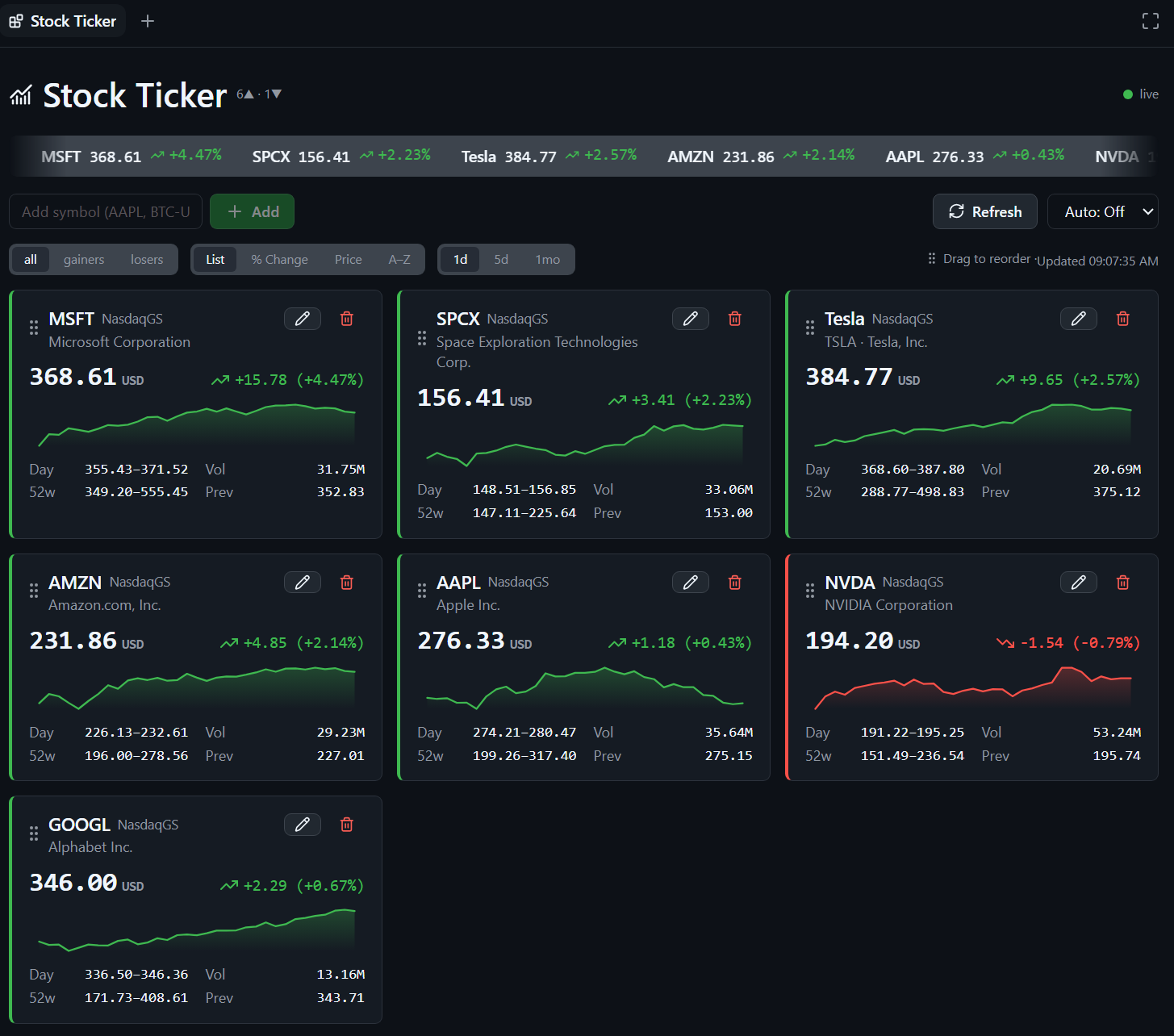
A Stock Ticker canvas built with the kit: live quote cards with sparklines, filter/sort tabs, and a watchlist — Primer-themed, official GitHub icons.
Quickstart
1. Install the skill:
npx skills add jongio/skills --skill create-canvas-app
2. Reload skills — run /skills reload, or start a new session.
3. Ask Copilot to build a canvas:
/create-canvas-app build a kanban board canvas with todo / doing / done columns

That's it. The agent loads the skill, stamps a working canvas with the kit (live shared state, durable storage, Primer theming, official GitHub icons), shapes it to your request, and validates it visually before handing it back.
No agent? Stamp one yourself in one command — see Build without the agent.
What you get
- Live shared state — the agent and the user act on the same state through the same action handlers; updates fan out to every open panel over SSE.
- No keystroke loss — Preact diffs the DOM, so live pushes never clobber
focus or half-typed input (the #1 bug in hand-rolled
innerHTMLcanvases). - Durable per-user storage — state persists under
$COPILOT_HOME/extensions/<name>/artifacts/<domain>.json. - Shared multiplayer storage (optional) —
githubStorebacks the board with a file in a private repo, so collaborators edit one live document and see each other's changes within seconds (poll + adopt); GitHub handles access control. - Primer theming —
ck-*classes mapped to the host theme tokens with GitHub-dark fallbacks. - Official GitHub icons — the exact Lucide set github-app ships
(
lucide-react@1.23.0), vendored and byte-identical. - Host AI in a handler — call the Copilot app's own model from an action with
ctx.ai(question)(silent, no keys, no history) or hand work to the main agent withctx.askAgent(prompt). No API keys, no model picker, no externalfetch. - Deep links into github-app — build a validated
ghapp://URL (open a session, jump to a surface) with the kit's deep-link builders and render it as atarget="_blank"link; the canvas webview routes it into the app's confirmation-gated deeplink pipeline. No OS launcher, no IPC, no SDK. - A generator —
node scripts/new-canvas.mjs <name>stamps a working canvas (--template datafor a fetch + auto-refresh canvas,--template aifor a host-AI canvas) with its own smoke test. - Tests — a standalone HTTP harness, a kit byte-parity check, a generator test, a kit-sync/freshness tooling check, and a Lucide re-vendor determinism test.
Use it
Once installed, invoke the skill by name and describe the canvas you want:
/create-canvas-app make a canvas that tracks release readiness checklist items
/create-canvas-app a canvas to review and triage incoming webhook events
You don't have to name the skill explicitly — the agent routes to it whenever you
ask to "create / scaffold / build a canvas." Invoking /create-canvas-app just
guarantees it.
Install options
The Quickstart installs globally. Other ways:
# Into the current project (.agents/skills/create-canvas-app/):
npx skills add jongio/skills --skill create-canvas-app

# Pin to a branch or tag:
npx skills add jongio/skills#main --skill create-canvas-app
Uses the vercel-labs/skills CLI
(skills.sh) — note the binary is skills (plural). This skill lives in the
jongio/skills monorepo at
skills/create-canvas-app/; the bundled kit/, reference/, and test/
directories are copied in with it.
Copilot plugin marketplace — install through Copilot's native plugin
system. Add the jongio/skills repo as a
marketplace once, then install this skill from it:
copilot plugin marketplace add jongio/skills
copilot plugin install create-canvas-app@jongio-skills
In the Copilot app: Settings → Plugins → Install ▾ → Add marketplace,
enter jongio/skills, then click Install on create-canvas-app. The
root README has a
screenshot walkthrough. Or install every skill at once with
copilot plugin install jongio/skills.
Local install (no network) — clone, then run the bundled installer:
pwsh -File scripts/install-local.ps1
Manual install — copy this whole folder to
$COPILOT_HOME/skills/create-canvas-app/ (~/.copilot/skills/create-canvas-app/
by default).
After any install, reload skills with /skills reload or a new session.
Static minimal path
For read-only or near-static content, use the runtime's vanilla canvas scaffold
(extensions_manage scaffold kind:canvas) and keep its HTML in the single
extension module. Do not add canvas-kit/. If the canvas later needs inputs,
shared state, agent actions, or live updates, regenerate it from one of the
interactive Preact templates below and port the static markup into web/app.mjs.
Do not grow the one-file scaffold into a hand-rolled interactive runtime.
Build without the agent
Prefer to drive it yourself? The generator stamps the same working canvas the skill uses:
# A working list canvas, kit copied in for you:
node scripts/new-canvas.mjs my-board --title "My Board" --dir .github/extensions/my-board

# An external-data canvas (fetch + refresh + visibility-gated auto-refresh):
node scripts/new-canvas.mjs market-feed --template data --dir .github/extensions/market-feed

# A host-AI canvas (silent ctx.ai generation + ctx.askAgent handoff):
node scripts/new-canvas.mjs ai-helper --template ai --dir .github/extensions/ai-helper
Reload extensions, then open the canvas (canvasId: "my-board"). It works out of
the box: add, toggle, and remove items, live, shared between you and the agent.
Each stamped canvas ships a test/smoke.test.mjs — run node test/smoke.test.mjs
from the canvas folder to prove its actions over real HTTP.
Generated templates contain only their required kit modules and exact icon
subset. The complete generated output is budgeted at 130,000 bytes for list,
145,000 bytes for data, and 140,000 bytes for ai; generation fails with the
actual and allowed byte counts if a template grows past its budget.
Target any extension scope with --dir: .github/extensions/<name> (in-repo,
committed), $COPILOT_HOME/extensions/<name> (personal, local to you), or
$COPILOT_HOME/session-state/<sessionId>/extensions/<name> (current session only —
a throwaway canvas that disappears with the session).
Then make it yours:
canvas.mjs— editcreateInitialState, the action handlers, andstatusLine. This file is SDK-free and holds all your logic.web/app.mjs— render the shared state with Preact + htm; callinvoke("<action>", input)from buttons. Keep draft inputs inuseState.web/index.html— the shell; links/kit/theme.cssand./app.mjs.extension.mjs— the only SDK adapter; you rarely touch it.
See SKILL.md for the full authoring contract and reference/decision-log/
for a complete worked example.
Kit synchronization and upgrades
canvas-kit/.kit-features.json deterministically lists the selected canonical
files and icon names. Running node scripts/sync-kit.mjs <extension-dir> reads
that manifest, regenerates the exact subset, and prunes stale files.
check-kit-freshness.mjs validates the same selection offline.
Older generated canvases have no feature manifest. Synchronizing them continues
to copy the full kit so an upgrade cannot silently remove a module they use. To
adopt a smaller scoped kit, generate the matching built-in template and port the
app-specific canvas.mjs and web/ changes into the new extension.
Ship it
Built a canvas you want to keep and reuse? Drop the folder into
jongio/copilot-extensions — a
collection of finished, installable canvases. From there you (or anyone with
access) install one in-app by asking the agent: "install the stock-ticker canvas
from jongio/copilot-extensions/extensions/stock-ticker." No clone, no build.
Layout
SKILL.md                      The Copilot skill (authoring contract + workflow)
kit/                          The canonical kit — copy into your extension as canvas-kit/
  core-client.mjs             Core browser runtime used by scoped templates
  client.mjs                  Backward-compatible full-kit barrel with optional exports
  server.mjs                  SDK-free runtime: /state, /events (SSE), /action, static, inputSchema/stateSchema validation, optional shared-state sync
  storage.mjs                 Durable JSON store — userStore / sessionStore / workspaceStore (atomic, concurrency-safe writes)
  github-store.mjs            Shared repo-backed store — githubStore (multi-writer via the GitHub Contents API; poll + optimistic-lock)
  validate.mjs                Dependency-free JSON-Schema-subset validator (enforces action inputSchema + stateSchema)
  net.mjs                     Server-side egress guard: assertPublicUrl / isBlockedAddress / safeFetch (SSRF-safe fetch + timeout)
  format.mjs                  nid + relativeTime / compactNumber / percent helpers
  deeplinks.mjs               github-app deep-link builders (ghapp://) + safe URL / prompt helpers
  theme.css                   Primer-token styling (ck-* classes)
  icons.mjs                   Lucide Icon component + helpers
  version.mjs                 KIT_VERSION stamp — sync + freshness tooling
  vendor/                     Vendored Preact+htm and the Lucide glyph data
reference/decision-log/       Complete working canvas in the real installed shape
                              (CRUD + host AI + an "Open in github-app" card that
                              demonstrates every ghapp:// deep-link builder)
reference/deeplinks.md        Deep-link schema reference (routes, params, validation)
scripts/
  new-canvas.mjs              Generator — stamp a new canvas (--template list|data|ai)
  kit-features.mjs            Strict feature manifest, icon subset, and size-budget helpers
  sync-kit.mjs                Sync a manifest subset or a legacy full kit, then stamp the version
  check-kit-freshness.mjs     Offline drift gate for scoped and full vendored kits
  vendor-lucide.mjs           Rebuild kit/vendor/lucide.mjs from a pinned lucide-react release
  install-local.ps1           Install this skill into $COPILOT_HOME/skills
test/
  http.test.mjs               Boots the runtime over real HTTP and checks the contract
  client.test.mjs             Unit-tests the DOM-free client transport (connectCanvas): /state, SSE, invoke
  kit-parity.test.mjs         Asserts kit/ == reference canvas-kit/ (no drift)
  deeplinks.test.mjs          Checks the ghapp:// builders: validation, encoding, injection resistance
  generator.test.mjs          Stamps the list/data/ai templates, runs their smoke tests, checks the kit API
  tooling.test.mjs            Exercises the version stamp, sync-kit, and the freshness drift gate
  vendor-lucide.test.mjs      Checks the Lucide vendoring generator (sorting, key-strip, determinism)
  kit-runtime.test.mjs        Checks input/state schema validation, the net.mjs SSRF guard, concurrency-safe storage, the githubStore shared store, and the server sync loop
Run the tests
node test/http.test.mjs
node test/client.test.mjs
node test/kit-parity.test.mjs
node test/deeplinks.test.mjs
node test/generator.test.mjs
node test/tooling.test.mjs
node test/vendor-lucide.test.mjs
node test/kit-runtime.test.mjs
No dependencies to install — everything is vendored. Node 18+ (developed on 24).
npm test runs all eight in sequence.
License
MIT — see LICENSE.
Skill manifest
Create Canvas App
What a canvas is (and when to build one)
A canvas is an interactive surface the agent opens in a side panel via
open_canvas. Both the agent and the user act on the same state
through the same action handlers. Reach for a canvas when chat text or a diff
isn't enough: live dashboards, editors, spreadsheets, trackers, kanban/board
views, document previews, tool-specific workflows.
If the user just needs a non-visual agent tool, build a normal extension tool instead — not a canvas.
Rendering tier — decide first
| Tier | Use when | How |
|---|---|---|
| Static HTML string | Read-only or near-static content; no inputs to protect | The runtime's vanilla scaffold (extensions_manage scaffold kind:canvas). |
| Preact + htm + this kit | Anything interactive: inputs, live updates, lists, forms, shared state | This kit. Default choice for real canvases. |
For the static tier, use the vanilla scaffold as generated and keep the HTML in
its single extension module. Do not copy canvas-kit/ into that extension. Move
to a generated Preact template as soon as the canvas needs inputs, shared state,
agent actions, or live updates. A one-file interactive counter is not the upgrade
path because it duplicates action logic and keeps state per panel.
The single most important reason to use the kit: Preact diffs the DOM, so a
live state push from the agent does not clobber focus, caret position, or
half-typed text in an input. The innerHTML = ... pattern most early canvases
use repaints the whole tree and loses keystrokes on every push. Don't do that.
The model (read this before coding)
extension.mjs   ── the ONLY file that imports the Copilot SDK (thin adapter; also wires host AI)
canvas.mjs      ── your canvas: id, schema, state load/save, action handlers (SDK-free)
canvas-kit/     ── the template's feature-scoped kit (do not edit)
web/index.html  ── shell: loads /kit/theme.css and ./app.mjs
web/app.mjs     ── your Preact view
- State is shared and durable. It's keyed by a domain id resolved from the
open input (
resolveDomainId), not byinstanceId— open the same domain in two panels and they show the same data. Persistence goes throughuserStore(extName, file)→$COPILOT_HOME/extensions/<name>/artifacts/<domain>.json. Two more tiers exist inkit/storage.mjsfor non-durable/scoped state:sessionStore(sessionId, extName, file)(per-session scratch, discarded with the session) andworkspaceStore(workspacePath, file)(rooted at the session workspace). All three write atomically (temp + rename) and serialize concurrent saves to the same file, so a racing agent + UI save can't corrupt orEPERMthe durable file. - Shared, multiplayer state (optional). For a board multiple people edit,
swap the local tier for
githubStore({ owner, repo, path })fromkit/github-store.mjs: it persists the same JSON to a file in a (private) repo via the GitHub Contents API, so every collaborator with push access edits ONE document — GitHub is both the store and the access control. Wire it asloadState/saveState, and addsyncState: () => store.poll()+syncIntervalMsso the runtime polls for other people's edits (cheap ETag304when unchanged) and adopts them live — but only while a panel is being viewed. Writes are optimistic-locked by blob SHA (a conflicting commit re-reads + retries; last-writer-wins by default, or pass amerge(remote, mine)). Token comes fromGH_TOKEN/GITHUB_TOKENorgh auth tokenand is only ever sent as anAuthorizationheader. - Agent and UI share handlers. An action invoked by the agent and the same
action invoked from a button run the identical handler and produce the identical
state mutation. Write the logic once, in
canvas.mjs. - Live updates are automatic. The kit serves
GET /state,GET /events(SSE), andPOST /action.mountCanvaswires them up; every state change fans out to all open panels. - Sensitive session data needs a capability. Set
requireCapability: truein the canvas config for private plans or reports. The runtime returns a per-panel capability URL; the client carries it on state/SSE/action requests and the server checks Host/Origin. Preserve that URL's query string; never publish it or persist it as evidence. Assets remain separate from private data. server.mjsis SDK-free so the whole runtime is testable with plain Node HTTP (seetest/http.test.mjs). Keep SDK calls inextension.mjsonly.
Two kinds of state in the view — keep them separate
- Shared domain state arrives via SSE and is re-rendered on every push. Treat
it as read-only in the view; change it only by calling
invoke(action, input). - Local UI state (a draft input value, the active tab/filter) lives in
useStateand must never be pushed to the server until the user commits it.
Action results & errors — how failures surface
Both callers (agent and UI) hit the same handler, and the runtime wraps every invocation in the same envelope, so model failures deliberately:
- Return a small plain object for success (
{ id, status },{ count }).POST /actionanswers{ ok: true, result }. - Throw for a hard failure (bad input, missing id). The runtime answers
{ ok: false, code, message }— HTTP 400 for a known kit error (e.g. an unknown action) and 500 for a handlerthrow— andmountCanvas'sinvokerejects with aCanvasActionErrorcarrying thatcode/message, so a button handler cantry/catchit. On the agent side,extension.mjsmaps the same error to aCanvasError. A throw is surfaced, never a crash. - For an expected, transient failure (a flaky upstream fetch on a background
poll), don't throw — capture it into
state.errorand return so the error card shows while the poll stays quiet (see the data template'srefresh).
Input & state are schema-validated at the boundary
An action's inputSchema is enforced by the runtime, not just declared: a
payload that violates it (wrong type, missing required field, out-of-enum value,
or an unexpected property under additionalProperties: false) is rejected with
an invalid_input error (HTTP 400) before your handler runs — from the
agent side too. So inputSchema is your typed contract; write it precisely and
your handler only sees well-shaped input. Business rules still live in the
handler (a schema-valid but empty " " title reaches the handler, which
throws → 500). Open input is validated against config.inputSchema the same way.
Optionally set config.stateSchema (same JSON-Schema subset, kit/validate.mjs)
to guard the durable shape: if a handler produces state that violates it, the
mutation is rolled back and the action fails loud (500) instead of persisting
corrupt state. It's opt-in — omit it and any state shape is allowed.
Icons — official GitHub Lucide, always
The kit vendors the exact Lucide set github-app ships (lucide-react@1.23.0,
byte-identical). Use it for every icon; do not hand-write SVGs or pull a CDN.
import { Icon } from "/kit/icons.mjs";
html`<${Icon} name="circle-check" size=${16} />`
Contract: names are kebab-case (circle-check, trash-2, list-todo).
viewBox is fixed 0 0 24 24, stroke-width is 2 — never pass
strokeWidth. Use sizes 12 · 14 · 16 · 20 · 24 · 32. Match github-app's own
glyph choices when there's an obvious mapping (e.g. open=circle-dot,
done=circle-check, bookmark=bookmark). iconNames() / hasIcon(name) are
available if you need to validate.
Theme — Primer tokens, with fallbacks
Link /kit/theme.css and build on its ck-* classes (ck-card, ck-btn,
ck-btn-primary, ck-input, ck-badge, ck-tabs, ck-status, ck-empty, …).
They map to the Primer tokens the runtime injects onto the canvas document, each
with a hardcoded GitHub-dark fallback, so a canvas looks right even if a token is
missing. Add canvas-specific CSS on top; don't restyle the primitives.
Badges are generic. Use the semantic variants ck-badge-success,
ck-badge-accent, ck-badge-muted, ck-badge-danger, ck-badge-attention and
map your statuses to them in the view (the reference does
open → success, decided → accent, parked → muted). Don't add app-specific
status class names to the shared theme.
Loading & error primitives (don't hand-roll these):
ck-spinner— spin animation; pair with a Lucide loader, e.g.html\<$ name="loader-circle" class="ck-spinner" />``.ck-skeleton— shimmering placeholder block for content that's still loading.ck-callout/ck-callout ck-error— an inline notice / error surface for a failed fetch, e.g.html\<$ name="circle-x" size=${16} />$``.
Motion safety is global. theme.css already ships a
@media (prefers-reduced-motion: reduce) guard that neutralizes all animations
and transitions (kit spinners/skeletons and any you add). You do not repeat
it per canvas — but do keep motion decorative, never the only signal.
View API — hooks, helpers, fragments
/kit/client.mjs re-exports the full vendored Preact hook set, not just
useState: useEffect, useRef, useMemo, useCallback, useReducer,
useContext, useLayoutEffect, useImperativeHandle. Call hooks
unconditionally at the top of a component — before any early return
(e.g. the if (!state) return … loading branch comes after your hooks).
It also exports formatting + id helpers so you stop reinventing them:
import { nid, relativeTime, compactNumber, percent } from "/kit/client.mjs";
nid();                       // "lq3k9f2a" — short unique id
relativeTime(iso);           // "5m ago" / "3h ago" / "2d ago" / a date
compactNumber(2_300_000);    // "2.3M"
percent(1.25);               // "+1.25%"
nid is also importable server-side in canvas.mjs via
import { nid } from "./canvas-kit/format.mjs" (the generator does this).
The formatters are locale-aware — relativeTime ends in a
toLocaleDateString(), and compactNumber/percent go through
Number.prototype.toLocaleString, so their output depends on the host locale
("1.5K" vs "1,5 K", 2025-01-31 vs 31/01/2025). Keep the raw values in
durable state (an ISO string, a Number) and format in the view. Never store
a formatted string and never parse one back — formatting is a presentation
concern, and a value formatted under one locale can't be reliably re-read under
another.
Fragment is NOT exported. To return sibling nodes without a wrapper, use
htm's built-in empty-tag syntax — html`<><${A} /><${B} /></>` — or just
return an array of vnodes. Don't import { Fragment }; it isn't there.
External-data canvases — fetch + auto-refresh
Most real canvases aren't user-entered CRUD lists; they pull from the network and refresh. The shape:
fetch()lives in the action handler (or a helper it calls), never in the view. Use the kit'ssafeFetch— it SSRF-guards the URL and applies a hard timeout, so a caller-influenced source can't reach the internal network and a slow upstream can't hang the panel:import { safeFetch } from "./canvas-kit/net.mjs"; async function fetchItems(url) { const res = await safeFetch(url, { headers: { Accept: "application/json" } }); if (!res.ok) throw new Error(`HTTP ${res.status}`); return mapItems(await res.json()); }safeFetchruns server-side on the loopback runtime, so it enforces an SSRF guard (kit/net.mjs): it allows onlyhttp/httpsto a public host and rejects loopback, link-local (incl. cloud metadata), and private ranges — including every address the hostname resolves to — then fetches with anAbortSignal.timeout.assertPublicUrl(url)/isBlockedAddress(ip)are also exported if you need the check without the fetch. Anything you feed back to the agent (e.g. vialist_items) is still attacker-influenced text, so keep the source one you choose and treat fetched content as untrusted (render it as text, neverinnerHTML).Expose a
refreshaction that fetches and writes the result into shared state. Capture failures intostate.errorand return (don't throw) so a background poll tick stays quiet while the error card shows. Capture the input before theawait, and write back with a functionalsetso a concurrent action (another poll, aset_source) isn't clobbered:refresh: { inputSchema: { type: "object", properties: {}, additionalProperties: false }, handler: async ({ state, set }) => { const sourceUrl = state.sourceUrl; // capture before await try { const items = await fetchItems(sourceUrl); set((cur) => cur.sourceUrl !== sourceUrl // drop a stale response ? cur : { ...cur, items, error: null, lastRefresh: new Date().toISOString() }); return { count: items.length }; } catch (err) { set((cur) => ({ ...cur, error: `Couldn't load: ${err.message}`, lastRefresh: new Date().toISOString() })); return { ok: false, error: String(err.message) }; } }, },Poll with the kit, not a raw
setInterval.pollWhileVisible(tick, seconds)runstickon an interval only while the panel is visible (so a backgrounded canvas stops hitting the network) and returns a cleanup function — a drop-inuseEffectreturn:import { pollWhileVisible } from "/kit/client.mjs"; // interval bound to durable state; rebuilds when it changes: useEffect(() => pollWhileVisible(() => invoke("refresh"), state.autoRefreshSec || 0), [state.autoRefreshSec]);For a fixed interval you can skip the effect entirely:
mountCanvas({ view, poll: { action: "refresh", seconds: 60, immediate: true } }).
Stamp this whole shape with node scripts/new-canvas.mjs <name> --template data.
Build a canvas — fastest path
- Stamp it (one working canvas, kit already nested, a smoke test included):
Targetnode scripts/new-canvas.mjs <name> --dir <target> --title "Display Name".github/extensions/<name>for an in-repo extension (committed, shared with the team),$COPILOT_HOME/extensions/<name>for a personal one (local to you), or$COPILOT_HOME/session-state/<sessionId>/extensions/<name>for a throwaway canvas scoped to just the current session — it's discovered like the others (itsextensionIdissession:<sessionId>:<name>) and disappears when the session does. Add--template datafor an external-data canvas (fetch +refresh+ visibility-gated polling), or--template aifor a host-AI canvas (ctx.aisilent generation +ctx.askAgenthandoff), instead of the default user-entered list. - Reload + open. Run
extensions_reload, thenopen_canvaswithcanvasId: "<name>". The list canvas works immediately. - Shape your data. In
canvas.mjs, editcreateInitialState, the action handlers (rename/replaceadd_item/toggle_item/remove_item/list_items), andstatusLine. Keep each handler pure: readstate, callset(next), return a small result. - Shape the view. In
web/app.mjs, render the shared state and callinvoke("<action>", input)from controls. Keep drafts inuseState. - Add an action both sides use. Give the agent a verb (e.g.
add_item) and wire the same verb to a button — one handler, two callers.
If you prefer to hand-assemble instead of using the generator: copy kit/ into
your extension as canvas-kit/, then copy reference/decision-log/extension.mjs
verbatim and adapt canvas.mjs + web/ from the reference.
Keeping your vendored kit in sync
A generated extension vendors only the canonical files and icons required by its
built-in template. canvas-kit/.kit-features.json records that exact selection.
Older extensions without the manifest remain full-kit consumers. The kit version is still exported by kit/version.mjs, /kit/core-client.mjs,
and the backward-compatible full-kit /kit/client.mjs barrel.
Re-sync after a kit change. Bump
KIT_VERSIONwhen you change any kit file, then refresh each vendored copy:node scripts/sync-kit.mjs <extension-dir>For a generated scoped kit, this regenerates the files and icon names recorded in
.kit-features.json, overwrites changes, and prunes stale files. For an older extension without that manifest, it preserves compatibility by writing the complete kit. Both paths record the version in<extension-dir>/canvas-kit/.kit-version.json.Gate drift in CI (offline). Fail the build if any vendored kit has drifted from
kit/— by file set, by file contents, or by recorded version:node scripts/check-kit-freshness.mjs <extensions-dir>Point it at a folder of extensions (e.g.
.github/extensions), a single extension dir, or acanvas-kit/dir. Exit 0 = all fresh; exit 1 = drift, with the offending files listed. It runs no network and needs no dependencies.
Both .kit-version.json and .kit-features.json are metadata, not canonical kit
files. The feature manifest is deterministic and fully lists the selected
canonical files and icons.
To reduce an older full-kit canvas, regenerate the matching built-in template
and port the app-specific canvas.mjs and web/ changes into it. Do not create a
feature manifest by hand because a missing dependency could make the extension
fail only at runtime.
- Re-vendor the Lucide glyphs (rare).
kit/vendor/lucide.mjsis AUTO-GENERATED to match the exactlucide-reactrelease the Copilot host app ships, so canvases render the same glyphs the host does. When the host bumps its Lucide version, regenerate the file deterministically rather than hand-editing:
Then bumpnode scripts/vendor-lucide.mjs <version>KIT_VERSIONand re-sync vendored copies. Pass--icons-dir <path>to vendor from an existing install instead of fetching one.
Validate visually — don't claim done without looking
A canvas isn't done because the server boots. Verify the UI:
- Run the standalone HTTP test to prove the runtime contract:
node test/http.test.mjs(andnode test/client.test.mjs,node test/kit-parity.test.mjs,node test/generator.test.mjs,node test/tooling.test.mjs,node test/vendor-lucide.test.mjs,node test/kit-runtime.test.mjs). A stamped canvas ships its owntest/smoke.test.mjs— run it from the canvas folder (node test/smoke.test.mjs) to prove its actions over real HTTP. - Open the canvas and look at it (Playwright or the browser canvas): navigate to the panel, assert key text/controls render, take a screenshot.
- Drive an action from the UI and invoke the same action as the agent; confirm both update the panel live (SSE) without losing input focus.
- Only then report it as working.
Reference + tests (study these)
reference/decision-log/— a complete, working canvas in the exact installed shape (kit nested ascanvas-kit/). Best example of every contract above — including the host model: asummarizeaction (silentctx.ai) and ahand_to_agentaction (ctx.askAgent), each capturing model errors into state. It also demonstrates every deep-link builder: aset_repoaction, a per-decision "Open in session" link, and an "Open in github-app" card (Chats, new automation, issue/PR, open-by-session-id, and a hosted-launcher web-links toggle).reference/deeplinks.md— the deep-link schema reference: routes, parameters, the validation the builders apply, the webview mechanism, and how to add a route.kit/— the canonical kit you copy in. Source of truth.test/http.test.mjs— boots the SDK-free runtime over real HTTP and checks/state,/events,/action, static serving, path-traversal safety, and the host-model actions (offline-error capture + a wired-host stub).test/client.test.mjs— unit-tests the DOM-free client transport (connectCanvas): the initial/statefetch, SSE state pushes + connected flag, andinvoke→POST /action(result +CanvasActionErroron failure), with stubbedfetch/EventSource(no browser needed).test/kit-parity.test.mjs— guaranteeskit/and the reference's bundledcanvas-kit/stay byte-identical.test/deeplinks.test.mjs— checks theghapp://builders: input validation (matching github-app), param encoding, injection resistance, and the launcher wrapper.test/generator.test.mjs— stamps the list, data, and ai templates, runs their smoke tests, and checks the kit API surface (format helpers, poll helper, theme primitives, host-model wiring).test/tooling.test.mjs— exercises the version stamp (kit/version.mjs),scripts/sync-kit.mjs, and the offlinescripts/check-kit-freshness.mjsdrift gate.test/vendor-lucide.test.mjs— checks the Lucide vendoring generator (scripts/vendor-lucide.mjs): sorting,key-strip, alias mapping, determinism.test/kit-runtime.test.mjs— exercises the runtime hardening:kit/validate.mjsinput/stateSchemavalidation (incl. prototype-key safety), thekit/net.mjsSSRF guard (assertPublicUrl/safeFetch, IPv4-mapped-IPv6 forms), concurrency-safekit/storage.mjssaves +sessionStore, thekit/github-store.mjsshared store (mocked fetch: load/decode, ETag304poll,409re-read+retry,404fallback) and the server'ssyncStateadopt-and-broadcast loop, prototype-safekit/icons.mjsname resolution, and the server's bounded SSE subscriber cap.
Footguns
- Never hand
open_canvasaninstanceIdoutside^[A-Za-z0-9][A-Za-z0-9._-]{0,127}$— ≤128 chars, an alphanumeric first character, then onlyA-Za-z0-9._-. A malformed handle (leading-/_, spaces, over-long) is rejected by the runtime withInvalid canvas instance IDbefore your canvas ever opens. - Never reach for the model with
fetch/API keys or aclient.createSession()sub-session (it hangs from an extension) — usectx.ai(...)for silent generation,ctx.askAgent(...)to drive the main agent. - Never hand-build a
ghapp://URL, and never omittarget="_blank"on a deep-link anchor. Use the kit builders (buildSessionDeepLink, …) and render atarget="_blank"link so the canvas webview routes it into the app.
Files (skills)
-
docs
-
invoke.png 13 KB · in bundle
-
stock-ticker.png 176.2 KB · in bundle
-
-
evals
-
create-canvas-app
-
eval.yaml 12.7 KB
Loading…
-
-
README.md 2.4 KB
Loading…
-
-
kit
-
vendor
-
lucide.mjs 386.5 KB · in bundle
-
preact-htm-standalone.mjs 12.9 KB · in bundle
-
-
client.mjs 641 B · in bundle
-
core-client.mjs 8.3 KB · in bundle
-
deeplinks.mjs 15.9 KB · in bundle
-
format.mjs 3.1 KB · in bundle
-
github-store.mjs 9.8 KB · in bundle
-
icons.mjs 4.1 KB · in bundle
-
net.mjs 6 KB · in bundle
-
server.mjs 22.2 KB · in bundle
-
storage.mjs 5.1 KB · in bundle
-
theme.css 11.8 KB · in bundle
-
validate.mjs 6.1 KB · in bundle
-
version.mjs 683 B · in bundle
-
-
reference
-
decision-log
-
canvas-kit
-
vendor
-
lucide.mjs 386.5 KB · in bundle
-
preact-htm-standalone.mjs 12.9 KB · in bundle
-
-
.kit-version.json 111 B
Loading… -
client.mjs 641 B · in bundle
-
core-client.mjs 8.3 KB · in bundle
-
deeplinks.mjs 15.9 KB · in bundle
-
format.mjs 3.1 KB · in bundle
-
github-store.mjs 9.8 KB · in bundle
-
icons.mjs 4.1 KB · in bundle
-
net.mjs 6 KB · in bundle
-
server.mjs 22.2 KB · in bundle
-
storage.mjs 5.1 KB · in bundle
-
theme.css 11.8 KB · in bundle
-
validate.mjs 6.1 KB · in bundle
-
version.mjs 683 B · in bundle
-
-
web
-
app.mjs 16.5 KB · in bundle
-
index.html 770 B · in bundle
-
-
canvas.mjs 11.9 KB · in bundle
-
copilot-extension.json 45 B
Loading… -
extension.mjs 2.6 KB · in bundle
-
-
deeplinks.md 9 KB
Loading…
-
-
references
-
advanced-patterns.md 13.8 KB
Loading…
-
-
scripts
-
check-kit-freshness.mjs 5.7 KB · in bundle
-
install-local.ps1 1.2 KB · in bundle
-
kit-features.mjs 4.4 KB · in bundle
-
new-canvas.mjs 48.6 KB · in bundle
-
sync-kit.mjs 5.2 KB · in bundle
-
vendor-lucide.mjs 7.9 KB · in bundle
-
-
test
-
client.test.mjs 5.7 KB · in bundle
-
deeplinks.test.mjs 18.1 KB · in bundle
-
generator.test.mjs 19.2 KB · in bundle
-
http.test.mjs 15.3 KB · in bundle
-
kit-parity.test.mjs 2.9 KB · in bundle
-
kit-runtime.test.mjs 24.8 KB · in bundle
-
tooling.test.mjs 12 KB · in bundle
-
vendor-lucide.test.mjs 5 KB · in bundle
-
-
.npmrc 18 B · in bundle
-
.vally.yaml 907 B
Loading… -
LICENSE 1 KB · in bundle
-
package-lock.json 108.1 KB
Loading… -
package.json 985 B
Loading… -
README.md 12.3 KB
# create-canvas-app Build **GitHub Copilot App canvas extensions** the right way, fast — a no-build Preact + htm kit packaged as a Copilot skill. A canvas is an interactive side-panel surface the Copilot agent can open and drive: dashboards, editors, trackers, boards, document previews.  > A Stock Ticker canvas built with the kit: live quote cards with sparklines, > filter/sort tabs, and a watchlist — Primer-themed, official GitHub icons. ## Quickstart **1. Install the skill**: ```sh npx skills add jongio/skills --skill create-canvas-app ``` **2. Reload skills** — run `/skills reload`, or start a new session. **3. Ask Copilot to build a canvas:** ```text /create-canvas-app build a kanban board canvas with todo / doing / done columns ```  That's it. The agent loads the skill, stamps a working canvas with the kit (live shared state, durable storage, Primer theming, official GitHub icons), shapes it to your request, and validates it visually before handing it back. > No agent? Stamp one yourself in one command — see > [Build without the agent](#build-without-the-agent). ## What you get - **Live shared state** — the agent and the user act on the same state through the same action handlers; updates fan out to every open panel over SSE. - **No keystroke loss** — Preact diffs the DOM, so live pushes never clobber focus or half-typed input (the #1 bug in hand-rolled `innerHTML` canvases). - **Durable per-user storage** — state persists under `$COPILOT_HOME/extensions/<name>/artifacts/<domain>.json`. - **Shared multiplayer storage (optional)** — `githubStore` backs the board with a file in a private repo, so collaborators edit one live document and see each other's changes within seconds (poll + adopt); GitHub handles access control. - **Primer theming** — `ck-*` classes mapped to the host theme tokens with GitHub-dark fallbacks. - **Official GitHub icons** — the exact Lucide set github-app ships (`lucide-react@1.23.0`), vendored and byte-identical. - **Host AI in a handler** — call the Copilot app's own model from an action with `ctx.ai(question)` (silent, no keys, no history) or hand work to the main agent with `ctx.askAgent(prompt)`. No API keys, no model picker, no external `fetch`. - **Deep links into github-app** — build a validated `ghapp://` URL (open a session, jump to a surface) with the kit's deep-link builders and render it as a `target="_blank"` link; the canvas webview routes it into the app's confirmation-gated deeplink pipeline. No OS launcher, no IPC, no SDK. - **A generator** — `node scripts/new-canvas.mjs <name>` stamps a working canvas (`--template data` for a fetch + auto-refresh canvas, `--template ai` for a host-AI canvas) with its own smoke test. - **Tests** — a standalone HTTP harness, a kit byte-parity check, a generator test, a kit-sync/freshness tooling check, and a Lucide re-vendor determinism test. ## Use it Once installed, invoke the skill by name and describe the canvas you want: ```text /create-canvas-app make a canvas that tracks release readiness checklist items ``` ```text /create-canvas-app a canvas to review and triage incoming webhook events ``` You don't have to name the skill explicitly — the agent routes to it whenever you ask to "create / scaffold / build a canvas." Invoking `/create-canvas-app` just guarantees it. ## Install options The Quickstart installs globally. Other ways: ```sh # Into the current project (.agents/skills/create-canvas-app/): npx skills add jongio/skills --skill create-canvas-app # Pin to a branch or tag: npx skills add jongio/skills#main --skill create-canvas-app ``` Uses the [`vercel-labs/skills`](https://github.com/vercel-labs/skills) CLI (`skills.sh`) — note the binary is **`skills`** (plural). This skill lives in the [`jongio/skills`](https://github.com/jongio/skills) monorepo at `skills/create-canvas-app/`; the bundled `kit/`, `reference/`, and `test/` directories are copied in with it. **Copilot plugin marketplace** — install through Copilot's native plugin system. Add the [`jongio/skills`](https://github.com/jongio/skills) repo as a marketplace once, then install this skill from it: ```sh copilot plugin marketplace add jongio/skills copilot plugin install create-canvas-app@jongio-skills ``` In the Copilot app: **Settings → Plugins → Install ▾ → Add marketplace**, enter `jongio/skills`, then click **Install** on `create-canvas-app`. The [root README](../../README.md#add-as-a-marketplace-or-install-as-a-plugin) has a screenshot walkthrough. Or install every skill at once with `copilot plugin install jongio/skills`. **Local install (no network)** — clone, then run the bundled installer: ```sh pwsh -File scripts/install-local.ps1 ``` **Manual install** — copy this whole folder to `$COPILOT_HOME/skills/create-canvas-app/` (`~/.copilot/skills/create-canvas-app/` by default). After any install, reload skills with `/skills reload` or a new session. ## Static minimal path For read-only or near-static content, use the runtime's vanilla canvas scaffold (`extensions_manage scaffold kind:canvas`) and keep its HTML in the single extension module. Do not add `canvas-kit/`. If the canvas later needs inputs, shared state, agent actions, or live updates, regenerate it from one of the interactive Preact templates below and port the static markup into `web/app.mjs`. Do not grow the one-file scaffold into a hand-rolled interactive runtime. ## Build without the agent Prefer to drive it yourself? The generator stamps the same working canvas the skill uses: ```sh # A working list canvas, kit copied in for you: node scripts/new-canvas.mjs my-board --title "My Board" --dir .github/extensions/my-board # An external-data canvas (fetch + refresh + visibility-gated auto-refresh): node scripts/new-canvas.mjs market-feed --template data --dir .github/extensions/market-feed # A host-AI canvas (silent ctx.ai generation + ctx.askAgent handoff): node scripts/new-canvas.mjs ai-helper --template ai --dir .github/extensions/ai-helper ``` Reload extensions, then open the canvas (`canvasId: "my-board"`). It works out of the box: add, toggle, and remove items, live, shared between you and the agent. Each stamped canvas ships a `test/smoke.test.mjs` — run `node test/smoke.test.mjs` from the canvas folder to prove its actions over real HTTP. Generated templates contain only their required kit modules and exact icon subset. The complete generated output is budgeted at 130,000 bytes for `list`, 145,000 bytes for `data`, and 140,000 bytes for `ai`; generation fails with the actual and allowed byte counts if a template grows past its budget. Target any extension scope with `--dir`: `.github/extensions/<name>` (in-repo, committed), `$COPILOT_HOME/extensions/<name>` (personal, local to you), or `$COPILOT_HOME/session-state/<sessionId>/extensions/<name>` (current session only — a throwaway canvas that disappears with the session). Then make it yours: 1. **`canvas.mjs`** — edit `createInitialState`, the action handlers, and `statusLine`. This file is SDK-free and holds all your logic. 2. **`web/app.mjs`** — render the shared state with Preact + htm; call `invoke("<action>", input)` from buttons. Keep draft inputs in `useState`. 3. **`web/index.html`** — the shell; links `/kit/theme.css` and `./app.mjs`. 4. **`extension.mjs`** — the only SDK adapter; you rarely touch it. See **`SKILL.md`** for the full authoring contract and **`reference/decision-log/`** for a complete worked example. ### Kit synchronization and upgrades `canvas-kit/.kit-features.json` deterministically lists the selected canonical files and icon names. Running `node scripts/sync-kit.mjs <extension-dir>` reads that manifest, regenerates the exact subset, and prunes stale files. `check-kit-freshness.mjs` validates the same selection offline. Older generated canvases have no feature manifest. Synchronizing them continues to copy the full kit so an upgrade cannot silently remove a module they use. To adopt a smaller scoped kit, generate the matching built-in template and port the app-specific `canvas.mjs` and `web/` changes into the new extension. ## Ship it Built a canvas you want to keep and reuse? Drop the folder into [`jongio/copilot-extensions`](https://github.com/jongio/copilot-extensions) — a collection of finished, installable canvases. From there you (or anyone with access) install one in-app by asking the agent: *"install the stock-ticker canvas from jongio/copilot-extensions/extensions/stock-ticker."* No clone, no build. ## Layout ```text SKILL.md The Copilot skill (authoring contract + workflow) kit/ The canonical kit — copy into your extension as canvas-kit/ core-client.mjs Core browser runtime used by scoped templates client.mjs Backward-compatible full-kit barrel with optional exports server.mjs SDK-free runtime: /state, /events (SSE), /action, static, inputSchema/stateSchema validation, optional shared-state sync storage.mjs Durable JSON store — userStore / sessionStore / workspaceStore (atomic, concurrency-safe writes) github-store.mjs Shared repo-backed store — githubStore (multi-writer via the GitHub Contents API; poll + optimistic-lock) validate.mjs Dependency-free JSON-Schema-subset validator (enforces action inputSchema + stateSchema) net.mjs Server-side egress guard: assertPublicUrl / isBlockedAddress / safeFetch (SSRF-safe fetch + timeout) format.mjs nid + relativeTime / compactNumber / percent helpers deeplinks.mjs github-app deep-link builders (ghapp://) + safe URL / prompt helpers theme.css Primer-token styling (ck-* classes) icons.mjs Lucide Icon component + helpers version.mjs KIT_VERSION stamp — sync + freshness tooling vendor/ Vendored Preact+htm and the Lucide glyph data reference/decision-log/ Complete working canvas in the real installed shape (CRUD + host AI + an "Open in github-app" card that demonstrates every ghapp:// deep-link builder) reference/deeplinks.md Deep-link schema reference (routes, params, validation) scripts/ new-canvas.mjs Generator — stamp a new canvas (--template list|data|ai) kit-features.mjs Strict feature manifest, icon subset, and size-budget helpers sync-kit.mjs Sync a manifest subset or a legacy full kit, then stamp the version check-kit-freshness.mjs Offline drift gate for scoped and full vendored kits vendor-lucide.mjs Rebuild kit/vendor/lucide.mjs from a pinned lucide-react release install-local.ps1 Install this skill into $COPILOT_HOME/skills test/ http.test.mjs Boots the runtime over real HTTP and checks the contract client.test.mjs Unit-tests the DOM-free client transport (connectCanvas): /state, SSE, invoke kit-parity.test.mjs Asserts kit/ == reference canvas-kit/ (no drift) deeplinks.test.mjs Checks the ghapp:// builders: validation, encoding, injection resistance generator.test.mjs Stamps the list/data/ai templates, runs their smoke tests, checks the kit API tooling.test.mjs Exercises the version stamp, sync-kit, and the freshness drift gate vendor-lucide.test.mjs Checks the Lucide vendoring generator (sorting, key-strip, determinism) kit-runtime.test.mjs Checks input/state schema validation, the net.mjs SSRF guard, concurrency-safe storage, the githubStore shared store, and the server sync loop ``` ## Run the tests ```sh node test/http.test.mjs node test/client.test.mjs node test/kit-parity.test.mjs node test/deeplinks.test.mjs node test/generator.test.mjs node test/tooling.test.mjs node test/vendor-lucide.test.mjs node test/kit-runtime.test.mjs ``` No dependencies to install — everything is vendored. Node 18+ (developed on 24). `npm test` runs all eight in sequence. ## License MIT — see [LICENSE](./LICENSE). -
SKILL.md 23 KB
--- name: create-canvas-app description: >- Build a GitHub Copilot App canvas extension the right way, fast. Use when the user wants to create, scaffold, or improve an interactive canvas (a side-panel UI the agent can open and drive) — dashboards, editors, trackers, boards, document/preview surfaces. Provides a no-build Preact + htm kit with live SSE state, durable per-user storage, Primer theming, and the official GitHub Lucide icon set, plus a generator that stamps a working canvas in one command. Do NOT use for non-canvas extensions (plain agent tools) or for shipping web apps unrelated to Copilot canvases. metadata: version: "1.1.0" --- # Create Canvas App ## What a canvas is (and when to build one) A canvas is an interactive surface the agent opens in a side panel via `open_canvas`. Both the **agent** and the **user** act on the **same state** through the **same action handlers**. Reach for a canvas when chat text or a diff isn't enough: live dashboards, editors, spreadsheets, trackers, kanban/board views, document previews, tool-specific workflows. If the user just needs a non-visual agent tool, build a normal extension tool instead — not a canvas. ## Rendering tier — decide first | Tier | Use when | How | | --- | --- | --- | | **Static HTML string** | Read-only or near-static content; no inputs to protect | The runtime's vanilla scaffold (`extensions_manage scaffold kind:canvas`). | | **Preact + htm + this kit** | Anything interactive: inputs, live updates, lists, forms, shared state | This kit. **Default choice for real canvases.** | For the static tier, use the vanilla scaffold as generated and keep the HTML in its single extension module. Do not copy `canvas-kit/` into that extension. Move to a generated Preact template as soon as the canvas needs inputs, shared state, agent actions, or live updates. A one-file interactive counter is not the upgrade path because it duplicates action logic and keeps state per panel. The single most important reason to use the kit: **Preact diffs the DOM**, so a live state push from the agent does **not** clobber focus, caret position, or half-typed text in an input. The `innerHTML = ...` pattern most early canvases use repaints the whole tree and loses keystrokes on every push. Don't do that. ## The model (read this before coding) ```text extension.mjs ── the ONLY file that imports the Copilot SDK (thin adapter; also wires host AI) canvas.mjs ── your canvas: id, schema, state load/save, action handlers (SDK-free) canvas-kit/ ── the template's feature-scoped kit (do not edit) web/index.html ── shell: loads /kit/theme.css and ./app.mjs web/app.mjs ── your Preact view ``` - **State is shared and durable.** It's keyed by a *domain id* resolved from the open input (`resolveDomainId`), **not** by `instanceId` — open the same domain in two panels and they show the same data. Persistence goes through `userStore(extName, file)` → `$COPILOT_HOME/extensions/<name>/artifacts/<domain>.json`. Two more tiers exist in `kit/storage.mjs` for non-durable/scoped state: `sessionStore(sessionId, extName, file)` (per-session scratch, discarded with the session) and `workspaceStore(workspacePath, file)` (rooted at the session workspace). All three write atomically (temp + rename) and **serialize concurrent saves to the same file**, so a racing agent + UI save can't corrupt or `EPERM` the durable file. - **Shared, multiplayer state (optional).** For a board multiple *people* edit, swap the local tier for `githubStore({ owner, repo, path })` from `kit/github-store.mjs`: it persists the same JSON to a file in a (private) repo via the GitHub Contents API, so every collaborator with push access edits ONE document — GitHub is both the store and the access control. Wire it as `loadState`/`saveState`, and add `syncState: () => store.poll()` + `syncIntervalMs` so the runtime polls for other people's edits (cheap ETag `304` when unchanged) and adopts them live — but only while a panel is being viewed. Writes are optimistic-locked by blob SHA (a conflicting commit re-reads + retries; last-writer-wins by default, or pass a `merge(remote, mine)`). Token comes from `GH_TOKEN`/`GITHUB_TOKEN` or `gh auth token` and is only ever sent as an `Authorization` header. - **Agent and UI share handlers.** An action invoked by the agent and the same action invoked from a button run the identical handler and produce the identical state mutation. Write the logic once, in `canvas.mjs`. - **Live updates are automatic.** The kit serves `GET /state`, `GET /events` (SSE), and `POST /action`. `mountCanvas` wires them up; every state change fans out to all open panels. - **Sensitive session data needs a capability.** Set `requireCapability: true` in the canvas config for private plans or reports. The runtime returns a per-panel capability URL; the client carries it on state/SSE/action requests and the server checks Host/Origin. Preserve that URL's query string; never publish it or persist it as evidence. Assets remain separate from private data. - **`server.mjs` is SDK-free** so the whole runtime is testable with plain Node HTTP (see `test/http.test.mjs`). Keep SDK calls in `extension.mjs` only. ### Two kinds of state in the view — keep them separate - **Shared domain state** arrives via SSE and is re-rendered on every push. Treat it as read-only in the view; change it only by calling `invoke(action, input)`. - **Local UI state** (a draft input value, the active tab/filter) lives in `useState` and must never be pushed to the server until the user commits it. ### Action results & errors — how failures surface Both callers (agent and UI) hit the same handler, and the runtime wraps every invocation in the same envelope, so model failures deliberately: - **Return** a small plain object for success (`{ id, status }`, `{ count }`). `POST /action` answers `{ ok: true, result }`. - **Throw** for a hard failure (bad input, missing id). The runtime answers `{ ok: false, code, message }` — HTTP **400** for a known kit error (e.g. an unknown action) and **500** for a handler `throw` — and `mountCanvas`'s `invoke` **rejects** with a `CanvasActionError` carrying that `code`/`message`, so a button handler can `try/catch` it. On the agent side, `extension.mjs` maps the same error to a `CanvasError`. A throw is *surfaced*, never a crash. - For an **expected, transient** failure (a flaky upstream fetch on a background poll), don't throw — capture it into `state.error` and **return** so the error card shows while the poll stays quiet (see the data template's `refresh`). ### Input & state are schema-validated at the boundary An action's `inputSchema` is **enforced by the runtime**, not just declared: a payload that violates it (wrong type, missing required field, out-of-enum value, or an unexpected property under `additionalProperties: false`) is rejected with an `invalid_input` error (**HTTP 400**) *before* your handler runs — from the agent side too. So `inputSchema` is your typed contract; write it precisely and your handler only sees well-shaped input. **Business rules still live in the handler** (a schema-valid but empty `" "` title reaches the handler, which throws → 500). Open input is validated against `config.inputSchema` the same way. Optionally set `config.stateSchema` (same JSON-Schema subset, `kit/validate.mjs`) to guard the **durable shape**: if a handler produces state that violates it, the mutation is rolled back and the action fails loud (500) instead of persisting corrupt state. It's opt-in — omit it and any state shape is allowed. ## Icons — official GitHub Lucide, always The kit vendors the **exact Lucide set github-app ships** (`lucide-react@1.23.0`, byte-identical). Use it for *every* icon; do not hand-write SVGs or pull a CDN. ```js import { Icon } from "/kit/icons.mjs"; html`<${Icon} name="circle-check" size=${16} />` ``` Contract: names are **kebab-case** (`circle-check`, `trash-2`, `list-todo`). `viewBox` is fixed `0 0 24 24`, `stroke-width` is `2` — **never** pass `strokeWidth`. Use sizes `12 · 14 · 16 · 20 · 24 · 32`. Match github-app's own glyph choices when there's an obvious mapping (e.g. open=`circle-dot`, done=`circle-check`, bookmark=`bookmark`). `iconNames()` / `hasIcon(name)` are available if you need to validate. ## Theme — Primer tokens, with fallbacks Link `/kit/theme.css` and build on its `ck-*` classes (`ck-card`, `ck-btn`, `ck-btn-primary`, `ck-input`, `ck-badge`, `ck-tabs`, `ck-status`, `ck-empty`, …). They map to the Primer tokens the runtime injects onto the canvas document, each with a hardcoded GitHub-dark fallback, so a canvas looks right even if a token is missing. Add canvas-specific CSS on top; don't restyle the primitives. **Badges are generic.** Use the semantic variants `ck-badge-success`, `ck-badge-accent`, `ck-badge-muted`, `ck-badge-danger`, `ck-badge-attention` and map *your* statuses to them in the view (the reference does `open → success, decided → accent, parked → muted`). Don't add app-specific status class names to the shared theme. **Loading & error primitives** (don't hand-roll these): - `ck-spinner` — spin animation; pair with a Lucide loader, e.g. `html\`<\${Icon} name="loader-circle" class="ck-spinner" />\``. - `ck-skeleton` — shimmering placeholder block for content that's still loading. - `ck-callout` / `ck-callout ck-error` — an inline notice / error surface for a failed fetch, e.g. `html\`<div class="ck-callout ck-error"><\${Icon} name="circle-x" size=\${16} /><span>\${state.error}</span></div>\``. **Motion safety is global.** `theme.css` already ships a `@media (prefers-reduced-motion: reduce)` guard that neutralizes *all* animations and transitions (kit spinners/skeletons and any you add). You do **not** repeat it per canvas — but do keep motion decorative, never the only signal. ## View API — hooks, helpers, fragments `/kit/client.mjs` re-exports the full vendored Preact hook set, not just `useState`: `useEffect`, `useRef`, `useMemo`, `useCallback`, `useReducer`, `useContext`, `useLayoutEffect`, `useImperativeHandle`. Call hooks unconditionally at the top of a component — **before** any early `return` (e.g. the `if (!state) return …` loading branch comes after your hooks). It also exports formatting + id helpers so you stop reinventing them: ```js import { nid, relativeTime, compactNumber, percent } from "/kit/client.mjs"; nid(); // "lq3k9f2a" — short unique id relativeTime(iso); // "5m ago" / "3h ago" / "2d ago" / a date compactNumber(2_300_000); // "2.3M" percent(1.25); // "+1.25%" ``` `nid` is also importable server-side in `canvas.mjs` via `import { nid } from "./canvas-kit/format.mjs"` (the generator does this). **The formatters are locale-aware** — `relativeTime` ends in a `toLocaleDateString()`, and `compactNumber`/`percent` go through `Number.prototype.toLocaleString`, so their output depends on the host locale (`"1.5K"` vs `"1,5 K"`, `2025-01-31` vs `31/01/2025`). Keep the **raw** values in durable state (an ISO string, a `Number`) and format **in the view**. Never store a formatted string and never parse one back — formatting is a presentation concern, and a value formatted under one locale can't be reliably re-read under another. **`Fragment` is NOT exported.** To return sibling nodes without a wrapper, use htm's built-in empty-tag syntax — `` html`<><${A} /><${B} /></>` `` — or just return an array of vnodes. Don't `import { Fragment }`; it isn't there. ## External-data canvases — fetch + auto-refresh Most real canvases aren't user-entered CRUD lists; they pull from the network and refresh. The shape: 1. **`fetch()` lives in the action handler (or a helper it calls), never in the view.** Use the kit's **`safeFetch`** — it SSRF-guards the URL and applies a hard timeout, so a caller-influenced source can't reach the internal network and a slow upstream can't hang the panel: ```js import { safeFetch } from "./canvas-kit/net.mjs"; async function fetchItems(url) { const res = await safeFetch(url, { headers: { Accept: "application/json" } }); if (!res.ok) throw new Error(`HTTP ${res.status}`); return mapItems(await res.json()); } ``` `safeFetch` runs server-side on the loopback runtime, so it enforces an **SSRF guard** (`kit/net.mjs`): it allows only `http`/`https` to a **public** host and rejects loopback, link-local (incl. cloud metadata), and private ranges — including every address the hostname resolves to — then fetches with an `AbortSignal.timeout`. `assertPublicUrl(url)` / `isBlockedAddress(ip)` are also exported if you need the check without the fetch. Anything you feed back to the agent (e.g. via `list_items`) is still attacker-influenced text, so keep the source one *you* choose and treat fetched content as untrusted (render it as text, never `innerHTML`). 2. **Expose a `refresh` action** that fetches and writes the result into shared state. Capture failures into `state.error` and *return* (don't throw) so a background poll tick stays quiet while the error card shows. Capture the input **before** the `await`, and write back with a **functional `set`** so a concurrent action (another poll, a `set_source`) isn't clobbered: ```js refresh: { inputSchema: { type: "object", properties: {}, additionalProperties: false }, handler: async ({ state, set }) => { const sourceUrl = state.sourceUrl; // capture before await try { const items = await fetchItems(sourceUrl); set((cur) => cur.sourceUrl !== sourceUrl // drop a stale response ? cur : { ...cur, items, error: null, lastRefresh: new Date().toISOString() }); return { count: items.length }; } catch (err) { set((cur) => ({ ...cur, error: `Couldn't load: ${err.message}`, lastRefresh: new Date().toISOString() })); return { ok: false, error: String(err.message) }; } }, }, ``` 3. **Poll with the kit, not a raw `setInterval`.** `pollWhileVisible(tick, seconds)` runs `tick` on an interval **only while the panel is visible** (so a backgrounded canvas stops hitting the network) and returns a cleanup function — a drop-in `useEffect` return: ```js import { pollWhileVisible } from "/kit/client.mjs"; // interval bound to durable state; rebuilds when it changes: useEffect(() => pollWhileVisible(() => invoke("refresh"), state.autoRefreshSec || 0), [state.autoRefreshSec]); ``` For a fixed interval you can skip the effect entirely: `mountCanvas({ view, poll: { action: "refresh", seconds: 60, immediate: true } })`. Stamp this whole shape with `node scripts/new-canvas.mjs <name> --template data`. ## Build a canvas — fastest path 1. **Stamp it** (one working canvas, kit already nested, a smoke test included): ```sh node scripts/new-canvas.mjs <name> --dir <target> --title "Display Name" ``` Target `.github/extensions/<name>` for an in-repo extension (committed, shared with the team), `$COPILOT_HOME/extensions/<name>` for a personal one (local to you), or `$COPILOT_HOME/session-state/<sessionId>/extensions/<name>` for a throwaway canvas scoped to just the current session — it's discovered like the others (its `extensionId` is `session:<sessionId>:<name>`) and disappears when the session does. Add `--template data` for an external-data canvas (fetch + `refresh` + visibility-gated polling), or `--template ai` for a host-AI canvas (`ctx.ai` silent generation + `ctx.askAgent` handoff), instead of the default user-entered list. 2. **Reload + open.** Run `extensions_reload`, then `open_canvas` with `canvasId: "<name>"`. The list canvas works immediately. 3. **Shape your data.** In `canvas.mjs`, edit `createInitialState`, the action handlers (rename/replace `add_item`/`toggle_item`/`remove_item`/`list_items`), and `statusLine`. Keep each handler pure: read `state`, call `set(next)`, return a small result. 4. **Shape the view.** In `web/app.mjs`, render the shared state and call `invoke("<action>", input)` from controls. Keep drafts in `useState`. 5. **Add an action both sides use.** Give the agent a verb (e.g. `add_item`) and wire the same verb to a button — one handler, two callers. If you prefer to hand-assemble instead of using the generator: copy `kit/` into your extension as `canvas-kit/`, then copy `reference/decision-log/extension.mjs` verbatim and adapt `canvas.mjs` + `web/` from the reference. ## Keeping your vendored kit in sync A generated extension vendors only the canonical files and icons required by its built-in template. `canvas-kit/.kit-features.json` records that exact selection. Older extensions without the manifest remain full-kit consumers. The kit version is still exported by `kit/version.mjs`, `/kit/core-client.mjs`, and the backward-compatible full-kit `/kit/client.mjs` barrel. - **Re-sync after a kit change.** Bump `KIT_VERSION` when you change any kit file, then refresh each vendored copy: ```sh node scripts/sync-kit.mjs <extension-dir> ``` For a generated scoped kit, this regenerates the files and icon names recorded in `.kit-features.json`, overwrites changes, and prunes stale files. For an older extension without that manifest, it preserves compatibility by writing the complete kit. Both paths record the version in `<extension-dir>/canvas-kit/.kit-version.json`. - **Gate drift in CI (offline).** Fail the build if any vendored kit has drifted from `kit/` — by file set, by file contents, or by recorded version: ```sh node scripts/check-kit-freshness.mjs <extensions-dir> ``` Point it at a folder of extensions (e.g. `.github/extensions`), a single extension dir, or a `canvas-kit/` dir. Exit 0 = all fresh; exit 1 = drift, with the offending files listed. It runs no network and needs no dependencies. Both `.kit-version.json` and `.kit-features.json` are metadata, not canonical kit files. The feature manifest is deterministic and fully lists the selected canonical files and icons. To reduce an older full-kit canvas, regenerate the matching built-in template and port the app-specific `canvas.mjs` and `web/` changes into it. Do not create a feature manifest by hand because a missing dependency could make the extension fail only at runtime. - **Re-vendor the Lucide glyphs (rare).** `kit/vendor/lucide.mjs` is AUTO-GENERATED to match the exact `lucide-react` release the Copilot host app ships, so canvases render the same glyphs the host does. When the host bumps its Lucide version, regenerate the file deterministically rather than hand-editing: ```sh node scripts/vendor-lucide.mjs <version> ``` Then bump `KIT_VERSION` and re-sync vendored copies. Pass `--icons-dir <path>` to vendor from an existing install instead of fetching one. ## Validate visually — don't claim done without looking A canvas isn't done because the server boots. Verify the UI: 1. Run the standalone HTTP test to prove the runtime contract: `node test/http.test.mjs` (and `node test/client.test.mjs`, `node test/kit-parity.test.mjs`, `node test/generator.test.mjs`, `node test/tooling.test.mjs`, `node test/vendor-lucide.test.mjs`, `node test/kit-runtime.test.mjs`). A stamped canvas ships its own `test/smoke.test.mjs` — run it from the canvas folder (`node test/smoke.test.mjs`) to prove its actions over real HTTP. 2. Open the canvas and **look at it** (Playwright or the browser canvas): navigate to the panel, assert key text/controls render, take a screenshot. 3. Drive an action from the UI **and** invoke the same action as the agent; confirm both update the panel live (SSE) without losing input focus. 4. Only then report it as working. ## Reference + tests (study these) - `reference/decision-log/` — a complete, working canvas in the exact installed shape (kit nested as `canvas-kit/`). Best example of every contract above — including the host model: a `summarize` action (silent `ctx.ai`) and a `hand_to_agent` action (`ctx.askAgent`), each capturing model errors into state. It also demonstrates every deep-link builder: a `set_repo` action, a per-decision "Open in session" link, and an "Open in github-app" card (Chats, new automation, issue/PR, open-by-session-id, and a hosted-launcher web-links toggle). - `reference/deeplinks.md` — the deep-link schema reference: routes, parameters, the validation the builders apply, the webview mechanism, and how to add a route. - `kit/` — the canonical kit you copy in. Source of truth. - `test/http.test.mjs` — boots the SDK-free runtime over real HTTP and checks `/state`, `/events`, `/action`, static serving, path-traversal safety, and the host-model actions (offline-error capture + a wired-host stub). - `test/client.test.mjs` — unit-tests the DOM-free client transport (`connectCanvas`): the initial `/state` fetch, SSE state pushes + connected flag, and `invoke` → `POST /action` (result + `CanvasActionError` on failure), with stubbed `fetch`/`EventSource` (no browser needed). - `test/kit-parity.test.mjs` — guarantees `kit/` and the reference's bundled `canvas-kit/` stay byte-identical. - `test/deeplinks.test.mjs` — checks the `ghapp://` builders: input validation (matching github-app), param encoding, injection resistance, and the launcher wrapper. - `test/generator.test.mjs` — stamps the list, data, and ai templates, runs their smoke tests, and checks the kit API surface (format helpers, poll helper, theme primitives, host-model wiring). - `test/tooling.test.mjs` — exercises the version stamp (`kit/version.mjs`), `scripts/sync-kit.mjs`, and the offline `scripts/check-kit-freshness.mjs` drift gate. - `test/vendor-lucide.test.mjs` — checks the Lucide vendoring generator (`scripts/vendor-lucide.mjs`): sorting, `key`-strip, alias mapping, determinism. - `test/kit-runtime.test.mjs` — exercises the runtime hardening: `kit/validate.mjs` input/`stateSchema` validation (incl. prototype-key safety), the `kit/net.mjs` SSRF guard (`assertPublicUrl`/`safeFetch`, IPv4-mapped-IPv6 forms), concurrency-safe `kit/storage.mjs` saves + `sessionStore`, the `kit/github-store.mjs` shared store (mocked fetch: load/decode, ETag `304` poll, `409` re-read+retry, `404` fallback) and the server's `syncState` adopt-and-broadcast loop, prototype-safe `kit/icons.mjs` name resolution, and the server's bounded SSE subscriber cap. ## Footguns - **Never** hand `open_canvas` an `instanceId` outside `^[A-Za-z0-9][A-Za-z0-9._-]{0,127}$` — ≤128 chars, an alphanumeric first character, then only `A-Za-z0-9._-`. A malformed handle (leading `-`/`_`, spaces, over-long) is rejected by the runtime with `Invalid canvas instance ID` before your canvas ever opens. - **Never** reach for the model with `fetch`/API keys or a `client.createSession()` sub-session (it hangs from an extension) — use `ctx.ai(...)` for silent generation, `ctx.askAgent(...)` to drive the main agent. - **Never** hand-build a `ghapp://` URL, and never omit `target="_blank"` on a deep-link anchor. Use the kit builders (`buildSessionDeepLink`, …) and render a `target="_blank"` link so the canvas webview routes it into the app. -
thumbnail.png 288 KB · in bundle
Comments (0)
Sign in to join the conversation.
Reviews (0)
No reviews yet.
No comments yet.