botkits-shorts-reframe
Use this when turning a 16:9 video into 9:16 with a fixed center crop, scaling to 1080x1920, keeping the audio, and checking duration and resolution.
Install
npx skills add https://github.com/botkitsdev/botkits/tree/main/skills/video/botkits-shorts-reframe
claude plugin marketplace add https://llmmart.ai/marketplace.json && claude plugin install botkitsdev-botkits@llmmart
git clone https://github.com/botkitsdev/botkits.git
The skills CLI installs just this skill, for any of its supported agents. Claude Code installs the whole botkitsdev/botkits collection as a plugin from our marketplace. Git is the plain clone.
README
botkits-shorts-reframe
Turn a 16:9 video into a 1080×1920 Short. Center crop, audio kept, length and resolution checked.
Use this when turning one landscape (16:9) clip into a vertical (9:16) clip with a fixed center crop.
Install
npx skills add botkitsdev/botkits --skill botkits-shorts-reframe
To list every skill in the repo: npx skills add botkitsdev/botkits --list.
No CLI? Copy this folder into the skills folder your agent uses, and keep SKILL.md inside it.
What it does
- Crops the full height to a centered 9:16 slice, then scales to 1080×1920. The crop expression works at any 16:9 source size, including 1920×1080 and 1280×720.
- Copies the audio as-is with
-c:a copy. If the source has no audio, drop that flag. Video is re-encoded because a crop changes the pixels. - Stays on a fixed crop. It does not pan, zoom, or pad with letterboxing. If the subject sits off-center, set
xexplicitly, for examplecrop=ih*9/16:ih:(iw-ih*9/16)/3:0. - After the encode, checks that the output is 1080×1920 and that its duration matches the source within a frame or two. If duration drifted, re-run and check you did not add
-t,-ss, or a mismatched-shortestflag.
Before / after (example)
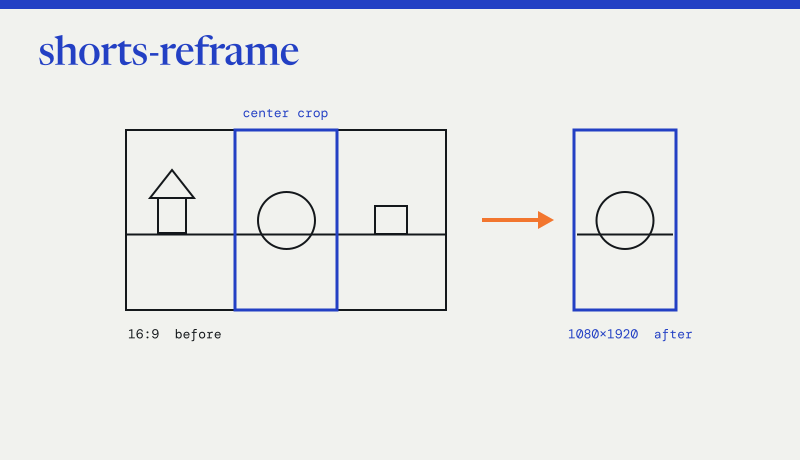
This example starts with a 16:9 file, such as 1920×1080. The source is a full landscape frame. A default center crop keeps the middle and cuts the sides. If the subject sits off-center, that default window misses them.
Run this command:
ffmpeg -i input.mp4 -vf "crop=ih*9/16:ih,scale=1080:1920" -c:a copy output.mp4
ffprobe must then show width 1080, height 1920, and a duration that matches the source within a frame or two. If the subject was off-center, set x yourself instead of using the default.
Use it in
- Used daily: Grok Bot.
- Installs with
npx skills add(tested 18 Nov 2026): Claude Code, Codex, Cursor, Gemini CLI, GitHub Copilot and Grok Build. - Supports the SKILL.md format (vendor docs): Claude apps (upload), ChatGPT (Business, Enterprise, Edu, Healthcare upload), and the other clients listed at agentskills.io.
- Other agents that support the Agent Skills format can load it. We have not run it there.
- No direct install yet in ChatGPT dots or Meta Muse. Paste the instructions from SKILL.md into a chat.
| Agent | Put this folder here |
|---|---|
| Grok Bot | Paste SKILL.md in a 1:1 chat and ask the Bot to save it as a skill. |
| Claude Code | .claude/skills/botkits-shorts-reframe/ or ~/.claude/skills/botkits-shorts-reframe/ |
| Codex | .agents/skills/botkits-shorts-reframe/ or ~/.agents/skills/botkits-shorts-reframe/ |
| Cursor | .agents/skills/botkits-shorts-reframe/ or .cursor/skills/botkits-shorts-reframe/ |
| Gemini CLI | .gemini/skills/botkits-shorts-reframe/ or .agents/skills/botkits-shorts-reframe/ (one folder deep only) |
| GitHub Copilot | .github/skills/botkits-shorts-reframe/ or .agents/skills/botkits-shorts-reframe/ |
| Grok Build | .grok/skills/botkits-shorts-reframe/ or ~/.grok/skills/botkits-shorts-reframe/ |
| Claude apps | Turn on code execution. ZIP this folder and upload it in Customize, Skills. |
Install tested is not run tested.
Premium
The free skill works by itself. The Shorts Builder Kit adds eased pan and zoom, a loudness check and a jitter check. Price: $14.
Links
- botkits.dev
- Instructions: SKILL.md
- Inspired by: FFmpeg crop filter docs and the mediacodec.dev crop guide. The docs are a filter reference and the guide has the centered crop. This skill adds the scale to 1080x1920 and the duration and resolution checks.
License: MIT
Skill manifest
Shorts reframe
Turn one landscape (16:9) clip into a vertical (9:16) clip with a fixed center crop. Do not pan, zoom, or pad with letterboxing.
Command
Crop the full height to a centered 9:16 slice, then scale to 1080x1920. Copy the audio as-is (-c:a copy). Video must be re-encoded because a crop changes the pixels.
ffmpeg -i input.mp4 -vf "crop=ih*9/16:ih,scale=1080:1920" -c:a copy output.mp4
crop=ih*9/16:ih keeps the input height and sets the width to height × 9/16. When x and y are omitted, the crop filter centers the rectangle (x defaults to (in_w-out_w)/2). The expression works at any 16:9 source size (1920x1080, 1280x720, and so on).
If the source has no audio, drop -c:a copy. If the subject sits off-center, set x explicitly instead of relying on the default, for example crop=ih*9/16:ih:(iw-ih*9/16)/3:0. This skill stays on a fixed crop; do not animate the window.
Checks
After the encode, confirm the output is 1080x1920 and that its duration matches the source (within a frame or two):
ffprobe -v error -select_streams v:0 -show_entries stream=width,height -of default=noprint_wrappers=1 output.mp4
ffprobe -v error -show_entries format=duration -of default=noprint_wrappers=1 input.mp4
ffprobe -v error -show_entries format=duration -of default=noprint_wrappers=1 output.mp4
Width must be 1080 and height 1920. If duration drifted, re-run and check you did not add -t, -ss, or a mismatched -shortest flag.
Inspired by
Inspired by the FFmpeg crop filter docs (crop=w:h:x:y, ih/iw, and centered defaults) and the mediacodec.dev crop guide (crop=ih*9/16:ih with -c:a copy). The official docs are a filter reference, not a 16:9-to-9:16 recipe; the guide has the centered crop but not a scale to 1080x1920 or duration and resolution checks. This skill adds the complete command and those two checks.
Files (botkits)
-
README.md 4.4 KB
<picture><source media="(prefers-color-scheme: dark)" srcset="../../../assets/skills/header-botkits-shorts-reframe-dark.png 1x, ../../../assets/skills/header-botkits-shorts-reframe-dark@2x.png 2x"><img src="../../../assets/skills/header-botkits-shorts-reframe-light.png" srcset="../../../assets/skills/header-botkits-shorts-reframe-light.png 1x, ../../../assets/skills/header-botkits-shorts-reframe-light@2x.png 2x" width="800" alt="BotKits botkits-shorts-reframe skill header"></picture> # botkits-shorts-reframe Turn a 16:9 video into a 1080×1920 Short. Center crop, audio kept, length and resolution checked. Use this when turning one landscape (16:9) clip into a vertical (9:16) clip with a fixed center crop. ## Install ```sh npx skills add botkitsdev/botkits --skill botkits-shorts-reframe ``` To list every skill in the repo: `npx skills add botkitsdev/botkits --list`. No CLI? Copy this folder into the skills folder your agent uses, and keep `SKILL.md` inside it. ## What it does - Crops the full height to a centered 9:16 slice, then scales to 1080×1920. The crop expression works at any 16:9 source size, including 1920×1080 and 1280×720. - Copies the audio as-is with `-c:a copy`. If the source has no audio, drop that flag. Video is re-encoded because a crop changes the pixels. - Stays on a fixed crop. It does not pan, zoom, or pad with letterboxing. If the subject sits off-center, set `x` explicitly, for example `crop=ih*9/16:ih:(iw-ih*9/16)/3:0`. - After the encode, checks that the output is 1080×1920 and that its duration matches the source within a frame or two. If duration drifted, re-run and check you did not add `-t`, `-ss`, or a mismatched `-shortest` flag. ## Before / after (example) This example starts with a 16:9 file, such as 1920×1080. The source is a full landscape frame. A default center crop keeps the middle and cuts the sides. If the subject sits off-center, that default window misses them. Run this command: ```sh ffmpeg -i input.mp4 -vf "crop=ih*9/16:ih,scale=1080:1920" -c:a copy output.mp4 ``` ffprobe must then show width `1080`, height `1920`, and a duration that matches the source within a frame or two. If the subject was off-center, set `x` yourself instead of using the default.  ## Use it in - Used daily: Grok Bot. - Installs with `npx skills add` (tested 18 Nov 2026): Claude Code, Codex, Cursor, Gemini CLI, GitHub Copilot and Grok Build. - Supports the SKILL.md format (vendor docs): Claude apps (upload), ChatGPT (Business, Enterprise, Edu, Healthcare upload), and the other clients listed at [agentskills.io](https://agentskills.io/clients). - Other agents that support the Agent Skills format can load it. We have not run it there. - No direct install yet in ChatGPT dots or Meta Muse. Paste the instructions from [SKILL.md](SKILL.md) into a chat. | Agent | Put this folder here | | --- | --- | | Grok Bot | Paste [SKILL.md](SKILL.md) in a 1:1 chat and ask the Bot to save it as a skill. | | Claude Code | `.claude/skills/botkits-shorts-reframe/` or `~/.claude/skills/botkits-shorts-reframe/` | | Codex | `.agents/skills/botkits-shorts-reframe/` or `~/.agents/skills/botkits-shorts-reframe/` | | Cursor | `.agents/skills/botkits-shorts-reframe/` or `.cursor/skills/botkits-shorts-reframe/` | | Gemini CLI | `.gemini/skills/botkits-shorts-reframe/` or `.agents/skills/botkits-shorts-reframe/` (one folder deep only) | | GitHub Copilot | `.github/skills/botkits-shorts-reframe/` or `.agents/skills/botkits-shorts-reframe/` | | Grok Build | `.grok/skills/botkits-shorts-reframe/` or `~/.grok/skills/botkits-shorts-reframe/` | | Claude apps | Turn on code execution. ZIP this folder and upload it in Customize, Skills. | Install tested is not run tested. ## Premium The free skill works by itself. The [Shorts Builder Kit](https://daniacostaai.gumroad.com/l/ommvol) adds eased pan and zoom, a loudness check and a jitter check. Price: $14. ## Links - [botkits.dev](https://botkits.dev) - Instructions: [SKILL.md](SKILL.md) - Inspired by: [FFmpeg crop filter docs](https://ffmpeg.org/ffmpeg-filters.html#crop) and the [mediacodec.dev crop guide](https://mediacodec.dev/how-to/crop-video/). The docs are a filter reference and the guide has the centered crop. This skill adds the scale to 1080x1920 and the duration and resolution checks. License: MIT -
SKILL.md 2.1 KB
---
name: botkits-shorts-reframe
description: >-
  Use this when turning a 16:9 video into 9:16 with a fixed center
  crop, scaling to 1080x1920, keeping the audio, and checking
  duration and resolution.
---
# Shorts reframe

Turn one landscape (16:9) clip into a vertical (9:16) clip with a fixed center crop. Do not pan, zoom, or pad with letterboxing.

## Command

Crop the full height to a centered 9:16 slice, then scale to 1080x1920. Copy the audio as-is (`-c:a copy`). Video must be re-encoded because a crop changes the pixels.

```sh
ffmpeg -i input.mp4 -vf "crop=ih*9/16:ih,scale=1080:1920" -c:a copy output.mp4
```

`crop=ih*9/16:ih` keeps the input height and sets the width to height × 9/16. When `x` and `y` are omitted, the crop filter centers the rectangle (`x` defaults to `(in_w-out_w)/2`). The expression works at any 16:9 source size (1920x1080, 1280x720, and so on).

If the source has no audio, drop `-c:a copy`. If the subject sits off-center, set `x` explicitly instead of relying on the default, for example `crop=ih*9/16:ih:(iw-ih*9/16)/3:0`. This skill stays on a fixed crop; do not animate the window.

## Checks

After the encode, confirm the output is 1080x1920 and that its duration matches the source (within a frame or two):

```sh
ffprobe -v error -select_streams v:0 -show_entries stream=width,height -of default=noprint_wrappers=1 output.mp4
ffprobe -v error -show_entries format=duration -of default=noprint_wrappers=1 input.mp4
ffprobe -v error -show_entries format=duration -of default=noprint_wrappers=1 output.mp4
```

Width must be `1080` and height `1920`. If duration drifted, re-run and check you did not add `-t`, `-ss`, or a mismatched `-shortest` flag.

## Inspired by

Inspired by the [FFmpeg crop filter docs](https://ffmpeg.org/ffmpeg-filters.html#crop) (`crop=w:h:x:y`, `ih`/`iw`, and centered defaults) and the [mediacodec.dev crop guide](https://mediacodec.dev/how-to/crop-video/) (`crop=ih*9/16:ih` with `-c:a copy`). The official docs are a filter reference, not a 16:9-to-9:16 recipe; the guide has the centered crop but not a scale to 1080x1920 or duration and resolution checks. This skill adds the complete command and those two checks.
Comments (0)
Sign in to join the conversation.
Reviews (0)
No reviews yet.
No comments yet.