ape-present
Converts a blog post into a single self-contained HTML document -- a visual-heavy, readable walkthrough with custom animated diagrams, short and crisp bullet points, and a natural explanation flow from first principles. Trigger on "ape present", "make this presentable", or "turn
Install
npx skills add https://github.com/arpitbbhayani/ape-skills/tree/master/ape-present
claude plugin marketplace add https://llmmart.ai/marketplace.json && claude plugin install arpitbbhayani-ape-skills@llmmart
git clone https://github.com/arpitbbhayani/ape-skills.git
The skills CLI installs just this skill, for any of its supported agents. Claude Code installs the whole arpitbbhayani/ape-skills collection as a plugin from our marketplace. Git is the plain clone.
Skill manifest
Present Skill
Takes a blog post and produces one self-contained HTML file designed for intuitive learning: a clean header, short crisp bullet points, and visual-first explanations. Diagrams take center stage, featuring custom animations that visually demonstrate the underlying mechanics, followed by numbers set large and wire layouts or pseudocode where relevant.
It is a document, not a deck. No full-screen hero sections, no scroll-snapping, and no slide feel. Single file, comfortable reading width (--measure), full theme support, and a fixed section skeleton -- illustration, context, body, sources -- so every document has a coherent shape.
It is not the blog either. The post merely recorded or explained; this document teaches. Write it as an expert engineer explaining the concept to a sharp peer:
- Visuals carry the heavy lifting: Every idea is anchored by a diagram, custom animation, code snippet, or layout.
- Short, crisp bullet points: No verbose paragraphs or walls of text. Use punchy, high-signal bullets that explain the invariant, the causal steps, and the trade-off.
- Custom animations: You are free and encouraged to design custom SVG/CSS animations tailored directly to what the concept needs to make the mechanism click.
- Natural, causal flow: Ideas progress logically, where each section resolves a constraint or trade-off raised by the previous one.
Audience: practicing engineers. Ground explanations in first principles and systems realities (disk seeks, memory hierarchies, network hops).
Design System & Custom Animations
The reference/ directory next to this file holds the design system: base.css, runtime.js, skeleton.html, svg-templates.md, and verify.sh.
- Visual-first presentation: Every idea gets at least one visual figure. Multiple visuals per idea (e.g. animated flow + pseudocode, diagram + trade-off matrix) are welcomed whenever helpful.
- Custom animated diagrams encouraged: While
svg-templates.mdprovides a fast catalogue of standard shapes, do not feel constrained by it. When a concept calls for a specialized layout, data movement, or custom state cycle, design a custom animated SVG. - Cohesive tokens: Build custom visuals using only the CSS variables defined in
base.css(var(--surface),var(--line),var(--accent),var(--accent-soft),var(--muted),var(--err),var(--ok)). Never invent arbitrary hex colors outside:root. - Motion with purpose: Motion exists to make mechanisms intuitive. Animate data packets moving along paths (
animateMotion), pulsing nodes (class="pulse"), flowing channels (class="stream-channel"), or cycling active states (data-cycle). Keep motion purposeful and loops reasonable (1.5s - 3s). Static evidence charts (bars, tables, quotes) stay still.
Input Handling
The user may provide input in any of these forms:
- File path on disk: a path ending in
.md,.txt,.html, or similar. Read the file directly. - A URL: fetch using web tools, then strip navigation and sidebars before working on the body.
- Pasted content: raw text in the message.
- Ambiguous: if unclear, ask once. Do not guess.
Optional modifiers:
- Audience: e.g., "for execs", "for new grads". Default: software engineers with 5-8 years of experience.
- Length: "short" (4-6 key ideas) or "full" (all core ideas). Default: full.
- Theme: "midnight", "tokyo", "nord", "dracula", "gruvbox", "rosepine", "forest", "neon", "daylight", "arctic", "solarized", "paper", "rosequartz", "swiss" (applied via
<html lang="en" data-theme="theme">). Default: OS-following. - Layout:
data-layout="left"for left-aligned body with rightward breakouts. Default: centered.
Step 1: Find the Spine & Natural Flow
Read the source material once. Extract:
- The one-line claim: The central thesis in one punchy sentence (the dek).
- The lead visual illustration concept: A simple, iconic visual motif representing the topic (e.g. an append stream entering an active block, a single heartbeat pulse, an index pointer). Keep it simple and focused — never try to map the entire blog post or full architecture into this one visual.
- The ideas in natural explanatory flow: 4 to 10 progressive milestones. Each milestone represents one logical step in understanding:
- What fundamental constraint makes this hard?
- The central intuition / naive attempt breakdown.
- The core mechanism (how the gears turn).
- How edge cases, concurrency, or scale are solved.
- The primary trade-off or production reality. Every idea heading is a clear, read-aloud sentence capturing the insight.
- The visual & animation concept for each idea: A template from
svg-templates.mdor a custom animated design that illuminates the specific mechanics. - Key numbers & invariants: Exact stats, orders of magnitude, and core formulas.
- Concrete code / layout: Trimmed code (<= 20 lines) or clean pseudocode; record/wire format diagrams.
Print the spine:
- Lead Illustration:
<super-visual description capturing the talk> NN. <idea as sentence> -> <visual / custom animation description>.
Step 2: Document Structure & Writing Style
Follow skeleton.html:
<article class="doc">
  <header class="doc-header">
    <h1>{{TITLE}}</h1>
    <p class="dek">{{ONE-LINE CLAIM}}</p>
  </header>

  <section id="illustration">
    <figure class="wide lead-art">
      <!-- High-impact visual illustration that conceptually represents the talk/article.
           Not a text summary, but an evocative, animated visual scene capturing the topic. -->
      {{LEAD SVG ILLUSTRATION}}
      <figcaption><strong>{{Illustration Title, 3-6 words.}}</strong> {{One crisp sentence capturing what the visual represents about the talk.}}</figcaption>
    </figure>
  </section>

  <section id="context">
    <h2>{{CONTEXT HEADING as a sentence}}</h2>
    <div class="context-body">
      <!-- 2-4 crisp bullets grounding the problem in first principles -->
      <ul class="rules">
        <li><strong>The Fundamental Invariant</strong>: ...</li>
        <li><strong>Why Naive Approaches Fail</strong>: ...</li>
      </ul>
    </div>
  </section>

  <section id="body">
    <!-- One section per idea, numbered data-n="01", data-n="02", etc. -->
    <h2 data-n="01">{{IDEA AS A READ-ALOUD SENTENCE}}</h2>

    <!-- Short, crisp bullet points explaining the concept -->
    <ul class="rules">
      <li><strong>Core Intuition</strong>: [The immediate mental model or physics constraint]</li>
      <li><strong>Mechanism</strong>: [Causal step-by-step: what happens, in what order]</li>
      <li><strong>Trade-off / Invariant</strong>: [What is gained vs. what is sacrificed]</li>
    </ul>

    <!-- Visual: Animated SVG (custom or template), Code, Layout, or Matrix -->
    <figure class="wide">
      {{ANIMATED SVG OR VISUAL}}
      <figcaption><strong>{{Label, 3-6 words.}}</strong> {{One sentence explaining what the visual demonstrates.}}</figcaption>
    </figure>

    <!-- Optional: Second visual element if helpful (pseudocode, stat row, trade-off matrix, wire format) -->
    <!-- Optional: Caveat aside if the source had one -->
    <div class="aside"><p>{{The caveat or boundary condition}}</p></div>
  </section>

  <section id="sources">
    <h2>Sources & References</h2>
    <ul>
      <li cite="...">...</li>
    </ul>
  </section>
</article>
Writing Rules: Short, Crisp, Intuitive
- No walls of prose: Never write dense multi-paragraph text. Explain ideas through tight, bulleted points (
.rulesor.steps). - Focus heavily on explanation: Frame every concept from first principles. What invariant makes this hard? What naive assumption broke? How does this design restore the guarantee?
- Natural progression: Section N+1 should naturally answer the challenge or trade-off left open by Section N.
- Cross-link text to visuals: Use
<span class="inspect-node" tabindex="0" data-target="node-id">to connect bullet points directly to highlighted diagram elements. - Truthful to the source: Use the post's exact numbers, benchmarks, and claims. Never fabricate facts or benchmarks.
Step 3: Crafting Visuals & Custom Animations
- Crafting the Lead Visual Illustration (Simplicity First):
- The talk opens with a simple, iconic visual anchor, never a text summary or TL;DR box.
- Do NOT map the whole blog post into one complex diagram: Do not attempt to fit multiple systems, stages, or edge cases into this illustration. Body sections will explain mechanisms one step at a time.
- Aim for simplicity & elegance: 2 to 3 clean elements max. A focused visual motif that sets the mood/theme of the talk (e.g., an append stream entering an active block, a clean pulse between two nodes, or a pointer to an index cell).
- Subtle, purposeful motion: A single moving packet or gentle pulse. Keep it calm, clean, and fast to parse visually.
- Use the templates or invent custom designs: Standard templates in
reference/svg-templates.mdwork well for basic pipelines, tables, and trees. When the idea has a distinct spatial or mechanical dynamic, write a custom animated SVG. - Animation primitives:
animateMotion: Move packets, offsets, or requests along SVG paths (<mpath href="#path-id"/>).class="pulse"orclass="pulse-glow": Highlight active buffers, locks, or workers.data-cycle="ms": Step sequentially through state machines, ring tokens, or phased protocols.class="flowing": Show continuous streams or data pipes.
- Keep diagrams clean and legible:
- 8px grid alignment,
viewBox="0 0 960 H"(or640for narrow). - Clear typography: labels inside elements at font-size 16-18, annotations at 14.
- Accessible: every
<svg>must haverole="img"and a descriptivearia-label. - Captioned: every visual sits in a
<figure>with a<figcaption>.
- 8px grid alignment,
Step 4: Assemble and Verify
- Write content file: Start with
skeleton.html, write headers, bullets, and figures. Leave{{BASE_CSS}}and{{RUNTIME_JS}}in place. Remove skeletondata-exampleblocks. - Inject CSS & JS mechanically:
python3 - <<'EOF' from pathlib import Path ref = Path("REF") # path to reference/ doc = Path("out.html") html = doc.read_text() html = html.replace("{{BASE_CSS}}", (ref/"base.css").read_text()) html = html.replace("{{RUNTIME_JS}}", (ref/"runtime.js").read_text()) doc.write_text(html) EOF - Verify with script:
Fix any structural issues (missing sections, unclosed tags, leftoverbash <skill-dir>/reference/verify.sh out.html source.md{{markers, or ungrounded numbers). - Factual review: Confirm that all numbers, algorithmic steps, and trade-offs faithfully reflect the source material without hallucinations.
Checklist
- Visual-heavy presentation: at least one visual figure per idea; custom animated designs used where helpful to show mechanism.
- Simple, iconic lead visual illustration under the header (not an overloaded architectural diagram summarizing the whole blog post).
- Short, crisp bullets instead of dense prose paragraphs.
- Natural explanatory flow: ideas progress logically from problem to mechanism to edge cases and trade-offs.
- Visuals built cleanly using design system CSS variables (
--surface,--line,--accent, etc.). - Mechanism diagrams move purposefully; static evidence figures remain still.
- Every figure has a
<figcaption>with a bold label and clear takeaway. - Four required sections present (
illustration,context,body,sources), exactly oneh1. - Design system (
base.cssandruntime.js) injected cleanly with zero leftover{{markers. - Numbers, benchmarks, and claims grounded in the source material.
Output Structure
- Print one punchy flavour line starting with "Ape is": e.g., "Ape is turning this post into a visual-heavy walkthrough with custom animations."
- Print the spine showing the natural flow of ideas and their visual/animated forms.
- Build the self-contained HTML file and run verification.
- Print a concise summary with:
- Output file path
- Key ideas and the animated/visual forms used
- Confirmation of factual alignment and verification status
Files (ape-skills)
-
reference
-
examples
-
ai-first-engineering-orgs.md 9.5 KB
--- description: "Every process a software team runs was built to manage a scarce resource. For twenty years that resource was engineering time. Waterfall managed it with sequencing. Agile managed it with short cycles and constant renegotiation. Both approaches assume the same thing: writing code is the expensive step, so protect it with process." slug: ai-first-org published_at: 2026-08-06 category: engineering-explorations --- Every process a software team runs was built to manage a scarce resource. For twenty years that resource was engineering time. Waterfall managed it with sequencing. Agile managed it with short cycles and constant renegotiation. Both approaches assume the same thing: writing code is the expensive step, so protect it with process. That assumption is breaking. At AI first orgs, writing code, writing tests, and refactoring stop being the bottleneck. The bottleneck does not disappear, it moves. Verification, code review, and security start taking up the time that typing code used to take. If your team's process still optimizes for the old bottleneck, it is optimizing for the wrong thing, and it is probably making you slower without anyone noticing. This is not a call to throw out process. It is a call to look at each process, ask what gap it was closing, and check whether that gap still exists once an AI coding tool is doing most of the typing. ## The Processes That Stops Working Process rarely gets deleted on its own. A ritual gets added to close a real gap, the gap closes, and the ritual survives out of habit. Nobody schedules a retro to ask "does this still make sense." Once an org adopts agentic coding as the default way of working, several long standing norms stop making sense within weeks. Here is what an AI first org replaces them with, and why. ## Planning The old norm was heavy upfront planning, because coding time was the expensive part and you wanted to spend it on the right things. A team that writes a solid six month roadmap today will find it out of date by month three, because the tools themselves keep changing what is possible. AI first orgs plan just in time (JIT), the same idea as JIT compilation: do the minimum planning needed, right before you need it, and let the plan compile against current reality instead of a six month old guess. In practice this looks like: - Skip the design doc for most features. Build a prototype first, then write down what you learned. - Get the prototype in front of five to ten internal users within a day or two, not a formal beta cycle. - Replace the quarterly product review with lightweight decisions inside the pull request thread, where the code and the discussion live together. - Reserve a full design doc for the rare case where a decision is expensive to reverse, such as a data model change or a public API contract. The practical test for whether you need a doc: can this decision be undone with one more prototype iteration. If yes, skip the doc and build. ## Ask The Model Before The Person Before agentic coding, "who wrote this" was the fastest path to an answer, because the author held context nobody else had. Once most pull requests are AI assisted, the author is often not the fastest path anymore. The model watched the whole change happen and can answer directly. The shift is one extra question before you go looking for a human: what do I actually need to know. "Who wrote this" collapses into several different questions, each with a different best source: - Who caused this regression, and when. Ask the model to walk the git history and correlate it against the failing test. - Who is the domain expert on this subsystem. Ask the model to summarize ownership from the codeowners file and recent commit activity, then go talk to that person about judgment calls the model cannot make. - Why was this decision made. Ask the model to pull the pull request description and linked discussion before pinging anyone. Once you notice a question repeats, automate it instead of asking it again. A summary of customer feedback channels, for example, does not need a human doing it manually over coffee every morning. It can be a scheduled job that runs before anyone is at their desk. The rule of thumb: if you asked the same category of question three times this month, turn it into a standing job. ## Code Review - Trust But Verify Code review used to mean a human read every line. That does not scale once code volume goes up an order of magnitude, and it was never a great use of senior engineering time in the first place. In an AI first org, the model owns: - Style and linting, with zero human time spent on nits - Responding to pull request feedback and iterating until comments are resolved - Catching and fixing bugs before a commit lands - Writing and updating tests for the change Humans stay in the loop specifically where domain judgment cannot be automated: - Legal review for anything touching data handling, licensing, or compliance risk - Security review for trust boundaries, auth flows, and anything crossing a privilege level - Product and design review for taste, for whether a feature actually solves the user's problem A simple test before assigning a human reviewer: would a wrong call here be expensive to reverse, or does it require judgment about risk tolerance rather than correctness. If the answer is no to both, the pull request does not need a human gate. This split is not static. As models improve, more of what needs a human today will not need one next quarter. Treat the trust versus verify line as something to revisit monthly, not something set once and forgotten. ## Team Makeup - Roles Blur On Purpose When engineering time was the constraint, roles were drawn around who could write code. Product managers planned, designers designed, engineers coded. Agentic coding erodes that line from both directions. Product managers ship prototypes directly. Engineers pick up content and design work that used to sit strictly outside their lane. AI first orgs end up hiring for two profiles: - Creative builders with product sense: people who are curious enough to prototype something new every week and care about whether it actually solves a problem. - Engineers with deep systems expertise: people who understand the hard constraints, like distributed state, latency budgets, or security boundaries, that a model cannot yet reason about reliably on its own. Raw throughput matters less, since the model absorbs most of it. The scarce skill becomes knowing where a human still needs to make the call. ## The Few Rules That Should Not Be Negotiable Not every part of this shift should be left to individual teams to figure out on their own. A small set of org level principles need to hold across the board: - Everyone, including cross functional partners, uses the AI coding tools daily. Dogfooding is not optional, it is how an org notices what is broken before its users do. - Keep management flat. Managers should ship real work themselves before they lead a team, so they understand what the work actually feels like now. - Anyone can question and kill a process that no longer serves its purpose, without needing permission from above. Inside those rules, individual teams should keep full agency over how they triage work, run standups, and decide which workflows get automated first. ## Metrics That Tell You The New Norms Are Sticking Three numbers are worth tracking as an org makes this shift: - Onboarding ramp time. How fast does a new engineer, designer, or product manager ship real work. This should drop from weeks to days once the org is truly AI first. - Pull request cycle time. Watch this closely, since it often reveals where a build system or CI pipeline cannot keep pace with the new volume of code moving through review. - Percentage of AI assisted commits. In a mature AI first org this trends toward 100 percent within months. The last metric is a trap if you stop there. Throughput measures activity, not outcomes. A team can drive AI assisted commits to 100 percent and still ship the wrong thing faster. Pair throughput with a metric tied to the actual problem being solved, whether that is customer retention, incident rate, or feature adoption, so speed serves the goal rather than becoming the goal. ## Audit Your Noisiest Workflow Pick the workflow your team dreads most. The expensive status meeting, the manual release checklist, the weekly report nobody reads twice. Ask two questions: - Is this still serving its original purpose. - If yes, can it be automated instead of run by hand. Picture a weekly review where everyone has a laptop open the entire time, except for the thirty seconds when it is their turn to give a status update. One question, "why are we having this meeting again," is often enough for the room to realize nobody needs it. Run that same question against your own noisiest process this week. You will likely find at least one ritual that was built for a bottleneck that no longer exists. --- Footnote: AI first engineering orgs move the bottleneck from writing code to verifying it, which means planning, context gathering, code review, and team structure all need to change with it. Move planning to just in time prototypes instead of long roadmaps. Ask the model for context before asking a person, and automate any question asked repeatedly. Let AI tools own style, bugs, and tests, and reserve human review for security, legal, and product judgment. Expect roles to blur, hire for product sense and systems depth, and track onboarding time, pull request cycle time, and AI assisted commits, while treating throughput as a means, not the goal. -
bitcask.md 8.7 KB
--- description: Bitcask was introduced as the backend for a distributed database named Riak in which each node used to run one instance of Bitcask to hold the data that it was responsible for. In this essay, we take a detailed look into Bitcask, its design, and find the secret sauce that makes it so performant. category: engineering-explorations subcategory: datastores-deepdives published_at: 2020-07-19 slug: bitcask --- Bitcask is one of the most efficient embedded Key-Value (KV) Databases designed to handle production-grade traffic. The paper that introduced Bitcask to the world says it is a _[Log-Structured](https://en.wikipedia.org/wiki/Log-structured_file_system) [Hash Table](https://en.wikipedia.org/wiki/Hash_table) for Fast Key/Value Data_ which, in a simpler language, means that the data will be written sequentially to an append-only log file and there will be pointers for each `key` pointing to the `position` of its log entry. Building a KV store off the append-only log files seems like a really weird design choice, but Bitcask does not only make it efficient but it also gives a really high Read-Write throughput. Bitcask was introduced as the backend for a distributed database named [Riak](https://riak.com/) in which each node used to run one instance of Bitcask to hold the data that it was responsible for. In this essay, we take a detailed look into Bitcask, its design, and find the secret sauce that makes it so performant. # Design of Bitcask Bitcask uses a lot of principles from [log-structured file systems](https://en.wikipedia.org/wiki/Log-structured_file_system) and draws inspiration from a number of designs that involve log file merging, for example - merging in LSM Trees. It essentially is just a directory of append-only (log) files with a fixed structure and an in-memory index holding the keys mapped to a bunch of information necessary for point lookups - referring to the entry in the datafile. ## Datafiles Datafiles are append-only log files that hold the KV pairs along with some meta-information. A single Bitcask instance could have many datafiles, out of which just one will be active and opened for writing, while the others are considered immutable and are only used for reads.  Each entry in the datafile has a fixed structure illustrated above and it stores `crc`, `timestamp`, `key_size`, `value_size`, actual `key`, and the actual `value`. All the write operations - create, update and delete - made on the engine translates into entries in this active datafile. When this active datafile meets a size threshold, it is closed and a new active datafile is created; and as stated earlier, when closed (intentionally or unintentionally), the datafile is considered immutable and is never opened for writing again. ## KeyDir KeyDir is an in-memory hash table that stores all the keys present in the Bitcask instance and maps it to the offset in the datafile where the log entry (value) resides; thus facilitating the point lookups. The mapped value in the Hash Table is a structure that holds `file_id`, `offset`, and some meta-information like `timestamp`, as illustrated below.  # Operations on Bitcask Now that we have seen the overall design and components of Bitcask, we can jump into exploring the operations that it supports and details of their implementations. ### Putting a new Key Value When a new KV pair is submitted to be stored in the Bitcask, the engine first appends it to the active datafile and then creates a new entry in the KeyDir specifying the offset and file where the value is stored. Both of these actions are performed atomically which means either the entry is made in both the structures or none. Putting a new Key-Value pair requires just one atomic operation encapsulating one disk write and a few in-memory access and updates. Since the active datafile is an append-only file, the disk write operation does not have to perform any disk seek whatsoever making the write operate at an optimum rate providing a high write throughput. ### Updating an existing Key Value This KV store does not support partial update, out of the box, but it does support full value replacement. Hence the update operation is very similar to putting a new KV pair, the only change being instead of creating an entry in KeyDir, the existing entry is updated with the new position in, possibly, the new datafile. The entry corresponding to the old value is now dangling and will be garbage collected explicitly during merging and compaction. ### Deleting a Key Deleting a key is a special operation where the engine atomically appends a new entry in the active datafile with value equalling a tombstone value, denoting deletion, and deleting the entry from the in-memory KeyDir. The tombstone value is chosen as something very unique so that it does not interfere with the existing value space. Delete operation, just like the update operation, is very lightweight and requires a disk write and an in-memory update. In delete operation as well, the older entries corresponding to the deleted keys are left dangling and will be garbage collected explicitly during merging and compaction. ### Reading a Key-Value Reading a KV pair from the store requires the engine to first find the datafile and the offset within it for the given key; which is done using the KeyDir. Once that information is available the engine then performs one disk read from the corresponding datafile at the offset to retrieve the log entry. The correctness of the value retrieved is checked against the CRC stored and the value is then returned to the client. The operation is inherently fast as it requires just one disk read and a few in-memory accesses, but it could be made faster using Filesystem read-ahead cache. # Merge and Compaction As we have seen during Update and Delete operations the old entries corresponding to the key remain untouched and dangling and this leads to Bitcask consuming a lot of disk space. In order to make things efficient for the disk utilization the engine once a while compacts the older closed datafiles into one or many merged files having the same structure as the existing datafiles. The merge process iterates over all the immutable files in the Bitcask and produces a set of datafiles having only _live_ and _latest_ versions of each present key. This way the unused and non-existent keys are ignored from the newer datafiles saving a bunch of disk space. Since the record now exists in a different merged datafile and at a new offset, its entry in KeyDir needs an atomic updation. # Performant bootup If the Bitcask crashes and needs a boot-up, it will have to read all the datafiles and build a new KeyDir. Merging and compaction here do help as it reduces the need to read data that is eventually going to be evicted. But there is another operation that could help in making the boot times faster. For every datafile a _hint_ file is created which holds everything in the datafile except the value i.e. it holds the key and its meta-information. This _hint_ file, hence, is just a file containing all the keys from the corresponding datafile. This _hint_ file is very small in size and hence by reading this file the engine could quickly create the entire KeyDir and complete the bootup process faster. # Strengths and Weaknesses of Bitcask ## Strengths - Low latency for read and write operations - High Write Throughput - Single disk seek to retrieve any value - Predictable lookup and insert performance - Crash recovery is fast and bounded - Backing up is easy - Just copy the directory would suffice ## Weaknesses The KeyDir holds all the keys in memory at all times and this adds a huge constraint on the system that it needs to have enough memory to contain the entire keyspace along with other essentials like Filesystem buffers. Thus the limiting factor for a Bitcask is the limited RAM available to hold the KeyDir. Although this weakness sees a major one but the solution to this is fairly simple. We can typically shard the keys and scale it horizontally without losing much of the basic operations like Create, Read, Update, and Delete. # References - [Bitcask Paper](https://riak.com/assets/bitcask-intro.pdf) - [Bitcask - Wikipedia](https://en.wikipedia.org/wiki/Bitcask) - [Riak's Bitcask - High Scalability](http://highscalability.com/blog/2011/1/10/riaks-bitcask-a-log-structured-hash-table-for-fast-keyvalue.html/) - [Implementation of the Bitcask storage model-merge and hint files](https://topic.alibabacloud.com/a/implementation-of-the-bitcask-storage-model-merge-and-hint-files_8_8_31516931.html) -
bitcask.spine.md 2.1 KB
# Worked example: the spine for `bitcask.md` Source: `bitcask.md`, 1,376 words, 2 figures ("Datafiles", "KeyDir"), no tables, no maths. Ten ideas, so grouped into four parts (`h2` parts, `h3` ideas). Budget: 1,200-2,900 words. Claim (dek): *Append every write, keep every key in memory, and any value is one disk seek away.* ## Structure 01. Bitcask is a directory of append-only files plus one in-memory index -> pipeline §1 (client -> active file, client -> keydir), two packets 02. A datafile entry is a fixed record, so it can be scanned without an index -> `.cells.row` (crc · tstamp · ksz · vsz · key · value); source figure "Datafiles" redrawn 03. A datafile is active, then immutable, then merged away -> state machine §8, `data-cycle` 04. KeyDir maps every key to a file, an offset and a timestamp -> pipeline §1 (key -> keydir entry -> datafile -> value); source figure "KeyDir" redrawn ## Operations 05. A put is one append plus one KeyDir update, performed atomically -> sequence §2 (client, active file, keydir), three packets 06. A read is exactly one disk read -> flowchart §7 (in keydir? yes -> 1 disk read -> check crc), pulse on the diamond, packet on "yes" 07. Updates and deletes leave old entries dangling until compaction -> `.cells` with `.bad` for superseded entries and a tombstone; aside: tombstone value must not collide with real values ## Housekeeping 08. Merge rewrites immutable files keeping only the latest live version of each key -> `.panels` before/after (7 entries across 3 files -> 3 entries in 1 file) 09. Hint files make boot fast and bounded -> pipeline §1 (datafile -> hint file -> keydir -> bitcask) ## Limits 10. The whole keyspace must fit in RAM -> `.quote` + aside (shard keys to scale) ## What a wrong spine looks like for this post - One idea per post heading ("Introduction", "Datafiles", "KeyDir", "Operations", ...): topics, not claims. - One idea per paragraph: 25 sections, half of them restating the previous one. - Everything as a pipeline diagram: the record layout is a row of cells, the lifecycle is a state machine, the read is a decision -- the shape of the idea picks the visual. -
intuition-behind-idf.md 7.9 KB
--- description: Explore Inverse Document Frequency (IDF), a key concept in search & text mining. Learn how it quantifies term rarity and its connection to probability. category: engineering-explorations subcategory: advanced-algorithms published_at: 2020-03-10 slug: idf --- [TF-IDF](https://en.wikipedia.org/wiki/Tf%E2%80%93idf) is one of the most popular measures that quantify document relevance for a given term. It is extensively used in [Information Retrieval](https://en.wikipedia.org/wiki/Information_retrieval) (ex: Search Engines), Text Mining and even for text-heavy Machine Learning use cases like Document Classification and Clustering. Today we explore the better half of TF-IDF and see its connection with Probability, the role it plays in TF-IDF and even the intuition behind it. Inverse Document Frequency (IDF) is a measure of term rarity which means it quantifies how rare the term, in the corpus, really is (document collection); higher the IDF, rarer the term. A rare term helps in discriminating, distinguishing and ranking documents and it contributes more information to the corpus than what a more frequent term (like `a`, `and` and `the`) does. The IDF was heuristically proposed in the paper "[A statistical interpretation of term specificity and its application in retrieval](http://citeseerx.ist.psu.edu/viewdoc/download?doi=10.1.1.115.8343&rep=rep1&type=pdf)" (Spärck Jones, 1972) and was originally called Term Specificity. # The intuition behind IDF In order to quantify the term rarity, the heuristic says we need to give higher weight to the term that occurs in fewer documents and lesser weights to the frequent ones. Thus this measure (weight) `w` of the term is **inversely proportional** to the number of documents in which it is present (called Document Frequency) - and hence the measure is called Inverse Document Frequency.  Any function that adheres to the requirement of being inversely proportional to the document frequency i.e. a decreasing function, would do the job; it may not yield optimality but could be used as an IDF for some use cases. Some decreasing functions that could be used as an IDF for some use cases are shown below 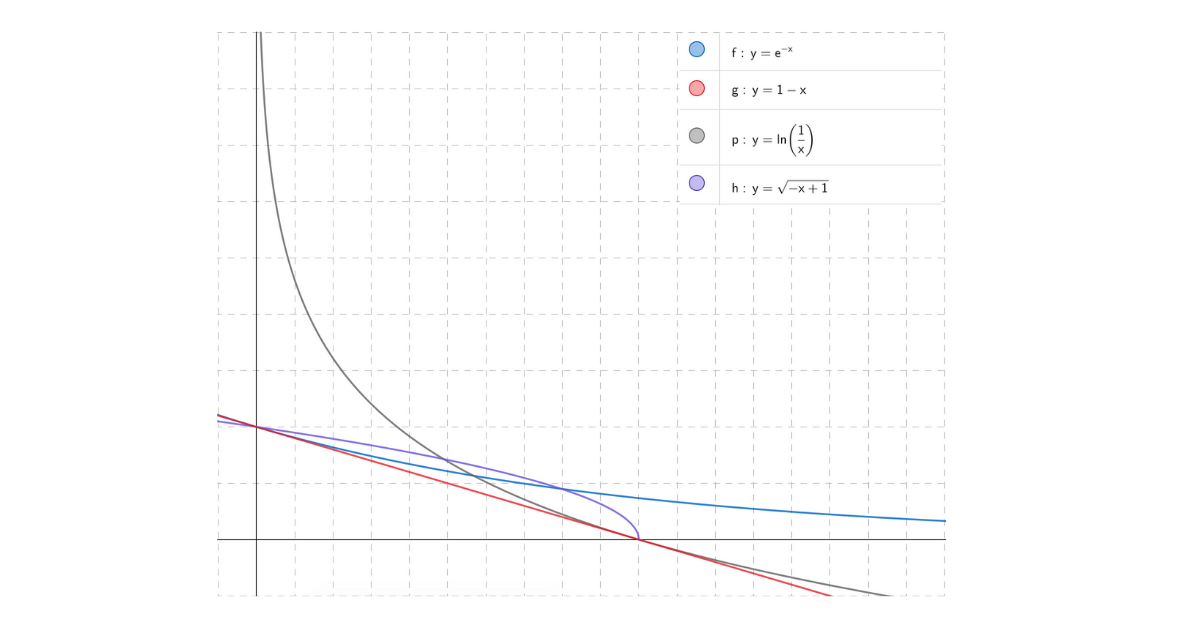 The more frequent words, like `a`, `and` and `the` will lie on the far right of the plot and will have a smaller value of IDF. # The most common IDF A widely adapted IDF measure that performs better in most use cases is defined below  where - `N` is the number of documents in the corpus - `df(t)` is the number of documents that has an occurrence of the term `t` If we plot the above IDF function against the document frequency we get a nice smooth decreasing function as shown below. For lower values of X i.e. Document Frequency we see the IDF is very high as it suggests a good discriminator and as the Document Frequency increases the plot smoothly descends and reaches 0 for `df(t) = N`. 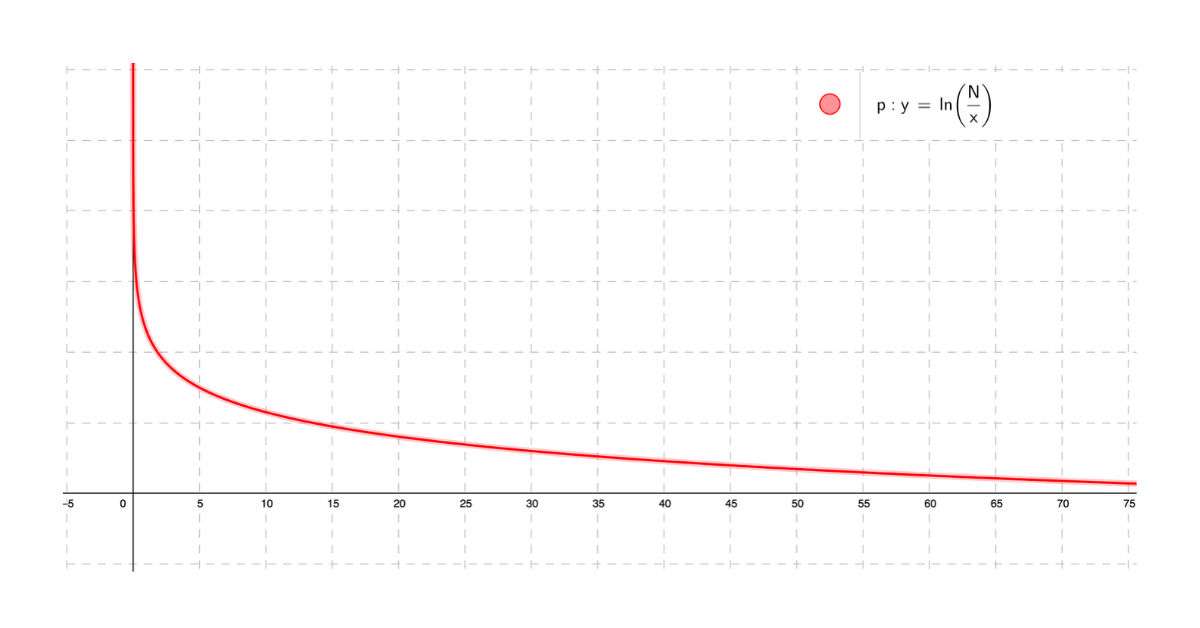 # IDF and Probability What would be the probability that a random document picked from a corpus of `N` documents contains the term `t`? The answer to this question is the fraction of documents, out of N, that contains the term `t` and, as seen above, this is its Document Frequency.  The fraction inside the logarithm in the IDF function is oddly similar to the above probability, in fact, it is the inverse of probability defined above. Hence we could redefine IDF using this probability as  By defining IDF as a probability, we could now estimate the true IDF of a term by observing a random sample instead and computing IDF on this sampled data. # IDF of conjunction Computing IDF for a single term is fine but what happens when we have multiple terms? How would that fare out? This is a very common use case in Information Retrieval where we need to rank documents for a given search query, and the search query more often than not contains multiple terms. For finding IDF of multiple terms in conjunction we make an assumption - the occurrences of terms are statistically independent and because of this the equation below holds true  Given this, we could derive the IDF of two terms in conjunction as follows 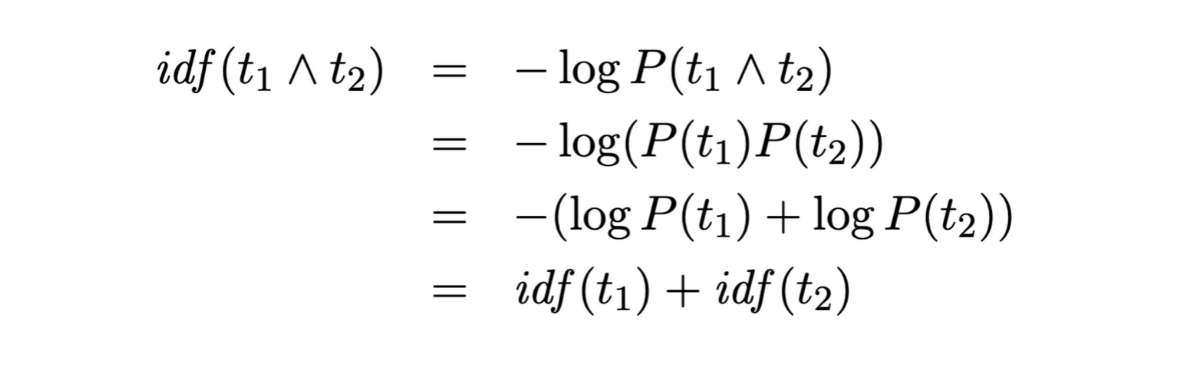 From the derivation above we see that the IDF of conjunction is just the summation of IDF of individual terms. Extending this to search engines we could say that the score of a document for a given search query is the summation of scores that document gets for individual terms of the query. > Note: IDF on conjunction could be made much more complex by not assuming statistical independence. # Other measures of IDF The decreasing functions we see in the first section of this article were just some examples of possible IDF functions. But there are IDF functions that are not just examples but are also used in some specific use cases and some of them are: 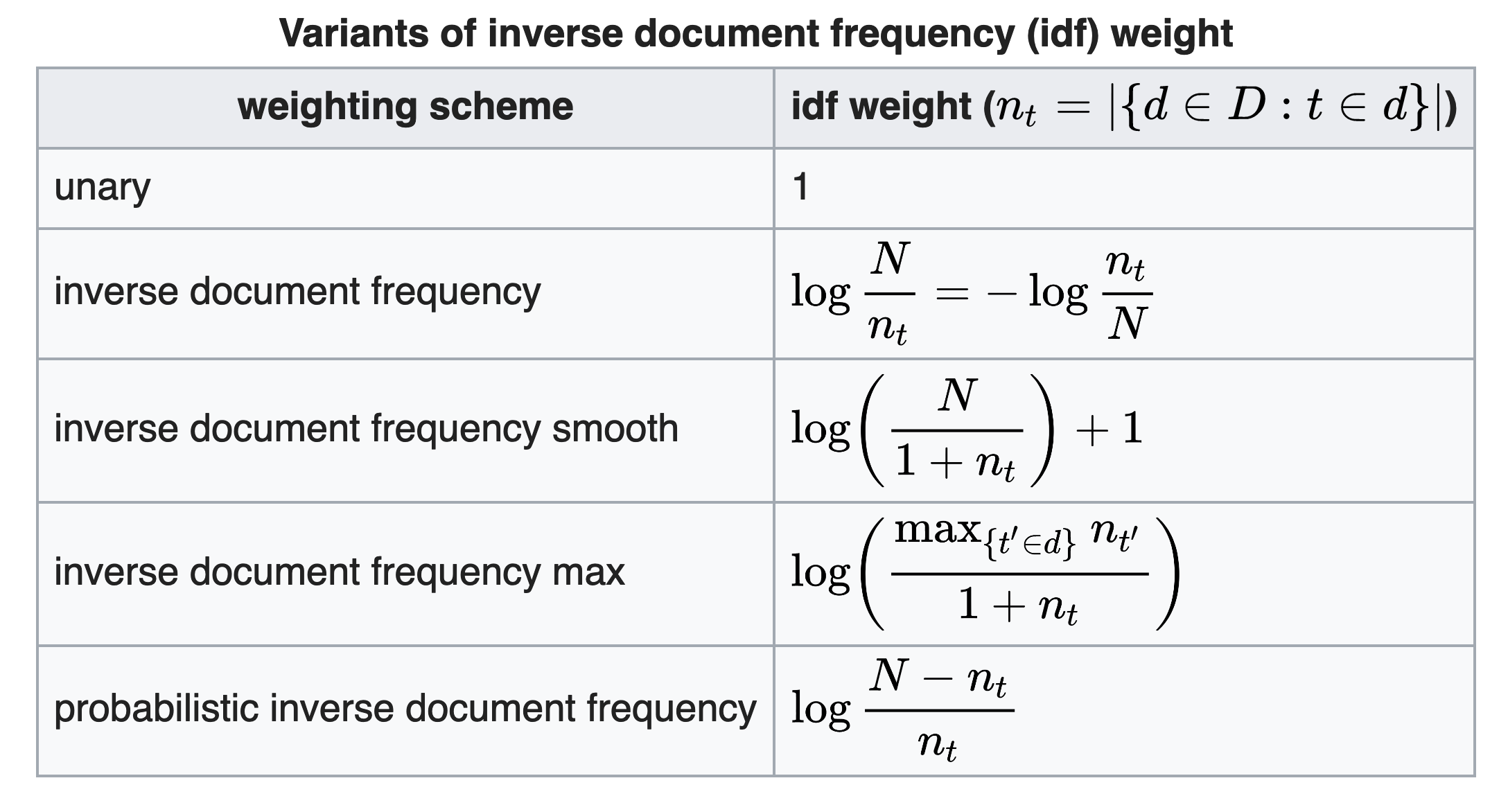 Most of the IDF functions only differ in the bounds they produce for a given range of document frequency. The plots of 3 IDF functions namely - Common IDF, Smooth IDF, and Probabilistic IDF, are shown below: 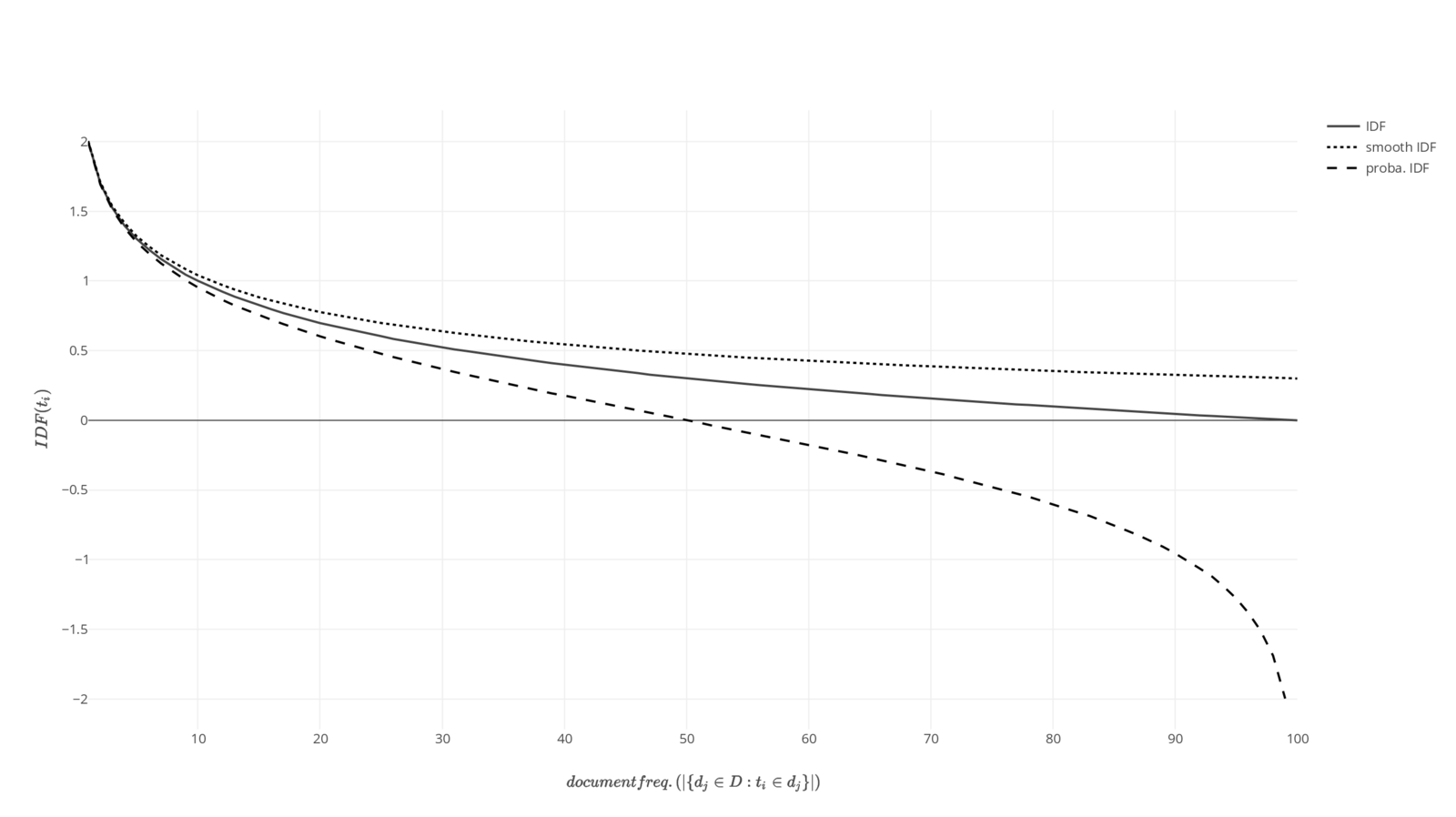 By observing the plots of 3 different IDF functions it becomes clear that we should use Probabilistic IDF function when we want to penalize a term that occurs in more than 50% of document by giving it a negative weight; and use a Smooth IDF when we do not want a bounded IDF value and not `undefined` (for `DF(t) = 0`) and `0` (for `DF(t) = N`) as such values ruins a function where IDF is multiplied with some other scalar (like Term Frequency). Similarly, we could define our own IDF function by deciding when and how the penalty to be applied and defining the parameters accordingly. # Role of IDF in TF-IDF TF-IDF suggests how important a word is to a document in a collection (corpus). It helps search engines identify what it is that makes a given document special for a given query. It is defined as the product of Term Frequency (number of occurrences of the term in the document) and Inverse Document Frequency. For the document to have a high TF-IDF score (high relevance) it needs to have high term frequency and a high inverse document frequency (i.e. low document frequency) of the term. Thus IDF primarily downscales the frequent occurring of common words and boosts the infrequent words with high term frequency. # References This article is mostly based on the wonderful paper [Understanding Inverse Document Frequency: On theoretical arguments for IDF](https://pdfs.semanticscholar.org/8397/ab573dd6c97a39ff4feb9c2d9b3c1e16c705.pdf) by Stephen Robertson. Other references: - [TF-IDF - Wikipedia](https://en.wikipedia.org/wiki/Tf%E2%80%93idf) - [Inverse Document Frequency and the Importance of Uniqueness](https://moz.com/blog/inverse-document-frequency-and-the-importance-of-uniqueness) Images used in other measures of IDF are taken from [Wikipedia page of TF-IDF](https://en.wikipedia.org/wiki/Tf%E2%80%93idf).
-
-
base.css 72.4 KB · in bundle
-
runtime.js 7.6 KB
// ape-present runtime. Copy verbatim into the <script> at the end of <body>. // Covers: figure reveals, stat counters, live diagram motion (packets, pulses, // cycles, streaming channels), meter animations, inspect-node cross-highlighting, // interactive step-by-step walkthroughs, and theme switching. (() => { if (window.__apePresent) return; window.__apePresent = true; const root = document.documentElement; const reduced = matchMedia('(prefers-reduced-motion: reduce)').matches; // --- Theme -------------------------------------------------------------- { // The theme the document was built with (data-theme on <html>, or none = follow OS). const builtTheme = root.getAttribute('data-theme'); const DARK = ['midnight', 'dark', 'mocha', 'tokyo', 'tokyo-night', 'nord', 'dracula', 'gruvbox', 'rosepine', 'rose-pine', 'forest', 'neon']; // Scoped per document so toggling one doc never restyles another on the same origin. const KEY = 'ape-theme:' + (location.pathname.split('/').pop() || 'doc'); const applyTheme = (t) => { if (!t) return; root.setAttribute('data-theme', t); try { localStorage.setItem(KEY, t); } catch (_) {} }; try { const saved = localStorage.getItem(KEY); if (saved) root.setAttribute('data-theme', saved); } catch (_) {} window.addEventListener('message', (e) => { if (e && e.data && e.data.type === 'theme' && e.data.theme) { applyTheme(e.data.theme); } }); try { if (window.parent && window.parent !== window && window.parent.document && window.parent.document.documentElement) { const parentTheme = window.parent.document.documentElement.getAttribute('data-theme'); if (parentTheme) root.setAttribute('data-theme', parentTheme); } } catch (_) {} // `t` flips polarity but remembers the built theme: a nord document goes // nord -> daylight -> nord, not nord -> midnight. addEventListener('keydown', (e) => { if (e.key !== 't' || e.metaKey || e.ctrlKey || e.altKey) return; if (e.target && /INPUT|TEXTAREA/.test(e.target.tagName)) return; const cur = root.getAttribute('data-theme'); const isDark = cur ? DARK.includes(cur) : matchMedia('(prefers-color-scheme: dark)').matches; const darkHome = builtTheme && DARK.includes(builtTheme) ? builtTheme : 'midnight'; const lightHome = builtTheme && !DARK.includes(builtTheme) ? builtTheme : 'daylight'; applyTheme(isDark ? lightHome : darkHome); }); } // --- Counters ----------------------------------------------------------- const countUp = (el) => { if (el.dataset.done) return; el.dataset.done = '1'; const to = parseFloat(el.dataset.to); const decimals = parseInt(el.dataset.decimals || '0', 10); const fmt = (v) => (el.dataset.prefix || '') + v.toLocaleString(undefined, { minimumFractionDigits: decimals, maximumFractionDigits: decimals, }) + (el.dataset.suffix || ''); if (reduced || isNaN(to)) { el.textContent = fmt(isNaN(to) ? 0 : to); return; } const start = performance.now(), dur = 1200; const tick = (now) => { const p = Math.min(1, (now - start) / dur); el.textContent = fmt(to * (1 - Math.pow(1 - p, 3))); if (p < 1) requestAnimationFrame(tick); }; requestAnimationFrame(tick); }; // --- Meter / Race Bars ---------------------------------------------------- const animateMeter = (el) => { const pct = el.dataset.pct || el.style.getPropertyValue('--pct') || '0%'; el.style.setProperty('--target-pct', pct); el.classList.add('filled'); }; // --- Reveal once ---------------------------------------------------------- const targets = [...document.querySelectorAll('figure, .stats, .summary, .callout, .race-bars, .quadrant, .stepper, .panels')]; const io = new IntersectionObserver((entries) => { for (const e of entries) { if (!e.isIntersecting) continue; e.target.classList.add('in'); e.target.querySelectorAll('.num[data-to]').forEach(countUp); e.target.querySelectorAll('.meter-fill, .race-fill').forEach(animateMeter); io.unobserve(e.target); } }, { threshold: 0.15 }); targets.forEach((t) => io.observe(t)); // --- Live motion: run only while the figure is on screen ------------------ const live = new IntersectionObserver((entries) => { for (const e of entries) { e.target.classList.toggle('live', e.isIntersecting); e.target.querySelectorAll('svg').forEach((svg) => { if (reduced) { svg.pauseAnimations(); return; } e.isIntersecting ? svg.unpauseAnimations() : svg.pauseAnimations(); }); } }, { threshold: 0.1 }); document.querySelectorAll('figure, .live-host').forEach((f) => live.observe(f)); // --- Cycles: [data-cycle="900"] lights its children in turn, forever ------ document.querySelectorAll('[data-cycle]').forEach((host) => { const kids = [...host.children]; if (kids.length < 2) return; const step = parseInt(host.dataset.cycle, 10) || 900; let i = 0; if (reduced) { kids[0].classList.add('lit'); return; } setInterval(() => { if (!host.closest('.live') && !host.classList.contains('live')) return; kids.forEach((k) => k.classList.remove('lit')); kids[i % kids.length].classList.add('lit'); i++; }, step); }); // --- Inspect-Node Cross-Highlighting (Prose <-> Diagram) ------------------ document.querySelectorAll('.inspect-node[data-target]').forEach((pill) => { const targetId = pill.dataset.target; const targetEl = document.getElementById(targetId); if (!targetEl) return; const svg = targetEl.closest('svg'); const activate = () => { pill.classList.add('inspecting'); if (svg) svg.classList.add('inspect-active'); targetEl.classList.add('inspected'); }; const deactivate = () => { pill.classList.remove('inspecting'); if (svg) svg.classList.remove('inspect-active'); targetEl.classList.remove('inspected'); }; pill.addEventListener('mouseenter', activate); pill.addEventListener('mouseleave', deactivate); pill.addEventListener('focus', activate); pill.addEventListener('blur', deactivate); // Touch / click: toggle, so the highlight is reachable without hover or a keyboard. pill.addEventListener('click', () => pill.classList.contains('inspecting') ? deactivate() : activate()); }); // --- Interactive Step-by-Step Steppers ----------------------------------- document.querySelectorAll('.stepper').forEach((stepper) => { const panes = [...stepper.querySelectorAll('.step-pane')]; const indicator = stepper.querySelector('.step-count'); const prevBtn = stepper.querySelector('.step-prev'); const nextBtn = stepper.querySelector('.step-next'); const targetSvgId = stepper.dataset.svg; const svg = targetSvgId ? document.getElementById(targetSvgId) : null; let current = 0; const render = () => { panes.forEach((p, idx) => p.classList.toggle('active', idx === current)); if (indicator) indicator.textContent = `${current + 1} / ${panes.length}`; if (prevBtn) prevBtn.disabled = current === 0; if (nextBtn) nextBtn.disabled = current === panes.length - 1; if (svg) { svg.querySelectorAll('[data-step]').forEach((el) => { const stepVal = parseInt(el.dataset.step, 10); el.classList.toggle('active-step', stepVal === current + 1); }); } }; if (prevBtn) prevBtn.addEventListener('click', () => { if (current > 0) { current--; render(); } }); if (nextBtn) nextBtn.addEventListener('click', () => { if (current < panes.length - 1) { current++; render(); } }); render(); }); })(); -
skeleton.html 11.7 KB · in bundle
-
svg-templates.md 54.7 KB
# SVG Templates Copy the template for the idea shape, change only the labels, counts, and highlighted elements. Do not change stroke widths, radii, font sizes, or the grid. The visuals look good because they all obey the same grammar; a "creative" deviation is what makes a document look amateur. ## Grammar (applies to every diagram) - `viewBox` on an 8px grid. Widths: `960` for full-width diagrams, `640` for narrow. Height as needed, usually 240-420. Never set `width`/`height` attributes; CSS sizes it. - Boxes: `rx="10"`, `stroke-width="1.5"`, `fill="var(--surface)"`, `stroke="var(--line)"`. The box the idea is about: `stroke="var(--accent)"`, `fill="var(--accent-soft)"`. A failing box: `stroke="var(--err)"`. - Box size: `w=160 h=64` default. Text centred: `text-anchor="middle" dominant-baseline="middle"`. - Text: `font-size="18"` for labels inside boxes, `font-size="14" fill="var(--muted)"` for arrow labels and annotations. Never below 13. A box label is at most 14 characters at `w=160`; longer labels use the `w=192` positions below or a shorter word. Never more than 3 words in a box. - Arrow labels: at most 8 characters, centred above the arrow's midpoint (`y = arrow_y - 14`). A label that will not fit in 8 characters goes in the figcaption instead. - Arrows: `stroke="var(--muted)" stroke-width="1.5" fill="none" marker-end="url(#arr)"`, class `draw`. Orthogonal or straight only; a diagonal arrow means the layout is wrong. The arrow the idea is about: `stroke="var(--accent)"` with `marker-end="url(#arr-a)"`. - Gap between boxes: 64 horizontally, 48 vertically. Max 7 boxes per diagram; if the system has more, the diagram is about a subsystem. - Every diagram: `role="img"` and `aria-label` stating the idea, not the shapes. - Every diagram sits inside `<figure>` (add `class="wide"` for 960-wide diagrams so they break out of the prose column) with a `<figcaption>` beneath it. - Stagger: `data-i`/`style="--i:n"` on each `.pop` and `.draw` in reading order. Marker definitions -- include once per SVG that has arrows: ```html <defs> <marker id="arr" viewBox="0 0 10 10" refX="9" refY="5" markerWidth="8" markerHeight="8" orient="auto-start-reverse"> <path d="M0 0L10 5L0 10z" fill="var(--muted)"/> </marker> <marker id="arr-a" viewBox="0 0 10 10" refX="9" refY="5" markerWidth="8" markerHeight="8" orient="auto-start-reverse"> <path d="M0 0L10 5L0 10z" fill="var(--accent)"/> </marker> </defs> ``` Box + label group (repeat, translate to position): ```html <g class="pop" style="--i:0" transform="translate(40 88)"> <rect width="160" height="64" rx="10" fill="var(--surface)" stroke="var(--line)" stroke-width="1.5"/> <text x="80" y="32" text-anchor="middle" dominant-baseline="middle" font-size="18">Client</text> </g> ## 0. Lead Visual Illustration (The Talk Visual Anchor) Replaces the top text summary box. Opens the document with a simple, iconic visual motif that evokes the talk's theme. **Rules for Lead Illustrations:** - **Keep it simple, never complex**: Do NOT try to compress the entire blog post or multi-stage system architecture into one visual. Leave detailed mechanisms for the body sections. - **Iconic visual motif**: 2 to 3 clean elements max that represent the central intuition (e.g., a write head appending to an active block, two nodes exchanging a heartbeat pulse, or an index pointer). - **Subtle, purposeful motion**: A single animated packet (`animateMotion`) or gentle pulse (`class="pulse"`). - **Clean proportions**: Height should be modest (typically `viewBox="0 0 960 160"` to `viewBox="0 0 960 180"`). Example simple lead illustration (Sequential Append Motif): ```html <svg viewBox="0 0 960 160" role="img" aria-label="Simple visual motif: sequential stream appending into active storage"> <defs> <marker id="arr-lead" viewBox="0 0 10 10" refX="9" refY="5" markerWidth="8" markerHeight="8" orient="auto-start-reverse"> <path d="M0 0L10 5L0 10z" fill="var(--accent)"/> </marker> </defs> <!-- Left: Source Inflow --> <g class="pop" style="--i:0" transform="translate(180 48)"> <rect width="180" height="64" rx="10" fill="var(--surface)" stroke="var(--line)" stroke-width="1.5"/> <text x="90" y="32" text-anchor="middle" dominant-baseline="middle" font-size="16" font-family="var(--mono)" fill="var(--muted)">Mutation Stream</text> </g> <!-- Connecting Stream Line with Animated Packet --> <path id="lead-path" d="M360 80 H540" stroke="var(--accent-line)" stroke-width="2" fill="none" marker-end="url(#arr-lead)"/> <circle r="4.5" fill="var(--accent)"> <animateMotion dur="1.8s" repeatCount="indefinite" path="M360 80 H530"/> </circle> <!-- Right: Active Target Structure --> <g class="pop" style="--i:1" transform="translate(540 48)"> <rect width="240" height="64" rx="10" fill="var(--accent-soft)" stroke="var(--accent)" stroke-width="1.5"/> <text x="120" y="32" text-anchor="middle" dominant-baseline="middle" font-size="16" font-weight="600" fill="var(--accent)">Append-Only Log</text> </g> </svg> ``` ## 1. Pipeline / request flow (left to right) Three to five boxes on one row, arrows labelled with what flows. ```html <svg viewBox="0 0 960 240" role="img" aria-label="Writes go to the log before the table"> <defs> <marker id="arr" viewBox="0 0 10 10" refX="9" refY="5" markerWidth="8" markerHeight="8" orient="auto-start-reverse"> <path d="M0 0L10 5L0 10z" fill="var(--muted)"/> </marker> <marker id="arr-a" viewBox="0 0 10 10" refX="9" refY="5" markerWidth="8" markerHeight="8" orient="auto-start-reverse"> <path d="M0 0L10 5L0 10z" fill="var(--accent)"/> </marker> </defs> <g class="pop" style="--i:0" transform="translate(40 88)"><rect width="160" height="64" rx="10" fill="var(--surface)" stroke="var(--line)" stroke-width="1.5"/><text x="80" y="32" text-anchor="middle" dominant-baseline="middle" font-size="18">Client</text></g> <path class="draw" style="--i:1" d="M200 120H264" stroke="var(--muted)" stroke-width="1.5" fill="none" marker-end="url(#arr)"/> <text x="232" y="106" text-anchor="middle" font-size="14" fill="var(--muted)">write</text> <g class="pop" style="--i:2" transform="translate(264 88)"><rect width="160" height="64" rx="10" fill="var(--accent-soft)" stroke="var(--accent)" stroke-width="1.5"/><text x="80" y="32" text-anchor="middle" dominant-baseline="middle" font-size="18">WAL</text></g> <path class="draw" style="--i:3" d="M424 120H488" stroke="var(--accent)" stroke-width="1.5" fill="none" marker-end="url(#arr-a)"/> <text x="456" y="106" text-anchor="middle" font-size="14" fill="var(--muted)">fsync</text> <g class="pop" style="--i:4" transform="translate(488 88)"><rect width="160" height="64" rx="10" fill="var(--surface)" stroke="var(--line)" stroke-width="1.5"/><text x="80" y="32" text-anchor="middle" dominant-baseline="middle" font-size="18">Memtable</text></g> <path class="draw" style="--i:5" d="M648 120H712" stroke="var(--muted)" stroke-width="1.5" fill="none" marker-end="url(#arr)"/> <text x="680" y="106" text-anchor="middle" font-size="14" fill="var(--muted)">flush</text> <g class="pop" style="--i:6" transform="translate(712 88)"><rect width="160" height="64" rx="10" fill="var(--surface)" stroke="var(--line)" stroke-width="1.5"/><text x="80" y="32" text-anchor="middle" dominant-baseline="middle" font-size="18">SSTable</text></g> </svg> ``` Positions for N boxes across 960 wide (w=160, gap=64): start `x = (960 - (N*160 + (N-1)*64)) / 2`, then `x += 224` each. N=3: 176, 400, 624. N=4: 64, 288, 512, 736. N=5: use `w=144 gap=48`: 40, 232, 424, 616, 808. Long labels (`w=192 gap=64`): N=3: 96, 352, 608. N=4: not possible at 960 -- shorten the labels. ### 1b. Branching pipeline (one source, two targets) Source box on the left, vertically centred; two targets stacked on the right; orthogonal elbows. The taken or important branch is accent. ```html <svg viewBox="0 0 640 240" role="img" aria-label="A put writes the file and then the index"> <defs> <marker id="arr" viewBox="0 0 10 10" refX="9" refY="5" markerWidth="8" markerHeight="8" orient="auto-start-reverse"> <path d="M0 0L10 5L0 10z" fill="var(--muted)"/> </marker> <marker id="arr-a" viewBox="0 0 10 10" refX="9" refY="5" markerWidth="8" markerHeight="8" orient="auto-start-reverse"> <path d="M0 0L10 5L0 10z" fill="var(--accent)"/> </marker> </defs> <g class="pop" style="--i:0" transform="translate(40 88)"><rect width="160" height="64" rx="10" fill="var(--surface)" stroke="var(--line)" stroke-width="1.5"/><text x="80" y="32" text-anchor="middle" dominant-baseline="middle" font-size="18">put(k, v)</text></g> <path class="draw" style="--i:1" d="M200 120H280V56H396" stroke="var(--accent)" stroke-width="1.5" fill="none" marker-end="url(#arr-a)"/> <text x="338" y="42" text-anchor="middle" font-size="14" fill="var(--muted)">append</text> <path class="draw" style="--i:2" d="M200 120H280V184H396" stroke="var(--muted)" stroke-width="1.5" fill="none" marker-end="url(#arr)"/> <text x="338" y="170" text-anchor="middle" font-size="14" fill="var(--muted)">update</text> <g class="pop" style="--i:3" transform="translate(400 24)"><rect width="160" height="64" rx="10" fill="var(--accent-soft)" stroke="var(--accent)" stroke-width="1.5"/><text x="80" y="32" text-anchor="middle" dominant-baseline="middle" font-size="18">datafile</text></g> <g class="pop" style="--i:4" transform="translate(400 152)"><rect width="160" height="64" rx="10" fill="var(--surface)" stroke="var(--line)" stroke-width="1.5"/><text x="80" y="32" text-anchor="middle" dominant-baseline="middle" font-size="18">keydir</text></g> </svg> ``` For two sources into one target, mirror it: targets become sources on the left, the merge box on the right. ### 1c. Data Flow Graph (Complex tracking through components) Use for illustrating how data is processed, transformed, or routed through multiple components in a system. Perfect for showing stream processing or event-driven architectures. ```html <svg viewBox="0 0 960 360" role="img" aria-label="Events are validated, enriched, and fanned out to storage and analytics"> <defs> <marker id="arr" viewBox="0 0 10 10" refX="9" refY="5" markerWidth="8" markerHeight="8" orient="auto-start-reverse"> <path d="M0 0L10 5L0 10z" fill="var(--muted)"/> </marker> <marker id="arr-a" viewBox="0 0 10 10" refX="9" refY="5" markerWidth="8" markerHeight="8" orient="auto-start-reverse"> <path d="M0 0L10 5L0 10z" fill="var(--accent)"/> </marker> </defs> <!-- Nodes --> <g class="pop" style="--i:0" transform="translate(40 148)"><rect width="160" height="64" rx="10" fill="var(--surface)" stroke="var(--line)" stroke-width="1.5"/><text x="80" y="32" text-anchor="middle" dominant-baseline="middle" font-size="18">Ingress API</text></g> <g class="pop" style="--i:1" transform="translate(280 148)"><circle cx="80" cy="32" r="32" fill="var(--surface0)" stroke="var(--line)" stroke-width="1.5"/><text x="80" y="32" text-anchor="middle" dominant-baseline="middle" font-size="14">Validate</text></g> <g class="pop" style="--i:2" transform="translate(460 148)"><rect width="160" height="64" rx="10" fill="var(--accent-soft)" stroke="var(--accent)" stroke-width="1.5"/><text x="80" y="32" text-anchor="middle" dominant-baseline="middle" font-size="18">Event Bus</text></g> <g class="pop" style="--i:3" transform="translate(720 52)"><rect width="160" height="64" rx="10" fill="var(--surface)" stroke="var(--line)" stroke-width="1.5"/><text x="80" y="32" text-anchor="middle" dominant-baseline="middle" font-size="18">Data Lake</text></g> <g class="pop" style="--i:4" transform="translate(720 244)"><rect width="160" height="64" rx="10" fill="var(--surface)" stroke="var(--line)" stroke-width="1.5"/><text x="80" y="32" text-anchor="middle" dominant-baseline="middle" font-size="18">Real-time DB</text></g> <!-- Edges --> <path id="df1" class="draw" style="--i:5" d="M200 180H280" stroke="var(--muted)" stroke-width="1.5" fill="none" marker-end="url(#arr)"/> <path id="df2" class="draw" style="--i:6" d="M360 180H460" stroke="var(--accent)" stroke-width="1.5" fill="none" marker-end="url(#arr-a)"/> <path id="df3" class="draw" style="--i:7" d="M620 180H670V84H720" stroke="var(--muted)" stroke-width="1.5" fill="none" marker-end="url(#arr)"/> <path id="df4" class="draw" style="--i:8" d="M620 180H670V276H720" stroke="var(--muted)" stroke-width="1.5" fill="none" marker-end="url(#arr)"/> <text x="670" y="156" text-anchor="middle" font-size="14" fill="var(--muted)">fan-out</text> <!-- Moving Data Packets --> <circle class="packet" r="5"><animateMotion dur="4s" repeatCount="indefinite" begin="0s" keyPoints="0;1" keyTimes="0;1"><mpath href="#df1"/></animateMotion></circle> <circle class="packet" r="5"><animateMotion dur="4s" repeatCount="indefinite" begin="1s" keyPoints="0;1" keyTimes="0;1"><mpath href="#df2"/></animateMotion></circle> <circle class="packet" r="5"><animateMotion dur="4s" repeatCount="indefinite" begin="2.5s" keyPoints="0;1" keyTimes="0;1"><mpath href="#df3"/></animateMotion></circle> <circle class="packet" r="5"><animateMotion dur="4s" repeatCount="indefinite" begin="2.5s" keyPoints="0;1" keyTimes="0;1"><mpath href="#df4"/></animateMotion></circle> </svg> ``` ### 1d. Hub-and-Spoke / Pub-Sub Broadcast Use for message brokers, load balancing, fan-in/fan-out, or pub/sub topics (e.g. Kafka, RabbitMQ). ```html <svg viewBox="0 0 640 360" role="img" aria-label="A central message broker routes events to multiple subscribers"> <defs> <marker id="arr" viewBox="0 0 10 10" refX="9" refY="5" markerWidth="8" markerHeight="8" orient="auto-start-reverse"> <path d="M0 0L10 5L0 10z" fill="var(--muted)"/> </marker> <marker id="arr-a" viewBox="0 0 10 10" refX="9" refY="5" markerWidth="8" markerHeight="8" orient="auto-start-reverse"> <path d="M0 0L10 5L0 10z" fill="var(--accent)"/> </marker> </defs> <!-- Producers --> <g class="pop" style="--i:0" transform="translate(60 100)"><rect width="120" height="48" rx="8" fill="var(--surface)" stroke="var(--line)" stroke-width="1.5"/><text x="60" y="24" text-anchor="middle" dominant-baseline="middle" font-size="15">Producer A</text></g> <g class="pop" style="--i:0" transform="translate(60 212)"><rect width="120" height="48" rx="8" fill="var(--surface)" stroke="var(--line)" stroke-width="1.5"/><text x="60" y="24" text-anchor="middle" dominant-baseline="middle" font-size="15">Producer B</text></g> <!-- The Broker --> <g class="pop" style="--i:1" transform="translate(260 148)"><rect width="120" height="64" rx="10" fill="var(--accent-soft)" stroke="var(--accent)" stroke-width="1.5"/><text x="60" y="32" text-anchor="middle" dominant-baseline="middle" font-size="18">Broker</text></g> <!-- Subscribers --> <g class="pop" style="--i:2" transform="translate(460 48)"><rect width="120" height="48" rx="8" fill="var(--surface)" stroke="var(--line)" stroke-width="1.5"/><text x="60" y="24" text-anchor="middle" dominant-baseline="middle" font-size="15">Sub 1</text></g> <g class="pop" style="--i:2" transform="translate(460 156)"><rect width="120" height="48" rx="8" fill="var(--surface)" stroke="var(--line)" stroke-width="1.5"/><text x="60" y="24" text-anchor="middle" dominant-baseline="middle" font-size="15">Sub 2</text></g> <g class="pop" style="--i:2" transform="translate(460 264)"><rect width="120" height="48" rx="8" fill="var(--surface)" stroke="var(--line)" stroke-width="1.5"/><text x="60" y="24" text-anchor="middle" dominant-baseline="middle" font-size="15">Sub 3</text></g> <!-- Arrows --> <path id="hub1" class="draw" style="--i:3" d="M180 124 L 260 160" stroke="var(--muted)" stroke-width="1.5" fill="none" marker-end="url(#arr)"/> <path id="hub2" class="draw" style="--i:4" d="M180 236 L 260 200" stroke="var(--muted)" stroke-width="1.5" fill="none" marker-end="url(#arr)"/> <path id="hub3" class="draw" style="--i:5" d="M380 160 L 460 72" stroke="var(--accent)" stroke-width="1.5" fill="none" marker-end="url(#arr-a)"/> <path id="hub4" class="draw" style="--i:6" d="M380 180 L 460 180" stroke="var(--accent)" stroke-width="1.5" fill="none" marker-end="url(#arr-a)"/> <path id="hub5" class="draw" style="--i:7" d="M380 200 L 460 288" stroke="var(--accent)" stroke-width="1.5" fill="none" marker-end="url(#arr-a)"/> <!-- Moving Messages --> <circle class="packet" r="5"><animateMotion dur="2s" repeatCount="indefinite" begin="0s"><mpath href="#hub1"/></animateMotion></circle> <circle class="packet" r="5"><animateMotion dur="2s" repeatCount="indefinite" begin="1s"><mpath href="#hub2"/></animateMotion></circle> <circle class="packet" r="5"><animateMotion dur="2s" repeatCount="indefinite" begin="2.5s"><mpath href="#hub3"/></animateMotion></circle> <circle class="packet" r="5"><animateMotion dur="2s" repeatCount="indefinite" begin="2.5s"><mpath href="#hub4"/></animateMotion></circle> <circle class="packet" r="5"><animateMotion dur="2s" repeatCount="indefinite" begin="2.5s"><mpath href="#hub5"/></animateMotion></circle> </svg> ``` ## 2. Sequence diagram (two or three actors, time downward) Use for request/response, handshake, consensus round, race. ```html <svg viewBox="0 0 960 360" role="img" aria-label="Leader replicates to a follower before acknowledging"> <defs> <marker id="arr" viewBox="0 0 10 10" refX="9" refY="5" markerWidth="8" markerHeight="8" orient="auto-start-reverse"> <path d="M0 0L10 5L0 10z" fill="var(--muted)"/> </marker> <marker id="arr-a" viewBox="0 0 10 10" refX="9" refY="5" markerWidth="8" markerHeight="8" orient="auto-start-reverse"> <path d="M0 0L10 5L0 10z" fill="var(--accent)"/> </marker> </defs> <!-- actor headers --> <g class="pop" style="--i:0" transform="translate(120 24)"><rect width="160" height="48" rx="10" fill="var(--surface)" stroke="var(--line)" stroke-width="1.5"/><text x="80" y="24" text-anchor="middle" dominant-baseline="middle" font-size="18">Client</text></g> <g class="pop" style="--i:0" transform="translate(400 24)"><rect width="160" height="48" rx="10" fill="var(--accent-soft)" stroke="var(--accent)" stroke-width="1.5"/><text x="80" y="24" text-anchor="middle" dominant-baseline="middle" font-size="18">Leader</text></g> <g class="pop" style="--i:0" transform="translate(680 24)"><rect width="160" height="48" rx="10" fill="var(--surface)" stroke="var(--line)" stroke-width="1.5"/><text x="80" y="24" text-anchor="middle" dominant-baseline="middle" font-size="18">Follower</text></g> <!-- lifelines --> <path d="M200 72V336 M480 72V336 M760 72V336" stroke="var(--line)" stroke-width="1.5" stroke-dasharray="4 6"/> <!-- messages: y increases 56 per step --> <path id="seq1" class="draw" style="--i:1" d="M200 120H476" stroke="var(--muted)" stroke-width="1.5" fill="none" marker-end="url(#arr)"/> <text x="340" y="108" text-anchor="middle" font-size="14" fill="var(--muted)">put(k, v)</text> <path id="seq2" class="draw" style="--i:2" d="M480 176H756" stroke="var(--accent)" stroke-width="1.5" fill="none" marker-end="url(#arr-a)"/> <text x="620" y="164" text-anchor="middle" font-size="14" fill="var(--muted)">append</text> <path id="seq3" class="draw" style="--i:3" d="M760 232H484" stroke="var(--muted)" stroke-width="1.5" fill="none" marker-end="url(#arr)"/> <text x="620" y="220" text-anchor="middle" font-size="14" fill="var(--muted)">ack</text> <path id="seq4" class="draw" style="--i:4" d="M480 288H204" stroke="var(--muted)" stroke-width="1.5" fill="none" marker-end="url(#arr)"/> <text x="340" y="276" text-anchor="middle" font-size="14" fill="var(--muted)">ok</text> <!-- multi-hop packet loop --> <circle class="packet" r="5"><animateMotion dur="2.4s" begin="0.2s" repeatCount="indefinite"><mpath href="#seq1"/></animateMotion></circle> <circle class="packet" r="5"><animateMotion dur="2.4s" begin="0.8s" repeatCount="indefinite"><mpath href="#seq2"/></animateMotion></circle> <circle class="packet ok" r="5"><animateMotion dur="2.4s" begin="1.4s" repeatCount="indefinite"><mpath href="#seq3"/></animateMotion></circle> <circle class="packet ok" r="5"><animateMotion dur="2.4s" begin="1.9s" repeatCount="indefinite"><mpath href="#seq4"/></animateMotion></circle> </svg> ``` For a race / bug: two message arrows that cross, both in `var(--err)` with `url(#arr-e)` (define a third marker with `fill="var(--err)"`), and one annotation in `var(--err)` naming the bad state. ### 2b. Parallel Execution / Concurrency Swimlanes Use for illustrating asynchronous tasks, blocking vs non-blocking I/O, parallelism, and latency bottlenecks. Time flows left-to-right. ```html <svg viewBox="0 0 640 240" role="img" aria-label="Async I/O allows Thread A to do other work instead of blocking"> <!-- Axis --> <line x1="120" y1="200" x2="600" y2="200" stroke="var(--line)" stroke-width="1.5" stroke-dasharray="4 4"/> <text x="600" y="222" text-anchor="end" font-size="12" fill="var(--muted)">Time →</text> <!-- Labels --> <text x="100" y="44" text-anchor="end" dominant-baseline="middle" font-size="14">Thread A</text> <text x="100" y="104" text-anchor="end" dominant-baseline="middle" font-size="14">Thread B</text> <text x="100" y="164" text-anchor="end" dominant-baseline="middle" font-size="14">Network I/O</text> <!-- Thread A tasks --> <g class="pop" style="--i:0"> <rect x="120" y="28" width="60" height="32" rx="4" fill="var(--accent-soft)" stroke="var(--accent)" stroke-width="1.5"/> <text x="150" y="44" text-anchor="middle" dominant-baseline="middle" font-size="12" fill="var(--accent)">Req 1</text> </g> <!-- Network starts after Req 1 --> <path class="draw" style="--i:1" d="M180 44 L 190 44 L 190 164 L 200 164" stroke="var(--muted)" stroke-width="1.5" fill="none"/> <g class="pop" style="--i:2"> <rect x="200" y="148" width="200" height="32" rx="4" fill="var(--surface0)" stroke="var(--line)" stroke-width="1.5"/> <text x="300" y="164" text-anchor="middle" dominant-baseline="middle" font-size="12">Wait (async)</text> </g> <!-- Thread A does other work while Network is waiting --> <g class="pop" style="--i:3"> <rect x="200" y="28" width="80" height="32" rx="4" fill="var(--surface)" stroke="var(--line)" stroke-width="1.5"/> <text x="240" y="44" text-anchor="middle" dominant-baseline="middle" font-size="12">Req 2</text> </g> <!-- Thread B picks up processing --> <g class="pop" style="--i:4"> <rect x="290" y="88" width="100" height="32" rx="4" fill="var(--surface)" stroke="var(--line)" stroke-width="1.5"/> <text x="340" y="104" text-anchor="middle" dominant-baseline="middle" font-size="12">Process 2</text> </g> <!-- Network completes, Thread A handles response --> <path class="draw" style="--i:5" d="M400 164 L 410 164 L 410 44 L 420 44" stroke="var(--muted)" stroke-width="1.5" fill="none"/> <g class="pop" style="--i:6"> <rect x="420" y="28" width="60" height="32" rx="4" fill="var(--accent-soft)" stroke="var(--accent)" stroke-width="1.5"/> <text x="450" y="44" text-anchor="middle" dominant-baseline="middle" font-size="12" fill="var(--accent)">Resp 1</text> </g> </svg> ``` ## 3. Bar chart (comparison of magnitudes) Label bars directly. No axes lines except a baseline. No legend. Bars `class="grow"`. ```html <svg viewBox="0 0 960 320" role="img" aria-label="p99 latency: 41 ms before, 12 ms after"> <line x1="80" y1="260" x2="880" y2="260" stroke="var(--line)" stroke-width="1.5"/> <rect class="grow" style="--i:0" x="280" y="60" width="120" height="200" rx="6" fill="var(--muted)"/> <text x="340" y="44" text-anchor="middle" font-size="18" font-family="var(--mono)">41 ms</text> <text x="340" y="292" text-anchor="middle" font-size="14" fill="var(--muted)">before</text> <rect class="grow" style="--i:1" x="560" y="201" width="120" height="59" rx="6" fill="var(--accent)"/> <text x="620" y="185" text-anchor="middle" font-size="18" font-family="var(--mono)">12 ms</text> <text x="620" y="292" text-anchor="middle" font-size="14" fill="var(--muted)">after</text> </svg> ``` ### 3a. Benchmark Race Bars (HTML/CSS, preferred for throughput/speed comparisons) Animated horizontal meters that race across to target positions on reveal. ```html <div class="race-bars"> <div class="race-item"> <span class="race-label">Bitcask</span> <div class="race-track"><div class="race-fill accent" data-pct="92%"></div></div> <span class="race-val">41.2 kops/s</span> </div> <div class="race-item"> <span class="race-label">LevelDB</span> <div class="race-track"><div class="race-fill" data-pct="54%"></div></div> <span class="race-val">24.1 kops/s</span> </div> <div class="race-item"> <span class="race-label">B-Tree</span> <div class="race-track"><div class="race-fill" data-pct="28%"></div></div> <span class="race-val">12.5 kops/s</span> </div> </div> ``` ### 3b. 2x2 Trade-off Matrix / Quadrants Ideal for comparing systems across two conflicting axes (e.g. Write Throughput vs Read Latency, Consistency vs Availability). ```html <svg viewBox="0 0 640 400" role="img" aria-label="Trade-off space: Append-only stores maximize write throughput with low write latency" class="quadrant-svg"> <!-- Outer border --> <rect x="40" y="40" width="560" height="320" rx="10" fill="var(--surface)" stroke="var(--line)" stroke-width="1.5"/> <!-- Crosshair axes --> <line x1="40" y1="200" x2="600" y2="200" stroke="var(--line)" stroke-width="1.5" stroke-dasharray="4 4"/> <line x1="320" y1="40" x2="320" y2="360" stroke="var(--line)" stroke-width="1.5" stroke-dasharray="4 4"/> <!-- Quadrant Labels --> <text x="60" y="66" font-size="12" fill="var(--muted)" font-family="var(--mono)" letter-spacing="0.08em" text-transform="uppercase">High Cost / High Durability</text> <text x="580" y="66" text-anchor="end" font-size="12" fill="var(--accent)" font-family="var(--mono)" letter-spacing="0.08em" text-transform="uppercase">Target: Low Latency + Fast Writes</text> <text x="60" y="344" font-size="12" fill="var(--muted)" font-family="var(--mono)" letter-spacing="0.08em" text-transform="uppercase">Simple / Ephemeral</text> <text x="580" y="344" text-anchor="end" font-size="12" fill="var(--muted)" font-family="var(--mono)" letter-spacing="0.08em" text-transform="uppercase">High Seek Overhead</text> <!-- Positioned System Nodes --> <g class="pop quadrant-node" style="--i:1" transform="translate(180 280)"> <circle cx="0" cy="0" r="24" fill="var(--surface0)" stroke="var(--line)" stroke-width="1.5"/> <text x="0" y="4" text-anchor="middle" font-size="14">B-Tree</text> </g> <g class="pop quadrant-node" style="--i:2" transform="translate(260 120)"> <circle cx="0" cy="0" r="24" fill="var(--surface0)" stroke="var(--line)" stroke-width="1.5"/> <text x="0" y="4" text-anchor="middle" font-size="14">LSM</text> </g> <g class="pop quadrant-node" style="--i:3" transform="translate(480 110)"> <circle cx="0" cy="0" r="28" fill="var(--accent-soft)" stroke="var(--accent)" stroke-width="2"/> <text x="0" y="4" text-anchor="middle" font-size="15" font-weight="600" fill="var(--accent)">Bitcask</text> </g> </svg> ``` ### 3c. Architecture Stack/Layer Breakdown Use for system overviews, stack architectures, or layered compositions (e.g. App -> API -> Cache -> DB). ```html <svg viewBox="0 0 640 420" role="img" aria-label="A modern three-tier web architecture"> <defs> <marker id="arr" viewBox="0 0 10 10" refX="9" refY="5" markerWidth="8" markerHeight="8" orient="auto-start-reverse"> <path d="M0 0L10 5L0 10z" fill="var(--muted)"/> </marker> </defs> <!-- Base layer (DB / Storage) --> <g class="pop" style="--i:0" transform="translate(160 300)"> <rect width="320" height="80" rx="10" fill="var(--surface)" stroke="var(--line)" stroke-width="1.5"/> <text x="160" y="40" text-anchor="middle" dominant-baseline="middle" font-size="18">Database (Persistent)</text> </g> <!-- Middle layer (API / Logic) with split elements --> <g class="pop" style="--i:1" transform="translate(160 170)"> <rect width="320" height="100" rx="10" fill="var(--surface)" stroke="var(--line)" stroke-width="1.5" stroke-dasharray="4 4"/> <text x="160" y="24" text-anchor="middle" dominant-baseline="middle" font-size="14" fill="var(--muted)">Application Layer</text> </g> <g class="pop" style="--i:2" transform="translate(180 200)"> <rect width="130" height="48" rx="8" fill="var(--surface0)" stroke="var(--line)" stroke-width="1.5"/> <text x="65" y="24" text-anchor="middle" dominant-baseline="middle" font-size="15">API Service</text> </g> <g class="pop" style="--i:3" transform="translate(330 200)"> <rect width="130" height="48" rx="8" fill="var(--accent-soft)" stroke="var(--accent)" stroke-width="1.5"/> <text x="65" y="24" text-anchor="middle" dominant-baseline="middle" font-size="15" fill="var(--accent)">Cache</text> </g> <!-- Top layer (Client / Front-end) --> <g class="pop" style="--i:4" transform="translate(200 40)"> <rect width="240" height="70" rx="10" fill="var(--surface)" stroke="var(--line)" stroke-width="1.5"/> <text x="120" y="35" text-anchor="middle" dominant-baseline="middle" font-size="18">Client Application</text> </g> <!-- Connectors --> <path id="arch1" class="draw" style="--i:5" d="M320 110V170" stroke="var(--muted)" stroke-width="1.5" fill="none" marker-end="url(#arr)"/> <path id="arch2" class="draw" style="--i:6" d="M320 270V300" stroke="var(--muted)" stroke-width="1.5" fill="none" marker-end="url(#arr)"/> <!-- Motion --> <circle class="packet" r="5"><animateMotion dur="2.8s" repeatCount="indefinite" begin="0.2s"><mpath href="#arch1"/></animateMotion></circle> <circle class="packet" r="5"><animateMotion dur="2.8s" repeatCount="indefinite" begin="1.4s"><mpath href="#arch2"/></animateMotion></circle> </svg> ``` ### 3d. Function curve (a quantity against another) One accent curve, a baseline and a left axis in `--line`, two or three labelled points. ```html <svg viewBox="0 0 640 320" role="img" aria-label="IDF falls as document frequency rises and reaches zero when every document has the term"> <line x1="72" y1="272" x2="600" y2="272" stroke="var(--line)" stroke-width="1.5"/> <line x1="72" y1="32" x2="72" y2="272" stroke="var(--line)" stroke-width="1.5"/> <text x="600" y="296" text-anchor="end" font-size="14" fill="var(--muted)">df(t) →</text> <text x="60" y="40" text-anchor="end" font-size="14" fill="var(--muted)">idf</text> <path id="c1" class="draw" style="--i:0" d="M96 48 C 160 200, 320 250, 584 268" stroke="var(--accent)" stroke-width="2" fill="none"/> <circle cx="96" cy="48" r="5" fill="var(--accent)"/><text x="112" y="52" font-size="14" fill="var(--muted)">rare term</text> <circle cx="584" cy="268" r="5" fill="var(--muted)"/><text x="572" y="256" text-anchor="end" font-size="14" fill="var(--muted)">in every doc: 0</text> <circle class="packet" r="5"><animateMotion dur="3s" repeatCount="indefinite"><mpath href="#c1"/></animateMotion></circle> </svg> ``` ### 3e. Latency waterfall (where the time goes) Sequential spans of one operation, each starting where the previous ended, on one time axis. Evidence, not mechanism: **static, no motion**. The span the idea is about gets the accent; every value label must be stated by the post. Spans scale linearly with their values; the name sits left of the row, the value at the span's end. ```html <svg viewBox="0 0 960 300" role="img" aria-label="The server phase dominates the 200 ms request"> <line x1="120" y1="260" x2="880" y2="260" stroke="var(--line)" stroke-width="1.5"/> <text x="880" y="288" text-anchor="end" font-size="14" fill="var(--muted)">time →</text> <g class="pop" style="--i:0"> <rect x="120" y="48" width="46" height="32" rx="6" fill="var(--muted)"/> <text x="112" y="64" text-anchor="end" dominant-baseline="middle" font-size="14" fill="var(--muted)">DNS</text> <text x="174" y="64" dominant-baseline="middle" font-size="14" fill="var(--muted)">12 ms</text> </g> <g class="pop" style="--i:1"> <rect x="166" y="96" width="144" height="32" rx="6" fill="var(--muted)"/> <text x="112" y="112" text-anchor="end" dominant-baseline="middle" font-size="14" fill="var(--muted)">TLS</text> <text x="318" y="112" dominant-baseline="middle" font-size="14" fill="var(--muted)">38 ms</text> </g> <g class="pop" style="--i:2"> <rect x="310" y="144" width="361" height="32" rx="6" fill="var(--accent)"/> <text x="112" y="160" text-anchor="end" dominant-baseline="middle" font-size="14" fill="var(--muted)">server</text> <text x="679" y="160" dominant-baseline="middle" font-size="14" fill="var(--accent)">95 ms</text> </g> <g class="pop" style="--i:3"> <rect x="671" y="192" width="209" height="32" rx="6" fill="var(--muted)"/> <text x="112" y="208" text-anchor="end" dominant-baseline="middle" font-size="14" fill="var(--muted)">transfer</text> <text x="872" y="208" text-anchor="end" dominant-baseline="middle" font-size="14" fill="var(--bg)">55 ms</text> </g> <line x1="880" y1="40" x2="880" y2="260" stroke="var(--line)" stroke-width="1.5" stroke-dasharray="4 4"/> <text x="872" y="32" text-anchor="end" font-size="14" fill="var(--muted)">200 ms total</text> </svg> ``` ### 3f. Histogram with percentile markers (the shape of a distribution) The shape — the cluster and the tail — is the idea. Bars in `--muted`; the percentile the idea is about gets an accent dashed marker. **Static.** Bar heights sketch the distribution; only the marker labels carry values, and only values the post states. ```html <svg viewBox="0 0 960 320" role="img" aria-label="Most requests finish near 2 ms but the p99 tail reaches 40 ms"> <line x1="80" y1="260" x2="880" y2="260" stroke="var(--line)" stroke-width="1.5"/> <text x="880" y="288" text-anchor="end" font-size="14" fill="var(--muted)">latency →</text> <rect class="grow" style="--i:0" x="88" y="200" width="40" height="60" rx="4" fill="var(--muted)"/> <rect class="grow" style="--i:1" x="136" y="120" width="40" height="140" rx="4" fill="var(--muted)"/> <rect class="grow" style="--i:2" x="184" y="60" width="40" height="200" rx="4" fill="var(--muted)"/> <rect class="grow" style="--i:3" x="232" y="40" width="40" height="220" rx="4" fill="var(--muted)"/> <rect class="grow" style="--i:4" x="280" y="70" width="40" height="190" rx="4" fill="var(--muted)"/> <rect class="grow" style="--i:5" x="328" y="110" width="40" height="150" rx="4" fill="var(--muted)"/> <rect class="grow" style="--i:6" x="376" y="150" width="40" height="110" rx="4" fill="var(--muted)"/> <rect class="grow" style="--i:7" x="424" y="180" width="40" height="80" rx="4" fill="var(--muted)"/> <rect class="grow" style="--i:8" x="472" y="205" width="40" height="55" rx="4" fill="var(--muted)"/> <rect class="grow" style="--i:9" x="520" y="222" width="40" height="38" rx="4" fill="var(--muted)"/> <rect class="grow" style="--i:10" x="568" y="234" width="40" height="26" rx="4" fill="var(--muted)"/> <rect class="grow" style="--i:11" x="616" y="242" width="40" height="18" rx="4" fill="var(--muted)"/> <rect class="grow" style="--i:12" x="664" y="248" width="40" height="12" rx="4" fill="var(--muted)"/> <rect class="grow" style="--i:13" x="712" y="252" width="40" height="8" rx="4" fill="var(--muted)"/> <rect class="grow" style="--i:14" x="760" y="254" width="40" height="6" rx="4" fill="var(--muted)"/> <rect class="grow" style="--i:15" x="808" y="256" width="40" height="4" rx="4" fill="var(--muted)"/> <line x1="252" y1="24" x2="252" y2="260" stroke="var(--muted)" stroke-width="1.5" stroke-dasharray="4 4"/> <text x="260" y="32" font-size="14" fill="var(--muted)">p50 2 ms</text> <line x1="828" y1="24" x2="828" y2="260" stroke="var(--accent)" stroke-width="1.5" stroke-dasharray="4 4"/> <text x="820" y="32" text-anchor="end" font-size="14" fill="var(--accent)">p99 40 ms</text> </svg> ``` ### 3g. Magnitude ladder (values spanning orders of magnitude) Horizontal bars with length proportional to **log10** of the value — linear bars go blank across orders of magnitude. This is the only non-linear template; it must keep the "log scale" annotation. The row the idea is about gets the accent. **Static.** Bar length: `60 + log10(value in the smallest unit) * 86`. ```html <svg viewBox="0 0 960 280" role="img" aria-label="A disk seek costs ten million times an L1 hit"> <g class="pop" style="--i:0"> <rect class="grow-x" style="--i:0" x="200" y="40" width="60" height="32" rx="6" fill="var(--muted)"/> <text x="192" y="56" text-anchor="end" dominant-baseline="middle" font-size="14" fill="var(--muted)">L1 hit</text> <text x="268" y="56" dominant-baseline="middle" font-size="14" fill="var(--muted)">1 ns</text> </g> <g class="pop" style="--i:1"> <rect class="grow-x" style="--i:1" x="200" y="96" width="232" height="32" rx="6" fill="var(--muted)"/> <text x="192" y="112" text-anchor="end" dominant-baseline="middle" font-size="14" fill="var(--muted)">RAM read</text> <text x="440" y="112" dominant-baseline="middle" font-size="14" fill="var(--muted)">100 ns</text> </g> <g class="pop" style="--i:2"> <rect class="grow-x" style="--i:2" x="200" y="152" width="490" height="32" rx="6" fill="var(--muted)"/> <text x="192" y="168" text-anchor="end" dominant-baseline="middle" font-size="14" fill="var(--muted)">SSD read</text> <text x="698" y="168" dominant-baseline="middle" font-size="14" fill="var(--muted)">100 µs</text> </g> <g class="pop" style="--i:3"> <rect class="grow-x" style="--i:3" x="200" y="208" width="662" height="32" rx="6" fill="var(--accent)"/> <text x="192" y="224" text-anchor="end" dominant-baseline="middle" font-size="14" fill="var(--muted)">disk seek</text> <text x="870" y="224" dominant-baseline="middle" font-size="14" fill="var(--accent)">10 ms</text> </g> <text x="880" y="264" text-anchor="end" font-size="14" fill="var(--muted)">log scale →</text> </svg> ``` ### 3h. Multi-curve comparison (two or three growth shapes against each other) Same axes as §3d. The curve the idea is about is accent solid; the others are `--muted`, the third dashed. Endpoint labels name the curves. **Static — no packet.** ```html <svg viewBox="0 0 640 320" role="img" aria-label="Scan cost grows with n while the index stays near-flat"> <line x1="72" y1="272" x2="600" y2="272" stroke="var(--line)" stroke-width="1.5"/> <line x1="72" y1="32" x2="72" y2="272" stroke="var(--line)" stroke-width="1.5"/> <text x="600" y="296" text-anchor="end" font-size="14" fill="var(--muted)">n →</text> <text x="60" y="40" text-anchor="end" font-size="14" fill="var(--muted)">cost</text> <path class="draw" style="--i:0" d="M96 256 L 560 56" stroke="var(--muted)" stroke-width="2" fill="none"/> <text x="548" y="44" text-anchor="end" font-size="14" fill="var(--muted)">scan O(n)</text> <path class="draw" style="--i:1" d="M96 264 C 240 216, 400 208, 560 204" stroke="var(--accent)" stroke-width="2" fill="none"/> <text x="548" y="192" text-anchor="end" font-size="14" fill="var(--accent)">index O(log n)</text> </svg> ``` ### 3i. Annotated time series (a metric over time, with events) One accent curve, dashed vertical markers at the events the post names, a dot where the marker meets the curve. **Static.** Label only events and values the post states; a long event label goes in the figcaption. ```html <svg viewBox="0 0 960 320" role="img" aria-label="Throughput doubles after the deploy and holds through the cache flush"> <line x1="80" y1="260" x2="880" y2="260" stroke="var(--line)" stroke-width="1.5"/> <text x="880" y="288" text-anchor="end" font-size="14" fill="var(--muted)">time →</text> <path class="draw" style="--i:0" d="M96 200 C 200 196, 300 192, 380 188 C 420 120, 480 96, 600 92 C 700 90, 800 94, 864 92" stroke="var(--accent)" stroke-width="2" fill="none"/> <line x1="380" y1="48" x2="380" y2="260" stroke="var(--muted)" stroke-width="1.5" stroke-dasharray="4 4"/> <circle cx="380" cy="188" r="5" fill="var(--accent)"/> <text x="388" y="56" font-size="14" fill="var(--muted)">deploy</text> <line x1="640" y1="48" x2="640" y2="260" stroke="var(--muted)" stroke-width="1.5" stroke-dasharray="4 4"/> <circle cx="640" cy="91" r="5" fill="var(--accent)"/> <text x="648" y="56" font-size="14" fill="var(--muted)">cache flush</text> </svg> ``` ## 4. Tree / hash / linked structure ```html <svg viewBox="0 0 640 320" role="img" aria-label="Lookup walks root to leaf in three hops"> <path class="draw" style="--i:1" d="M320 64L192 160 M320 64L448 160 M192 160L128 256 M192 160L256 256" stroke="var(--line)" stroke-width="1.5" fill="none"/> <g class="pop" style="--i:0"><circle cx="320" cy="64" r="28" fill="var(--accent-soft)" stroke="var(--accent)" stroke-width="1.5"/><text x="320" y="64" text-anchor="middle" dominant-baseline="middle" font-size="18">50</text></g> <g class="pop" style="--i:2"><circle cx="192" cy="160" r="28" fill="var(--accent-soft)" stroke="var(--accent)" stroke-width="1.5"/><text x="192" y="160" text-anchor="middle" dominant-baseline="middle" font-size="18">20</text></g> <g class="pop" style="--i:2"><circle cx="448" cy="160" r="28" fill="var(--surface)" stroke="var(--line)" stroke-width="1.5"/><text x="448" y="160" text-anchor="middle" dominant-baseline="middle" font-size="18">70</text></g> <g class="pop" style="--i:3"><circle cx="128" cy="256" r="28" fill="var(--surface)" stroke="var(--line)" stroke-width="1.5"/><text x="128" y="256" text-anchor="middle" dominant-baseline="middle" font-size="18">10</text></g> <g class="pop" style="--i:3"><circle cx="256" cy="256" r="28" fill="var(--accent-soft)" stroke="var(--accent)" stroke-width="1.5"/><text x="256" y="256" text-anchor="middle" dominant-baseline="middle" font-size="18">30</text></g> </svg> ``` ### 4b. Ring Topology (Consistent Hashing / Distributed Nodes) Use for distributed hashing partitions, leader election rings, or circular peer-to-peer relationships. ```html <svg viewBox="0 0 400 400" role="img" aria-label="Consistent hashing ring distributes keys across three nodes"> <!-- The Ring --> <circle cx="200" cy="200" r="120" fill="none" stroke="var(--line)" stroke-width="2" stroke-dasharray="6 6"/> <!-- Highlight region for N1 --> <path class="draw" style="--i:3" d="M 96 260 A 120 120 0 0 1 200 80" fill="none" stroke="var(--accent)" stroke-width="4"/> <!-- Node N1: Top --> <g class="pop" style="--i:0" transform="translate(200 80)"> <circle cx="0" cy="0" r="28" fill="var(--accent-soft)" stroke="var(--accent)" stroke-width="1.5"/> <text x="0" y="2" text-anchor="middle" dominant-baseline="middle" font-size="14" font-weight="bold" fill="var(--accent)">N1</text> </g> <!-- Node N2: Bottom Right --> <g class="pop" style="--i:1" transform="translate(304 260)"> <circle cx="0" cy="0" r="28" fill="var(--surface)" stroke="var(--line)" stroke-width="1.5"/> <text x="0" y="2" text-anchor="middle" dominant-baseline="middle" font-size="14" font-weight="bold">N2</text> </g> <!-- Node N3: Bottom Left --> <g class="pop" style="--i:2" transform="translate(96 260)"> <circle cx="0" cy="0" r="28" fill="var(--surface)" stroke="var(--line)" stroke-width="1.5"/> <text x="0" y="2" text-anchor="middle" dominant-baseline="middle" font-size="14" font-weight="bold">N3</text> </g> <!-- An incoming Key assignment --> <g class="pop pulse" style="--i:4" transform="translate(105 110)"> <circle cx="0" cy="0" r="8" fill="var(--accent)"/> <text x="-12" y="-4" text-anchor="end" font-size="14" fill="var(--accent)" font-family="var(--mono)">Key K</text> </g> <text x="200" y="200" text-anchor="middle" dominant-baseline="middle" font-size="15" fill="var(--muted)">Hash Space</text> </svg> ``` ### 4c. Nested Boundaries / Containment Structure Use for Virtual Machines, Docker containers, Kubernetes pods, sandbox isolation, or Domain-Driven Design bounding contexts. ```html <svg viewBox="0 0 640 400" role="img" aria-label="A physical node hosts multiple pods, which contain application containers"> <!-- Outer Boundary (e.g. Node) --> <rect style="--i:0" class="pop" x="40" y="40" width="560" height="320" rx="12" fill="var(--surface0)" stroke="var(--muted)" stroke-width="2" stroke-dasharray="6 6"/> <text style="--i:0" class="pop" x="60" y="70" font-size="14" fill="var(--muted)" font-family="var(--mono)" letter-spacing="0.1em" text-transform="uppercase">Physical Host Node</text> <!-- Level 2 Boundary: Pod A --> <g class="pop" style="--i:1" transform="translate(80 100)"> <rect width="220" height="220" rx="8" fill="var(--surface)" stroke="var(--line)" stroke-width="1.5"/> <text x="20" y="30" font-size="14" font-weight="bold">Pod A</text> <!-- Level 3 Boundary: Containers --> <rect class="pop" style="--i:2" x="20" y="50" width="180" height="70" rx="6" fill="var(--accent-soft)" stroke="var(--accent)" stroke-width="1.5"/> <text class="pop" style="--i:2" x="110" y="85" text-anchor="middle" dominant-baseline="middle" font-size="16" fill="var(--accent)">App Container</text> <rect class="pop" style="--i:3" x="20" y="130" width="180" height="70" rx="6" fill="var(--surface0)" stroke="var(--line)" stroke-width="1.5"/> <text class="pop" style="--i:3" x="110" y="165" text-anchor="middle" dominant-baseline="middle" font-size="16">Sidecar</text> </g> <!-- Level 2 Boundary: Pod B --> <g class="pop" style="--i:4" transform="translate(340 100)"> <rect width="220" height="120" rx="8" fill="var(--surface)" stroke="var(--line)" stroke-width="1.5"/> <text x="20" y="30" font-size="14" font-weight="bold">Pod B</text> <rect class="pop" style="--i:5" x="20" y="50" width="180" height="50" rx="6" fill="var(--accent-soft)" stroke="var(--accent)" stroke-width="1.5"/> <text class="pop" style="--i:5" x="110" y="75" text-anchor="middle" dominant-baseline="middle" font-size="16" fill="var(--accent)">Data Service</text> </g> </svg> ``` ### 4d. Schema / record relations (tables with fields) Titled boxes with field rows, an accent arrow from the referencing field to the key it points at. The linking field gets an accent-soft highlight. Arrow label at most 8 characters (`FK`); the full relation goes in the figcaption. Max 3 boxes; a wider schema is about a sub-relation. ```html <svg viewBox="0 0 640 280" role="img" aria-label="Orders reference users through user_id"> <defs> <marker id="arr-a" viewBox="0 0 10 10" refX="9" refY="5" markerWidth="8" markerHeight="8" orient="auto-start-reverse"> <path d="M0 0L10 5L0 10z" fill="var(--accent)"/> </marker> </defs> <g class="pop" style="--i:0" transform="translate(48 56)"> <rect width="192" height="152" rx="10" fill="var(--surface)" stroke="var(--line)" stroke-width="1.5"/> <line x1="0" y1="40" x2="192" y2="40" stroke="var(--line)" stroke-width="1.5"/> <text x="96" y="20" text-anchor="middle" dominant-baseline="middle" font-size="16" font-weight="600">users</text> <rect x="8" y="52" width="176" height="26" rx="4" fill="var(--accent-soft)"/> <text x="20" y="65" dominant-baseline="middle" font-size="14">id</text> <text x="20" y="97" dominant-baseline="middle" font-size="14" fill="var(--muted)">email</text> <text x="20" y="127" dominant-baseline="middle" font-size="14" fill="var(--muted)">created_at</text> </g> <g class="pop" style="--i:1" transform="translate(400 56)"> <rect width="192" height="152" rx="10" fill="var(--surface)" stroke="var(--line)" stroke-width="1.5"/> <line x1="0" y1="40" x2="192" y2="40" stroke="var(--line)" stroke-width="1.5"/> <text x="96" y="20" text-anchor="middle" dominant-baseline="middle" font-size="16" font-weight="600">orders</text> <text x="20" y="65" dominant-baseline="middle" font-size="14" fill="var(--muted)">id</text> <rect x="8" y="84" width="176" height="26" rx="4" fill="var(--accent-soft)"/> <text x="20" y="97" dominant-baseline="middle" font-size="14">user_id</text> <text x="20" y="127" dominant-baseline="middle" font-size="14" fill="var(--muted)">amount</text> </g> <path class="draw" style="--i:2" d="M408 153 H320 V121 H244" stroke="var(--accent)" stroke-width="1.5" fill="none" marker-end="url(#arr-a)"/> <text x="322" y="107" text-anchor="middle" font-size="14" fill="var(--muted)">FK</text> </svg> ``` ## 5. Options compared (Matrix) ```html <table class="matrix"> <thead><tr><th></th><th>Latency</th><th>Durability</th><th>Ops cost</th></tr></thead> <tbody> <tr style="--i:0"><th>Sync replication</th><td>✗ high</td><td>✓</td><td>✓</td></tr> <tr style="--i:1" class="chosen"><th>Async + WAL</th><td>✓ low</td><td>✓</td><td>✓</td></tr> <tr style="--i:2"><th>Fire and forget</th><td>✓ low</td><td>✗</td><td>✓</td></tr> </tbody> </table> ``` ## 6. Memory / buffer layout & compaction ```html <div class="cells row"> <div class="cell">crc</div><div class="cell">tstamp</div><div class="cell">ksz</div><div class="cell on">vsz</div> <div class="cell var">key</div><div class="cell var">value</div> </div> ``` ### 6b. Heatmap cells (intensity across a grid) Load skew, hot shards, cache hit patterns. Three intensity steps of the one accent hue (`heat-1` faint → `heat-3` hot); a cold cell stays plain. **Static** — the skew is evidence, not a mechanism. Fix the column count to the grid the post describes; label cells only if the post names them. ```html <div class="cells" style="grid-template-columns: repeat(8, minmax(2.75rem, 1fr));"> <div class="cell heat-1">s0</div><div class="cell">s1</div><div class="cell heat-2">s2</div><div class="cell heat-3">s3</div> <div class="cell heat-3">s4</div><div class="cell heat-1">s5</div><div class="cell">s6</div><div class="cell heat-1">s7</div> </div> ``` ## 7. Flowchart (decision) ```html <svg viewBox="0 0 640 400" role="img" aria-label="A read checks the keydir before touching disk"> <defs> <marker id="arr" viewBox="0 0 10 10" refX="9" refY="5" markerWidth="8" markerHeight="8" orient="auto-start-reverse"> <path d="M0 0L10 5L0 10z" fill="var(--muted)"/> </marker> <marker id="arr-a" viewBox="0 0 10 10" refX="9" refY="5" markerWidth="8" markerHeight="8" orient="auto-start-reverse"> <path d="M0 0L10 5L0 10z" fill="var(--accent)"/> </marker> </defs> <g class="pop" style="--i:0" transform="translate(240 16)"><rect width="160" height="56" rx="10" fill="var(--surface)" stroke="var(--line)" stroke-width="1.5"/><text x="80" y="28" text-anchor="middle" dominant-baseline="middle" font-size="18">get(key)</text></g> <path id="f1" class="draw" style="--i:1" d="M320 72V120" stroke="var(--muted)" stroke-width="1.5" fill="none" marker-end="url(#arr)"/> <g class="pop pulse" style="--i:2" transform="translate(240 124)"><path d="M80 0L160 40L80 80L0 40z" fill="var(--accent-soft)" stroke="var(--accent)" stroke-width="1.5"/><text x="80" y="40" text-anchor="middle" dominant-baseline="middle" font-size="16">in keydir?</text></g> <path id="f2" class="draw" style="--i:3" d="M240 164H128V232" stroke="var(--muted)" stroke-width="1.5" fill="none" marker-end="url(#arr)"/> <text x="176" y="154" text-anchor="middle" font-size="14" fill="var(--muted)">no</text> <path id="f3" class="draw" style="--i:3" d="M400 164H512V232" stroke="var(--accent)" stroke-width="1.5" fill="none" marker-end="url(#arr-a)"/> <text x="464" y="154" text-anchor="middle" font-size="14" fill="var(--muted)">yes</text> <g class="pop" style="--i:4" transform="translate(48 236)"><rect width="160" height="56" rx="10" fill="var(--surface)" stroke="var(--line)" stroke-width="1.5"/><text x="80" y="28" text-anchor="middle" dominant-baseline="middle" font-size="18">not found</text></g> <g class="pop" style="--i:4" transform="translate(432 236)"><rect width="160" height="56" rx="10" fill="var(--surface)" stroke="var(--line)" stroke-width="1.5"/><text x="80" y="28" text-anchor="middle" dominant-baseline="middle" font-size="18">1 disk seek</text></g> <circle class="packet" r="5"><animateMotion dur="2.4s" repeatCount="indefinite" keyPoints="0;1" keyTimes="0;1"><mpath href="#f3"/></animateMotion></circle> </svg> ``` ## 8. State machine ```html <svg viewBox="0 0 960 300" role="img" aria-label="A file moves from active to immutable to merged"> <defs> <marker id="arr" viewBox="0 0 10 10" refX="9" refY="5" markerWidth="8" markerHeight="8" orient="auto-start-reverse"> <path d="M0 0L10 5L0 10z" fill="var(--muted)"/> </marker> <marker id="arr-a" viewBox="0 0 10 10" refX="9" refY="5" markerWidth="8" markerHeight="8" orient="auto-start-reverse"> <path d="M0 0L10 5L0 10z" fill="var(--accent)"/> </marker> </defs> <g data-cycle="1400"> <g class="pop" style="--i:0"><circle cx="160" cy="150" r="44" fill="var(--surface)" stroke="var(--line)" stroke-width="1.5"/><text x="160" y="150" text-anchor="middle" dominant-baseline="middle" font-size="16">active</text></g> <g class="pop" style="--i:2"><circle cx="480" cy="150" r="44" fill="var(--surface)" stroke="var(--line)" stroke-width="1.5"/><text x="480" y="150" text-anchor="middle" dominant-baseline="middle" font-size="16">immutable</text></g> <g class="pop" style="--i:4"><circle cx="800" cy="150" r="44" fill="var(--surface)" stroke="var(--line)" stroke-width="1.5"/><text x="800" y="150" text-anchor="middle" dominant-baseline="middle" font-size="16">merged</text></g> </g> <path class="draw" style="--i:1" d="M204 150H436" stroke="var(--muted)" stroke-width="1.5" fill="none" marker-end="url(#arr)"/> <text x="318" y="136" text-anchor="middle" font-size="14" fill="var(--muted)">size > limit</text> <path class="draw" style="--i:3" d="M524 150H756" stroke="var(--muted)" stroke-width="1.5" fill="none" marker-end="url(#arr)"/> <text x="638" y="136" text-anchor="middle" font-size="14" fill="var(--muted)">compaction</text> <path class="draw" style="--i:1" d="M136 108C112 48 208 48 184 106" stroke="var(--muted)" stroke-width="1.5" fill="none" marker-end="url(#arr)"/> <text x="160" y="52" text-anchor="middle" font-size="14" fill="var(--muted)">put()</text> </svg> ``` ## 9. Timeline (history, phases over time) ```html <svg viewBox="0 0 960 200" role="img" aria-label="Three generations of the storage engine"> <line class="draw" x1="80" y1="110" x2="880" y2="110" stroke="var(--line)" stroke-width="1.5"/> <g class="pop" style="--i:1"><circle cx="160" cy="110" r="8" fill="var(--muted)"/><text x="160" y="80" text-anchor="middle" font-size="16">B-tree</text><text x="160" y="146" text-anchor="middle" font-size="14" fill="var(--muted)">2016</text></g> <g class="pop" style="--i:2"><circle cx="480" cy="110" r="8" fill="var(--muted)"/><text x="480" y="80" text-anchor="middle" font-size="16">LSM</text><text x="480" y="146" text-anchor="middle" font-size="14" fill="var(--muted)">2019</text></g> <g class="pop" style="--i:3"><circle cx="800" cy="110" r="10" fill="var(--accent)"/><text x="800" y="80" text-anchor="middle" font-size="16">Bitcask</text><text x="800" y="146" text-anchor="middle" font-size="14" fill="var(--muted)">2022</text></g> </svg> ``` ## 10. Making a diagram move Every diagram that shows a *mechanism* animates continuously while on screen: **Packet** -- a dot travelling along an arrow: ```html <circle class="packet" r="5"> <animateMotion dur="1.8s" repeatCount="indefinite" begin="0.3s"><mpath href="#p1"/></animateMotion> </circle> ``` **Pulse & Glow** -- `class="pulse"` or `class="pulse-glow"` on the active component. **Cycle** -- `data-cycle="900"` on a parent; its children take `.lit` in turn. **Streaming channel** -- `class="stream-channel"` or `class="flowing"` on continuous pipeline paths. -
verify.sh 7.9 KB
#!/usr/bin/env bash
# ape-present verifier. Usage: verify.sh out.html [source.md]
# Prints one line per check: PASS / FAIL / INFO. Exit 1 if any FAIL.
# Portable across macOS (BSD grep) and Linux: uses perl for anything BSD grep lacks.
set -u
OUT="${1:?usage: verify.sh out.html [source.md]}"
SRC="${2:-}"
fail=0
pass() { printf 'PASS  %s\n' "$1"; }
failm() { printf 'FAIL  %s\n' "$1"; fail=1; }
info() { printf 'INFO  %s\n' "$1"; }

text() { perl -0pe 's/<style>.*?<\/style>//s; s/<script.*?<\/script>//sg; s/<[^>]+>//g' "$OUT"; }

# Idea count: h3s when parts are used, else h2s in the body section. Needed for the
# word budget and for picking which heading level the sentence check applies to.
ideas=$(perl -0ne 'my ($b)=/(id="body".*?<\/section>)/s; $b//=""; my $h3=()=$b=~/<h3/g; my $h2=()=$b=~/<h2/g; print $h3>0?$h3:$h2' "$OUT")

# --- word budget (SKILL.md Step 3: 80-180 words per idea plus 150-300) ------------
if [ -n "$SRC" ] && [ -f "$SRC" ]; then
  s=$(wc -w < "$SRC" | tr -d ' '); d=$(text | wc -w | tr -d ' ')
  r=$(perl -e "printf '%.2f', $d/$s")
  lo=$((ideas*80+150)); hi=$((ideas*180+300))
  if [ "$d" -ge "$lo" ]; then pass "words $d for $ideas ideas (baseline $lo-$hi, source $s, ratio $r)"; else info "words $d for $ideas ideas (baseline $lo-$hi, source $s, ratio $r)"; fi
else info "no source given; word ratio skipped"; fi

# --- numbers grounded in the source -------------------------------------------------
if [ -n "$SRC" ] && [ -f "$SRC" ]; then
  # Every number in document prose (not attributes, CSS, JS) and every stat value
  # (data-to) must appear in the source text. Unit-suffixed source numbers ("1.5s",
  # "10x", "100GB") count. Ignores folio-style two-digit labels 00-99 alone.
  srcnums=$(perl -CSD -ne 'while (/(?<![\w.])(\d[\d,]*(?:\.\d+)?)/g) { my $n=$1; $n=~s/,//g; print "$n\n" }' "$SRC" | sort -u)
  docnums=$( (text | perl -CSD -ne 'while (/(?<![\w.#])(\d[\d,]*(?:\.\d+)?)/g) { my $n=$1; $n=~s/,//g; next if $n =~ /^\d{1,2}$/; print "$n\n" }'; \
              perl -ne 'while (/data-to="([\d.,]+)"/g) { my $n=$1; $n=~s/,//g; print "$n\n" }' "$OUT") | sort -u)
  missing=$(printf '%s\n' "$docnums" | while read -r n; do [ -n "$n" ] || continue; printf '%s\n' "$srcnums" | grep -qx -- "$n" || echo "$n"; done | tr '\n' ' ')
  [ -z "$missing" ] && pass "every number in prose and stats appears in the source" || failm "numbers in prose/stats not found in source: $missing"
fi

# --- colours --------------------------------------------------------------------
hex=$(perl -0ne 'my $s=$_; $s =~ s/:root[^{]*\{[^}]*\}//g; $s =~ s/\@media[^{]*\{\s*:root[^{]*\{[^}]*\}\s*\}//g; while ($s =~ /(?<=[\s:(,])(#[0-9a-fA-F]{3,8})\b/g) { print "$1\n" }' "$OUT" | sort -u | tr '\n' ' ')
[ -z "$hex" ] && pass "no hex colours outside :root" || failm "hex outside :root: $hex"

# --- externals ------------------------------------------------------------------
ext=$(perl -ne 'while (/(?:src|href)="(https?:\/\/[^"]+)"/g) { print "$1\n" }' "$OUT" \
  | grep -vE '^https?://(fonts\.googleapis\.com|fonts\.gstatic\.com|cdn\.jsdelivr\.net/npm/mathjax@3\.2\.2/)' \
  | while read -r u; do U="$u" perl -0ne 'exit(/<a [^>]*href="\Q$ENV{U}\E"/ ? 0 : 1)' "$OUT" || echo "$u"; done)
[ -z "$ext" ] && pass "no external resources beyond fonts + pinned MathJax (anchor links allowed)" || failm "unexpected external refs:\n$ext"
grep -qE 'url\(\s*["'"'"']?(https?:|data:)|@import' "$OUT" && failm "css url(http|data)/@import present" || pass "no css url(http|data)/@import"
formulas=$(grep -c 'class="formula"' "$OUT"); mj=$(grep -ic 'mathjax' "$OUT")
if [ "$formulas" -eq 0 ] && [ "$mj" -gt 0 ]; then failm "MathJax included but no .formula"
elif [ "$formulas" -gt 0 ] && [ "$mj" -eq 0 ]; then failm "$formulas .formula but MathJax script missing"
else pass "MathJax present iff .formula ($formulas formulas)"; fi
if [ "$formulas" -gt 0 ]; then
  plains=$(grep -c 'data-plain=' "$OUT")
  [ "$plains" -ge "$formulas" ] && pass "every .formula has a data-plain fallback" || failm "$formulas formulas but only $plains data-plain fallbacks"
fi
n=$(grep -cE '<img|<iframe' "$OUT"); [ "$n" -eq 0 ] && pass "no <img>/<iframe>" || failm "$n <img>/<iframe> tags"
n=$(grep -c '<link' "$OUT"); [ "$n" -eq 3 ] && pass "exactly 3 <link> (fonts)" || failm "$n <link> tags (expect 3)"

# --- content hygiene --------------------------------------------------------------
e=$(perl -CSD -ne 'print "$.\n" if /[\x{1F300}-\x{1FAFF}\x{2600}-\x{2712}\x{2719}-\x{27BF}]/' "$OUT" | tr '\n' ' ')
[ -z "$e" ] && pass "no emoji" || failm "emoji on lines: $e"
n=$(text | grep -cE '\{\{|\bTODO\b|\bTBD\b|lorem ipsum|\[insert'); [ "$n" -eq 0 ] && pass "no slots/TODO/placeholders" || failm "$n placeholder lines"
# Raw check too: catches unreplaced {{BASE_CSS}}/{{RUNTIME_JS}} markers inside <style>/<script>.
n=$(grep -c '{{' "$OUT"); [ "$n" -eq 0 ] && pass "no {{ anywhere (markers injected)" || failm "$n lines still contain {{ (unfilled slot or injection marker)"
n=$(grep -c 'data-example' "$OUT"); [ "$n" -eq 0 ] && pass "no skeleton examples left" || failm "$n data-example blocks left from the skeleton"

# --- structure --------------------------------------------------------------------
for s in illustration context body sources; do
  grep -q "<section id=\"$s\"" "$OUT" && pass "section $s" || failm "missing section $s"
done
n=$(grep -cE '<div class="summary"' "$OUT"); [ "$n" -eq 0 ] && pass "no text summary box (lead illustration used)" || failm "$n text summary box found (replace with lead illustration)"
n=$(grep -c '<h1' "$OUT"); [ "$n" -eq 1 ] && pass "one h1" || failm "$n h1"
perl -0ne 'exit((/id="sources".*?<li /s)?0:1)' "$OUT" && pass "has a source entry" || failm "no source entry"
f=$(grep -c '<figure' "$OUT"); c=$(grep -c '<figcaption' "$OUT")
[ "$f" -eq "$c" ] && pass "$f figures, all captioned" || failm "$f figures vs $c captions"
r=$(grep -c 'role="img"' "$OUT"); a=$(grep -c 'aria-label=' "$OUT"); svgs=$(grep -c '<svg' "$OUT")
[ "$r" -eq "$svgs" ] && [ "$a" -ge "$svgs" ] && pass "$svgs SVGs with role+aria-label" || failm "$svgs svg / $r role / $a aria-label"
m=$(perl -0pe 's/<style>.*?<\/style>//s; s/<script.*?<\/script>//sg' "$OUT" | grep -oE 'animateMotion|class="[^"]*pulse|data-cycle|class="[^"]*flowing' | wc -l | tr -d ' ')
info "$m motion primitives across $svgs SVGs (every mechanism diagram needs >= 1)"
# Box labels (font-size 18) longer than 14 chars usually overflow a w=160 box.
long=$(perl -0ne 'while (/<text[^>]*font-size="18"[^>]*>(.*?)<\/text>/gs) { my $t=$1; $t =~ s/<[^>]+>//g; print "$t\n" if length($t) > 14 }' "$OUT" | sort -u | tr '\n' '|')
[ -z "$long" ] && pass "no box label over 14 chars" || info "box labels over 14 chars (w=192 box or shorter word?): $long"
# Idea headings: h3 when parts are used, else h2. Part h2s and the fixed section h2s are exempt.
if [ "${ideas:-0}" -gt 0 ] && grep -q '<h3' "$OUT"; then lvl=h3; else lvl=h2; fi
heads=$(perl -0ne 'my ($b)=/(id="body".*?<\/section>)/s; $b//=""; while ($b =~ /<'"$lvl"'[^>]*>(.*?)<\/'"$lvl"'>/g) { my $t=$1; $t =~ s/<[^>]+>//g; print "$t\n" }' "$OUT")
short=$(printf '%s\n' "$heads" | awk 'NF<5')
[ -z "$short" ] && pass "idea headings ($lvl) read as sentences" || info "short idea headings (topics, not sentences?): $(printf '%s' "$short" | tr '\n' '|')"

# --- base.css / runtime.js unmodified? ---------------------------------------------
here=$(cd "$(dirname "$0")" && pwd)
if [ -f "$here/base.css" ]; then
  if perl -0ne 'exit(index($_, do { local(@ARGV,$/)=("'"$here"'/base.css"); my $c=<>; $c =~ s/--accent:(\s+)#[0-9a-fA-F]+;/--accent:$1#ACCENT;/g; $c }) >= 0 ? 0 : 1)' <(perl -0pe 's/--accent:(\s+)#[0-9a-fA-F]+;/--accent:$1#ACCENT;/g' "$OUT"); then pass "base.css embedded verbatim (accent aside)"; else failm "base.css not embedded verbatim (modified beyond the two --accent lines?)"; fi
fi
if [ -f "$here/runtime.js" ]; then
  if perl -0ne 'exit(index($_, do { local(@ARGV,$/)=("'"$here"'/runtime.js"); <> }) >= 0 ? 0 : 1)' "$OUT"; then pass "runtime.js embedded verbatim"; else failm "runtime.js not embedded verbatim"; fi
fi

exit $fail
-
-
SKILL.md 12.5 KB
---
name: ape-present
description: Converts a blog post into a single self-contained HTML document -- a visual-heavy, readable walkthrough with custom animated diagrams, short and crisp bullet points, and a natural explanation flow from first principles. Trigger on "ape present", "make this presentable", or "turn this post into a doc I can walk people through".
---

# Present Skill

Takes a blog post and produces one self-contained HTML file designed for intuitive learning: a clean header, short crisp bullet points, and visual-first explanations. Diagrams take center stage, featuring custom animations that visually demonstrate the underlying mechanics, followed by numbers set large and wire layouts or pseudocode where relevant.

It is a document, not a deck. No full-screen hero sections, no scroll-snapping, and no slide feel. Single file, comfortable reading width (`--measure`), full theme support, and a fixed section skeleton -- illustration, context, body, sources -- so every document has a coherent shape.

It is not the blog either. The post merely recorded or explained; this document **teaches**. Write it as an expert engineer explaining the concept to a sharp peer:
- **Visuals carry the heavy lifting**: Every idea is anchored by a diagram, custom animation, code snippet, or layout.
- **Short, crisp bullet points**: No verbose paragraphs or walls of text. Use punchy, high-signal bullets that explain the invariant, the causal steps, and the trade-off.
- **Custom animations**: You are free and encouraged to design custom SVG/CSS animations tailored directly to what the concept needs to make the mechanism click.
- **Natural, causal flow**: Ideas progress logically, where each section resolves a constraint or trade-off raised by the previous one.

Audience: practicing engineers. Ground explanations in first principles and systems realities (disk seeks, memory hierarchies, network hops).

## Design System & Custom Animations

The `reference/` directory next to this file holds the design system: `base.css`, `runtime.js`, `skeleton.html`, `svg-templates.md`, and `verify.sh`.

- **Visual-first presentation**: Every idea gets at least one visual figure. Multiple visuals per idea (e.g. animated flow + pseudocode, diagram + trade-off matrix) are welcomed whenever helpful.
- **Custom animated diagrams encouraged**: While `svg-templates.md` provides a fast catalogue of standard shapes, do not feel constrained by it. When a concept calls for a specialized layout, data movement, or custom state cycle, **design a custom animated SVG**.
- **Cohesive tokens**: Build custom visuals using only the CSS variables defined in `base.css` (`var(--surface)`, `var(--line)`, `var(--accent)`, `var(--accent-soft)`, `var(--muted)`, `var(--err)`, `var(--ok)`). Never invent arbitrary hex colors outside `:root`.
- **Motion with purpose**: Motion exists to make mechanisms intuitive. Animate data packets moving along paths (`animateMotion`), pulsing nodes (`class="pulse"`), flowing channels (`class="stream-channel"`), or cycling active states (`data-cycle`). Keep motion purposeful and loops reasonable (1.5s - 3s). Static evidence charts (bars, tables, quotes) stay still.

## Input Handling

The user may provide input in any of these forms:

1. **File path on disk**: a path ending in `.md`, `.txt`, `.html`, or similar. Read the file directly.
2. **A URL**: fetch using web tools, then strip navigation and sidebars before working on the body.
3. **Pasted content**: raw text in the message.
4. **Ambiguous**: if unclear, ask once. Do not guess.

Optional modifiers:
- **Audience**: e.g., "for execs", "for new grads". Default: software engineers with 5-8 years of experience.
- **Length**: "short" (4-6 key ideas) or "full" (all core ideas). Default: full.
- **Theme**: "midnight", "tokyo", "nord", "dracula", "gruvbox", "rosepine", "forest", "neon", "daylight", "arctic", "solarized", "paper", "rosequartz", "swiss" (applied via `<html lang="en" data-theme="theme">`). Default: OS-following.
- **Layout**: `data-layout="left"` for left-aligned body with rightward breakouts. Default: centered.

## Step 1: Find the Spine & Natural Flow

Read the source material once. Extract:

1. **The one-line claim**: The central thesis in one punchy sentence (the dek).
2. **The lead visual illustration concept**: A simple, iconic visual motif representing the topic (e.g. an append stream entering an active block, a single heartbeat pulse, an index pointer). Keep it simple and focused — never try to map the entire blog post or full architecture into this one visual.
3. **The ideas in natural explanatory flow**: 4 to 10 progressive milestones. Each milestone represents one logical step in understanding:
   - What fundamental constraint makes this hard?
   - The central intuition / naive attempt breakdown.
   - The core mechanism (how the gears turn).
   - How edge cases, concurrency, or scale are solved.
   - The primary trade-off or production reality.
   *Every idea heading is a clear, read-aloud sentence capturing the insight.*
4. **The visual & animation concept for each idea**: A template from `svg-templates.md` or a custom animated design that illuminates the specific mechanics.
5. **Key numbers & invariants**: Exact stats, orders of magnitude, and core formulas.
6. **Concrete code / layout**: Trimmed code (<= 20 lines) or clean pseudocode; record/wire format diagrams.

Print the spine:
- Lead Illustration: `<super-visual description capturing the talk>`
- `NN. <idea as sentence> -> <visual / custom animation description>`.

## Step 2: Document Structure & Writing Style

Follow `skeleton.html`:

```html
<article class="doc">
  <header class="doc-header">
    <h1>{{TITLE}}</h1>
    <p class="dek">{{ONE-LINE CLAIM}}</p>
  </header>

  <section id="illustration">
    <figure class="wide lead-art">
      <!-- High-impact visual illustration that conceptually represents the talk/article.
           Not a text summary, but an evocative, animated visual scene capturing the topic. -->
      {{LEAD SVG ILLUSTRATION}}
      <figcaption><strong>{{Illustration Title, 3-6 words.}}</strong> {{One crisp sentence capturing what the visual represents about the talk.}}</figcaption>
    </figure>
  </section>

  <section id="context">
    <h2>{{CONTEXT HEADING as a sentence}}</h2>
    <div class="context-body">
      <!-- 2-4 crisp bullets grounding the problem in first principles -->
      <ul class="rules">
        <li><strong>The Fundamental Invariant</strong>: ...</li>
        <li><strong>Why Naive Approaches Fail</strong>: ...</li>
      </ul>
    </div>
  </section>

  <section id="body">
    <!-- One section per idea, numbered data-n="01", data-n="02", etc. -->
    <h2 data-n="01">{{IDEA AS A READ-ALOUD SENTENCE}}</h2>

    <!-- Short, crisp bullet points explaining the concept -->
    <ul class="rules">
      <li><strong>Core Intuition</strong>: [The immediate mental model or physics constraint]</li>
      <li><strong>Mechanism</strong>: [Causal step-by-step: what happens, in what order]</li>
      <li><strong>Trade-off / Invariant</strong>: [What is gained vs. what is sacrificed]</li>
    </ul>

    <!-- Visual: Animated SVG (custom or template), Code, Layout, or Matrix -->
    <figure class="wide">
      {{ANIMATED SVG OR VISUAL}}
      <figcaption><strong>{{Label, 3-6 words.}}</strong> {{One sentence explaining what the visual demonstrates.}}</figcaption>
    </figure>

    <!-- Optional: Second visual element if helpful (pseudocode, stat row, trade-off matrix, wire format) -->
    <!-- Optional: Caveat aside if the source had one -->
    <div class="aside"><p>{{The caveat or boundary condition}}</p></div>
  </section>

  <section id="sources">
    <h2>Sources & References</h2>
    <ul>
      <li cite="...">...</li>
    </ul>
  </section>
</article>
```

### Writing Rules: Short, Crisp, Intuitive

- **No walls of prose**: Never write dense multi-paragraph text. Explain ideas through tight, bulleted points (`.rules` or `.steps`).
- **Focus heavily on explanation**: Frame every concept from first principles. What invariant makes this hard? What naive assumption broke? How does this design restore the guarantee?
- **Natural progression**: Section N+1 should naturally answer the challenge or trade-off left open by Section N.
- **Cross-link text to visuals**: Use `<span class="inspect-node" tabindex="0" data-target="node-id">` to connect bullet points directly to highlighted diagram elements.
- **Truthful to the source**: Use the post's exact numbers, benchmarks, and claims. Never fabricate facts or benchmarks.

## Step 3: Crafting Visuals & Custom Animations

- **Crafting the Lead Visual Illustration (Simplicity First)**:
  - The talk opens with a simple, iconic visual anchor, never a text summary or TL;DR box.
  - **Do NOT map the whole blog post into one complex diagram**: Do not attempt to fit multiple systems, stages, or edge cases into this illustration. Body sections will explain mechanisms one step at a time.
  - **Aim for simplicity & elegance**: 2 to 3 clean elements max. A focused visual motif that sets the mood/theme of the talk (e.g., an append stream entering an active block, a clean pulse between two nodes, or a pointer to an index cell).
  - **Subtle, purposeful motion**: A single moving packet or gentle pulse. Keep it calm, clean, and fast to parse visually.
- **Use the templates or invent custom designs**: Standard templates in `reference/svg-templates.md` work well for basic pipelines, tables, and trees. When the idea has a distinct spatial or mechanical dynamic, **write a custom animated SVG**.
- **Animation primitives**:
  - `animateMotion`: Move packets, offsets, or requests along SVG paths (`<mpath href="#path-id"/>`).
  - `class="pulse"` or `class="pulse-glow"`: Highlight active buffers, locks, or workers.
  - `data-cycle="ms"`: Step sequentially through state machines, ring tokens, or phased protocols.
  - `class="flowing"`: Show continuous streams or data pipes.
- **Keep diagrams clean and legible**:
  - 8px grid alignment, `viewBox="0 0 960 H"` (or `640` for narrow).
  - Clear typography: labels inside elements at font-size 16-18, annotations at 14.
  - Accessible: every `<svg>` must have `role="img"` and a descriptive `aria-label`.
  - Captioned: every visual sits in a `<figure>` with a `<figcaption>`.

## Step 4: Assemble and Verify

1. **Write content file**: Start with `skeleton.html`, write headers, bullets, and figures. Leave `{{BASE_CSS}}` and `{{RUNTIME_JS}}` in place. Remove skeleton `data-example` blocks.
2. **Inject CSS & JS mechanically**:
   ```bash
   python3 - <<'EOF'
   from pathlib import Path
   ref = Path("REF") # path to reference/
   doc = Path("out.html")
   html = doc.read_text()
   html = html.replace("{{BASE_CSS}}", (ref/"base.css").read_text())
   html = html.replace("{{RUNTIME_JS}}", (ref/"runtime.js").read_text())
   doc.write_text(html)
   EOF
   ```
3. **Verify with script**:
   ```bash
   bash <skill-dir>/reference/verify.sh out.html source.md
   ```
   Fix any structural issues (missing sections, unclosed tags, leftover `{{` markers, or ungrounded numbers).
4. **Factual review**: Confirm that all numbers, algorithmic steps, and trade-offs faithfully reflect the source material without hallucinations.

## Checklist

- [ ] Visual-heavy presentation: at least one visual figure per idea; custom animated designs used where helpful to show mechanism.
- [ ] Simple, iconic lead visual illustration under the header (not an overloaded architectural diagram summarizing the whole blog post).
- [ ] Short, crisp bullets instead of dense prose paragraphs.
- [ ] Natural explanatory flow: ideas progress logically from problem to mechanism to edge cases and trade-offs.
- [ ] Visuals built cleanly using design system CSS variables (`--surface`, `--line`, `--accent`, etc.).
- [ ] Mechanism diagrams move purposefully; static evidence figures remain still.
- [ ] Every figure has a `<figcaption>` with a bold label and clear takeaway.
- [ ] Four required sections present (`illustration`, `context`, `body`, `sources`), exactly one `h1`.
- [ ] Design system (`base.css` and `runtime.js`) injected cleanly with zero leftover `{{` markers.
- [ ] Numbers, benchmarks, and claims grounded in the source material.

## Output Structure

1. Print one punchy flavour line starting with "Ape is": e.g., "Ape is turning this post into a visual-heavy walkthrough with custom animations."
2. Print the spine showing the natural flow of ideas and their visual/animated forms.
3. Build the self-contained HTML file and run verification.
4. Print a concise summary with:
   - Output file path
   - Key ideas and the animated/visual forms used
   - Confirmation of factual alignment and verification status
Comments (0)
Sign in to join the conversation.
Reviews (0)
No reviews yet.
No comments yet.