65-graphics-prompt-pill-reveal
Makes the "Prompt Pill Reveal" animated graphic (a brand name in a white pill that grows into an AI prompt box, types the user's request, is sent, shrinks into a coloured "working" pill with a spinning star, collapses to an icon and bursts open into a full result image with a sma
Install
npx skills add https://github.com/pihu26112005/claude-editing-skills/tree/main/skills/65-graphics-prompt-pill-reveal
claude plugin marketplace add https://llmmart.ai/marketplace.json && claude plugin install pihu26112005-claude-editing-skills@llmmart
git clone https://github.com/pihu26112005/claude-editing-skills.git
The skills CLI installs just this skill, for any of its supported agents. Claude Code installs the whole pihu26112005/claude-editing-skills collection as a plugin from our marketplace. Git is the plain clone.
README
65 · Prompt Pill Reveal
Results
Your content, animated by Claude. A brand pill opens into a prompt box, the request types itself and is sent, and a working pill bursts into a full result image; the demo uses a fictional tide-guide app with a generated seascape.
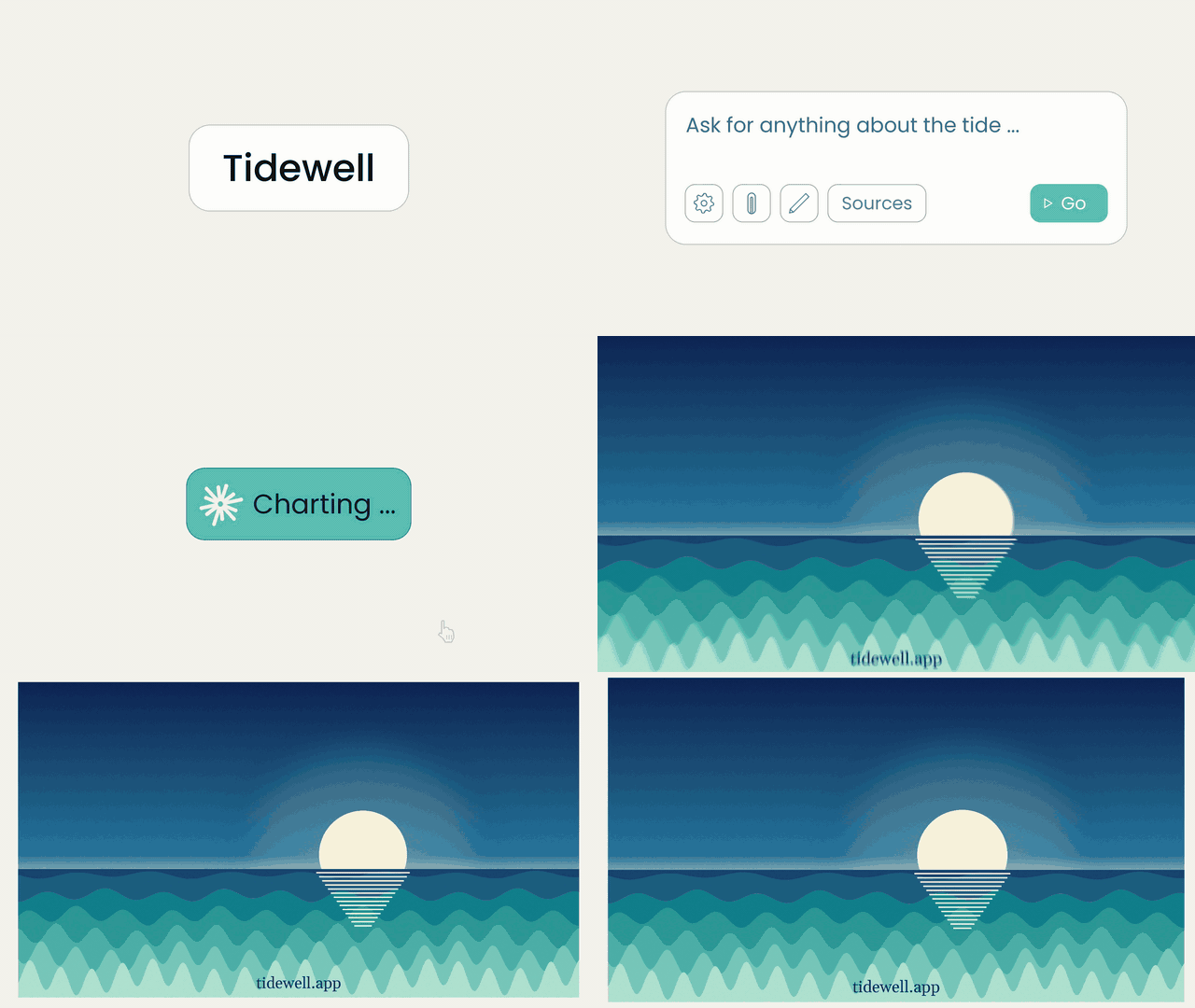
Format: 16:9 · 1920×1080 · 14 s
The graphic
A brand name sits in a white rounded pill on a warm off-white canvas. The pill grows into a prompt box with a placeholder, small tool buttons and a coloured send button. The placeholder fades out and the user's request appears word by word, the box growing line by line. A pointer taps send, the box shrinks into a coloured pill with a spinning star and a status word that changes once, then folds into a small icon. The icon pops open into a result image with a caption, which settles and slowly pushes in.
Perfect for AI product teasers, app launch clips, "prompt to result" explainers and generator demos.
Give it:
- a brand name (up to 10 characters);
- your prompt text (up to 140 characters);
- a result image (any photo or artwork; it is cropped to 16:9) and a short caption;
- optional: placeholder, button labels, two status words, accent, background, text and caption colours.
What you get back: a finished 16:9 video (or a still image), rendered and checked by Claude.
What's inside:
- SKILL.md: how Claude collects your content, checks it and renders the graphic.
- description.md: the full specification: canvas, 13 parameters, every element and beat.
Try it:
/motion-graphics-skills:65-graphics-prompt-pill-reveal
Make this graphic. Brand: "Tidewell". Prompt: "Build a pocket guide to the best tide times on every beach." Caption: "tidewell.app". [attach the result image]
Skill manifest
65 · Prompt Pill Reveal
1. YOUR JOB
You make one animated graphic. Its design is fixed in description.md. Collect the parameter values, check them, render the graphic exactly as specified, check the frames, and deliver. Never change the beats, layout, timing or motion. Never add elements.
2. COLLECT THE PARAMETERS
2.1 Parameters
| ID | Parameter | Required | Default |
|---|---|---|---|
| P1 | Brand name (≤ 10 chars) | yes | none |
| P2 | Prompt text (≤ 140 chars, ≤ 4 lines) | yes | none |
| P3 | Result image | yes | none |
| P4 | Image caption (≤ 24 chars) | yes | none |
| P5 | Placeholder text | no | Describe what you want to make ... |
| P6 | Import button label | no | import |
| P7 | Send button label | no | Send |
| P8 | Status word 1 | no | Designing |
| P9 | Status word 2 | no | Editing |
| P10 | Accent colour | no | #F89A7C |
| P11 | Background colour | no | #F4F2EC |
| P12 | Text colour | no | #111111 |
| P13 | Caption colour | no | #FAEEDC |
2.2 Read everything the user gave
Read the message, attached images and documents. Map each piece to parameters using description.md section 2.1. State the mapping in a short list.
2.3 Check completeness
If a required parameter is missing, ask for all missing ones in one numbered message with limits. Mention optional ones in one line with defaults. Stop and wait.
2.4 Validate
Text length (auto-fit to 70%, else ask to shorten). Image at least 1280 px wide (upscale with Lanczos if smaller). Colours as hex; accent must contrast with the dark text colour.
2.5 Complete input
If everything came in the first message, ask nothing and start. Never ask about anything that is not a parameter.
3. HARD RULES
- Same graphic for every user: beats, timing, layout and motion exactly as description.md.
- Only the user's words on screen, plus the labelled defaults of P5 to P9.
- The result image is cover-fit cropped to 16:9, never stretched.
- Text auto-fits and never overflows the prompt box.
- Output: 1920×1080, 30 fps, 14.03 s.
4. WORKFLOW
- Step 1: Collect and validate. Write a table with final values.
- Step 2: Prepare assets: cover-crop the image, measure text, wrap and justify the prompt.
- Step 3: Build every frame from description.md at 3840×2160, downscale to 1920×1080 with Lanczos, add sub-frame blur on the burst beat, encode
libx264 -crf 16 -preset slow -pix_fmt yuv420p -r 30. Render with few workers to limit memory. - Step 4: Check: a contact sheet (2 fps) plus the frames at every beat's end. Look at them. Checklist: every value on screen and spelled exactly; prompt inside its box; pill sizes match the text; star centred; image intact. Fix and re-render.
- Step 5: Deliver
prompt-pill-reveal.mp4(claude.ai:/mnt/user-data/outputs/), the final parameter table, and one line on what can be changed.
5. STILL MODE
If the user wants an image, render the settled final frame (description.md section 7) as a PNG at 1920×1080.
6. NO CODE EXECUTION
Give an editor build sheet: layers, keyframes per beat from description.md section 5, text, colours and the image crop.
7. NEVER DO
Never invent content or use any reference content. Never change the design. Never stretch the image. Never deliver without looking at the frames. Never ask about anything beyond missing or invalid parameters.
Files (claude-editing-skills)
-
description.md 7.6 KB
Loading… -
README.md 1.9 KB
# 65 · Prompt Pill Reveal ## Results **Your content, animated by Claude.** A brand pill opens into a prompt box, the request types itself and is sent, and a working pill bursts into a full result image; the demo uses a fictional tide-guide app with a generated seascape.  **Format:** 16:9 · 1920×1080 · 14 s ## The graphic A brand name sits in a white rounded pill on a warm off-white canvas. The pill grows into a prompt box with a placeholder, small tool buttons and a coloured send button. The placeholder fades out and the user's request appears word by word, the box growing line by line. A pointer taps send, the box shrinks into a coloured pill with a spinning star and a status word that changes once, then folds into a small icon. The icon pops open into a result image with a caption, which settles and slowly pushes in. Perfect for AI product teasers, app launch clips, "prompt to result" explainers and generator demos. **Give it:** - a brand name (up to 10 characters); - your prompt text (up to 140 characters); - a result image (any photo or artwork; it is cropped to 16:9) and a short caption; - optional: placeholder, button labels, two status words, accent, background, text and caption colours. **What you get back:** a finished 16:9 video (or a still image), rendered and checked by Claude. **What's inside:** - [SKILL.md](SKILL.md): how Claude collects your content, checks it and renders the graphic. - [description.md](description.md): the full specification: canvas, 13 parameters, every element and beat. **Try it:** ``` /motion-graphics-skills:65-graphics-prompt-pill-reveal Make this graphic. Brand: "Tidewell". Prompt: "Build a pocket guide to the best tide times on every beach." Caption: "tidewell.app". [attach the result image] ``` -
SKILL.md 3.8 KB
---
name: "65-graphics-prompt-pill-reveal"
description: "Makes the \"Prompt Pill Reveal\" animated graphic (a brand name in a white pill that grows into an AI prompt box, types the user's request, is sent, shrinks into a coloured \"working\" pill with a spinning star, collapses to an icon and bursts open into a full result image with a small caption) from the user's own text, colour and image, as a finished 16:9 video. Use when the user wants an AI prompt demo, chat-box intro, prompt-to-result product teaser, app generator animation or typed-prompt reveal."
---

# 65 · Prompt Pill Reveal

## 1. YOUR JOB
You make one animated graphic. Its design is fixed in description.md. Collect the parameter values, check them, render the graphic exactly as specified, check the frames, and deliver. Never change the beats, layout, timing or motion. Never add elements.

## 2. COLLECT THE PARAMETERS
### 2.1 Parameters
| ID | Parameter | Required | Default |
|---|---|---|---|
| P1 | Brand name (≤ 10 chars) | yes | none |
| P2 | Prompt text (≤ 140 chars, ≤ 4 lines) | yes | none |
| P3 | Result image | yes | none |
| P4 | Image caption (≤ 24 chars) | yes | none |
| P5 | Placeholder text | no | Describe what you want to make ... |
| P6 | Import button label | no | import |
| P7 | Send button label | no | Send |
| P8 | Status word 1 | no | Designing |
| P9 | Status word 2 | no | Editing |
| P10 | Accent colour | no | #F89A7C |
| P11 | Background colour | no | #F4F2EC |
| P12 | Text colour | no | #111111 |
| P13 | Caption colour | no | #FAEEDC |

### 2.2 Read everything the user gave
Read the message, attached images and documents. Map each piece to parameters using description.md section 2.1. State the mapping in a short list.
### 2.3 Check completeness
If a required parameter is missing, ask for all missing ones in one numbered message with limits. Mention optional ones in one line with defaults. Stop and wait.
### 2.4 Validate
Text length (auto-fit to 70%, else ask to shorten). Image at least 1280 px wide (upscale with Lanczos if smaller). Colours as hex; accent must contrast with the dark text colour.
### 2.5 Complete input
If everything came in the first message, ask nothing and start.
Never ask about anything that is not a parameter.

## 3. HARD RULES
- Same graphic for every user: beats, timing, layout and motion exactly as description.md.
- Only the user's words on screen, plus the labelled defaults of P5 to P9.
- The result image is cover-fit cropped to 16:9, never stretched.
- Text auto-fits and never overflows the prompt box.
- Output: 1920×1080, 30 fps, 14.03 s.

## 4. WORKFLOW
- Step 1: Collect and validate. Write a table with final values.
- Step 2: Prepare assets: cover-crop the image, measure text, wrap and justify the prompt.
- Step 3: Build every frame from description.md at 3840×2160, downscale to 1920×1080 with Lanczos, add sub-frame blur on the burst beat, encode `libx264 -crf 16 -preset slow -pix_fmt yuv420p -r 30`. Render with few workers to limit memory.
- Step 4: Check: a contact sheet (2 fps) plus the frames at every beat's end. Look at them. Checklist: every value on screen and spelled exactly; prompt inside its box; pill sizes match the text; star centred; image intact. Fix and re-render.
- Step 5: Deliver `prompt-pill-reveal.mp4` (claude.ai: `/mnt/user-data/outputs/`), the final parameter table, and one line on what can be changed.

## 5. STILL MODE
If the user wants an image, render the settled final frame (description.md section 7) as a PNG at 1920×1080.

## 6. NO CODE EXECUTION
Give an editor build sheet: layers, keyframes per beat from description.md section 5, text, colours and the image crop.

## 7. NEVER DO
Never invent content or use any reference content. Never change the design. Never stretch the image. Never deliver without looking at the frames. Never ask about anything beyond missing or invalid parameters.
Comments (0)
Sign in to join the conversation.
Reviews (0)
No reviews yet.
No comments yet.