146-graphics-pinned-stamp-timeline
Makes the "Pinned Stamp Timeline" animated graphic (a paper ruler that scrolls between three dated picture stamps with counted tape labels, a pull-back with a bracket measuring the gap, a torn note card and a horizontal ruler recap) from the user's own events, dates and pictures,
Install
npx skills add https://github.com/pihu26112005/claude-editing-skills/tree/main/skills/146-graphics-pinned-stamp-timeline
claude plugin marketplace add https://llmmart.ai/marketplace.json && claude plugin install pihu26112005-claude-editing-skills@llmmart
git clone https://github.com/pihu26112005/claude-editing-skills.git
The skills CLI installs just this skill, for any of its supported agents. Claude Code installs the whole pihu26112005/claude-editing-skills collection as a plugin from our marketplace. Git is the plain clone.
README
146 · Pinned Stamp Timeline
Results
Your content, animated by Claude. Three dated picture stamps pinned on a scrolling paper ruler with counted gaps; the demo uses three flight firsts (balloon, biplane, jet airliner) with procedural pictures.
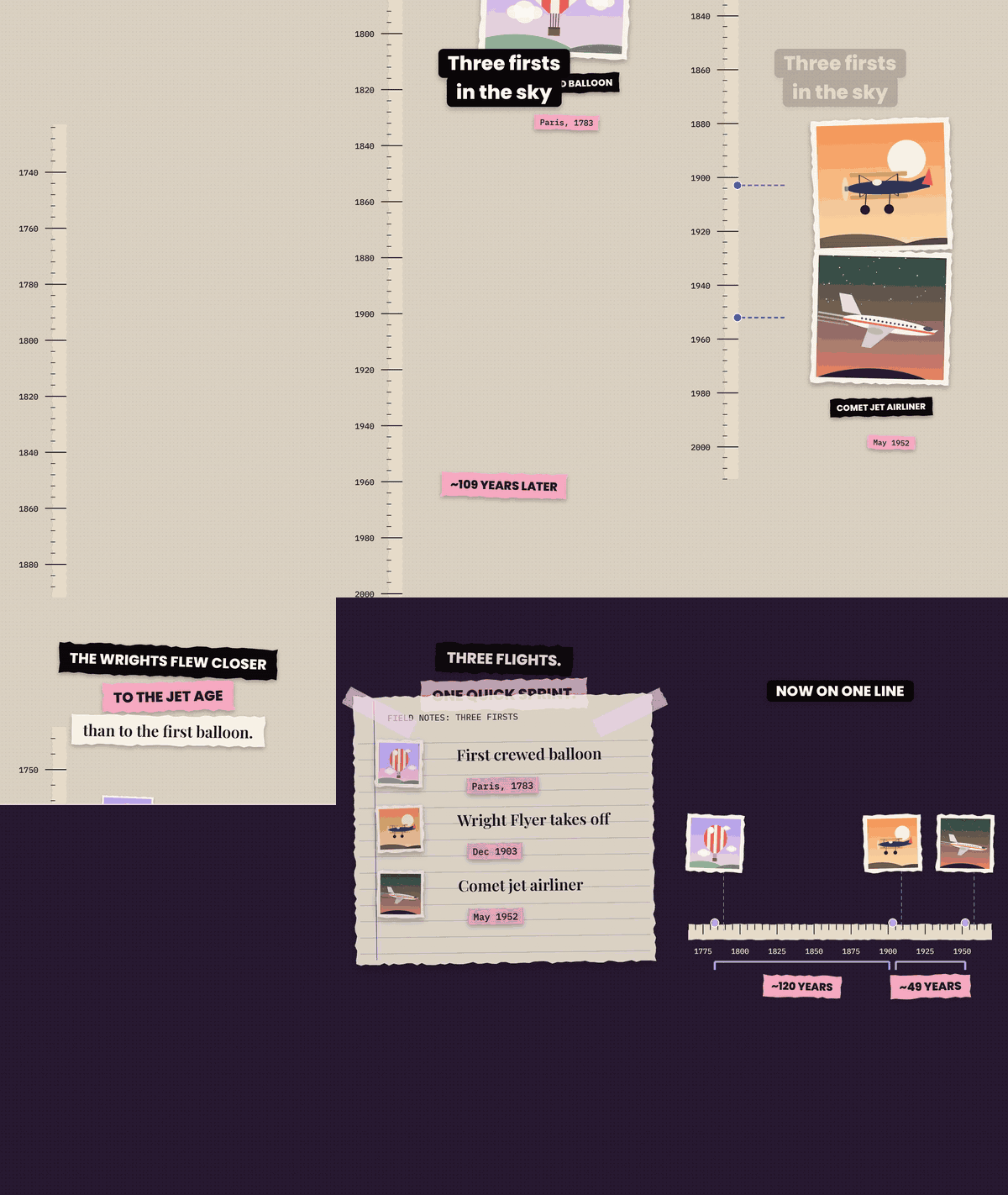
Format: 9:16 · 1080x1920 · 16.0 s
The graphic
A paper-coloured ruler scrolls from date to date. Each event lands as a torn-border picture stamp with a caption and date tape, pinned to the ruler by a dashed line, and a tape label counts the years between events. The camera pulls back to the whole ruler under a torn headline stack, and a bracket measures the gap. A dark scene follows with a taped note card that lists the three events, then a horizontal ruler with the three stamps and two gap brackets.
Perfect for history comparisons, "closer than you think" reveals, product or company milestones and any date-gap explainer.
Give it:
- 3 events: year, name (up to 26 characters) and date tag each;
- 3 pictures (any photos; or let Claude draw simple ones);
- a 3-line headline, a 2-line note headline and an opening chip text;
- optional: kicker, closing chip, accent, tape, paper and dark colours (defaults measured).
What you get back: a finished 9:16 video (or a still image), rendered and checked by Claude.
What's inside:
- SKILL.md: how Claude collects your content, checks it and renders the graphic.
- description.md: the full specification: canvas, 22 parameters, every element and beat.
Try it:
/motion-graphics-skills:146-graphics-pinned-stamp-timeline
Make this graphic. Events: 1783 First crewed balloon, 1903 Wright Flyer takes off, 1952 Comet jet airliner. [attach 3 pictures]
Skill manifest
146 · Pinned Stamp Timeline
1. YOUR JOB
You make one animated graphic. Its design is fixed in description.md. Collect the parameter values, check them, render the graphic exactly as specified, check the frames, and deliver. Never change the beats, layout, timing or motion. Never add elements.
2. COLLECT THE PARAMETERS
2.1 Parameters
| ID | Parameter | Required | Default |
|---|---|---|---|
| P1 | Opening chip text (≤ 2 lines) | yes | none |
| P2–P5 | Event 1: year, name, date tag, image | yes | none |
| P6–P9 | Event 2: year, name, date tag, image | yes | none |
| P10–P13 | Event 3: year, name, date tag, image | yes | none |
| P14 | Headline: 3 lines | yes | none |
| P15 | Note card headline: 2 lines | yes | none |
| P16 | Note card kicker | no | NOTES |
| P17 | Closing chip text | no | ON ONE LINE |
| P18 | Gap wording | no | ~N YEARS LATER / ~N YEARS |
| P19 | Accent colour | no | #D7472B |
| P20 | Tape colour | no | #E3C121 |
| P21 | Paper colour | no | #DDD3C4 |
| P22 | Dark colour | no | #253232 |
2.2 Read everything the user gave
Read the message, attached images and documents. Map each piece to parameters using description.md section 2.1. Sort events by year. State the mapping in a short list.
2.3 Check completeness
If a required parameter is missing, ask for all missing ones in one numbered message with limits (for example "3 events: year, name up to 26 chars, date tag", "3 pictures, or I draw simple ones", "a 3-line headline comparing the gaps"). Mention optional ones in one line. Stop and wait.
2.4 Validate
Years strictly increasing. Text limits (shrink to 70 percent, else ask to shorten). Image size (upscale small ones with Lanczos). Colours as hex with good contrast: tape colour must carry dark text, accent must be visible on paper. If two dates are so close that stickers overlap in the overview, ask the user to change one.
2.5 Complete input
If everything came in the first message, ask nothing and start. Never ask about anything that is not a parameter.
3. HARD RULES
- Same graphic for every user: beats, timing, layout, motion and camera exactly as description.md.
- Only the user's words on screen, plus the computed gap numbers and the defaults of P16–P18.
- Images: cover-fit crop only, never stretched; keep the focal point.
- Text auto-fits its box; never overflows or collides.
- Output: 1080×1920, 24 fps, 16.0 s, silent.
4. WORKFLOW
- Step 1: Collect and validate (section 2). Write the final parameter table.
- Step 2: Prepare assets: load or draw the three pictures, cover-crop, build sprites, measure and fit text.
- Step 3: Render every frame from description.md at the native size, supersampled 2×, one worker streaming into ffmpeg (
libx264 -crf 16 -preset slow -pix_fmt yuv420p -r 24). - Step 4: Check: a contact sheet (2 fps) plus frames at each beat's end (about 3.7, 5.6, 8.8, 12.0, 15.8 s). Look at them. Checklist: all parameter values on screen and spelled exactly; gap numbers correct; no clipping or overlap; stamps pinned to the right dates; motion matches the beats. Fix and re-render.
- Step 5: Deliver
pinned-stamp-timeline.mp4, the final parameter table and one line on what can be changed.
5. STILL MODE
For an image, render the still of description.md section 7 as PNG at 1080×1920.
6. NO CODE EXECUTION
Give an editor build sheet: layers, keyframes per beat, text, colours and image crops.
7. NEVER DO
Never invent content; never change the design; never stretch images; never deliver without looking at the frames; never ask about anything beyond missing or invalid parameters.
Files (claude-editing-skills)
-
description.md 11.3 KB
Loading… -
README.md 1.8 KB
# 146 · Pinned Stamp Timeline ## Results **Your content, animated by Claude.** Three dated picture stamps pinned on a scrolling paper ruler with counted gaps; the demo uses three flight firsts (balloon, biplane, jet airliner) with procedural pictures.  **Format:** 9:16 · 1080x1920 · 16.0 s ## The graphic A paper-coloured ruler scrolls from date to date. Each event lands as a torn-border picture stamp with a caption and date tape, pinned to the ruler by a dashed line, and a tape label counts the years between events. The camera pulls back to the whole ruler under a torn headline stack, and a bracket measures the gap. A dark scene follows with a taped note card that lists the three events, then a horizontal ruler with the three stamps and two gap brackets. Perfect for history comparisons, "closer than you think" reveals, product or company milestones and any date-gap explainer. **Give it:** - 3 events: year, name (up to 26 characters) and date tag each; - 3 pictures (any photos; or let Claude draw simple ones); - a 3-line headline, a 2-line note headline and an opening chip text; - optional: kicker, closing chip, accent, tape, paper and dark colours (defaults measured). **What you get back:** a finished 9:16 video (or a still image), rendered and checked by Claude. **What's inside:** - [SKILL.md](SKILL.md): how Claude collects your content, checks it and renders the graphic. - [description.md](description.md): the full specification: canvas, 22 parameters, every element and beat. **Try it:** ``` /motion-graphics-skills:146-graphics-pinned-stamp-timeline Make this graphic. Events: 1783 First crewed balloon, 1903 Wright Flyer takes off, 1952 Comet jet airliner. [attach 3 pictures] ``` -
SKILL.md 4 KB
---
name: "146-graphics-pinned-stamp-timeline"
description: "Makes the \"Pinned Stamp Timeline\" animated graphic (a paper ruler that scrolls between three dated picture stamps with counted tape labels, a pull-back with a bracket measuring the gap, a torn note card and a horizontal ruler recap) from the user's own events, dates and pictures, as a finished 9:16 video. Use when the user wants a history timeline, \"which is closer\" comparison, date-gap explainer, dated sticker timeline or years-later reveal."
---

# 146 · Pinned Stamp Timeline

## 1. YOUR JOB
You make one animated graphic. Its design is fixed in description.md. Collect the parameter values, check them, render the graphic exactly as specified, check the frames, and deliver. Never change the beats, layout, timing or motion. Never add elements.

## 2. COLLECT THE PARAMETERS
### 2.1 Parameters
| ID | Parameter | Required | Default |
|---|---|---|---|
| P1 | Opening chip text (≤ 2 lines) | yes | none |
| P2–P5 | Event 1: year, name, date tag, image | yes | none |
| P6–P9 | Event 2: year, name, date tag, image | yes | none |
| P10–P13 | Event 3: year, name, date tag, image | yes | none |
| P14 | Headline: 3 lines | yes | none |
| P15 | Note card headline: 2 lines | yes | none |
| P16 | Note card kicker | no | NOTES |
| P17 | Closing chip text | no | ON ONE LINE |
| P18 | Gap wording | no | ~N YEARS LATER / ~N YEARS |
| P19 | Accent colour | no | #D7472B |
| P20 | Tape colour | no | #E3C121 |
| P21 | Paper colour | no | #DDD3C4 |
| P22 | Dark colour | no | #253232 |

### 2.2 Read everything the user gave
Read the message, attached images and documents. Map each piece to parameters using description.md section 2.1. Sort events by year. State the mapping in a short list.
### 2.3 Check completeness
If a required parameter is missing, ask for all missing ones in one numbered message with limits (for example "3 events: year, name up to 26 chars, date tag", "3 pictures, or I draw simple ones", "a 3-line headline comparing the gaps"). Mention optional ones in one line. Stop and wait.
### 2.4 Validate
Years strictly increasing. Text limits (shrink to 70 percent, else ask to shorten). Image size (upscale small ones with Lanczos). Colours as hex with good contrast: tape colour must carry dark text, accent must be visible on paper. If two dates are so close that stickers overlap in the overview, ask the user to change one.
### 2.5 Complete input
If everything came in the first message, ask nothing and start.
Never ask about anything that is not a parameter.

## 3. HARD RULES
- Same graphic for every user: beats, timing, layout, motion and camera exactly as description.md.
- Only the user's words on screen, plus the computed gap numbers and the defaults of P16–P18.
- Images: cover-fit crop only, never stretched; keep the focal point.
- Text auto-fits its box; never overflows or collides.
- Output: 1080×1920, 24 fps, 16.0 s, silent.

## 4. WORKFLOW
- Step 1: Collect and validate (section 2). Write the final parameter table.
- Step 2: Prepare assets: load or draw the three pictures, cover-crop, build sprites, measure and fit text.
- Step 3: Render every frame from description.md at the native size, supersampled 2×, one worker streaming into ffmpeg (`libx264 -crf 16 -preset slow -pix_fmt yuv420p -r 24`).
- Step 4: Check: a contact sheet (2 fps) plus frames at each beat's end (about 3.7, 5.6, 8.8, 12.0, 15.8 s). Look at them. Checklist: all parameter values on screen and spelled exactly; gap numbers correct; no clipping or overlap; stamps pinned to the right dates; motion matches the beats. Fix and re-render.
- Step 5: Deliver `pinned-stamp-timeline.mp4`, the final parameter table and one line on what can be changed.

## 5. STILL MODE
For an image, render the still of description.md section 7 as PNG at 1080×1920.

## 6. NO CODE EXECUTION
Give an editor build sheet: layers, keyframes per beat, text, colours and image crops.

## 7. NEVER DO
Never invent content; never change the design; never stretch images; never deliver without looking at the frames; never ask about anything beyond missing or invalid parameters.
Comments (0)
Sign in to join the conversation.
Reviews (0)
No reviews yet.
No comments yet.