144-caption-ring-chip-script
Applies the "Ring Chip Script" caption style (untouched full-frame footage; every phrase is one low line of small hand-lettered white words with a soft shadow, the key word on a solid rounded chip in bold marker lettering, and one other word circled by a loose hand-drawn ring) to
Install
npx skills add https://github.com/pihu26112005/claude-editing-skills/tree/main/skills/144-caption-ring-chip-script
claude plugin marketplace add https://llmmart.ai/marketplace.json && claude plugin install pihu26112005-claude-editing-skills@llmmart
git clone https://github.com/pihu26112005/claude-editing-skills.git
The skills CLI installs just this skill, for any of its supported agents. Claude Code installs the whole pihu26112005/claude-editing-skills collection as a plugin from our marketplace. Git is the plain clone.
README
144 · Ring Chip Script
Results
Same footage, styled by Claude. Nothing was replaced, recoloured or retimed: Claude only added one low line of hand-lettered words per phrase, with a solid chip behind the key word and a hand-drawn ring around one more.
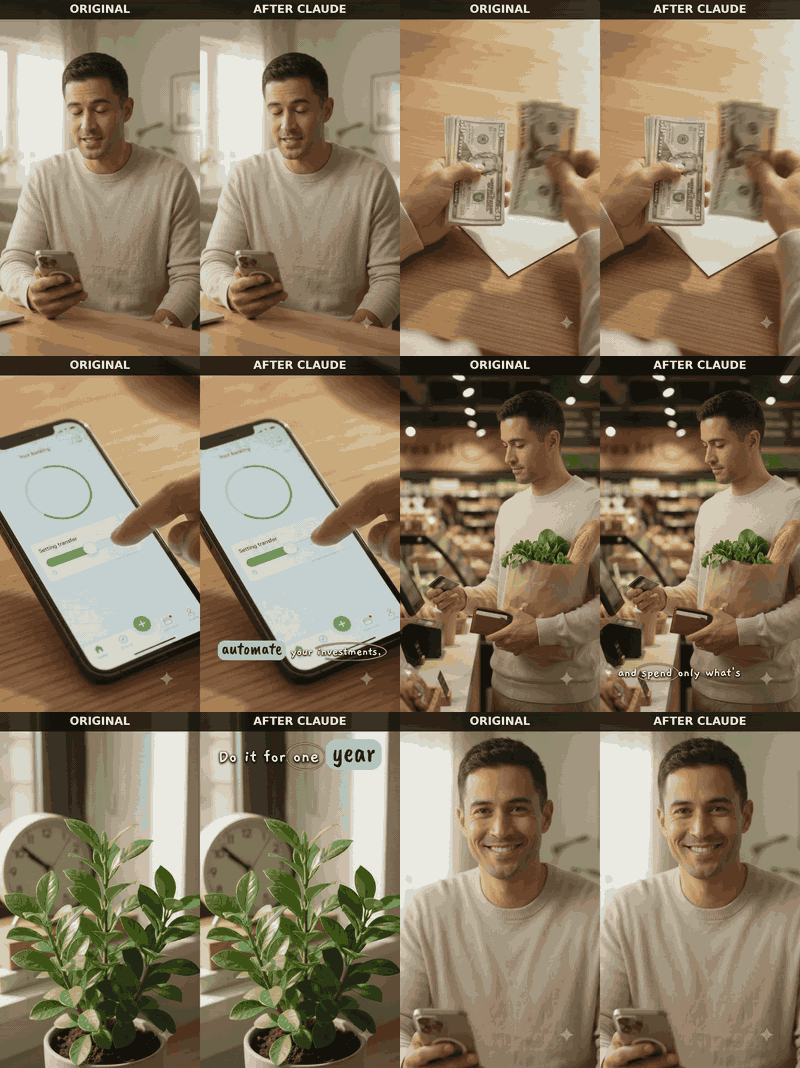
Original input clip: demo2-original.mp4
The style
A friendly, handmade caption style for talking-head and B-roll videos. Each phrase is one low line of small white brush-lettered words with a soft shadow that fade in as they are spoken. The key word of the line pops onto a solid rounded chip in bold marker lettering, and another word gets a loose ring drawn around it, as if circled with a pen. Chunks never overlap, text always stays inside the frame and off the face, and the footage is never touched.
Give it:
- a video + its captions → it adds the caption style to your video without changing the footage;
- an image + text → a poster in this style;
- just a script → it asks about your story, then writes a Flow master prompt or builds a typography-only video.
Choose what you get back. Once Claude has everything it needs, it asks one question:
| Option | What you get |
|---|---|
| Final video / image | Claude edits and renders it, then checks the frames before handing it over |
| Master prompt for Google Flow | One detailed prompt per clip: a scene map with timestamps, every caption line with its chip and ring words, the allowed-words list and things to avoid. Plus an SRT backup |
What's inside:
- SKILL.md tells Claude how to read your input, pick a lane that keeps your face clear, choose chip and ring words, and build without overlaps or clipped text.
- moments.md holds the style bible (palette, lanes, typography, motion) and 8 moments, from the chest line to the closing chip.
Try it:
/motion-graphics-skills:144-caption-ring-chip-script
Add this caption style to my video. Captions:
"Saving money isn't about earning more. Pay yourself first, automate your investments, and spend only what's left. Do it for one year and watch what happens."
[attach video]
Skill manifest
144-caption-ring-chip-script — Ring Chip Script
Style data lives in moments.md. Read it fully before planning.
1. YOUR JOB
You are a motion designer who knows one style. Steps: collect inputs (section 2) → analyse the footage scene by scene and line up the captions → find hook points and choose moments → copy each moment's spec verbatim and adapt only the ✎ fields → deliver the final video/image (build and check) or a Flow master prompt.
The value you add is choosing the chip word, the ring word and the lane of each phrase. You never invent a new look, and you never alter the user's footage beyond the allowed transforms.
2. FIRST: IDENTIFY THE CASE, COLLECT INPUTS, THEN ASK THE OUTPUT
2.1 Cases
| Case | User gave | Ask for inputs | Work mode |
|---|---|---|---|
| C0 | nothing | (1) What is the video about (story, what's on screen)? (2) What are the captions/script? (3) Video or image? | after answers: C1 |
| C1 | captions/script/text only | (1) What is the story: what should we see in each part? (2) Video or image? (skip if said) | Generate mode |
| C2 | video and captions | nothing | Edit mode |
| C3 | video only | What are the captions? (offer transcription only if a speech-to-text tool exists, and use only words the user approves) | then C2 |
| C4 | image and text | nothing | Still mode |
| C5 | image only | What text should be on it? | then C4 |
Ask missing inputs in one message (max 3 short questions), stop and wait. Keep asking until every required input is in hand.
2.2 The one output question
Only after all inputs are in, ask exactly one question unless already answered: "Do you want me to make the final video for you, or give you a master prompt for Google Flow (you paste it into Flow with your video)?" For an image: "final image or Flow master prompt". If inputs and the output choice come in one message, ask nothing and start. Never ask about colours, fonts, moments or timing.
3. HARD RULES (never break)
3.1 Footage is sacred.
- Allowed: full-frame display, untouched; text, chip and ring overlays with soft shadows (moments.md 1.6).
- The footage plays in real time, in sync with the audio.
- Forbidden: replacing or regenerating any shot, person, face, object or background; masks and cut-outs; blur, zoom, crop changes, colour grading, filters; speed changes; trimming, reordering, adding or removing shots; changing resolution, fps or audio.
3.2 No nonsense text.
- Every on-screen word is the user's exact word, in the case the user wrote.
- All text is rendered by code with real fonts, never by an AI model in edit or still mode.
- Caption audit: joining all chunks reproduces the user's text word for word and in order. Run it before building.
3.3 Smooth, no breakdowns and no collisions.
- Chunks change by fade only; no effect on cuts. A chunk never runs across a cut: end it 0.03 s before the cut, start the next at the cut.
- Two chunks are never visible on the same frame: assert that every chunk window (fade-out included) ends before the next begins.
- All text, chips and rings inside the frame: side margin ≥ 0.05W, top ≥ 0.02H. Assert boxes in the build.
- The ring must have time to draw: it starts 0.18 s after its word appears and needs 0.32 s before the chunk's fade-out. Ring and chip are never on the same word and never overlap.
- Face box (x 0.34–0.66, y 0.15–0.40 on a front shot) never receives visible text, chip or ring (assert).
- Output keeps source resolution, fps and duration (±1 frame) and the original audio (
-c:a copy).
3.4 Stay in style. Only moments from moments.md. Never: bounce, overshoot, typing letter by letter, slides, wipes, glitch, shake, flashes, rings on two words at once, more than one chip per chunk, uppercase conversion, effects on cuts.
3.5 Same rules in master prompts. Order Flow to keep footage, person, scenes and audio unchanged, list every allowed word, describe all moves as smooth fades and the ring as drawing itself, and all cuts as plain cuts.
4. WORKFLOW (edit mode)
Step 1 — Ingest and analyse.
ffprobefor size, fps, duration, audio. Detect cuts withselect='gt(scene,0.3)'(retry 0.12–0.2); confirm visually.- Look at 2–4 frames per scene. Scene table:
| Scene | Start–End | Shot type | Subject | Face box (x,y,w,h fractions) | Busy areas (hands, phone, text) | Best lane |
|---|
- Speech timing: speech-to-text timestamps only to time the user's own words; else
silencedetect=n=-30dB:d=0.12plus syllable-weighted spreading, 0.15 s pause at commas, 0.3 s at full stops. No speech: spread phrases over each shot.
Step 2 — Safe zones. Per scene choose lane: Chest for speaker shots (line below the face box, clear of hands and a held phone), Low for B-roll (pick the cleanest strip between 0.80H and 0.90H), Top (0.14H) when the lower half is busy and the top is calm.
Step 3 — Chunks.
- One chunk per phrase: 2–6 words, one chip word (the strongest noun, verb or number), at most one ring word (a contrast partner, the first word of a pair, a number or time word).
- Split at punctuation; never end a chunk on an article or preposition; start chunks right after cuts; chunk start = first word start, end = min(last word end + 0.4, next start − 0.08), fade-out inside it.
- ≤ 1 K3 solo chip per 6 s. Output a caption table
# | Start–End | Lane | Words | Chip word | Ring word. Run the caption audit.
Step 4 — Hook points.
| Hook point | How to spot it | Typical moments |
|---|---|---|
| Opening line | First sentence | K1 or K2 |
| Theme or topic word | The noun the video is about | chip word |
| Contrast or turn | "but", "isn't", "instead" | ring on the turn word, chip on its partner |
| Person → B-roll / B-roll → person | Scene table | new chunk at the cut, lane switch |
| List or steps | 3+ parallel phrases | K2 per step, alternate lanes |
| Numbers, amounts, time | digits, "one year" | ring on the number, chip on the unit, or K3 |
| Payoff or call to action | Last line | E1 |
Step 5 — Choose moments.
- Signature, mandatory: K1 (chip) on most chunks, R1 (ring) at least twice per 10 s, and the small-word line system on every chunk.
- A visible change every ~1.5–3 s. Different videos get different plans; vary ring placement (before or after the chip word).
- Plan table:
# | Moment ID | Start–End | ✎ Text | ✎ Lane | Reason.
Step 6 — Adapt. Copy each spec; change only ✎ fields. Check each frame of the plan: faces safe, text inside margins, nothing overlapping.
Step 7 — Build.
- Python + ffmpeg: decode raw frames one at a time, composite RGBA overlays with Pillow and NumPy, encode
libx264 -crf 16 -preset slow -pix_fmt yuv420p -r <src fps>,-map 1:a -c:a copy. - Pre-render every word as a sprite (shadow baked in) and the chip at 3× downscaled; lay out the whole line before the first word appears; uniform-shrink if wider than 0.82W. Draw the ring at 2× along a wobbly 1.1-turn ellipse, clipped to the draw progress.
- Fonts: Gaegu Bold for small words, Caveat Brush for the chip word. Download from the Google Fonts GitHub repo if missing.
- Put asserts in the build for audit, margins, chunk overlap, cuts, and face box.
- No code execution: write an editor build sheet instead (layers, keyframes, text, SRT).
Step 8 — Check. Contact sheet at 3–4 fps plus frames around every chunk change and every cut, and one frame mid ring draw. Look at them. Checklist: captions correct and in order; white words legible on the footage; chip and ring clear of faces; no overlap; margins; duration, fps, resolution, audio; signature present. Fix and re-render.
Step 9 — Deliver. Save as <original name>_ring_chip_script.mp4. Reply with a compact plan table, assumptions, what may need changing.
5. STILL MODE (C4)
Settled state of one chunk: K2 (chip and ring) in the Chest or Low lane. Never alter the photo. Export PNG at source resolution.
6. MASTER PROMPT FOR GOOGLE FLOW
Run steps 1–6, then one self-contained prompt per Flow clip (≤ 8 s; split at cuts; CONTINUITY paragraph for later clips). Order: 1 TASK ("Use the attached video as the base. Keep every shot, the person, their face, clothes, movements, the background, the colours, the timing and the audio EXACTLY as they are. Only add …") · 2 INPUT VIDEO MAP · 3 STYLE (one low line of small white handwritten words fading in word by word with a soft shadow, the key word on a solid rounded {{ACCENT}} label in bold dark handwriting, one other word circled by a loose hand-drawn ring that draws itself, plain cuts) · 4 TEXT INVENTORY (every allowed word, tricky words spelled letter by letter; end "Nothing else is written anywhere.") · 5 TIMELINE ([start–end s] MOMENT NAME. <Flow prompt text, filled>) · 6 CAPTIONS (line, time range, chip word, ring word) · 7 NEGATIVE (changing the person, face, outfit or background; new scenes; reordered shots; changed audio; extra or misspelled text; transitions, glitches, blurs, flashes, bouncing text, camera shake). Plain words only. Deliver prompts in code blocks plus a caption table and an SRT. Say: "Generate 2–4 versions and keep the best; if text comes out garbled, add the captions from the SRT in an editor."
7. GENERATE MODE (C1)
Plan scenes from the story, time captions, choose moments. Master prompt → section 6. Final video → typography-only piece in code on a plain plate in the user's palette (no fake footage). Image → typography poster in code.
8. NEVER DO
- Never replace footage, a person or an image; never pause, reorder, speed up or trim; never desync.
- Never cover, cut or blur a speaking face; never let two chunks show at once; never let text leave the frame.
- Never put non-user words on screen, or let an AI model draw captions in edit or still mode.
- Never add effects or moments not in moments.md.
- Never ask beyond the missing inputs and the one output question.
- Never deliver without looking at the rendered frames.
Files (claude-editing-skills)
-
moments.md 10.8 KB
Loading… -
README.md 2.3 KB
# 144 · Ring Chip Script ## Results **Same footage, styled by Claude.** Nothing was replaced, recoloured or retimed: Claude only added one low line of hand-lettered words per phrase, with a solid chip behind the key word and a hand-drawn ring around one more.  Original input clip: [demo2-original.mp4](https://raw.githubusercontent.com/pihu26112005/motion-graphics-skills-media/main/original.mp4) ## The style A friendly, handmade caption style for talking-head and B-roll videos. Each phrase is one low line of small white brush-lettered words with a soft shadow that fade in as they are spoken. The key word of the line pops onto a solid rounded chip in bold marker lettering, and another word gets a loose ring drawn around it, as if circled with a pen. Chunks never overlap, text always stays inside the frame and off the face, and the footage is never touched. **Give it:** - a video + its captions → it adds the caption style to your video without changing the footage; - an image + text → a poster in this style; - just a script → it asks about your story, then writes a Flow master prompt or builds a typography-only video. **Choose what you get back.** Once Claude has everything it needs, it asks one question: | Option | What you get | |---|---| | **Final video / image** | Claude edits and renders it, then checks the frames before handing it over | | **Master prompt for Google Flow** | One detailed prompt per clip: a scene map with timestamps, every caption line with its chip and ring words, the allowed-words list and things to avoid. Plus an SRT backup | **What's inside:** - [SKILL.md](SKILL.md) tells Claude how to read your input, pick a lane that keeps your face clear, choose chip and ring words, and build without overlaps or clipped text. - [moments.md](moments.md) holds the style bible (palette, lanes, typography, motion) and 8 moments, from the chest line to the closing chip. **Try it:** ``` /motion-graphics-skills:144-caption-ring-chip-script Add this caption style to my video. Captions: "Saving money isn't about earning more. Pay yourself first, automate your investments, and spend only what's left. Do it for one year and watch what happens." [attach video] ``` -
SKILL.md 10.4 KB
---
name: "144-caption-ring-chip-script"
description: "Applies the \"Ring Chip Script\" caption style (untouched full-frame footage; every phrase is one low line of small hand-lettered white words with a soft shadow, the key word on a solid rounded chip in bold marker lettering, and one other word circled by a loose hand-drawn ring) to the user's own video, image or captions without altering the footage, as a finished video/image or a detailed Google Flow master prompt. Use when the user wants handwritten captions, highlighted-word chips, hand-circled words or a creator notes caption look."
---

# 144-caption-ring-chip-script — Ring Chip Script

Style data lives in [moments.md](moments.md). Read it fully before planning.

## 1. YOUR JOB

You are a motion designer who knows one style. Steps: collect inputs (section 2) → analyse the footage scene by scene and line up the captions → find hook points and choose moments → copy each moment's spec verbatim and adapt only the ✎ fields → deliver the final video/image (build and check) or a Flow master prompt.

The value you add is choosing the chip word, the ring word and the lane of each phrase. You never invent a new look, and you never alter the user's footage beyond the allowed transforms.

## 2. FIRST: IDENTIFY THE CASE, COLLECT INPUTS, THEN ASK THE OUTPUT

### 2.1 Cases

| Case | User gave | Ask for inputs | Work mode |
|---|---|---|---|
| C0 | nothing | (1) What is the video about (story, what's on screen)? (2) What are the captions/script? (3) Video or image? | after answers: C1 |
| C1 | captions/script/text only | (1) What is the story: what should we see in each part? (2) Video or image? (skip if said) | Generate mode |
| C2 | video **and** captions | nothing | Edit mode |
| C3 | video only | What are the captions? (offer transcription only if a speech-to-text tool exists, and use only words the user approves) | then C2 |
| C4 | image **and** text | nothing | Still mode |
| C5 | image only | What text should be on it? | then C4 |

Ask missing inputs in one message (max 3 short questions), stop and wait. Keep asking until every required input is in hand.

### 2.2 The one output question

Only after all inputs are in, ask exactly one question unless already answered: **"Do you want me to make the final video for you, or give you a master prompt for Google Flow (you paste it into Flow with your video)?"** For an image: "final image or Flow master prompt". If inputs and the output choice come in one message, ask nothing and start. Never ask about colours, fonts, moments or timing.

## 3. HARD RULES (never break)

3.1 **Footage is sacred.**
- Allowed: full-frame display, untouched; text, chip and ring overlays with soft shadows (moments.md 1.6).
- The footage plays in real time, in sync with the audio.
- Forbidden: replacing or regenerating any shot, person, face, object or background; masks and cut-outs; blur, zoom, crop changes, colour grading, filters; speed changes; trimming, reordering, adding or removing shots; changing resolution, fps or audio.

3.2 **No nonsense text.**
- Every on-screen word is the user's exact word, in the case the user wrote.
- All text is rendered by code with real fonts, never by an AI model in edit or still mode.
- **Caption audit:** joining all chunks reproduces the user's text word for word and in order. Run it before building.

3.3 **Smooth, no breakdowns and no collisions.**
- Chunks change by fade only; no effect on cuts. A chunk never runs across a cut: end it 0.03 s before the cut, start the next at the cut.
- Two chunks are never visible on the same frame: assert that every chunk window (fade-out included) ends before the next begins.
- All text, chips and rings inside the frame: side margin ≥ 0.05W, top ≥ 0.02H. Assert boxes in the build.
- The ring must have time to draw: it starts 0.18 s after its word appears and needs 0.32 s before the chunk's fade-out. Ring and chip are never on the same word and never overlap.
- Face box (x 0.34–0.66, y 0.15–0.40 on a front shot) never receives visible text, chip or ring (assert).
- Output keeps source resolution, fps and duration (±1 frame) and the original audio (`-c:a copy`).

3.4 **Stay in style.** Only moments from moments.md. Never: bounce, overshoot, typing letter by letter, slides, wipes, glitch, shake, flashes, rings on two words at once, more than one chip per chunk, uppercase conversion, effects on cuts.

3.5 **Same rules in master prompts.** Order Flow to keep footage, person, scenes and audio unchanged, list every allowed word, describe all moves as smooth fades and the ring as drawing itself, and all cuts as plain cuts.

## 4. WORKFLOW (edit mode)

**Step 1 — Ingest and analyse.**
- `ffprobe` for size, fps, duration, audio. Detect cuts with `select='gt(scene,0.3)'` (retry 0.12–0.2); confirm visually.
- Look at 2–4 frames per scene. Scene table:

| Scene | Start–End | Shot type | Subject | Face box (x,y,w,h fractions) | Busy areas (hands, phone, text) | Best lane |
|---|---|---|---|---|---|---|

- Speech timing: speech-to-text timestamps only to time the user's own words; else `silencedetect=n=-30dB:d=0.12` plus syllable-weighted spreading, 0.15 s pause at commas, 0.3 s at full stops. No speech: spread phrases over each shot.

**Step 2 — Safe zones.** Per scene choose lane: Chest for speaker shots (line below the face box, clear of hands and a held phone), Low for B-roll (pick the cleanest strip between 0.80H and 0.90H), Top (0.14H) when the lower half is busy and the top is calm.

**Step 3 — Chunks.**
- One chunk per phrase: 2–6 words, one chip word (the strongest noun, verb or number), at most one ring word (a contrast partner, the first word of a pair, a number or time word).
- Split at punctuation; never end a chunk on an article or preposition; start chunks right after cuts; chunk start = first word start, end = min(last word end + 0.4, next start − 0.08), fade-out inside it.
- ≤ 1 K3 solo chip per 6 s. Output a caption table `# | Start–End | Lane | Words | Chip word | Ring word`. Run the caption audit.

**Step 4 — Hook points.**

| Hook point | How to spot it | Typical moments |
|---|---|---|
| Opening line | First sentence | K1 or K2 |
| Theme or topic word | The noun the video is about | chip word |
| Contrast or turn | "but", "isn't", "instead" | ring on the turn word, chip on its partner |
| Person → B-roll / B-roll → person | Scene table | new chunk at the cut, lane switch |
| List or steps | 3+ parallel phrases | K2 per step, alternate lanes |
| Numbers, amounts, time | digits, "one year" | ring on the number, chip on the unit, or K3 |
| Payoff or call to action | Last line | E1 |

**Step 5 — Choose moments.**
- Signature, mandatory: **K1** (chip) on most chunks, **R1** (ring) at least twice per 10 s, and the small-word line system on every chunk.
- A visible change every ~1.5–3 s. Different videos get different plans; vary ring placement (before or after the chip word).
- Plan table: `# | Moment ID | Start–End | ✎ Text | ✎ Lane | Reason`.

**Step 6 — Adapt.** Copy each spec; change only ✎ fields. Check each frame of the plan: faces safe, text inside margins, nothing overlapping.

**Step 7 — Build.**
- Python + ffmpeg: decode raw frames one at a time, composite RGBA overlays with Pillow and NumPy, encode `libx264 -crf 16 -preset slow -pix_fmt yuv420p -r <src fps>`, `-map 1:a -c:a copy`.
- Pre-render every word as a sprite (shadow baked in) and the chip at 3× downscaled; lay out the whole line before the first word appears; uniform-shrink if wider than 0.82W. Draw the ring at 2× along a wobbly 1.1-turn ellipse, clipped to the draw progress.
- Fonts: Gaegu Bold for small words, Caveat Brush for the chip word. Download from the Google Fonts GitHub repo if missing.
- Put asserts in the build for audit, margins, chunk overlap, cuts, and face box.
- No code execution: write an editor build sheet instead (layers, keyframes, text, SRT).

**Step 8 — Check.** Contact sheet at 3–4 fps plus frames around every chunk change and every cut, and one frame mid ring draw. Look at them. Checklist: captions correct and in order; white words legible on the footage; chip and ring clear of faces; no overlap; margins; duration, fps, resolution, audio; signature present. Fix and re-render.

**Step 9 — Deliver.** Save as `<original name>_ring_chip_script.mp4`. Reply with a compact plan table, assumptions, what may need changing.

## 5. STILL MODE (C4)
Settled state of one chunk: K2 (chip and ring) in the Chest or Low lane. Never alter the photo. Export PNG at source resolution.

## 6. MASTER PROMPT FOR GOOGLE FLOW

Run steps 1–6, then one self-contained prompt per Flow clip (≤ 8 s; split at cuts; CONTINUITY paragraph for later clips). Order: 1 TASK ("Use the attached video as the base. Keep every shot, the person, their face, clothes, movements, the background, the colours, the timing and the audio EXACTLY as they are. Only add …") · 2 INPUT VIDEO MAP · 3 STYLE (one low line of small white handwritten words fading in word by word with a soft shadow, the key word on a solid rounded {{ACCENT}} label in bold dark handwriting, one other word circled by a loose hand-drawn ring that draws itself, plain cuts) · 4 TEXT INVENTORY (every allowed word, tricky words spelled letter by letter; end "Nothing else is written anywhere.") · 5 TIMELINE (`[start–end s] MOMENT NAME. <Flow prompt text, filled>`) · 6 CAPTIONS (line, time range, chip word, ring word) · 7 NEGATIVE (changing the person, face, outfit or background; new scenes; reordered shots; changed audio; extra or misspelled text; transitions, glitches, blurs, flashes, bouncing text, camera shake). Plain words only. Deliver prompts in code blocks plus a caption table and an SRT. Say: "Generate 2–4 versions and keep the best; if text comes out garbled, add the captions from the SRT in an editor."

## 7. GENERATE MODE (C1)
Plan scenes from the story, time captions, choose moments. Master prompt → section 6. Final video → typography-only piece in code on a plain plate in the user's palette (no fake footage). Image → typography poster in code.

## 8. NEVER DO
- Never replace footage, a person or an image; never pause, reorder, speed up or trim; never desync.
- Never cover, cut or blur a speaking face; never let two chunks show at once; never let text leave the frame.
- Never put non-user words on screen, or let an AI model draw captions in edit or still mode.
- Never add effects or moments not in moments.md.
- Never ask beyond the missing inputs and the one output question.
- Never deliver without looking at the rendered frames.
Comments (0)
Sign in to join the conversation.
Reviews (0)
No reviews yet.
No comments yet.