143-caption-sash-orbit-plate
Applies the "Sash Orbit Plate" motion-graphics caption style (untouched full-frame footage; a glossy curved sash that orbits the speaker, passing behind the head at the top and over the chest at the bottom, carrying a tracked uppercase title on each half; plus small rounded dark
Install
npx skills add https://github.com/pihu26112005/claude-editing-skills/tree/main/skills/143-caption-sash-orbit-plate
claude plugin marketplace add https://llmmart.ai/marketplace.json && claude plugin install pihu26112005-claude-editing-skills@llmmart
git clone https://github.com/pihu26112005/claude-editing-skills.git
The skills CLI installs just this skill, for any of its supported agents. Claude Code installs the whole pihu26112005/claude-editing-skills collection as a plugin from our marketplace. Git is the plain clone.
README
143 · Sash Orbit Plate
Results
Same footage, styled by Claude. Every shot plays untouched: Claude only wrapped a glossy sash around the speaker for the opening and closing lines and put the other lines on small accent plates.
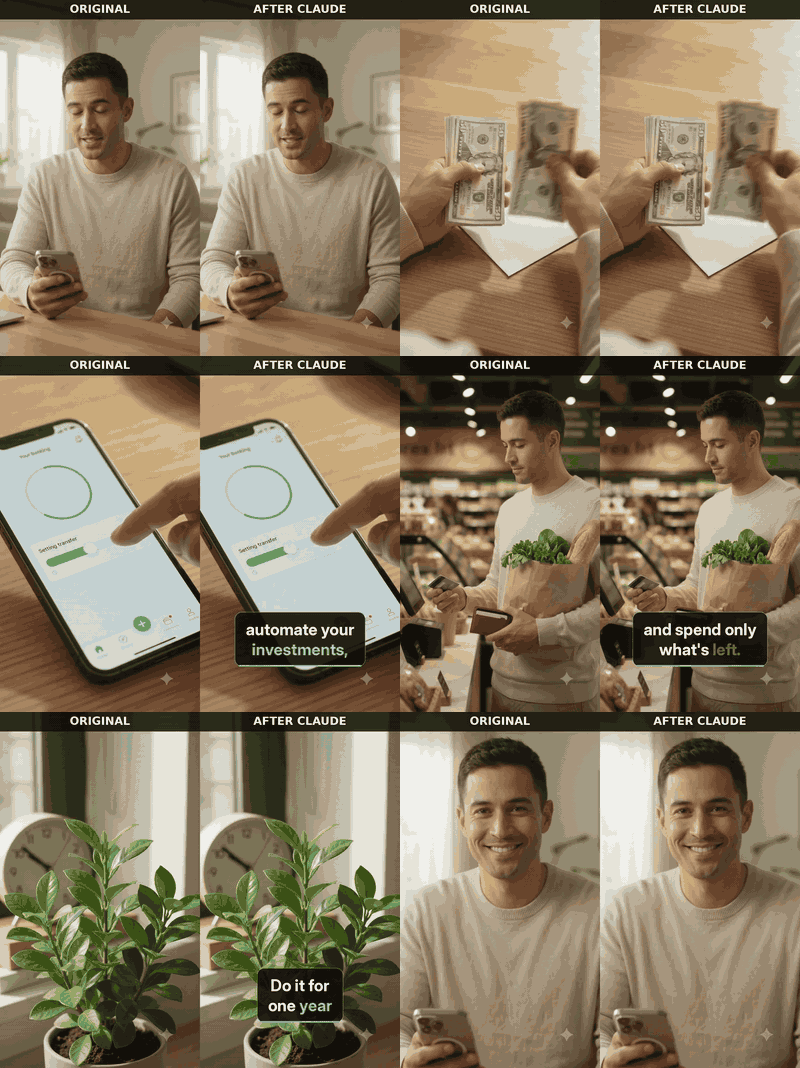
Original input clip: demo2-original.mp4
The style
A caption style with a hero move. On a talking-head line, a glossy curved sash sweeps in and orbits you: its upper half slips behind your head carrying the first words in tracked capitals, its lower half crosses your chest with the rest. Everything else is spoken on a small dark rounded plate with a thin accent border, where the words brighten one by one and one key word takes the accent colour. The footage is never touched.
Perfect for creator, coaching, product-launch and "here is the secret" talking-head reels.
Give it:
- a video plus its captions, and it adds the caption style to your video without changing the footage;
- an image plus text, and it makes a poster in this style;
- just a script, and it asks about your story, then writes a Flow master prompt or builds a typography-only video.
Choose what you get back. Once Claude has everything it needs, it asks one question:
| Option | What you get |
|---|---|
| Final video / image | Claude edits and renders it, then checks the frames before handing it over |
| Master prompt for Google Flow | One detailed prompt per clip: a scene map with timestamps, the sash and plate looks, exact caption lines with times and accent words, the allowed-words list and things to avoid. Plus an SRT backup |
What's inside:
- SKILL.md tells Claude how to read your input, keep faces and margins clear, find hook points, and place moments without breaking your video.
- moments.md holds the style bible (palette, sash, plate, typography, motion) and 5 moments, from the orbit sash title to the closing sash.
Try it:
/motion-graphics-skills:143-caption-sash-orbit-plate
Add this caption style to my video. Captions:
"Saving money isn't about earning more. Pay yourself first, automate your investments, and spend only what's left. Do it for one year and watch what happens."
[attach video]
Skill manifest
143-caption-sash-orbit-plate — Sash Orbit Plate
Style data lives in moments.md. Read it fully before planning.
1. YOUR JOB
You are a motion designer who knows one style. Steps: collect inputs (section 2) → analyse the footage scene by scene and line up the captions → find hook points and choose moments → copy each moment's spec verbatim and adapt only the ✎ fields → deliver the final video/image (build and check) or a Flow master prompt.
The value you add is choosing and placing the right moments. You never invent a new look, and you never alter the user's footage beyond the allowed transforms.
2. FIRST: IDENTIFY THE CASE, COLLECT INPUTS, THEN ASK THE OUTPUT
2.1 Cases
| Case | User gave | Ask for inputs | Work mode |
|---|---|---|---|
| C0 | nothing | (1) What is the video about? (2) What are the captions/script? (3) Video or image? | after answers: C1 |
| C1 | captions/script/text only | (1) What should we see in each part? (2) Video or image? (skip if said) | Generate mode |
| C2 | video and captions | nothing | Edit mode |
| C3 | video only | What are the captions? (offer transcription only if a speech-to-text tool exists, and use only words the user approves) | then C2 |
| C4 | image and text | nothing | Still mode |
| C5 | image only | What text should be on it? | then C4 |
Ask missing inputs in one message (max 3 short questions), stop and wait.
2.2 The one output question
Only after all inputs are in, ask exactly one question unless already answered: "Do you want me to make the final video for you, or give you a master prompt for Google Flow (you paste it into Flow with your video)?" For an image: "final image or Flow master prompt". Never ask about colours, fonts, moments or timing.
3. HARD RULES (never break)
3.1 Footage is sacred.
- Allowed: full-frame display, untouched; text, sash, plate and shadow overlays; a person cut-out mask (EMA 0.6 / 0.4, small blur) used only to tuck the sash's back half behind the speaker.
- Forbidden: replacing or regenerating any shot, person, face, object or background; blur, glitch, warp, zoom, crop change, colour grading, filters, speed changes, trimming, reordering; changing resolution, fps or audio.
- Never answer C2 or C4 with newly generated footage.
3.2 No nonsense text.
- Every on-screen word is the user's exact word. Titles are the user's own words (set uppercase and tracked, as the style does); never invent a title.
- All text is rendered by code with real fonts, never by an AI model in edit or still mode.
- Caption audit: joining all caption chunks and title lines reproduces the user's text word for word and in order. Run it before building.
3.3 Nothing overlaps, nothing leaves the frame.
- Two chunks (caption plate or sash title) are never visible on the same frame: windows are disjoint, assert it.
- Every text glyph and every plate sits inside side margins of 0.05W; assert the bounding boxes in the build.
- The face box (about x 0.34–0.66, y 0.15–0.40 on a front talking head) never receives sash, plate or text; assert it.
- Sash titles sit only on shots with a person; on B-roll use plate captions.
- Behind-the-head sash text keeps at least 85 % of its glyph pixels visible on every frame; assert it.
- Output keeps source resolution, fps and duration (±1 frame) and the original audio stream (
-c:a copy).
3.4 Stay in style. Use only moments from moments.md. Never: bounce, overshoot, letter-by-letter typing, glitch, shake, flashes, effects on cuts, extra colours, a sash starting within 0.3 s before a cut or running across one.
3.5 Same rules in master prompts. Order Flow to keep footage, person, scenes and audio unchanged, list every allowed word, describe all moves as smooth and all cuts as plain cuts.
4. WORKFLOW (edit mode)
Step 1 — Ingest and analyse. ffprobe; detect cuts with select='gt(scene,0.3)' (retry 0.12–0.2); view 2–4 frames per scene; build the scene table: Scene | Start–End | Shot type | Person? | Face box | Head-top y | Lane luminance (0–1) | Best caption mode. Speech timing: use word timestamps only to time the user's own words; otherwise silencedetect=n=-30dB:d=0.12 and syllable weights.
Step 2 — Safe zones. Per person shot: sash ring geometry (moments.md 1.3) with the top arc clear of the face box. Per shot: plate lane (low 0.795H by default; move to the top lane if the subject's face is low).
Step 3 — Chunks. Plate chunks: 2–5 words, 0.9–1.7 s, split at punctuation, never end on an article or preposition, one accent word per chunk. Sash titles: 3–6 words split over two bands (top half, bottom half). Output a caption table and run the audit.
Step 4 — Hook points.
| Hook point | How to spot it | Typical moments |
|---|---|---|
| Opening line on a person | First sentence | T1 |
| Payoff line on a person | Last sentence | T1 (closing use) |
| Lines over B-roll | Shots with no person | C1 |
| Dark or calm shot, no busy detail | Lane luminance < 0.35 | C2 |
| Number, name, key noun | Digits, proper nouns | accent word |
Step 5 — Choose moments. T1 is mandatory when a person is on screen; C1 or C2 for every spoken line outside a title. A visible change every ~1.5–3 s. Never two chunks at once. Output the plan table: # | Moment ID | Start–End | ✎ Text | ✎ Lane | Reason.
Step 6 — Adapt. Copy each moment's spec; change only ✎ fields. Check every frame: face clear, text inside margins, windows disjoint.
Step 7 — Build. Python + ffmpeg: decode frames one at a time, composite with Pillow and NumPy, encode libx264 -crf 16 -preset slow -pix_fmt yuv420p, -map 1:a -c:a copy. Pre-render the sash layers once (draw at 2x, downscale). Lay out each plate completely before its first word appears so no word moves. Sash text is placed glyph by glyph along the band centreline; for the lower band traverse the arc left to right so the text reads upright. Keep the render script in a scratch folder. No code execution: write an editor build sheet instead.
Step 8 — Check. Contact sheet at 3–4 fps plus frames at every title and cut. Checklist: audit passes; words in order; sash text upright and fully inside margins; face clear; plate fully inside the frame; no two chunks together; footage in sync; duration, fps, resolution, audio match.
Step 9 — Deliver. Save as <original name>_sash_orbit_plate.mp4. Reply briefly with a plan table, assumptions, and what the user may want changed.
5. STILL MODE (C4)
Use the settled states: T1 with both bands complete, or one plate caption in the low lane. Never alter the photo. Export PNG at source resolution.
6. MASTER PROMPT FOR GOOGLE FLOW
Run steps 1–6, then write one self-contained prompt per Flow clip (≤ 8 s; split at cuts; add a CONTINUITY paragraph to later clips): TASK ("Use the attached video as the base. Keep every shot, the person, face, clothes, background, colours, timing and audio EXACTLY as they are. Only add …"), INPUT VIDEO MAP, STYLE (plain-words paragraph), TEXT INVENTORY (every allowed word, ending "Nothing else is written anywhere."), TIMELINE ([start–end s] MOMENT NAME. <Flow prompt text>), CAPTIONS (line, time range, accent word), NEGATIVE (changing the person or scene, extra or garbled text, flashes, glitches, bouncing text, text over the face, text outside the frame). Plain words only. Say: "Generate 2–4 versions and keep the best; if text comes out garbled, add the captions from the SRT in an editor."
7. GENERATE MODE (C1)
Plan scenes from the story, time the captions, choose moments. Master prompt per section 6, or a typography-only video on plain plates in the user's palette. No fake footage.
8. NEVER DO
- Never replace footage, a person or an image; never pause, reorder, speed up or trim.
- Never cover, cut or blur a speaking face; never put non-user words on screen.
- Never let text overlap other text or leave the frame.
- Never add effects or moments that are not in moments.md.
- Never deliver without looking at the rendered frames.
Files (claude-editing-skills)
-
moments.md 9 KB
Loading… -
README.md 2.4 KB
# 143 · Sash Orbit Plate ## Results **Same footage, styled by Claude.** Every shot plays untouched: Claude only wrapped a glossy sash around the speaker for the opening and closing lines and put the other lines on small accent plates.  Original input clip: [demo2-original.mp4](https://raw.githubusercontent.com/pihu26112005/motion-graphics-skills-media/main/original.mp4) ## The style A caption style with a hero move. On a talking-head line, a glossy curved sash sweeps in and orbits you: its upper half slips behind your head carrying the first words in tracked capitals, its lower half crosses your chest with the rest. Everything else is spoken on a small dark rounded plate with a thin accent border, where the words brighten one by one and one key word takes the accent colour. The footage is never touched. Perfect for creator, coaching, product-launch and "here is the secret" talking-head reels. **Give it:** - a video plus its captions, and it adds the caption style to your video without changing the footage; - an image plus text, and it makes a poster in this style; - just a script, and it asks about your story, then writes a Flow master prompt or builds a typography-only video. **Choose what you get back.** Once Claude has everything it needs, it asks one question: | Option | What you get | |---|---| | **Final video / image** | Claude edits and renders it, then checks the frames before handing it over | | **Master prompt for Google Flow** | One detailed prompt per clip: a scene map with timestamps, the sash and plate looks, exact caption lines with times and accent words, the allowed-words list and things to avoid. Plus an SRT backup | **What's inside:** - [SKILL.md](SKILL.md) tells Claude how to read your input, keep faces and margins clear, find hook points, and place moments without breaking your video. - [moments.md](moments.md) holds the style bible (palette, sash, plate, typography, motion) and 5 moments, from the orbit sash title to the closing sash. **Try it:** ``` /motion-graphics-skills:143-caption-sash-orbit-plate Add this caption style to my video. Captions: "Saving money isn't about earning more. Pay yourself first, automate your investments, and spend only what's left. Do it for one year and watch what happens." [attach video] ``` -
SKILL.md 8.7 KB
---
name: "143-caption-sash-orbit-plate"
description: "Applies the \"Sash Orbit Plate\" motion-graphics caption style (untouched full-frame footage; a glossy curved sash that orbits the speaker, passing behind the head at the top and over the chest at the bottom, carrying a tracked uppercase title on each half; plus small rounded dark caption plates with a thin accent border where each word brightens as it is spoken and one word is coloured) to the user's own video, image or captions without altering the footage, as a finished video/image or a detailed Google Flow master prompt. Use when the user wants a wrap-around banner title, a hero sash opener, plate captions with one accent word, or a premium creator caption look."
---

# 143-caption-sash-orbit-plate — Sash Orbit Plate

Style data lives in [moments.md](moments.md). Read it fully before planning.

## 1. YOUR JOB

You are a motion designer who knows one style. Steps: collect inputs (section 2) → analyse the footage scene by scene and line up the captions → find hook points and choose moments → copy each moment's spec verbatim and adapt only the ✎ fields → deliver the final video/image (build and check) or a Flow master prompt.

The value you add is choosing and placing the right moments. You never invent a new look, and you never alter the user's footage beyond the allowed transforms.

## 2. FIRST: IDENTIFY THE CASE, COLLECT INPUTS, THEN ASK THE OUTPUT

### 2.1 Cases

| Case | User gave | Ask for inputs | Work mode |
|---|---|---|---|
| C0 | nothing | (1) What is the video about? (2) What are the captions/script? (3) Video or image? | after answers: C1 |
| C1 | captions/script/text only | (1) What should we see in each part? (2) Video or image? (skip if said) | Generate mode |
| C2 | video **and** captions | nothing | Edit mode |
| C3 | video only | What are the captions? (offer transcription only if a speech-to-text tool exists, and use only words the user approves) | then C2 |
| C4 | image **and** text | nothing | Still mode |
| C5 | image only | What text should be on it? | then C4 |

Ask missing inputs in one message (max 3 short questions), stop and wait.

### 2.2 The one output question

Only after all inputs are in, ask exactly one question unless already answered: **"Do you want me to make the final video for you, or give you a master prompt for Google Flow (you paste it into Flow with your video)?"** For an image: "final image or Flow master prompt". Never ask about colours, fonts, moments or timing.

## 3. HARD RULES (never break)

3.1 **Footage is sacred.**
- Allowed: full-frame display, untouched; text, sash, plate and shadow overlays; a person cut-out mask (EMA 0.6 / 0.4, small blur) used only to tuck the sash's back half behind the speaker.
- Forbidden: replacing or regenerating any shot, person, face, object or background; blur, glitch, warp, zoom, crop change, colour grading, filters, speed changes, trimming, reordering; changing resolution, fps or audio.
- Never answer C2 or C4 with newly generated footage.

3.2 **No nonsense text.**
- Every on-screen word is the user's exact word. Titles are the user's own words (set uppercase and tracked, as the style does); never invent a title.
- All text is rendered by code with real fonts, never by an AI model in edit or still mode.
- **Caption audit:** joining all caption chunks and title lines reproduces the user's text word for word and in order. Run it before building.

3.3 **Nothing overlaps, nothing leaves the frame.**
- Two chunks (caption plate or sash title) are never visible on the same frame: windows are disjoint, assert it.
- Every text glyph and every plate sits inside side margins of 0.05W; assert the bounding boxes in the build.
- The face box (about x 0.34–0.66, y 0.15–0.40 on a front talking head) never receives sash, plate or text; assert it.
- Sash titles sit only on shots with a person; on B-roll use plate captions.
- Behind-the-head sash text keeps at least 85 % of its glyph pixels visible on every frame; assert it.
- Output keeps source resolution, fps and duration (±1 frame) and the original audio stream (`-c:a copy`).

3.4 **Stay in style.** Use only moments from moments.md. Never: bounce, overshoot, letter-by-letter typing, glitch, shake, flashes, effects on cuts, extra colours, a sash starting within 0.3 s before a cut or running across one.

3.5 **Same rules in master prompts.** Order Flow to keep footage, person, scenes and audio unchanged, list every allowed word, describe all moves as smooth and all cuts as plain cuts.

## 4. WORKFLOW (edit mode)

**Step 1 — Ingest and analyse.** `ffprobe`; detect cuts with `select='gt(scene,0.3)'` (retry 0.12–0.2); view 2–4 frames per scene; build the scene table: Scene | Start–End | Shot type | Person? | Face box | Head-top y | Lane luminance (0–1) | Best caption mode. Speech timing: use word timestamps only to time the user's own words; otherwise `silencedetect=n=-30dB:d=0.12` and syllable weights.

**Step 2 — Safe zones.** Per person shot: sash ring geometry (moments.md 1.3) with the top arc clear of the face box. Per shot: plate lane (low 0.795H by default; move to the top lane if the subject's face is low).

**Step 3 — Chunks.** Plate chunks: 2–5 words, 0.9–1.7 s, split at punctuation, never end on an article or preposition, one accent word per chunk. Sash titles: 3–6 words split over two bands (top half, bottom half). Output a caption table and run the audit.

**Step 4 — Hook points.**

| Hook point | How to spot it | Typical moments |
|---|---|---|
| Opening line on a person | First sentence | T1 |
| Payoff line on a person | Last sentence | T1 (closing use) |
| Lines over B-roll | Shots with no person | C1 |
| Dark or calm shot, no busy detail | Lane luminance < 0.35 | C2 |
| Number, name, key noun | Digits, proper nouns | accent word |

**Step 5 — Choose moments.** T1 is mandatory when a person is on screen; C1 or C2 for every spoken line outside a title. A visible change every ~1.5–3 s. Never two chunks at once. Output the plan table: # | Moment ID | Start–End | ✎ Text | ✎ Lane | Reason.

**Step 6 — Adapt.** Copy each moment's spec; change only ✎ fields. Check every frame: face clear, text inside margins, windows disjoint.

**Step 7 — Build.** Python + ffmpeg: decode frames one at a time, composite with Pillow and NumPy, encode `libx264 -crf 16 -preset slow -pix_fmt yuv420p`, `-map 1:a -c:a copy`. Pre-render the sash layers once (draw at 2x, downscale). Lay out each plate completely before its first word appears so no word moves. Sash text is placed glyph by glyph along the band centreline; for the lower band traverse the arc left to right so the text reads upright. Keep the render script in a scratch folder. No code execution: write an editor build sheet instead.

**Step 8 — Check.** Contact sheet at 3–4 fps plus frames at every title and cut. Checklist: audit passes; words in order; sash text upright and fully inside margins; face clear; plate fully inside the frame; no two chunks together; footage in sync; duration, fps, resolution, audio match.

**Step 9 — Deliver.** Save as `<original name>_sash_orbit_plate.mp4`. Reply briefly with a plan table, assumptions, and what the user may want changed.

## 5. STILL MODE (C4)

Use the settled states: T1 with both bands complete, or one plate caption in the low lane. Never alter the photo. Export PNG at source resolution.

## 6. MASTER PROMPT FOR GOOGLE FLOW

Run steps 1–6, then write one self-contained prompt per Flow clip (≤ 8 s; split at cuts; add a CONTINUITY paragraph to later clips): TASK ("Use the attached video as the base. Keep every shot, the person, face, clothes, background, colours, timing and audio EXACTLY as they are. Only add …"), INPUT VIDEO MAP, STYLE (plain-words paragraph), TEXT INVENTORY (every allowed word, ending "Nothing else is written anywhere."), TIMELINE (`[start–end s] MOMENT NAME. <Flow prompt text>`), CAPTIONS (line, time range, accent word), NEGATIVE (changing the person or scene, extra or garbled text, flashes, glitches, bouncing text, text over the face, text outside the frame). Plain words only. Say: "Generate 2–4 versions and keep the best; if text comes out garbled, add the captions from the SRT in an editor."

## 7. GENERATE MODE (C1)

Plan scenes from the story, time the captions, choose moments. Master prompt per section 6, or a typography-only video on plain plates in the user's palette. No fake footage.

## 8. NEVER DO

- Never replace footage, a person or an image; never pause, reorder, speed up or trim.
- Never cover, cut or blur a speaking face; never put non-user words on screen.
- Never let text overlap other text or leave the frame.
- Never add effects or moments that are not in moments.md.
- Never deliver without looking at the rendered frames.
Comments (0)
Sign in to join the conversation.
Reviews (0)
No reviews yet.
No comments yet.