110-graphics-cursor-morph-widget
Makes the "Cursor Morph Widget" animated graphic (one black-and-white UI shape that never cuts: a cursor clicks and drags it through a button, loader, check, island, music player, scrubber, volume slider, toggle, tab bar, chart, command palette and toast, then back to the button
Install
npx skills add https://github.com/pihu26112005/claude-editing-skills/tree/main/skills/110-graphics-cursor-morph-widget
claude plugin marketplace add https://llmmart.ai/marketplace.json && claude plugin install pihu26112005-claude-editing-skills@llmmart
git clone https://github.com/pihu26112005/claude-editing-skills.git
The skills CLI installs just this skill, for any of its supported agents. Claude Code installs the whole pihu26112005/claude-editing-skills collection as a plugin from our marketplace. Git is the plain clone.
README
110 · Cursor Morph Widget
Results
Your content, animated by Claude. One black-and-white UI shape morphs through twelve states under a moving cursor; the demo is a coffee-brewing app with a teal-lime artwork.
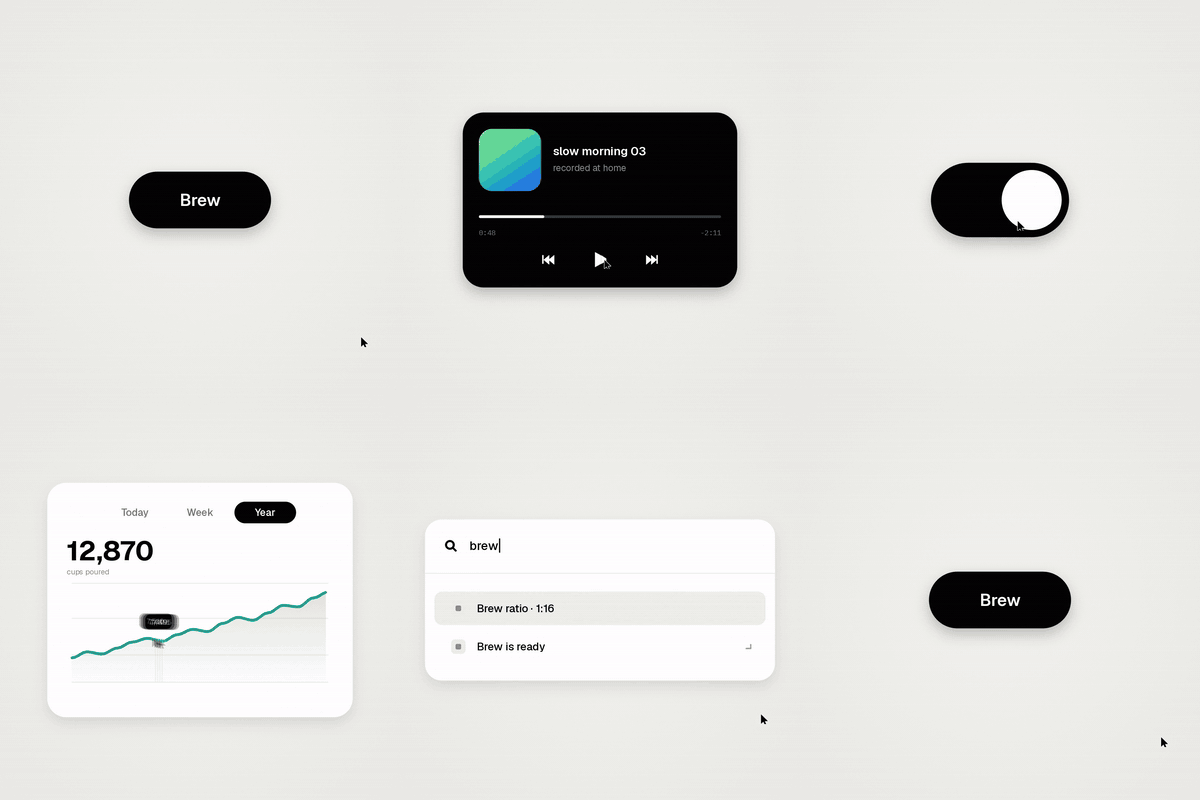
Format: 1:1 · 1080×1080 · 14 s
The graphic
A pill button on a warm grey canvas is clicked and shrinks into a loader, then a check, then a dynamic-island pill, then a music player. The cursor scrubs the progress bar, the card becomes a volume slider that stretches when dragged past its end, then a toggle that flips on the beat. The knob turns into a liquid tab indicator, the tabs open into a chart that draws itself with a hover tooltip, and the chart collapses into a command palette. Typing filters it, Enter fires a toast, and the toast settles back into the button so the video loops.
Every state is the same element changing size, radius and colour on springs, never cut. Text swaps with a short blur.
Perfect for product teasers, app launch loops, UI-motion portfolios and "everything is code" showreels.
Give it:
- a button label, a track title and subtitle, three tab labels, a metric caption with two numbers;
- a search word, two result labels and a toast text;
- optional: accent colour, artwork colours, canvas tone, which states to keep.
What you get back: a finished 1:1 video (or a still image), rendered and checked by Claude.
What's inside:
- SKILL.md: how Claude collects your content, checks it and renders the graphic.
- description.md: the full specification: canvas, 13 parameters, every state and beat.
Try it:
/motion-graphics-skills:110-graphics-cursor-morph-widget
Make this graphic. Button "Brew", track "slow morning 03" / "recorded at home", tabs Today / Week / Year, caption "cups poured" with 12,870 and 4,615, search "brew", results "Brew ratio · 1:16" and "Brew is ready", toast "Brew is ready".
Skill manifest
110 · Cursor Morph Widget
1. YOUR JOB
You make one animated graphic. Its design is fixed in description.md. Collect the parameter values, check them, render the graphic exactly as specified, check the frames, and deliver. Never change the beats, state order, timing, springs or motion. Never add elements.
2. COLLECT THE PARAMETERS
2.1 Parameters
| ID | Parameter | Required | Default |
|---|---|---|---|
| P1 | Button label (≤ 12 chars) | yes | none |
| P2 | Track title (≤ 18 chars) | yes | none |
| P3 | Track subtitle (≤ 22 chars) | yes | none |
| P4 | Tab labels (3, ≤ 7 chars each) | yes | none |
| P5 | Metric caption (≤ 14 chars) | yes | none |
| P6 | Metric values (two whole numbers) | yes | none |
| P7 | Search word (≤ 8 chars) | yes | none |
| P8 | Result labels (2, ≤ 22 chars) | yes | none |
| P9 | Toast text (≤ 24 chars) | yes | none |
| P10 | Accent colour | no | #0E9F8E demo; reference look is a warm gradient |
| P11 | Artwork gradient (3 colours) | no | derived from P10 |
| P12 | Canvas tone | no | #EFEFEB |
| P13 | State list | no | all 12 in reference order |
2.2 Read everything the user gave
Read the message, attached images and documents. Map each piece to parameters using description.md section 2.1. State the mapping in a short list.
2.3 Check completeness
If a required parameter is missing, ask for all missing ones in one numbered message with limits. Mention the optional ones in one line with defaults. Stop and wait.
2.4 Validate
Text length (auto-fit to 70%, else ask to shorten). The two metric values must differ and the second be smaller. Accent as hex, readable on white. The result labels should fit the search word.
2.5 Complete input
If everything came in the first message, ask nothing and start. Never ask about anything that is not a parameter.
3. HARD RULES
- Same graphic for every user: state order, beats, springs, cursor path and timing exactly as description.md.
- Only the user's words on screen. UI chrome stays black and white; the accent only colours the artwork, the chart line and the hover dot.
- One shape, never cut: every state is the same element changing size, radius and colour. Content swaps with a short blur.
- Text auto-fits and never clips. Button and toast widths follow their text.
- The last frame equals the first, cursor included, so the loop is seamless.
- Output: 1080×1080, 60 fps, 14 s.
4. WORKFLOW
- Step 1: Collect and validate. Write a table with final values.
- Step 2: Prepare assets: fonts (Geist, IBM Plex Mono for times), artwork gradient, chart series.
- Step 3: Build every frame as a pure function of time from description.md at 1080×1080 (closed-form springs, 4 to 8 sub-frames per frame for motion blur) and encode
libx264 -crf 16 -preset slow -pix_fmt yuv420p -r 60. Stream frames into ffmpeg; never hold them all in memory. - Step 4: Check: a contact sheet (2 fps) plus frames at every state's settle time. Look at them. Checklist: every value on screen and spelled exactly; no text overlap during swaps; nothing clipped; cursor on its target at every click; last frame equals the first. Fix and re-render.
- Step 5: Deliver
cursor-morph-widget.mp4(claude.ai:/mnt/user-data/outputs/), the final parameter table, and one line on what can be changed.
5. STILL MODE
If the user wants an image, render the settled frame of any one state (default: the music player) as a PNG at 1080×1080.
6. NO CODE EXECUTION
Give an editor build sheet: one rounded rectangle layer with size, radius and fill keyframes from description.md section 5, a cursor layer, and the content layers per state.
7. NEVER DO
Never invent content or use any reference content. Never change the design. Never cut between states. Never use bouncy easing, glows, particles or gradients on UI chrome. Never deliver without looking at the frames. Never ask about anything beyond missing or invalid parameters.
Files (claude-editing-skills)
-
description.md 12.4 KB
Loading… -
README.md 2 KB
# 110 · Cursor Morph Widget ## Results **Your content, animated by Claude.** One black-and-white UI shape morphs through twelve states under a moving cursor; the demo is a coffee-brewing app with a teal-lime artwork.  **Format:** 1:1 · 1080×1080 · 14 s ## The graphic A pill button on a warm grey canvas is clicked and shrinks into a loader, then a check, then a dynamic-island pill, then a music player. The cursor scrubs the progress bar, the card becomes a volume slider that stretches when dragged past its end, then a toggle that flips on the beat. The knob turns into a liquid tab indicator, the tabs open into a chart that draws itself with a hover tooltip, and the chart collapses into a command palette. Typing filters it, Enter fires a toast, and the toast settles back into the button so the video loops. Every state is the same element changing size, radius and colour on springs, never cut. Text swaps with a short blur. Perfect for product teasers, app launch loops, UI-motion portfolios and "everything is code" showreels. **Give it:** - a button label, a track title and subtitle, three tab labels, a metric caption with two numbers; - a search word, two result labels and a toast text; - optional: accent colour, artwork colours, canvas tone, which states to keep. **What you get back:** a finished 1:1 video (or a still image), rendered and checked by Claude. **What's inside:** - [SKILL.md](SKILL.md): how Claude collects your content, checks it and renders the graphic. - [description.md](description.md): the full specification: canvas, 13 parameters, every state and beat. **Try it:** ``` /motion-graphics-skills:110-graphics-cursor-morph-widget Make this graphic. Button "Brew", track "slow morning 03" / "recorded at home", tabs Today / Week / Year, caption "cups poured" with 12,870 and 4,615, search "brew", results "Brew ratio · 1:16" and "Brew is ready", toast "Brew is ready". ``` -
SKILL.md 4.4 KB
---
name: "110-graphics-cursor-morph-widget"
description: "Makes the \"Cursor Morph Widget\" animated graphic (one black-and-white UI shape that never cuts: a cursor clicks and drags it through a button, loader, check, island, music player, scrubber, volume slider, toggle, tab bar, chart, command palette and toast, then back to the button so it loops) from the user's own labels and one accent colour, as a finished 1:1 video. Use when the user wants a UI morph, product-UI loop, app micro-interaction showcase, cursor-driven component tour or one-element UI animation."
---

# 110 · Cursor Morph Widget

## 1. YOUR JOB
You make one animated graphic. Its design is fixed in description.md. Collect the parameter values, check them, render the graphic exactly as specified, check the frames, and deliver. Never change the beats, state order, timing, springs or motion. Never add elements.

## 2. COLLECT THE PARAMETERS
### 2.1 Parameters
| ID | Parameter | Required | Default |
|---|---|---|---|
| P1 | Button label (≤ 12 chars) | yes | none |
| P2 | Track title (≤ 18 chars) | yes | none |
| P3 | Track subtitle (≤ 22 chars) | yes | none |
| P4 | Tab labels (3, ≤ 7 chars each) | yes | none |
| P5 | Metric caption (≤ 14 chars) | yes | none |
| P6 | Metric values (two whole numbers) | yes | none |
| P7 | Search word (≤ 8 chars) | yes | none |
| P8 | Result labels (2, ≤ 22 chars) | yes | none |
| P9 | Toast text (≤ 24 chars) | yes | none |
| P10 | Accent colour | no | #0E9F8E demo; reference look is a warm gradient |
| P11 | Artwork gradient (3 colours) | no | derived from P10 |
| P12 | Canvas tone | no | #EFEFEB |
| P13 | State list | no | all 12 in reference order |

### 2.2 Read everything the user gave
Read the message, attached images and documents. Map each piece to parameters using description.md section 2.1. State the mapping in a short list.
### 2.3 Check completeness
If a required parameter is missing, ask for all missing ones in one numbered message with limits. Mention the optional ones in one line with defaults. Stop and wait.
### 2.4 Validate
Text length (auto-fit to 70%, else ask to shorten). The two metric values must differ and the second be smaller. Accent as hex, readable on white. The result labels should fit the search word.
### 2.5 Complete input
If everything came in the first message, ask nothing and start.
Never ask about anything that is not a parameter.

## 3. HARD RULES
- Same graphic for every user: state order, beats, springs, cursor path and timing exactly as description.md.
- Only the user's words on screen. UI chrome stays black and white; the accent only colours the artwork, the chart line and the hover dot.
- One shape, never cut: every state is the same element changing size, radius and colour. Content swaps with a short blur.
- Text auto-fits and never clips. Button and toast widths follow their text.
- The last frame equals the first, cursor included, so the loop is seamless.
- Output: 1080×1080, 60 fps, 14 s.

## 4. WORKFLOW
- Step 1: Collect and validate. Write a table with final values.
- Step 2: Prepare assets: fonts (Geist, IBM Plex Mono for times), artwork gradient, chart series.
- Step 3: Build every frame as a pure function of time from description.md at 1080×1080 (closed-form springs, 4 to 8 sub-frames per frame for motion blur) and encode `libx264 -crf 16 -preset slow -pix_fmt yuv420p -r 60`. Stream frames into ffmpeg; never hold them all in memory.
- Step 4: Check: a contact sheet (2 fps) plus frames at every state's settle time. Look at them. Checklist: every value on screen and spelled exactly; no text overlap during swaps; nothing clipped; cursor on its target at every click; last frame equals the first. Fix and re-render.
- Step 5: Deliver `cursor-morph-widget.mp4` (claude.ai: `/mnt/user-data/outputs/`), the final parameter table, and one line on what can be changed.

## 5. STILL MODE
If the user wants an image, render the settled frame of any one state (default: the music player) as a PNG at 1080×1080.

## 6. NO CODE EXECUTION
Give an editor build sheet: one rounded rectangle layer with size, radius and fill keyframes from description.md section 5, a cursor layer, and the content layers per state.

## 7. NEVER DO
Never invent content or use any reference content. Never change the design. Never cut between states. Never use bouncy easing, glows, particles or gradients on UI chrome. Never deliver without looking at the frames. Never ask about anything beyond missing or invalid parameters.
Comments (0)
Sign in to join the conversation.
Reviews (0)
No reviews yet.
No comments yet.