Vibetrack
Modern experiment tracking that follows you across servers, messengers, and LLMs.
vibetrack is a lightweight Python experiment tracker. Log metrics, images, and videos with TensorBoard-compatible SummaryWriter calls, then explore the same runs in a browser or query them from a coding agent.
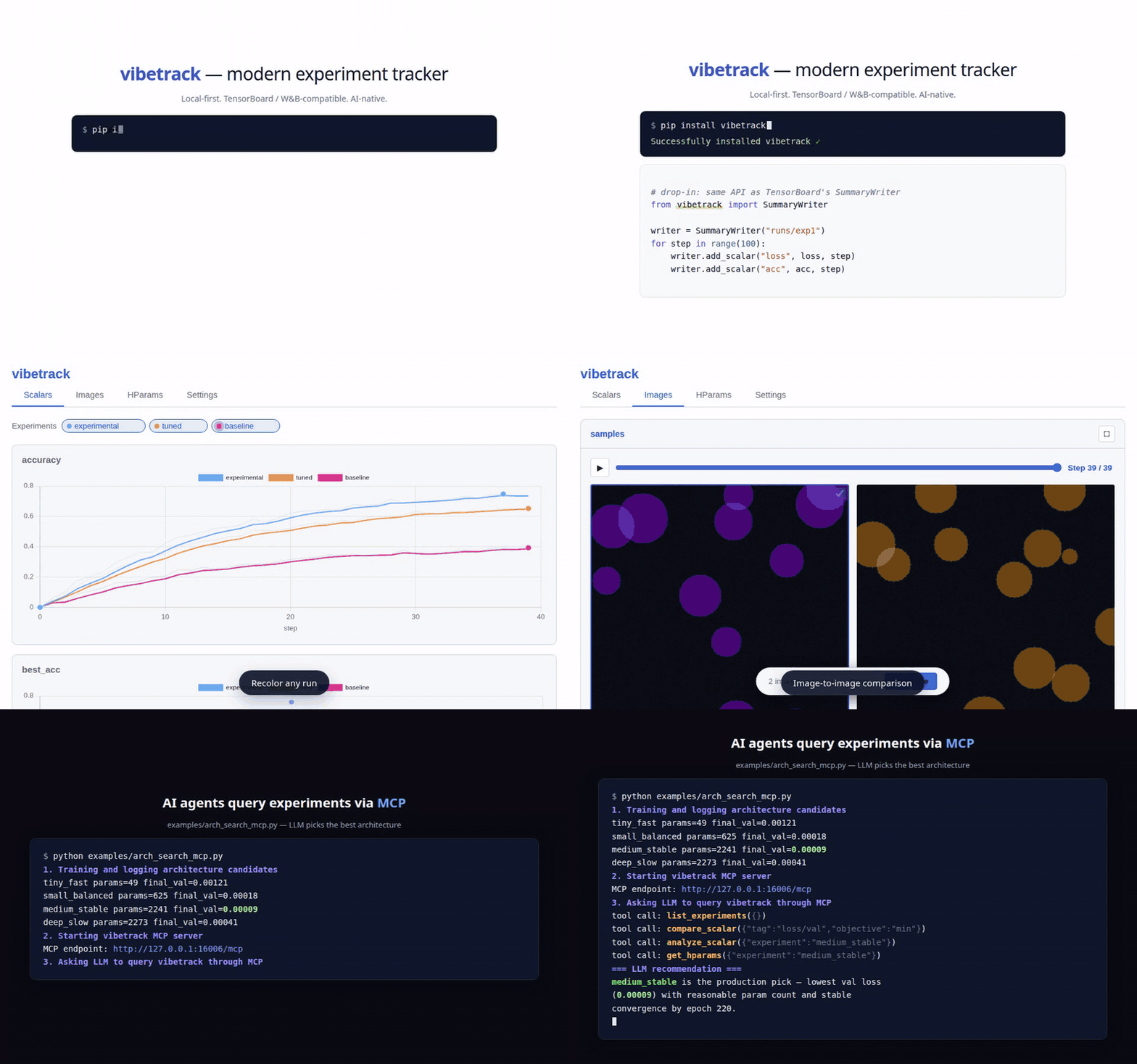
- Compare model outputs. Use a slider to compare two predictions on the same image. Play videos side by side, pause, and compare the same frame across runs.
- Follow training live. Send progress to Slack or Telegram, or display results in a terminal or Jupyter notebook.
- Bring runs together. Log to SQLite and local media files on a laptop or cloud worker. Sync runs from both to a shared bucket and compare them in one dashboard.
- Log scalars quickly. In the project's single-process benchmark with one million scalar writes, vibetrack logged 41,465 scalars/s, TensorBoard logged 31,521, and MLflow's file store logged 2,565. Benchmark and reproduction steps
Install and log your first run
Install the package in the Python environment you use for training. The web dashboard is included.
python -m pip install vibetrack
Save this as train.py. It fits one weight to a target of 3 and records how the loss changes at each step. In an existing TensorBoard loop, import SummaryWriter from vibetrack and keep your add_scalar(tag, value, step) calls.
from vibetrack import SummaryWriter

lr = 0.1
weight = 0.0
with SummaryWriter("runs/baseline", project_folder="runs", config={"lr": lr}) as writer:
    writer.define_metric("train/loss", goal="min", primary=True)
    for step in range(20):
        error = weight - 3.0
        writer.add_scalar("train/loss", error ** 2, step)
        weight -= lr * 2 * error
Run the script and start the dashboard from the same directory. Open the printed URL to see the loss curve. To compare learning rates, change lr and give the second run a new name, such as runs/lower-lr.
python train.py
vibetrack runs
Compare images and videos
At evaluation time, log files your model produced. Use the same input and tag across runs so the comparison lines up.
writer.add_image("eval/prediction", "prediction.png", step)
writer.add_video("eval/rollout", "rollout.mp4", step)
In the dashboard's Images or Video tab, select two outputs and click Compare. For videos, pause on a difference and choose Compare frame as images to inspect it with the image slider. Media inputs and logging API
Send live updates
Attach a destination inside the writer's with block, before the training loop. For Slack text updates, set SLACK_WEBHOOK_URL. For Telegram, install python -m pip install 'vibetrack[telegram]' and set VIBETRACK_TELEGRAM_TOKEN and VIBETRACK_TELEGRAM_CHAT_ID.
writer.to("slack", every="15m")    # Send a digest every 15 minutes of logging
writer.to("telegram", every=100)   # Send a summary every 100 events
Slack also supports media uploads with a bot token and channel. Viewer setup, credentials, and HTTP forwarding
Combine local and cloud runs
The quick start stores metrics in runs/vibetrack.db and media under the run directory. To merge results from several machines into one view, give each machine access to the same S3-compatible bucket and prefix. Replace s3://ml-runs/team with your location.
From the project's README.