English · 简体中文 · 日本語 · 한국어 · Tiếng Việt · Português (BR) · Italiano
Note
This is an unofficial, community skill. It is not made, reviewed, or endorsed by TypeSafe AI. TypeSafe publishes its own skill at typesafe-ai/skills. See How this differs from the official skill.
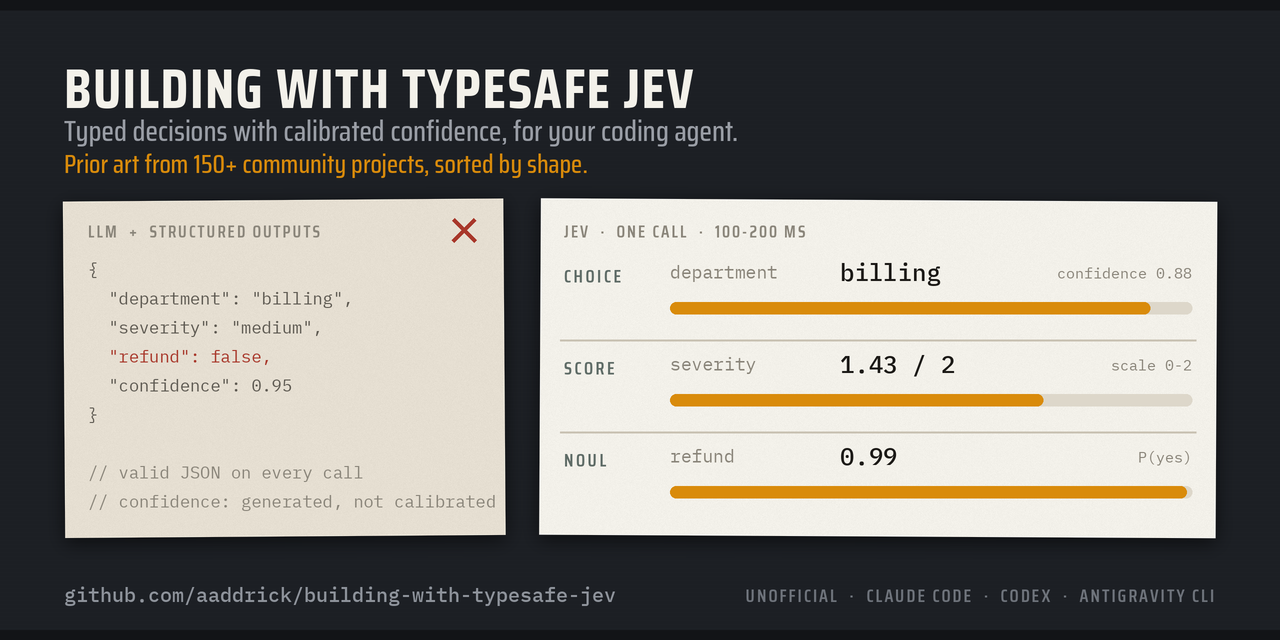
Coding agents treat Jev like one more chat model. This skill teaches them to design for it: typed questions, calibrated confidence, and links to 150+ community projects, sorted by how they work, with a code sketch for each pattern. It installs in Claude Code, Codex, Antigravity CLI, Muse, and Muse Code.
Jev is a System One model. It does not write text. You send it content and a set of typed questions, and it answers each one with a value and a calibrated probability, usually in 100 to 200 ms:
- Choice picks one option from a list. Example: route a ticket to billing, shipping, or support.
- Score places the content on a scale you describe. Example: grade a pull request from "ignores the spec" to "meets the spec".
- Noul gives the probability that a yes/no statement is true. Example: "this shell command deletes files outside the project."
Install
Claude Code
claude plugin marketplace add aaddrick/building-with-typesafe-jev
claude plugin install building-with-typesafe-jev@building-with-typesafe-jev
The skill loads on its own when you work on Jev code. To load it by hand, type:
/building-with-typesafe-jev:building-with-typesafe-jev
Codex
codex plugin marketplace add aaddrick/building-with-typesafe-jev
codex plugin add building-with-typesafe-jev@building-with-typesafe-jev
Start a new thread. Codex loads the skill when the task matches. To load it by hand, type:
$building-with-typesafe-jev:building-with-typesafe-jev
Antigravity CLI
agy plugin install https://github.com/aaddrick/building-with-typesafe-jev
Check that it installed:
agy plugin list
Start a new session. Antigravity CLI loads the skill when the task matches. To load it by hand, type:
/building-with-typesafe-jev:building-with-typesafe-jev
Coming from Gemini CLI? If agy plugin import gemini brought this extension over, run the install command above anyway so the current copy replaces the imported one.
Muse (muse.ai)
Muse loads skills from ~/workspace/skills/ on its own computer. Paste this command into a Muse chat and ask Muse to run it:
curl -fsSL https://raw.githubusercontent.com/aaddrick/building-with-typesafe-jev/main/scripts/install_muse.sh | bash
The script copies the skill folder there and rewrites the SKILL.md header into the shape Muse reads. Start a new chat. Muse loads the skill when the task matches. To update, run the command again.
Muse Code
Clone the repository:
git clone https://github.com/aaddrick/building-with-typesafe-jev.git
Install the skill for every project:
muse skills install building-with-typesafe-jev/skills/building-with-typesafe-jev --scope user
Check that it installed:
muse skills list
Start a new session. Muse Code loads the skill when the task matches. To load it by hand, type:
/building-with-typesafe-jev
No comments yet.